

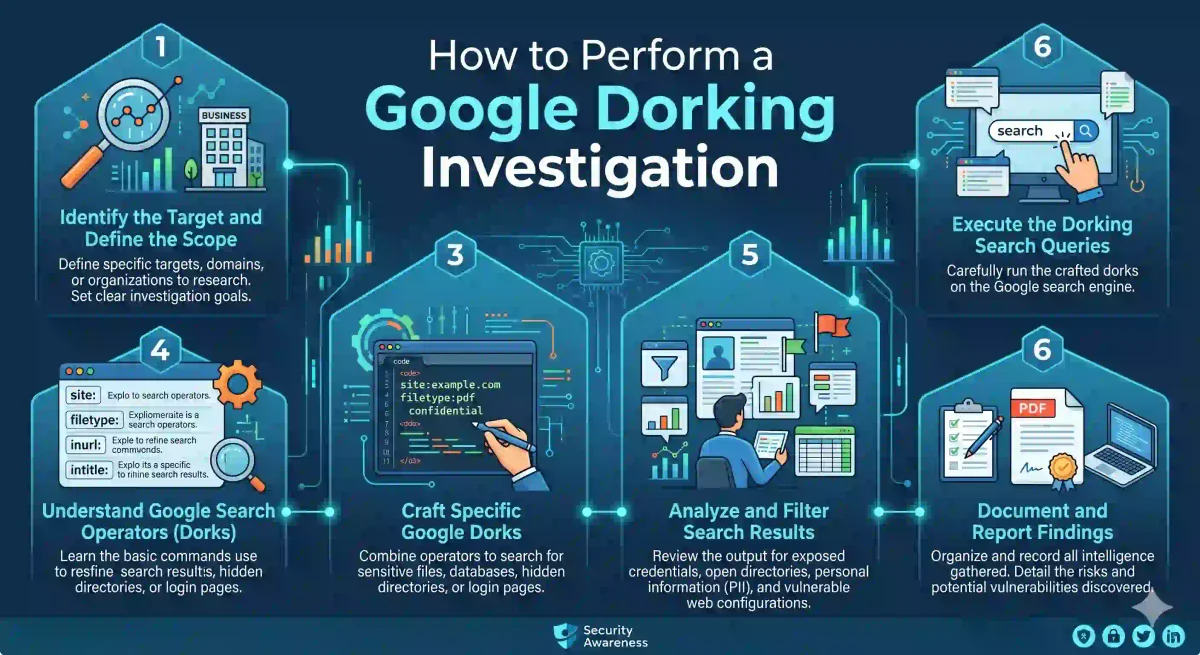
The Google Search engine is a powerful, expansive, and efficient public database. Day and night, 365 days a year, Google’s automated web crawlers (known as Googlebot) silently read, render, and index billions of web pages across the internet.
Under normal circumstances, an average internet user types a basic, natural-language question into the search bar, and Google’s algorithm returns the closest relevant matches. However, search engines index far more data than just public blog posts and Wikipedia articles. If a web administrator makes a single configuration error on their server, Google will index sensitive internal corporate documents, raw SQL database backups, administrative server logs, unencrypted passwords, and even live, unsecured webcam feeds pointing at secure facilities.
Accessing these hidden pockets of the internet using structured search parameters is an effective practice formally known throughout the cybersecurity industry as Google Dorking (or Google Hacking).
For Open Source Intelligence (OSINT) investigators, penetration testers, and threat actors alike, Google Dorking is the foundational bedrock of passive reconnaissance. In this comprehensive guide for 2026, we will break down the mechanical architecture of the Google Index, master the advanced operators, explore real-world dork formulas, and discuss how to automate your intelligence investigations safely.
1. The Core Mechanics: How the Google Index Actually Works
To master the art of Google Dorking, you must stop thinking of Google as just a search engine and start viewing it for what it is: a queryable database.
When Googlebot crawls a target website, it does not just read the text on the page. It parses the underlying HTML code and categorizes the scraped data into distinct database fields:
- The specific text located inside the
<title>tags. - The structure of the URL (the domain, the path, and the specific file extension).
- The text block located inside the
<body>tags. - The hidden metadata, the image alt-text, and the hyperlinked anchor text pointing to other sites.
Google stores all of this categorized data in a fast structure called an Inverted Index.
When a normal user types a standard search query, Google fuzzy-matches their words against this index. A Google Dork bypasses the fuzzy-matching algorithm. It commands the database to query specific HTML fields with surgical precision. When you write a Google Dork, you are essentially writing a targeted SQL query for the public internet.
The Power of Passive Reconnaissance
Because Google Dorking utilizes data that Google has already cached on its servers, it is a passive OSINT technique. The target organization has no idea you are investigating their infrastructure, because your IP address never sends a single packet of data to their web servers. You remain invisible.
2. Mastering the Advanced Search Operators
To build an effective Google Dork, you combine standard search keywords with Advanced Operators.
These operators are written in a strict syntax format: operator:term.
CRITICAL RULE: There must never be a space placed immediately after the colon. Writing site:nasa.gov works. Writing site: nasa.gov will break the query.
Here are the foundational operators you should know to become an OSINT master:
The site: Operator (The Target Lock)
This is the most common operator. It restricts the search to a specific domain or Top-Level Domain (TLD).
site:microsoft.com(Restricts the search to Microsoft’s infrastructure).site:.edu(Restricts the search to university or educational institutions).site:gov.uk(Restricts the search to United Kingdom government domains).
The filetype: (or ext:) Operator
This operator commands Google to only return specific file extensions, ignoring standard HTML web pages.
filetype:pdf(Returns downloadable PDF documents).filetype:sql(Returns raw database data dumps).filetype:env(Returns environment configuration files, often containing plaintext API passwords).
The intitle: and allintitle: Operators
This searches within the HTML <title> tags of the webpage (the text that appears on the top browser tab).
intitle:"Index of"(This string is used to find exposed open server directories).allintitle:"login portal" internal(Forces the title to contain both “login portal” AND “internal”).
The inurl: and allinurl: Operators
This filters the results based on the URL string of the page.
inurl:admin/dashboard(Finds pages where the URL contains that path).
The intext: and allintext: Operators
This command ignores the title and the URL, forcing Google to find the keyword within the body text of the page.
intext:"BEGIN RSA PRIVATE KEY"(Searches for exposed cryptographic keys).
Advanced Boolean Logic (AND, OR, NOT)
You can string multiple operators together using standard Boolean logic to create targeted queries:
- Use a minus sign
-to exclude terms (e.g.,site:target.com -site:www.target.comexcludes the main website, forcing Google to show you other subdomains). - Use
OR(must be capitalized) to search for multiple variations simultaneously (e.g.,filetype:pdf OR filetype:docx). - Use quotation marks
" "for exact string matching.
3. Real-World OSINT: Dorking for Sensitive Data
By combining these advanced operators, professional analysts construct queries designed to hunt for specific vulnerabilities or corporate data leaks.
Target 1: Hunting for Exposed Open Directories
When a web server (like Apache or Nginx) is misconfigured, and a specific directory does not contain a standard index.html file, the server will generate a list of files contained in that folder. Search engines index these lists.
- The Dork:
intitle:"Index of" site:target-company.com - The Variations:
intitle:"Index of /backups"(Finds corporate backups).intitle:"Index of /conf"(Finds server configuration files).intitle:"index of /" "parent directory"(A broader catch-all for open directories).
Target 2: Hunting for Exposed Corporate Credentials
Developers sometimes make the mistake of uploading sensitive application configuration files or SQL database backups to public-facing web folders on the server.
- Finding SQL Dumps:
filetype:sql "MySQL dump" site:target-company.com(This often returns downloadable.sqlfiles containing user tables, complete with hashed or plaintext passwords). - Finding Environment Files:
filetype:env "DB_PASSWORD"(Modern web frameworks like Laravel use.envfiles to store database passwords and AWS API keys. If the web server is misconfigured, these files are indexed by Google as plain text). - Finding SSH Keys:
intitle:"index of" "id_rsa"(Finds exposed directories containing private SSH keys, allowing an attacker to log into the target’s servers without a password).
Target 3: Exposing Sensitive Server Log Files
System administrators sometimes pipe application error logs or connection logs into public web directories for easier remote debugging.
- The Dork:
filetype:log "error" OR "username" OR "password" site:target-company.com - Why it is dangerous: Error logs frequently contain software stack traces that leak internal file paths of the server. They occasionally leak user credentials if a user types their password into the username field of a login portal.
Target 4: People Intelligence (Corporate OSINT)
Google Dorking is not just for finding technical server vulnerabilities. It is used in Corporate OSINT to map out personnel, find unlisted employee resumes, and reconstruct organizational charts.
- Finding Hidden Resumes:
site:target-company.com filetype:pdf (intitle:resume OR intitle:cv OR inurl:resume) - Finding Internal Strategy Memos:
site:target-company.com filetype:pdf intext:"Confidential" OR intext:"Internal Use Only" - Mapping Subdomains:
site:*.target-company.com -site:www.target-company.com(This dork removes the noise of the main marketing website from the search results, revealing staging servers, employee portals, and development subdomains).
4. The Google Hacking Database (GHDB)
You do not need to memorize every combination of advanced operators. The cybersecurity community maintains an open-source repository known as the Google Hacking Database (GHDB), hosted by Exploit-DB.
The GHDB contains thousands of pre-written Google Dorks categorized by their purpose. Categories include:
- Footholds: (Finding administrative login portals).
- Files containing juicy info: (Exposed passwords, API keys, corporate secrets).
- Vulnerable Servers: (Finding web servers running outdated, exploitable versions of software).
- Web Server Detection: (Fingerprinting the target infrastructure).
If a new zero-day vulnerability is publicly announced for a specific brand of enterprise VPN firewall, a new dork will be published to the GHDB, allowing security researchers to find vulnerable firewalls indexed by Google.
5. Dorking for Cameras and IoT (Google vs. Shodan)
A common misconception is that Google only indexes text documents. Google also indexes live web interfaces. This means Google routinely indexes the login portals for industrial control systems, water treatment plants, and unsecured corporate security cameras.
- The Camera Dork:
intitle:"webcamXP 5" OR inurl:8080/view/view.shtml(Brings up thousands of unsecured webcams).
However, while Google Dorking is excellent for finding visible web interfaces, it is generally considered secondary to Shodan when investigating the Internet of Things (IoT). Google is designed to crawl standard URLs on port 80 and 443 (HTTP/HTTPS). Shodan, on the other hand, is a specialized search engine designed to scan IP addresses across all available ports. If a vulnerable SQL database is exposed directly to the internet on port 3306, Google will not see it, but Shodan will index it. OSINT investigators often run Google Dorking and Shodan queries in parallel to ensure thorough coverage of the target.
6. Automation: Scripting and Scaling the Google Dorks
Manually typing different dorks into the Google search bar is tedious and inefficient. Furthermore, Google employs anti-bot protections. If you rapidly type many queries in a short timeframe, Google will present a CAPTCHA or temporarily ban your IP address.
To bypass this restriction, intelligence analysts use automated command-line tools.
- Pagodo: A Python script designed to automate Google Dorking at scale. You feed Pagodo a target domain, and it systematically scrapes the Google Hacking Database, pulls down relevant dorks, and runs them against the target. Crucially, Pagodo builds in randomized time delays (jitter) between each query, mimicking human typing speeds to safely bypass Google’s CAPTCHA defenses.
7. Defensive Actions: Securing Your Own Corporate Infrastructure
If you are a Systems Administrator, an IT Director, or a Cloud Engineer, the reality is that threat actors are running these Google Dorks against your corporate domain on a daily basis. You must actively defend against this indexing.
- Dork Yourself: The first step of defense is proactive offense. You should run the top GHDB queries against your own
site:domain at least once a month. If you find an exposed SQL dump indexed by Google, delete it immediately and rotate all passwords contained in that database. - Lock Down robots.txt: The
robots.txttext file sits at the root of your website and commands Googlebot on what it is allowed to index.User-agent: * Disallow: /admin-panel/ Disallow: /backups/ Disallow: /.git/ - Implement the Noindex Meta Tag: For certainty, place the
noindexdirective into the HTML header of any sensitive page. Even if a third-party site links to it, Google will refuse to index the page.<meta name="robots" content="noindex, nofollow"> - Disable Directory Listings: Ensure your web server configuration files forbid directory listings. In Nginx, ensure
autoindex off;is set. In Apache, ensureOptions -Indexesis configured. If a directory has noindex.htmlfile, the server must return a403 Forbiddenerror, giving Google nothing to index.
Frequently Asked Questions (FAQ)
What is Google Dorking?
Google Dorking (also known as Google Hacking) is the practice of using advanced Google search operators like site:, filetype:, intitle:, and inurl: to find specific information that is publicly indexed but not easily discoverable through normal searches.
Is Google Dorking legal?
Yes, Google Dorking itself is legal because you are only searching publicly indexed information through Google’s own search engine. However, using the results to access unauthorized systems, steal data, or exploit vulnerabilities is illegal.
What are the most useful Google Dork operators?
The most commonly used operators are site: (limit results to a specific domain), filetype: (find specific file types like PDF or XLSX), intitle: (search within page titles), inurl: (search within URLs), and the minus sign - to exclude terms.
Can Google Dorking find passwords and sensitive files?
Yes, misconfigured servers and websites sometimes accidentally expose sensitive files like password lists, database dumps, configuration files, and private documents. Google indexes these files, making them discoverable through carefully crafted dork queries.
How do I protect my website from Google Dorking?
Use a properly configured robots.txt file, ensure sensitive directories require authentication, avoid placing configuration files in publicly accessible locations, and regularly audit your site using Google Dorks against your own domain to find exposed data.
Conclusion: The Power of Passive OSINT
Google Dorking is a testament to the power of open-source intelligence. It requires no specialized hacking tools, no bypassing of corporate firewalls, and no physical infiltration. It relies on the target’s misconfigurations and the efficiency of the Google indexing engine.
By mastering these search operators, you transition from a casual web searcher into a capable intelligence analyst, capable of uncovering corporate secrets with a carefully crafted query.
Discussion
Loading comments...