

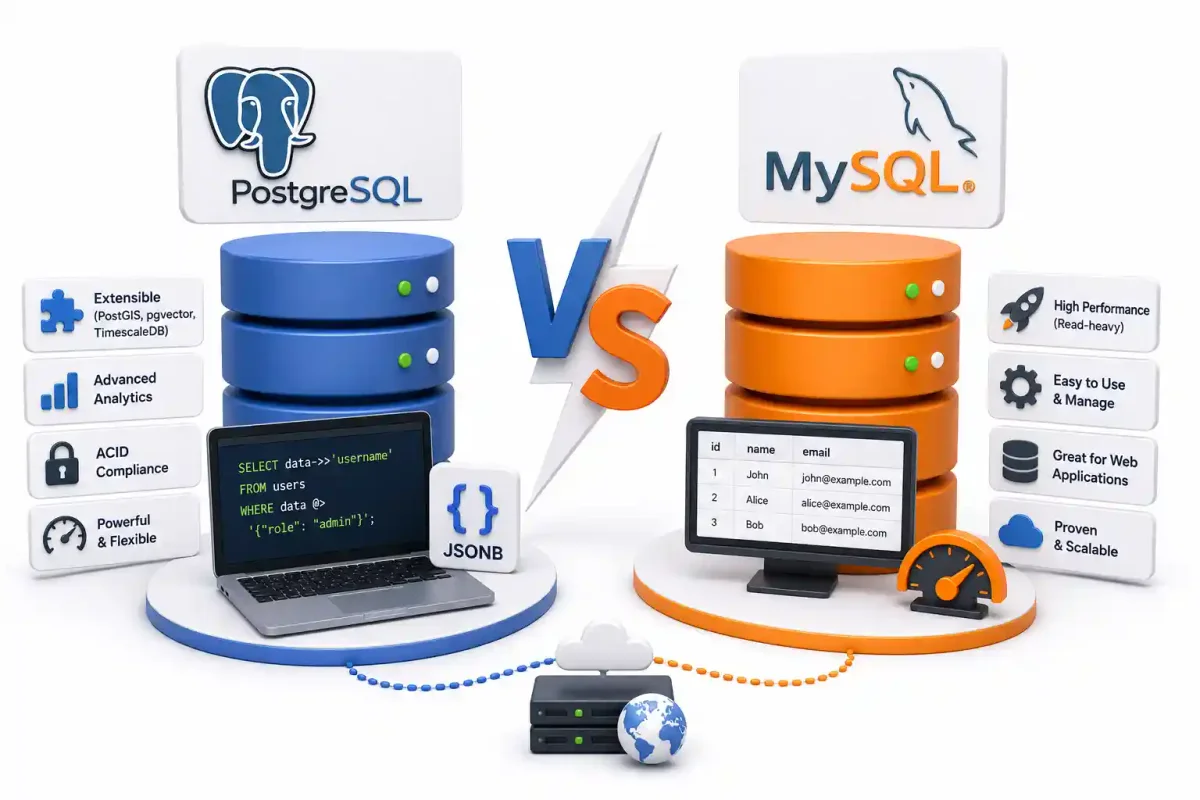
If you have spent any meaningful time maintaining backend infrastructure, you know that the database is the absolute heart of your system. You can easily swap out a frontend framework, and you can rapidly rewrite a stateless REST API, but migrating terabytes of production state between relational databases without downtime is a DevOps nightmare.
In 2026, the open-source relational database landscape is dominated by two titans: PostgreSQL and MySQL (and its popular fork, MariaDB).
While developers often bicker over SQL syntax variations or JSON functions, as a sysadmin who manages Linux VPS deployments, my concerns are fundamentally different. I care about how these engines consume Linux memory limits, how they handle concurrent transaction loads without locking the disk, and how easily they can be containerized using Docker and orchestrated via Kubernetes.
In this deep dive, we are stripping away the marketing fluff to examine the raw, underlying architecture of both databases and define exactly when you should deploy each in your production stack.
1. Connection Architecture: Processes vs. Threads
The most profound architectural difference between PostgreSQL and MySQL becomes painfully obvious the moment your application experiences a massive traffic spike.
PostgreSQL: Process-Per-Connection
When a backend service (like a Node.js or Python app) connects to PostgreSQL, the database engine instructs the Linux kernel to fork() a completely new memory process.
- The Advantage: Absolute stability. Because each connection is isolated in its own process, a catastrophic segfault in one query cannot bring down the primary database engine.
- The Drawback: Processes are incredibly heavy. If you have 5,000 idle connections, PostgreSQL will devour your server’s RAM.
- The DevOps Solution: In production, you must run PostgreSQL behind a connection pooler like PgBouncer or Pgpool-II. These tools multiplex thousands of client connections onto a small handful of actual database processes, dramatically lowering memory overhead on your Ubuntu or Debian host.
MySQL: Thread-Per-Connection
MySQL uses a fundamentally different approach. It runs as a single massive process and spins up lightweight “threads” for each user connection.
- The Advantage: Extreme scaling efficiency. MySQL can natively handle thousands of simultaneous connections with a significantly smaller memory footprint. This makes it highly favorable for low-resource Proxmox VE homelabs or entry-level cloud VMs.
- The Drawback: Because all threads share the same global memory space, a severe bug or memory leak in a single thread can theoretically corrupt or crash the entire MySQL daemon.
- The DevOps Solution: While MySQL handles connections better natively, enterprise deployments still heavily utilize proxy layers like ProxySQL to route reads and writes securely.
2. Multi-Version Concurrency Control (MVCC)
Imagine User A is running a slow analytical query to generate a report, while User B simultaneously updates a row being scanned by that report. How does the database prevent User A from reading partially updated, corrupted data? Both engines use MVCC, but their disk-level implementations dictate your maintenance strategy.
PostgreSQL’s Approach (Append-Only)
When you run an UPDATE in PostgreSQL, it does not overwrite the old data on the disk. Instead, it copies the row, inserts the new data, and flags the old row as “dead”. Read operations simply ignore the dead row.
Because of this append-only architecture, reads are never blocked by writes. However, this creates “dead tuples” (ghost rows) that rapidly consume disk space on your EXT4 or ZFS filesystems. PostgreSQL runs a background daemon called Autovacuum to aggressively sweep the disk and purge these ghost rows. If your database sustains a massive write load, Autovacuum can fall behind, resulting in severe database bloat that requires manual intervention.
MySQL’s Approach (Undo Logs via InnoDB)
MySQL (using the default InnoDB storage engine) updates the row directly in place but preserves the “old” version of the row in a dedicated structure called the Undo Log.
This prevents table bloat, meaning you don’t have to monitor an Autovacuum equivalent. However, if you have exceptionally long-running queries, the Undo Log can grow monstrously large, eventually degrading the entire system’s performance. (To track performance degradation in real-time, we highly recommend integrating Prometheus and Grafana into your stack).
3. The JSON Battle: Unstructured Data
For years, if you had highly nested, unstructured data, you were told to deploy a NoSQL solution like MongoDB. Both MySQL and PostgreSQL eventually introduced native JSON support, but the gap in capability is vast.
MySQL JSON Support
MySQL can natively store and query JSON documents. For a standard web application storing simple metadata, it works perfectly fine. However, trying to index complex nested arrays inside MySQL can be exceptionally clunky and computationally expensive.
PostgreSQL JSONB (The Industry Leader)
PostgreSQL introduced JSONB (Binary JSON). When you insert JSON text, PostgreSQL compiles it into an optimized binary format.
More importantly, PostgreSQL allows you to build GIN (Generalized Inverted Indexes) directly on the JSON payloads. This enables you to query millions of unstructured documents in milliseconds. When paired with Redis or Memcached for application-level caching, PostgreSQL acts as an incredibly potent NoSQL hybrid.
-- Example: Blazing fast indexed JSONB query in PostgreSQL
SELECT
    payload->>'username' as username,
    payload->>'email' as email
FROM users
WHERE payload @> '{"role": "admin", "active": true}';
4. The Extensibility Ecosystem
PostgreSQL’s true superpower is its extensibility. It wasn’t just built to be a database; it was built to be a framework for data.
- Geospatial: Need to calculate the distance between millions of GPS coordinates? The PostGIS extension turns PostgreSQL into the most advanced mapping database available.
- Time-Series: Analyzing server metrics or stock ticks? TimescaleDB transforms PostgreSQL into a high-performance time-series engine.
- Artificial Intelligence: With the massive boom in local LLMs (read our Ollama installation guide), the pgvector extension allows PostgreSQL to store and query high-dimensional vector embeddings natively.
MySQL, while exceptionally fast for what it does, simply does not possess an extension ecosystem capable of competing with PostgreSQL’s extreme versatility.
5. Security and Infrastructure Deployment
Deploying either database requires stringent security hygiene. A database is the crown jewel of your infrastructure, and it should never be exposed directly to the public internet.
When deploying databases via Docker Compose or orchestrating them via Coolify, DokPloy, or Portainer, follow these rules:
- Network Isolation: Ensure your database container binds strictly to a local Docker network or
127.0.0.1. (See our guide on securing Docker containers). - Access Control: Do not use the default
postgresorrootusers for application queries. Enforce the principle of least privilege. - VPN Tunneling: If you must connect to a remote database for administration, route your traffic through a secure Tailscale or WireGuard mesh network.
- Firewall Rules: Drop all external port 5432 (Postgres) and 3306 (MySQL) traffic using UFW firewall policies.
- Backups: Schedule automated, encrypted snapshot backups to off-site object storage using tools like BorgBackup or Restic. (Read our complete self-hosted backup strategies guide).
Conclusion: Which Should You Choose in 2026?
If you are a sysadmin or a DevOps engineer responsible for provisioning the backend architecture for a new, modern application today, the default choice should be PostgreSQL.
Modern applications have a habit of pivoting. An application that starts as a simple REST API (see our Node.js backend guide) might suddenly require AI vector search or complex geospatial tracking three months later. PostgreSQL handles all of this seamlessly.
However, MySQL (and MariaDB) is still a legendary piece of engineering. If you are deploying read-heavy content management systems like WordPress, or you are running a massive web application where 95% of queries are simple SELECT * FROM table, MySQL is historically easier to configure for replication and consumes fewer initial resources.
Before deploying either, ensure your host server is fully hardened by following our secure home server checklist and implementing strict SSH key authentication.
Official Documentation
For deep technical insights into MVCC, indexing strategies, and database administration, refer to the official documentation:
- PostgreSQL Official Documentation: https://www.postgresql.org/docs/
- MySQL Official Documentation: https://dev.mysql.com/doc/
- MariaDB Foundation: https://mariadb.org/
- PgBouncer Connection Pooler: https://www.pgbouncer.org/
- PostGIS Spatial Database: https://postgis.net/
Frequently Asked Questions (FAQ)
Which database is faster, PostgreSQL or MySQL?
Historically, MySQL (specifically InnoDB) was considerably faster for massive volumes of simple, read-heavy operations, making it the backbone of standard web architectures. PostgreSQL excels under extremely heavy, concurrent read/write loads and vastly outperforms MySQL when executing complex analytical queries (JOINs, subqueries, and window functions).
Why does PostgreSQL use so much RAM compared to MySQL?
PostgreSQL uses a process-per-connection architecture, meaning every active connection requires the OS to fork a separate memory process. MySQL uses a thread-per-connection model, which is much lighter. To mitigate PostgreSQL’s memory usage in high-traffic environments, you must use a connection pooler like PgBouncer.
What is Autovacuum in PostgreSQL?
Because PostgreSQL uses an append-only MVCC architecture, updating or deleting rows creates “dead tuples” (ghost data) on the disk. Autovacuum is a crucial background daemon that automatically scans tables and reclaims the space occupied by these dead tuples, preventing massive disk bloat.
Can I run both databases in Docker?
Yes, deploying both PostgreSQL and MySQL via Docker is the industry standard in 2026. Official images are highly optimized and allow you to isolate the databases completely from the host operating system, making CI/CD testing and production deployment far more reliable.
Which database is better for AI and Machine Learning?
PostgreSQL is overwhelmingly the better choice for modern AI workflows. The pgvector extension allows PostgreSQL to store high-dimensional embeddings and perform highly efficient similarity searches, functioning as a top-tier vector database alongside traditional relational data.
Is JSON support better in PostgreSQL?
Yes. While MySQL supports native JSON, PostgreSQL’s JSONB (Binary JSON) format is universally considered superior. JSONB parses the data upon insertion, allowing you to build highly optimized GIN indexes on the JSON structure, essentially rivaling the read performance of dedicated NoSQL databases like MongoDB.
How do I migrate from MySQL to PostgreSQL?
Migrating relational databases is challenging due to strict type differences and syntax variations. The industry-standard tool for this is pgloader, an automated utility that reads MySQL schemas, translates them into PostgreSQL standards, and streams the data directly over the network.
Does MySQL support geospatial data?
Yes, MySQL includes spatial data types and functions. However, PostgreSQL combined with the PostGIS extension provides the most advanced, feature-complete open-source geospatial routing and mapping capabilities in the world, far exceeding MySQL’s native capabilities.
What is the difference between MySQL and MariaDB?
MariaDB is a community-driven, open-source fork of MySQL created by MySQL’s original founders after Oracle acquired MySQL. For most standard web applications, MariaDB acts as a drop-in, highly compatible replacement for MySQL with a stronger commitment to open-source principles.
Should I expose my database to the internet?
Never. Databases should bind strictly to internal networks (127.0.0.1 or isolated Docker bridges). If you need to access the database remotely for administration (e.g., using DBeaver or DataGrip), you should route your connection through an encrypted SSH tunnel or a private WireGuard VPN.
Discussion
Loading comments...