Welcome to the definitive guide to the Software Development Life Cycle (SDLC). Whether you’re an aspiring developer, a project manager, or a business owner looking to understand how software gets built, this comprehensive guide will walk you through everything you need to know.
In 2026, the SDLC remains the backbone of successful software projects. Understanding this framework is essential for delivering high-quality software on time and within budget.
Introduction
What is SDLC?
The Software Development Life Cycle (SDLC) is a structured, systematic process used by software development teams to plan, design, build, test, deploy, and maintain high-quality software applications. Think of it as a roadmap that guides developers from the initial idea to a fully functional product and beyond.
Just as architects follow blueprints when constructing a building, software developers follow the SDLC to ensure their applications are reliable, scalable, and meet user needs.
Why is SDLC Important?
The SDLC is critically important because it:
- Provides structure: It transforms chaotic development into an organized process.
- Ensures quality: Built-in testing phases catch bugs early.
- Manages risks: Potential problems are identified and addressed before they become expensive.
- Saves money: Finding and fixing errors early is significantly cheaper than doing so after deployment.
- Improves communication: Clear phases and deliverables keep all stakeholders aligned.
Who Should Learn SDLC?
- Aspiring Developers: Understanding the full lifecycle makes you a more valuable team member.
- Project Managers: You need to know the phases to manage timelines and resources effectively.
- QA Engineers: Testing fits into specific phases of the lifecycle.
- Product Owners: You’ll understand where your requirements fit into the process.
- Business Stakeholders: This knowledge helps you set realistic expectations.
Real-World Example of SDLC
Imagine building an e-commerce platform like a smaller version of Amazon. The SDLC would guide you through:
- Planning: Deciding what features are needed (product listings, shopping cart, payments).
- Requirements: Gathering detailed specifications (how many products, payment gateways).
- Design: Sketching the user interface and database structure.
- Development: Writing the actual code.
- Testing: Ensuring the checkout process works without errors.
- Deployment: Launching the website to the public.
- Maintenance: Fixing bugs and adding new payment methods as they become available.
This structured approach ensures that when you launch, the platform actually works and meets customer expectations.
What is Software Development Life Cycle (SDLC)?
Definition of SDLC
The Software Development Life Cycle is a framework that defines the processes and stages involved in developing software applications. It provides a systematic approach to building software that is:
- Reliable: Consistently performs as expected.
- Maintainable: Easy to update and fix.
- Scalable: Can handle growing numbers of users and data.
- Cost-effective: Built within budget constraints.
- User-focused: Meets actual user needs and expectations.
Goals of SDLC
The primary goals of the SDLC are:
- Deliver high-quality software: Ensure the final product meets all specified requirements.
- Reduce development costs: Identify and fix issues early in the process.
- Improve efficiency: Streamline workflows and eliminate waste.
- Enhance project management: Provide clear milestones and deliverables.
- Increase transparency: All stakeholders understand the project’s progress.
Benefits of Using SDLC
| Benefit | Description |
|---|---|
| Standardized Process | Every team member follows the same procedures, reducing confusion. |
| Better Quality Assurance | Testing is integrated throughout the lifecycle, not just at the end. |
| Improved Risk Management | Potential problems are identified and mitigated early. |
| Clear Documentation | Every phase produces documentation that aids future development. |
| Customer Satisfaction | Delivering exactly what the customer requested builds trust. |
| Easier Maintenance | Well-documented, structured code is easier to update. |
Why is SDLC Important?
Improves Software Quality
By incorporating testing and quality assurance throughout the lifecycle, the SDLC ensures that:
- Bugs are caught and fixed early.
- Code follows established standards.
- The final product meets user expectations.
- Performance and security are prioritized from the start.
Reduces Development Cost
The “cost of change” curve is exponential. A bug found during the design phase costs pennies to fix. The same bug found in production can cost thousands or even millions. The SDLC helps:
- Identify issues early.
- Reduce rework.
- Optimize resource allocation.
Better Project Management
The SDLC provides project managers with:
- Clear milestones: Know exactly what stage the project is at.
- Measurable progress: Track deliverables and timelines.
- Resource planning: Know when you need developers, testers, or designers.
Easier Maintenance
Software needs to evolve. The SDLC ensures:
- Comprehensive documentation exists.
- Code is readable and follows standards.
- Testing ensures updates don’t break existing functionality.
Risk Reduction
Every software project has risks—technical, financial, and operational. The SDLC helps:
- Identify risks during planning.
- Mitigate risks through structured phases.
- Document lessons learned for future projects.
SDLC Life Cycle Stages Overview
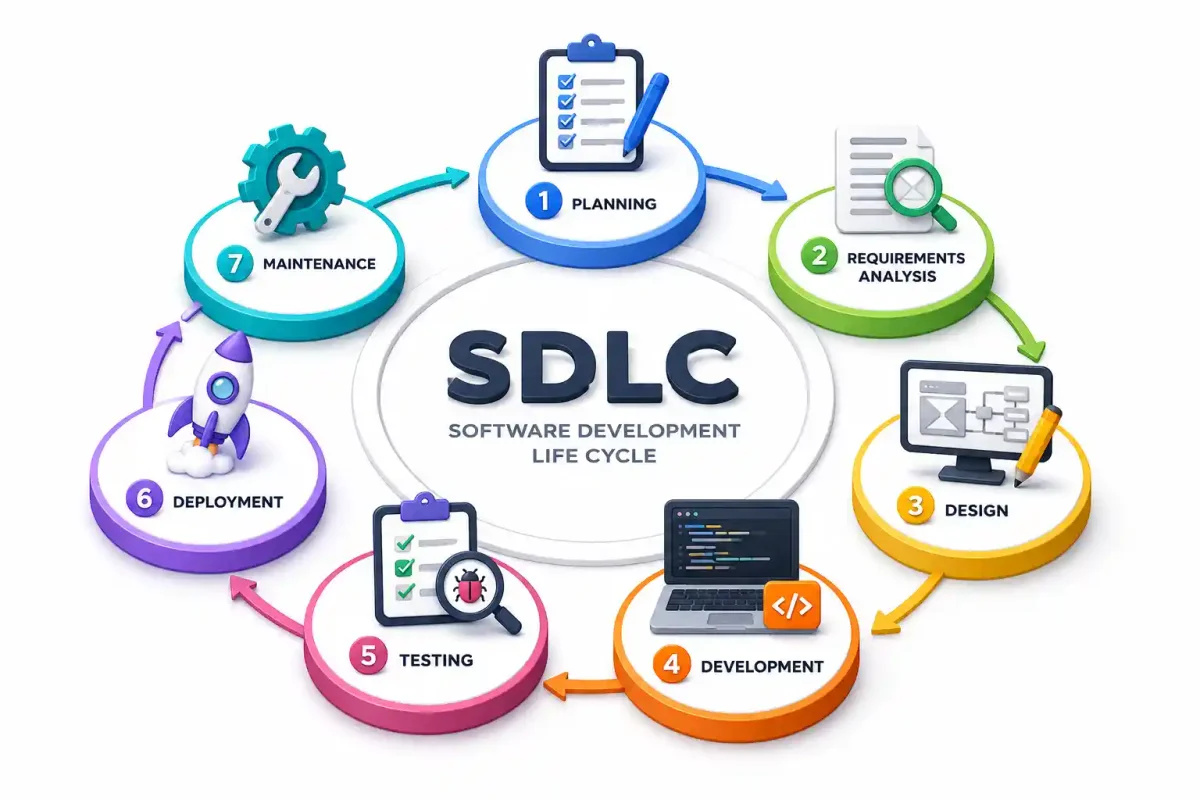
The SDLC consists of seven distinct phases. Here’s a quick overview:
| Phase | Objective | Key Activities | Typical Duration |
|---|---|---|---|
| 1. Planning | Define project scope and feasibility | Cost estimation, resource planning, risk analysis | 1-4 weeks |
| 2. Requirements Analysis | Gather and document user needs | Stakeholder interviews, SRS document creation | 2-6 weeks |
| 3. System Design | Create architecture and design specifications | HLD, LLD, database design, UI mockups | 2-8 weeks |
| 4. Development | Write the actual code | Coding, code reviews, version control | 4-12+ weeks |
| 5. Testing | Verify functionality and quality | Unit testing, integration testing, UAT | 2-6 weeks |
| 6. Deployment | Release the software | Production deployment, monitoring setup | 1-4 weeks |
| 7. Maintenance | Support and improve the software | Bug fixes, updates, performance optimization | Continuous |
Phase 1 – Planning
The Planning phase is where the entire project takes shape. This is the most critical phase—poor planning at this stage leads to failure later.
Project Objectives
Before any code is written, you must define:
- What problem does this software solve?
- Who is the target audience?
- What are the business goals?
Example: For an online learning platform, objectives might include:
- Supporting 10,000 concurrent users.
- Offering video streaming capabilities.
- Generating $50,000 in monthly recurring revenue within 6 months.
Feasibility Study
The feasibility study determines whether the project is worth pursuing across five dimensions:
- Technical Feasibility: Do we have the technology and skills needed?
- Economic Feasibility: Can we afford to build and maintain this?
- Legal Feasibility: Are there any legal or compliance issues?
- Operational Feasibility: Will the organization support this?
- Schedule Feasibility: Can we build this within the required timeframe?
Cost Estimation
Accurate cost estimation is essential. Developers use techniques like:
- Bottom-up estimation: Break the project into tiny tasks and estimate each.
- Analogous estimation: Compare to similar past projects.
- Parametric estimation: Use mathematical models based on project size.
Resource Planning
Identify the resources you need:
- Human resources: Developers, QA engineers, designers, project managers.
- Technical resources: Servers, development tools, licenses.
- Financial resources: Budget for salaries, infrastructure, marketing.
Risk Analysis
Every project has risks. The goal is to identify and mitigate them early:
| Risk Type | Example | Mitigation |
|---|---|---|
| Technical | The technology stack might not support required features | Prototype and evaluate before full commitment |
| Operational | Team members might leave mid-project | Cross-train team members |
| Schedule | Development might take longer than expected | Build buffer time into the schedule |
| Budget | Costs might exceed estimates | Track costs weekly and adjust |
Deliverables
At the end of the Planning phase, you should have:
- Project Charter: A formal document authorizing the project.
- Feasibility Report: Confirmation that the project is worth pursuing.
- High-level Timeline: A rough schedule with key milestones.
- Resource Plan: A list of required resources and budgets.
Phase 2 – Requirements Analysis
This phase defines exactly what the software will do. It bridges the gap between business needs and technical implementation.
Functional Requirements
These are the features the software must have. They describe what the system should do.
Example for an E-commerce Site:
- Users must be able to create an account.
- Users must be able to add items to a shopping cart.
- Users must be able to checkout using credit cards.
- Users must receive email confirmations for orders.
Non-functional Requirements
These describe how the system performs. They are equally important:
| Requirement | Description | Example |
|---|---|---|
| Performance | How fast the system responds | Page loads in under 2 seconds |
| Reliability | How often the system fails | 99.9% uptime |
| Security | How data is protected | PCI-DSS compliance |
| Usability | How easy the system is to use | 90% user satisfaction rating |
| Scalability | How well the system grows | Supports 10,000 concurrent users |
Requirement Gathering Techniques
Business analysts and product managers gather requirements using several techniques:
- Interviews: One-on-one conversations with stakeholders.
- Surveys: Collecting input from many users.
- Workshops: Group sessions with all stakeholders.
- Observation: Watching users perform tasks in their current workflow.
- Document Analysis: Reviewing existing system documentation.
Software Requirement Specification (SRS)
The SRS is the formal document that captures all requirements. It serves as the “source of truth” for the entire project.
A good SRS includes:
- Introduction: Background and purpose.
- Overall Description: Scope, user characteristics, operating environment.
- Functional Requirements: List of features with detailed descriptions.
- External Interface Requirements: User interfaces, hardware interfaces, software interfaces.
- Non-functional Requirements: Performance, security, reliability.
- Appendices: Detailed diagrams and models.
Stakeholder Communication
Communication is vital during this phase. All stakeholders—users, business owners, developers, testers—must have a shared understanding of what is being built.
Best Practices:
- Use simple language (avoid technical jargon when talking to business users).
- Regularly review requirements with all stakeholders.
- Prioritize requirements (MoSCoW: Must-have, Should-have, Could-have, Won’t-have).
- Keep a log of all decisions made.
Phase 3 – System Design
Once requirements are finalized, the System Design phase translates them into a detailed blueprint for developers. This phase answers “how” the software will work.
High-Level Design (HLD)
The HLD provides a bird’s-eye view of the entire system. It describes the overall architecture and how major components interact.
What HLD Covers:
- System architecture: Is it monolithic or microservices?
- Component breakdown: What are the main modules?
- Technology stack: Which languages, frameworks, and databases?
- Communication: How do components communicate (APIs, message queues)?
- External integrations: How does the system connect to third-party services?
Low-Level Design (LLD)
The LLD goes into granular detail about each component. It provides specific instructions for developers to follow.
What LLD Covers:
- Class diagrams: Detailed object-oriented design.
- Database schemas: Specific table structures and relationships.
- Algorithms: How specific features will be implemented.
- Error handling: How the system handles exceptions.
Database Design
Database design is critical for system performance and scalability.
Key Decisions:
- Relational (SQL) vs. Non-relational (NoSQL): Choose based on data structure and query patterns.
- Schema design: Define tables, columns, and relationships.
- Indexing: Plan indexes for fast queries.
- Sharding: Decide how to distribute data across multiple servers.
UI/UX Design
User Interface (UI) and User Experience (UX) design ensures the software is intuitive and enjoyable to use.
UI/UX Activities:
- Wireframes: Low-fidelity sketches of the interface.
- Prototypes: Interactive models of the final design.
- User flows: Step-by-step paths users take through the application.
- Style guides: Colors, typography, and component guidelines.
Architecture Planning
The architecture style significantly impacts development, deployment, and scalability.
| Architecture | Description | When to Use |
|---|---|---|
| Monolithic | Single codebase, deployed as one unit | Small teams, simple apps |
| Microservices | Independent services communicating via APIs | Large teams, complex apps |
| Serverless | Functions run on cloud providers on-demand | Event-driven workloads |
| Event-driven | Components communicate via events | Real-time applications |
Design Documents
At the end of this phase, you should have:
- High-Level Design Document (HLD)
- Low-Level Design Document (LLD)
- Database Schema Document
- API Design Document
- UI/UX Mockups and Prototypes
Phase 4 – Development
This is where the actual code gets written. Developers transform the design documents into a working application.
Coding Standards
Consistent coding standards make code more readable, maintainable, and collaborative.
Common Standards:
- Naming conventions:
camelCasefor variables,PascalCasefor classes. - Indentation: 2 or 4 spaces per indent level (no tabs).
- Commenting: Explain why something is done, not what the code does.
- DRY (Don’t Repeat Yourself): Reuse code instead of duplicating it.
- SOLID principles: Five design principles for better object-oriented code.
Choosing Programming Languages
Choosing the right language depends on project needs:
| Language | Best For | Example Use Case |
|---|---|---|
| Python | Backend development, data science | Django web apps |
| JavaScript/TypeScript | Web development, both frontend and backend | React, Node.js |
| Java | Enterprise applications, Android | Spring Boot microservices |
| C# | Windows applications, Unity games | .NET web APIs |
| Go | High-performance systems, microservices | Cloud infrastructure |
| Rust | Systems programming, performance-critical code | OS components |
Version Control with Git
Git is the industry standard for version control. It tracks code changes and enables collaboration.
Essential Git Commands:
git init # Initialize a repository
git clone <url> # Copy an existing repository
git add . # Stage changes for commit
git commit -m "message" # Save changes
git push # Upload changes to remote
git pull # Download changes from remote
git branch <name> # Create a new branch
git merge <branch> # Combine branches
Common Branching Strategies:
- GitFlow: Separate branches for features, releases, and hotfixes.
- GitHub Flow: Simple trunk-based development with feature branches.
- Trunk-Based Development: All work is done on a single main branch.
Code Review
Code reviews are systematic examinations of code by other developers.
Benefits of Code Reviews:
- Catch bugs before they reach production.
- Ensure code meets quality standards.
- Share knowledge across the team.
- Improve code consistency.
Best Practices:
- Review no more than 400 lines at a time.
- Focus on structure, logic, and readability, not just style.
- Be respectful and constructive in comments.
- Use automated tools to catch style issues.
Best Practices
- Test-Driven Development (TDD): Write tests before writing code.
- Continuous Integration: Merge code into main branch daily.
- Pair Programming: Two developers work together at one workstation.
- Refactoring: Regularly improve existing code without changing functionality.
- Document as you go: Write documentation alongside code.
Phase 5 – Testing
Testing ensures the software works correctly and meets all requirements. This phase is critical for quality assurance.
Why Testing Matters
- Prevents bugs: Catch issues early.
- Builds confidence: Trust that the software works as expected.
- Saves money: Fixing bugs in production is 100x more expensive than fixing them in development.
- Maintains reputation: Reliable software builds user trust.
Unit Testing
Unit tests verify individual components or functions in isolation.
Example (JavaScript/Jest):
function add(a, b) {
return a + b;
}
test('adds 2 + 3 to equal 5', () => {
expect(add(2, 3)).toBe(5);
});
Best Practices:
- Test one thing per test.
- Use descriptive test names.
- Keep tests small and fast.
- Aim for >80% code coverage.
Integration Testing
Integration tests verify that different components work together correctly.
Examples:
- Testing API endpoints with actual database connections.
- Verifying that the frontend and backend communicate properly.
- Testing external service integrations (payment gateways, etc.).
System Testing
System testing evaluates the complete, integrated system against requirements.
Types of System Testing:
- Functional Testing: Does the system do what it should?
- Performance Testing: Does the system meet speed requirements?
- Security Testing: Are vulnerabilities present?
- Compatibility Testing: Does it work across browsers and devices?
Acceptance Testing
Acceptance testing validates that the system meets business requirements.
User Acceptance Testing (UAT):
- Done by actual end-users.
- Confirms the software solves the business problem.
- Often the final step before deployment.
Regression Testing
Regression testing ensures that new code changes don’t break existing functionality.
Approaches:
- Full Regression: Retest everything (expensive).
- Selective Regression: Retest only affected areas.
- Automated Regression: Use automated test suites.
Automation Testing
Automation accelerates testing and reduces human error.
| Tool Category | Examples | Purpose |
|---|---|---|
| Unit Testing | Jest, JUnit, pytest | Test individual functions |
| Integration Testing | Postman, SoapUI | Test APIs |
| UI Testing | Selenium, Cypress | Test user interfaces |
| Performance Testing | JMeter, k6 | Load and stress testing |
| CI/CD Testing | Jenkins, GitHub Actions | Run tests automatically |
Phase 6 – Deployment
Deployment moves the software from development environments to production, where users can access it.
Deployment Methods
| Method | Description | Best For |
|---|---|---|
| Manual Deployment | Hands-on, step-by-step process | Small projects, initial setup |
| Blue-Green Deployment | Two identical environments (blue and green) for zero-downtime releases | Production applications |
| Canary Deployment | Gradually roll out changes to a small subset of users | Risk mitigation |
| Rolling Deployment | Update servers incrementally | Cloud applications |
| Feature Flags | Deploy code but toggle features on/off | Continuous deployment |
Production Environment
The production environment must be carefully configured:
- Servers: Properly sized for expected traffic.
- Load Balancers: Distribute traffic across multiple servers.
- Auto-Scaling: Automatically adjust resources based on demand.
- SSL Certificates: Enable HTTPS for security.
- Backups: Regularly back up data.
- Monitoring: Track system health and performance.
Continuous Deployment (CD)
Continuous Deployment automatically deploys code to production after passing automated tests.
CD Pipeline:
Code Commit → Automated Build → Automated Tests → Deploy to Staging → Deploy to Production
Benefits:
- Faster time to market.
- Reduced human error.
- Quicker feedback loops.
- More frequent, smaller updates.
Rollback Strategy
Every deployment should include a rollback plan if things go wrong.
Common Strategies:
- Revert Code: Revert to the previous version in version control.
- Infrastructure Rollback: Restore previous infrastructure state.
- Feature Flags: Disable the new feature without redeploying.
- Database Rollback: Revert database schema changes.
Monitoring After Deployment
Post-deployment monitoring is essential to catch issues quickly.
Key Metrics:
- Error rates: Are there more errors after deployment?
- Response times: Is the system slower?
- Resource usage: Are CPU, memory, or network spikes occurring?
- User feedback: Are users reporting issues?
- Logs: Are there unexpected errors in the logs?
Tools:
- Application Performance Monitoring: New Relic, Datadog.
- Log Management: Splunk, ELK Stack.
- Infrastructure Monitoring: Prometheus, Grafana.
Phase 7 – Maintenance
Once software is deployed, it enters the maintenance phase. This is the longest phase of the SDLC and lasts for the entire lifespan of the software.
Bug Fixes
No software is perfect. Even after extensive testing, bugs will surface in production.
Bug Management:
- Critical: Must be fixed immediately.
- High Priority: Fixed in the next release.
- Medium Priority: Scheduled for future updates.
- Low Priority: Fixed when convenient.
Performance Improvements
As user bases grow, performance bottlenecks appear.
Common Issues:
- Slow database queries.
- Memory leaks.
- Unoptimized images and assets.
- Third-party API latency.
Feature Updates
Software must evolve to meet changing user needs and market demands.
Update Cycle:
- Collect user feedback.
- Prioritize feature requests.
- Design and develop new features.
- Test and deploy.
Security Patches
Security is an ongoing concern. New vulnerabilities are discovered regularly.
Best Practices:
- Regularly update dependencies.
- Monitor security advisories.
- Conduct periodic security audits.
- Apply security patches promptly.
User Feedback
Listening to users is essential for improving the software.
Feedback Channels:
- In-app feedback forms.
- Support tickets.
- Social media monitoring.
- User surveys.
- Analytics data.
Popular SDLC Models
Different projects need different approaches. Here are the most popular SDLC models.
Waterfall Model
The Waterfall model is the oldest and most structured SDLC model. It follows a linear, sequential approach.
Phases:
Requirements → Design → Development → Testing → Deployment → Maintenance
Pros:
- Simple and easy to understand.
- Clear milestones and deliverables.
- Good for small, well-defined projects.
Cons:
- Rigid; changes are difficult.
- Testing happens late.
- Not suitable for complex, large projects.
Agile Model
Agile is an iterative approach that emphasizes flexibility and customer collaboration.
Core Values:
- Individuals and interactions over processes and tools.
- Working software over comprehensive documentation.
- Customer collaboration over contract negotiation.
- Responding to change over following a plan.
Pros:
- Adaptable to changing requirements.
- Frequent delivery of working software.
- High customer satisfaction.
Cons:
- Less predictability.
- Requires close collaboration.
- Documentation can be overlooked.
Scrum Framework
Scrum is the most popular Agile framework.
Key Components:
- Product Backlog: Prioritized list of features.
- Sprints: Time-boxed iterations (1-4 weeks).
- Daily Standups: 15-minute daily meetings.
- Sprint Review: Demo completed features.
- Sprint Retrospective: Reflect on process improvements.
Roles:
- Product Owner: Represents stakeholders.
- Scrum Master: Facilitates the process.
- Development Team: Builds the software.
Spiral Model
The Spiral model combines Agile and Waterfall approaches with a focus on risk management.
Process: Four main phases repeated in cycles:
- Determine objectives.
- Identify and resolve risks.
- Development and testing.
- Plan the next iteration.
Pros:
- Excellent risk management.
- Flexible and iterative.
- Good for large, complex projects.
Cons:
- Complex and expensive.
- Requires expert risk assessment.
V-Model
The V-Model (Verification and Validation Model) is a sequential model where testing is planned alongside development.
Structure:
- Left side: Development phases (Requirements → Design → Development).
- Right side: Testing phases (Unit Testing → Integration Testing → Acceptance Testing).
Pros:
- Testing is integrated throughout.
- Clear relationship between development and testing.
Cons:
- Rigid structure.
- Not suitable for complex projects.
Incremental Model
The Incremental model delivers software in functional modules, with each increment adding more features.
Process:
- Build an initial minimal version.
- Add features in subsequent increments.
- Each increment is fully tested.
Pros:
- Early delivery of core functionality.
- Lower risk than Waterfall.
Cons:
- Requires good architecture planning.
- Can be expensive if changes are needed.
Iterative Model
The Iterative model involves building and refining the software in repeated cycles.
Process:
- Build a basic version.
- Review and gather feedback.
- Improve and add features.
- Repeat until complete.
Pros:
- Working version available early.
- Learning from each iteration.
Cons:
- Can lead to scope creep.
- Requires strong project management.
DevOps Model
DevOps extends the SDLC by integrating development and operations.
Key Principles:
- Continuous Integration.
- Continuous Deployment.
- Continuous Monitoring.
- Collaboration between Dev and Ops teams.
Pros:
- Faster release cycles.
- Better reliability.
- Improved collaboration.
Cons:
- Requires cultural shift.
- Toolchain complexity.
Waterfall vs Agile
This is the most common comparison in SDLC. Let’s break down the differences.
Key Differences
| Aspect | Waterfall | Agile |
|---|---|---|
| Approach | Linear, sequential | Iterative, incremental |
| Requirements | Defined upfront | Evolve over time |
| Testing | At the end | Throughout the process |
| Delivery | Single delivery | Continuous delivery |
| Feedback | Late in the process | Early and continuous |
| Flexibility | Rigid, difficult changes | Flexible, easy changes |
| Documentation | Extensive upfront | Just-in-time documentation |
| Customer Involvement | Limited (start and end) | Continuous involvement |
| Team Structure | Specialized roles | Cross-functional teams |
Advantages
Waterfall Advantages:
- Predictable timeline and budget.
- Clear documentation for future maintenance.
- Simple to manage (sequential phases).
- Good for projects with fixed requirements.
Agile Advantages:
- Adaptable to changing requirements.
- Faster time to market.
- Higher customer satisfaction.
- Better team morale.
Disadvantages
Waterfall Disadvantages:
- Changes are expensive and difficult.
- Testing happens late (bugs found late).
- Not suitable for complex projects.
- Customer may not get what they expected.
Agile Disadvantages:
- Less predictability.
- Requires close team collaboration.
- Documentation may suffer.
- Can drift from original vision.
When to Choose Each
Choose Waterfall when:
- Requirements are well understood and unlikely to change.
- The project is small and straightforward.
- You need extensive documentation.
- Stakeholders are not available for continuous feedback.
Choose Agile when:
- Requirements are unclear or likely to change.
- The project is complex and large.
- You need fast time to market.
- You can have regular stakeholder involvement.
SDLC vs STLC
What is STLC?
STLC (Software Testing Life Cycle) is the process of planning and executing testing activities. It focuses specifically on quality assurance.
STLC Phases:
- Requirements Analysis (Test perspective).
- Test Planning.
- Test Case Development.
- Test Environment Setup.
- Test Execution.
- Test Cycle Closure.
Major Differences
| Aspect | SDLC | STLC |
|---|---|---|
| Scope | Entire software development process | Only testing activities |
| Purpose | Build the software | Verify the software |
| Stakeholders | Developers, managers, stakeholders | QA engineers, testers |
| Phases | 7 phases (Planning to Maintenance) | 6 phases (Analysis to Closure) |
| Deliverables | Software, documentation, code | Test cases, test results, bug reports |
| Timing | Runs throughout the project | Runs parallel to development |
| Orientation | Product-focused | Quality-focused |
Comparison Table
| Feature | SDLC | STLC |
|---|---|---|
| When it starts | Project inception | After requirements are available |
| Primary focus | Building software | Finding defects |
| Key activity | Coding | Testing |
| Output | Deployed software | Quality report |
| Success metric | On-time delivery, feature completeness | Defect density, test coverage |
SDLC vs Agile
Traditional SDLC
Traditional SDLC (often synonymous with Waterfall) follows a structured, sequential approach.
Key Characteristics:
- Phases are sequential.
- Requirements are frozen early.
- Comprehensive documentation.
- Delivery happens at the end.
Agile Methodology
Agile is a specific SDLC model that follows the Agile Manifesto.
Key Characteristics:
- Iterative delivery.
- Embracing change.
- Customer collaboration.
- Working software over documentation.
Comparison
| Aspect | Traditional SDLC | Agile SDLC |
|---|---|---|
| Planning | Detailed upfront | Continuous planning |
| Delivery | Once at the end | Frequent releases |
| Team Structure | Hierarchical | Self-organizing |
| Documentation | Extensive | Lightweight |
| Risk Management | Front-loaded | Continuous |
| Decision-Making | Top-down | Distributed |
Which is Better?
Spoiler alert: There is no “better”—only “better for your context.”
Use Traditional SDLC when:
- Requirements are stable.
- The project is relatively simple.
- You have a fixed budget and timeline.
- Regulatory compliance requires extensive documentation.
Use Agile when:
- Requirements are uncertain or changing.
- User feedback is critical.
- The project is complex and large.
- You want faster time to market.
SDLC Best Practices
Clear Documentation
Documentation is not optional—it’s essential for maintenance and knowledge transfer.
What to Document:
- Project requirements.
- Architecture decisions.
- API specifications.
- Deployment procedures.
- Known issues and workarounds.
Regular Communication
Communication breakdowns are the #1 cause of project failure.
Best Practices:
- Daily standups.
- Weekly stakeholder meetings.
- Clear communication channels (Slack, Teams).
- Documented decisions.
Version Control
Use Git (or similar) for all code, documentation, and configuration files.
Best Practices:
- Commit frequently.
- Write meaningful commit messages.
- Use feature branches.
- Review code before merging.
Continuous Testing
Testing should happen continuously, not just at the end.
Best Practices:
- Run tests on every commit.
- Automate wherever possible.
- Test in production-like environments.
- Monitor test coverage.
Security-First Approach
Security should be baked in, not bolted on.
Best Practices:
- Conduct security reviews early.
- Run vulnerability scans.
- Encrypt sensitive data.
- Keep dependencies updated.
Code Reviews
Code reviews catch issues and spread knowledge.
Best Practices:
- Review all code changes.
- Use checklists.
- Be constructive in feedback.
- Review small chunks of code.
Common SDLC Challenges
Scope Creep
Scope creep occurs when project requirements grow beyond the original plan.
How to Prevent:
- Define clear requirements upfront.
- Formalize change request processes.
- Prioritize features.
- Educate stakeholders on the cost of changes.
Poor Communication
Miscommunication leads to misunderstandings and rework.
How to Prevent:
- Establish clear channels.
- Document decisions.
- Involve all stakeholders.
- Hold regular meetings.
Unrealistic Deadlines
Deadlines that are too tight lead to burnout and compromised quality.
How to Prevent:
- Involve developers in estimation.
- Include buffer time.
- Break large tasks into smaller pieces.
- Track velocity to improve future estimation.
Budget Overruns
Running out of budget mid-project can be catastrophic.
How to Prevent:
- Track budget weekly.
- Use contingency reserve.
- Prioritize must-have features.
- Identify cost-saving opportunities.
Technical Debt
Technical debt is the cost of shortcuts taken during development.
How to Manage:
- Refactor regularly.
- Write unit tests.
- Document known debt.
- Address debt in sprint planning.
Changing Requirements
Requirements inevitably change. The question is how to manage it.
How to Manage:
- Use Agile methodologies.
- Track changes and their impact.
- Communicate changes to all stakeholders.
- Evaluate the cost and benefit of changes.
Tools Used in SDLC
Project Management
| Tool | Purpose |
|---|---|
| Jira | Agile project management, issue tracking |
| Trello | Kanban boards, simple task management |
| Asana | Team task management |
| Microsoft Project | Traditional project planning |
Version Control
| Tool | Purpose |
|---|---|
| Git | Distributed version control |
| GitHub | Git repository hosting, code review |
| GitLab | Git hosting with CI/CD |
| Bitbucket | Git hosting with CI/CD |
CI/CD
| Tool | Purpose |
|---|---|
| Jenkins | Open-source automation server |
| GitHub Actions | CI/CD within GitHub |
| GitLab CI | CI/CD integrated with GitLab |
| CircleCI | Cloud-based CI/CD |
| ArgoCD | GitOps continuous delivery |
Containerization
| Tool | Purpose |
|---|---|
| Docker | Containerization platform |
| Kubernetes | Container orchestration |
| Docker Compose | Multi-container applications |
Development
| Tool | Purpose |
|---|---|
| Visual Studio Code | Code editor |
| IntelliJ IDEA | Java IDE |
| PyCharm | Python IDE |
| Postman | API testing |
| Swagger | API documentation |
Design
| Tool | Purpose |
|---|---|
| Figma | UI/UX design |
| Sketch | UI design |
| Adobe XD | UI/UX design |
| Lucidchart | Diagramming |
Real-World SDLC Example
Building an E-commerce Website
Let’s trace a real-world project: building an e-commerce website from scratch.
Planning
- Objective: Build an e-commerce platform selling electronics.
- Feasibility: Market research shows demand.
- Budget: $500,000.
- Timeline: 12 months.
- Risks: Competition, supply chain issues.
Requirements
- Functional Requirements:
- Product catalog with categories.
- Shopping cart.
- Secure checkout.
- User accounts.
- Order management for admins.
- Non-functional Requirements:
- Handles 5,000 concurrent users.
- 99.9% uptime.
- PCI compliance for credit card security.
- Page loads under 2 seconds.
Design
- Architecture: Microservices (Product Service, Cart Service, Order Service, User Service).
- Technology Stack: React (frontend), Node.js (backend), PostgreSQL (database).
- Database: Products table, Users table, Orders table, Cart table.
- UI: Mockups created in Figma.
Development
- Team: 10 developers, 2 QA engineers, 1 PM.
- Version Control: Git hosted on GitHub.
- Process: Agile (Scrum) with 2-week sprints.
- Code Quality: ESLint, Prettier, code reviews.
Testing
- Unit Testing: Jest for backend, React Testing Library for frontend.
- Integration Testing: Postman for API testing.
- Performance Testing: k6 for load testing.
- UAT: Internal team tests the platform.
Deployment
- Environment: AWS (cloud hosting).
- CI/CD: GitHub Actions build and deploy.
- Method: Blue-Green deployment.
- Monitoring: New Relic, CloudWatch.
Maintenance
- Ongoing: Monthly releases.
- Hotfixes: As needed.
- Feedback: User surveys, analytics data.
Career Opportunities
Software Developer
Responsibilities:
- Write code.
- Review code.
- Debug issues.
- Participate in design discussions.
- Skills: Programming languages, version control, problem-solving.
QA Engineer
Responsibilities:
- Write test plans.
- Execute manual and automated tests.
- Report bugs.
- Ensure quality standards.
- Skills: Testing tools, attention to detail, automation frameworks.
Business Analyst
Responsibilities:
- Gather requirements.
- Bridge business and technical teams.
- Document processes.
- Skills: Communication, domain knowledge, analytical thinking.
System Analyst
Responsibilities:
- Analyze IT systems.
- Design solutions.
- Ensure systems meet business needs.
- Skills: System architecture, problem-solving, communication.
DevOps Engineer
Responsibilities:
- Manage CI/CD pipelines.
- Monitor production systems.
- Automate infrastructure.
- Skills: Cloud platforms, automation tools, monitoring.
Project Manager
Responsibilities:
- Plan projects.
- Manage resources.
- Track progress.
- Communicate with stakeholders.
- Skills: Leadership, communication, organization.
Product Manager
Responsibilities:
- Define product vision.
- Prioritize features.
- Understand user needs.
- Work with stakeholders.
- Skills: Strategy, communication, market understanding.
SDLC Interview Questions
Basic Questions
Q: What is SDLC? A: The Software Development Life Cycle is a structured process for building software, with distinct phases from planning to maintenance.
Q: What are the 7 phases of SDLC? A: Planning, Requirements Analysis, System Design, Development, Testing, Deployment, and Maintenance.
Q: What is the difference between Waterfall and Agile? A: Waterfall is sequential, with requirements fixed upfront. Agile is iterative, with continuous changes and customer involvement.
Q: Why is testing important in SDLC? A: Testing catches bugs early, ensures quality, and reduces costs by preventing issues from reaching production.
Q: What is the role of version control in SDLC? A: Version control tracks code changes, enables collaboration, and provides a history for debugging and rollback.
Intermediate Questions
Q: What is a Software Requirement Specification (SRS)? A: An SRS is a formal document that captures all functional and non-functional requirements for a software system.
Q: Explain the difference between High-Level Design and Low-Level Design. A: HLD provides a bird’s-eye view of system architecture, while LLD provides detailed, granular specifications for implementation.
Q: What is CI/CD? A: Continuous Integration (automatic code integration) and Continuous Deployment (automatic releases) streamline the development pipeline.
Q: What is the difference between functional and non-functional requirements? A: Functional requirements describe what the system does; non-functional requirements describe how the system performs.
Q: How do you handle changing requirements in Agile? A: Backlog refinement, sprint planning, and prioritization ensure that changing requirements are managed effectively.
Scenario-Based Questions
Q: The project is halfway done, and stakeholders want a major new feature. How do you handle it? A: Evaluate the impact on timeline and budget, prioritize the feature if necessary, and consider trade-offs (possibly cutting lower-priority features).
Q: A critical bug is found in production right after a major release. What do you do? A: Follow the rollback strategy, fix the issue, test thoroughly, and redeploy. Communicate with stakeholders about the incident and resolution.
Q: The team is struggling to meet deadlines. What are your next steps? A: Identify root causes (scope creep, poor estimation, technical debt), reassess priorities, redistribute workload, and improve the estimation process.
Q: You discover significant technical debt in the system. How do you address it? A: Document the debt, allocate time in sprints for refactoring, prioritize the most critical debt, and educate the team on writing better code.
Frequently Asked Questions (FAQ)
What is SDLC?
A: SDLC stands for Software Development Life Cycle. It’s a structured framework for developing software, guiding teams from idea to delivery and maintenance.
What are the 7 phases of SDLC?
A: The 7 phases are Planning, Requirements Analysis, System Design, Development, Testing, Deployment, and Maintenance.
Which SDLC model is best?
A: The best model depends on the project. Agile is great for complex projects with changing requirements; Waterfall works well for small, well-defined projects; DevOps is ideal for continuous delivery.
What is the difference between Agile and Waterfall?
A: Waterfall is a linear, sequential approach with fixed requirements. Agile is iterative, embraces change, and delivers value continuously.
What is the purpose of SDLC?
A: To provide a structured, systematic process for building high-quality software reliably, efficiently, and within budget.
Is SDLC only for large projects?
A: No. While larger projects benefit most from the structure, even small projects can use SDLC principles to stay organized and deliver quality.
What tools are used in SDLC?
A: Popular tools include Jira, Trello (management), Git, GitHub (version control), Docker, Kubernetes (containers), Jenkins, GitHub Actions (CI/CD), and Figma (design).
What is the role of testing in SDLC?
A: Testing ensures the software works as expected, catches bugs early, and verifies that requirements have been met.
What is SDLC in software engineering?
A: In software engineering, SDLC is the foundational framework that guides all phases of software development from conception to retirement.
Can DevOps replace SDLC?
A: DevOps is not a replacement—it’s an evolution. DevOps extends the SDLC by integrating development and operations, enabling faster, more reliable releases.
Conclusion
Key Takeaways
The Software Development Life Cycle is the backbone of modern software development. Here’s what you should remember:
- SDLC is a structured framework that guides software development from idea to delivery.
- It consists of 7 phases: Planning, Requirements, Design, Development, Testing, Deployment, and Maintenance.
- There is no “right” SDLC model—choose based on your project needs, team size, and requirements.
- Agile is the most popular model in modern development, offering flexibility and continuous value delivery.
- Testing is critical—catching bugs early saves time, money, and reputation.
- Version control and CI/CD are essential tools in any SDLC implementation.
- Maintenance is the longest phase—software requires ongoing support, updates, and security patches.
Which SDLC Model to Learn First
Start with Agile (Scrum) if you want to work in modern software development. It’s the most widely used model and will prepare you for 80% of development teams.
Learn Waterfall to understand the traditional approach and its historical context.
Then explore DevOps to see how development and operations work together for continuous delivery.
Next Steps for Beginners
- Pick a small project: The best way to learn the SDLC is to experience it firsthand. Build a simple web app or a mobile application.
- Follow the phases: Don’t just jump into coding immediately. Write down your requirements, sketch a design, build it, test it, and deploy it.
- Learn Agile basics: Familiarize yourself with Agile methodologies and Scrum. They are the industry standard.
- Use version control: Start using Git and GitHub on all of your projects immediately.
By understanding the Software Development Life Cycle, you are no longer just writing code—you are engineering software. Good luck on your journey!
Discussion
Loading comments...