

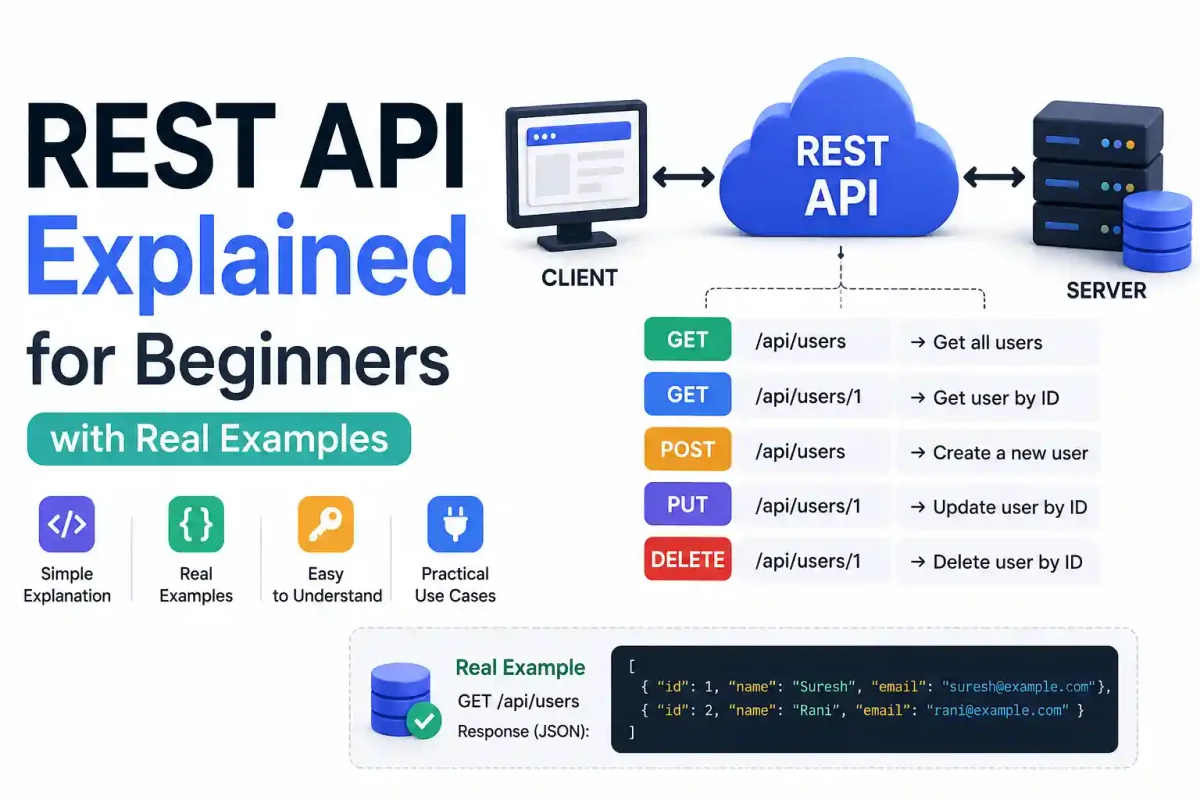
If you have spent any time working in modern web development or spinning up Docker containers, you have heard the term API. Documentation constantly tells you to “grab your API key,” “query the API endpoint,” or “expose your internal API securely.”
But what exactly is an API? And more specifically, what is a REST API, and why does almost every modern cloud service rely on them?
As an infrastructure engineer who spends all day deploying backend systems on Ubuntu servers, I can tell you that understanding REST APIs is the absolute foundation of modern system architecture. Whether you are automating server backups or building a full-stack SaaS product, REST APIs are how machines talk to each other.
In this guide, we are going to break down these concepts without the computer science theory. By the end, you will understand exactly how the modern web communicates, how HTTP methods map to database operations, and how to query real-world APIs yourself.
What is an API?
API stands for Application Programming Interface.
Simply put, an API is a messenger that takes your request, tells a backend system what you want to do, and then returns the response back to you.
The Restaurant Analogy
Imagine you are sitting at a table in a restaurant. You have a menu of choices to order from. The kitchen is the backend system (like PostgreSQL or MySQL) that will prepare your order.
What is missing is the critical link to communicate your order to the kitchen and deliver your food back to your table. That’s where the waiter comes in.
The waiter is the API.
- You (The Client): You tell the waiter what you want (e.g., “I’d like a burger”). In tech, this is your web browser or a tool like Postman making a request.
- The Waiter (The API): Takes your request, runs to the kitchen, and tells the backend exactly what to make.
- The Kitchen (The Server/Database): Processes the logic and “cooks” the data.
- The Waiter (The API): Brings the finished data (your food) back to your table.
In the digital world, if an app on your phone needs to fetch today’s weather, it doesn’t query a database directly. It sends a request to a Weather API. The API securely grabs the data from the backend servers and delivers it back to your phone. If you are curious how this data travels over the network, read our guide on how DNS domain resolution works.
What makes an API “RESTful”?
REST stands for Representational State Transfer. It’s not a programming language or a library; it’s an architectural style—a strict set of rules for how APIs should be built.
When an API follows these rules, we call it a REST API (or RESTful API).
Here are the core concepts of REST that matter to developers and sysadmins:
1. Everything is a “Resource”
In REST, data is treated as resources. A resource can be anything: a user, a blog post, a tweet, or a server configuration file on a Linux filesystem. Every resource is identified by a specific URL (called an Endpoint).
For example, if you want to access a list of users, the endpoint you query might look like this:
https://api.example.com/users
2. Statelessness
“Stateless” means that the server doesn’t remember anything about you between requests. Every single time you ask the waiter (the API) for something, you must provide all the information they need to fulfill the request, including authentication tokens like JWT (JSON Web Tokens) or OAuth2 credentials.
The server treats every request as brand new. This is why REST APIs scale so well when deployed behind load balancers like Nginx, Traefik, or Caddy—any server node can handle any request because no session memory is required.
The Four Main HTTP Methods (CRUD)
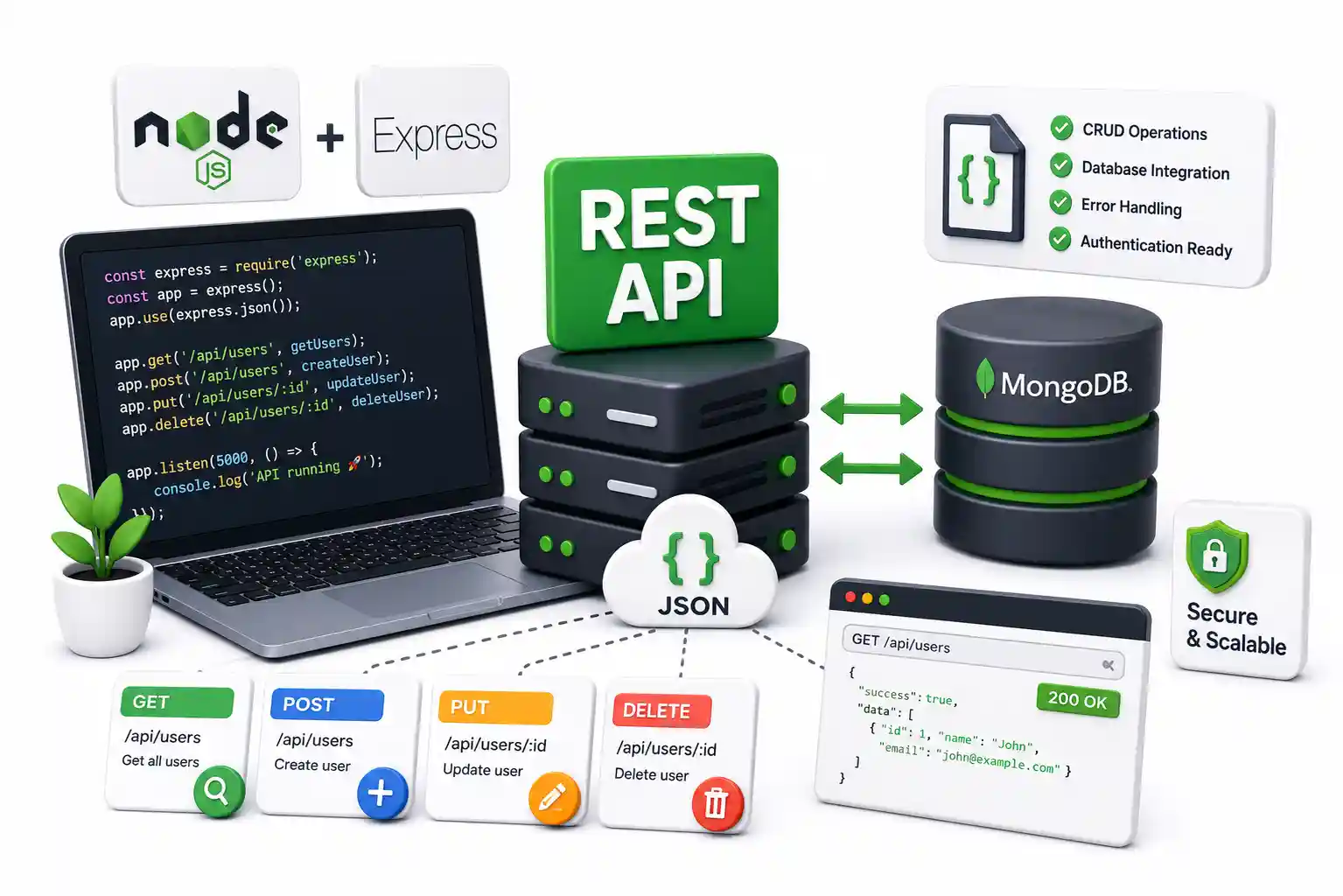
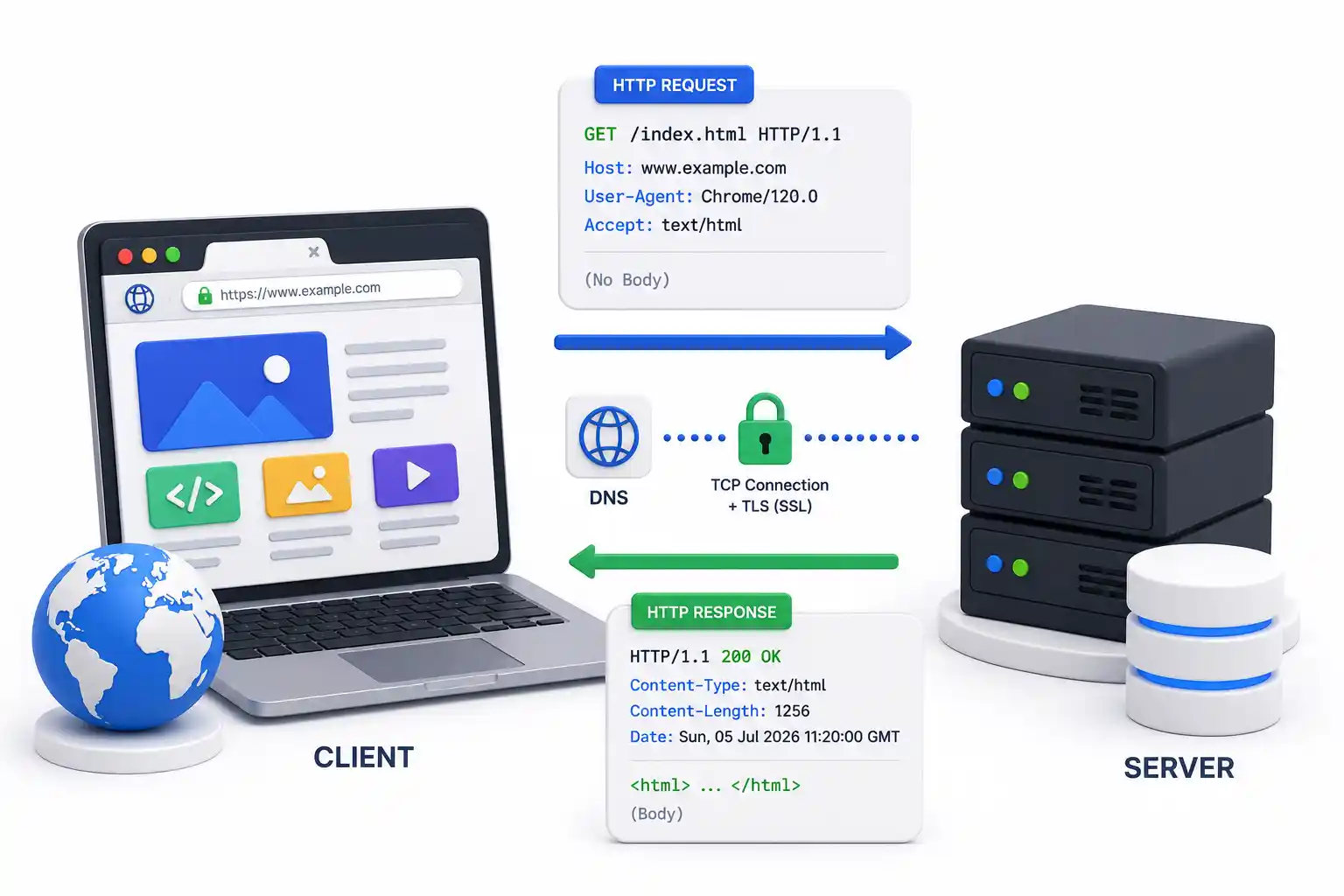
When you interact with a REST API, you do so using HTTP methods. These methods correspond to basic database operations, often referred to as CRUD (Create, Read, Update, Delete). To dive deeper into HTTP, read our HTTP basics guide.
1. GET (Read)
Used to retrieve data. It’s like asking the waiter to bring you the menu. When you use cURL in your terminal, it defaults to GET.
- Example:
GET /users(Fetches a list of all users) - Example:
GET /users/123(Fetches data specifically for the user with ID 123)
2. POST (Create)
Used to send new data to the server. It’s like giving the waiter your order.
- Example:
POST /users(Creates a brand new user using the JSON data you attached in the request body)
3. PUT / PATCH (Update)
Used to modify existing data.
- PUT replaces the entire resource. If you send a PUT request to update a user but forget to include their email, their email will be deleted because PUT replaces the whole object.
- PATCH updates only a specific part of a resource. (e.g., Changing just your email address while leaving the rest of the profile intact).
4. DELETE (Delete)
Used to remove data.
- Example:
DELETE /users/123(Deletes the user with ID 123 from the database).
How APIs Send Data: JSON
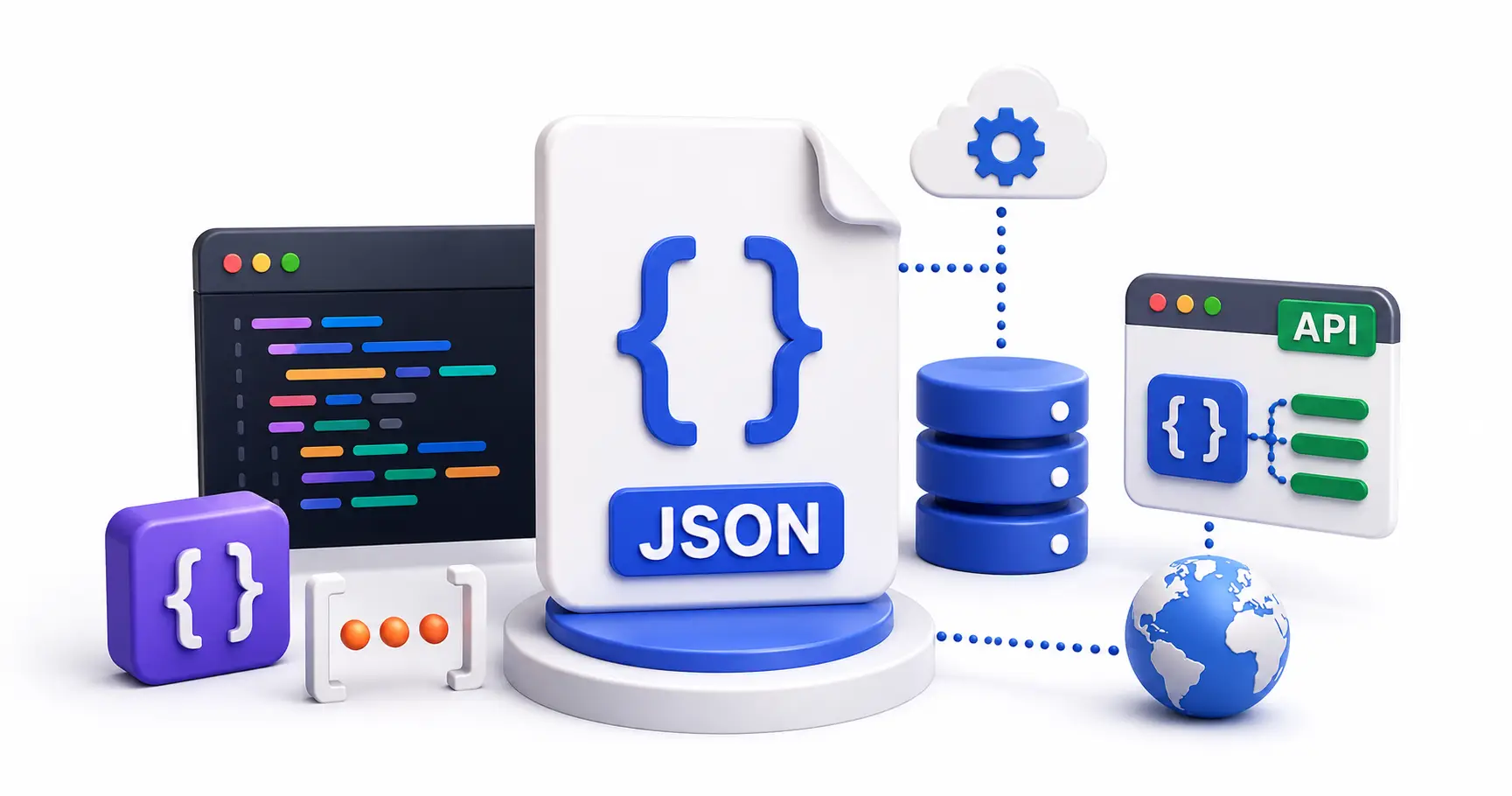
When the waiter brings your food, it comes on a plate. When a REST API brings your data, it usually comes packaged in JSON (JavaScript Object Notation). While older enterprise systems used XML or gRPC, JSON is the undisputed king of REST.
JSON is incredibly popular because it is fast to parse and easy for humans to read. Here is what a JSON response from a Weather API looks like:
{
  "city": "London",
  "temperature": 22,
  "condition": "Cloudy",
  "humidity": 65
}
It is just a simple list of “Keys” (like city) paired with “Values” (like "London"). When building your own APIs, frameworks like Express.js, Fastify, FastAPI (Python), and Django serialize data into JSON automatically.
Real-World API Examples
Let’s look at how famous platforms and self-hosted tools use REST APIs.
1. The GitHub API
If you are building CI/CD pipelines in GitHub Actions or GitLab CI, your scripts talk to the REST API:
- To get a user’s repositories:
GET https://api.github.com/users/suresh/repos - To create an issue:
POST https://api.github.com/repos/suresh/project/issues
2. Self-Hosted Uptime Kuma API
If you run your own server monitoring using Uptime Kuma, you can manage monitors programmatically:
- To fetch all active monitors:
GET http://your-kuma-server.local:3001/api/monitors
3. n8n Automation Engine
When using webhook integrations in n8n, the nodes are effectively sending and receiving REST payloads to connect different SaaS services together without writing manual code.
Understanding HTTP Status Codes
When the API returns your request, it always includes a Status Code—a three-digit number that tells you how things went. If you ever parse Nginx proxy manager logs or monitor Linux log files, you will see these constantly.
- 200 OK: Success! The waiter brought your food.
- 201 Created: Success! You successfully created a new resource (like registering a new account via POST).
- 400 Bad Request: You made a mistake. (e.g., You sent malformed JSON).
- 401 Unauthorized: You forgot your wallet. You need to log in or provide an API key. (Read our SSO guide for more on authentication).
- 403 Forbidden: You are logged in, but you don’t have administrative permission to perform that action.
- 404 Not Found: The resource doesn’t exist. You tried to look for a user that has been deleted.
- 500 Internal Server Error: The kitchen caught on fire. Something went wrong on the backend server.
Building and Securing APIs
If you are a developer looking to build your own API, Node.js with Express is the standard starting point. (Read our complete tutorial on building a REST API with Node.js).
When you decide to deploy that API, you will likely package it into a Docker container and host it on a Linux VPS via Coolify or DokPloy.
Because APIs are publicly accessible, they are massive targets for hackers. You must protect your host server using tools like Fail2ban, configure proper UFW firewall rules, and secure your endpoints with Let’s Encrypt HTTPS certificates. If you are building internal APIs for your homelab, lock them down behind a Tailscale or WireGuard VPN.
Official Documentation
For deep technical insights into API design, HTTP protocols, and API development frameworks, refer to these official resources:
- Mozilla Developer Network (MDN) HTTP Methods: https://developer.mozilla.org/en-US/docs/Web/HTTP/Methods
- OpenAPI Specification (Swagger): https://swagger.io/specification/
- Postman API Platform: https://www.postman.com/
- cURL Documentation: https://curl.se/docs/
- REST Architectural constraints (Roy Fielding’s Dissertation): https://www.ics.uci.edu/~fielding/pubs/dissertation/rest_arch_style.htm
Frequently Asked Questions (FAQ)
What is a REST API in simple terms?
A REST API is like a waiter in a restaurant. Your application (the customer) sends a request to a backend server (the kitchen) through the API (the waiter), and the server sends back the data you asked for. It strictly uses standard HTTP methods like GET, POST, PUT, and DELETE.
What is the difference between an API and a REST API?
An API is any interface that allows two software applications to communicate (including GraphQL, SOAP, or gRPC). A REST API is a specific architectural style of API that follows REST principles—it uses standard HTTP methods, is entirely stateless, and typically exchanges data in lightweight JSON format.
Do I need to know programming to use a REST API?
Not necessarily. You can use visual tools like Postman or Insomnia, or even your web browser, to make GET requests to public APIs without writing any code. However, to integrate APIs into automated backend workflows, basic programming knowledge (like Python or JavaScript) is required.
Why do REST APIs use JSON instead of XML?
JSON is lighter, far easier for humans to read, and faster for servers to parse than bulky XML. Most modern programming languages have built-in support for native JSON parsing, making it the industry-standard data format for REST communication.
Are REST APIs free to use?
Many public APIs are free, such as weather APIs, public crypto data APIs, and GitHub’s public API. However, commercial APIs like those from Google Maps, OpenAI, or Stripe often have strict rate limits on their free tiers and require paid subscriptions for production volume.
How do I secure a REST API?
APIs should be secured using HTTPS (TLS/SSL) to encrypt data in transit. You must also implement authentication (like OAuth2 or JWT tokens) to verify user identity, enforce rate limiting to prevent DDoS attacks, and validate all incoming JSON payloads to prevent SQL injection.
What is a REST API endpoint?
An endpoint is the specific URL (the web address) where a resource lives on the server. For example, https://api.github.com/users is the endpoint that returns user data. Endpoints represent the specific “nouns” in your system architecture.
What does “Stateless” mean in REST?
Statelessness means the server does not store any session data about the client between HTTP requests. Every single request sent to the API must contain all the context and authentication tokens required to understand and authorize the operation.
Should I use GraphQL instead of REST?
It depends on your use case. REST is excellent for standard, predictable resource fetching and caching. GraphQL is better when your frontend needs to fetch complex, deeply nested relational data in a single request without over-fetching unnecessary fields.
Can I run a REST API in a Docker container?
Yes. Containerizing APIs using Docker is the industry standard. This ensures your API environment (Node.js, Python, dependencies) runs exactly the same way on your local machine, your staging server, and your production Kubernetes cluster.
Discussion
Loading comments...