

I remember the exact moment asynchronous JavaScript finally made sense to me. I was sitting in a crowded coffee shop years ago, completely frustrated. My backend API logic was running in an order that made zero sense. Database queries were returning undefined before they had finished executing, and my server logs were a jumbled mess.
Then a senior engineer looked at my screen and said something that changed everything: “JavaScript is like a restaurant kitchen. The head chef doesn’t stand idle waiting for a pot of soup to boil before they start chopping the salad.”
That metaphor unlocked the core philosophy of Node.js and modern web browsers. Today, as we scale containerized microservices and build highly concurrent systems, understanding the why behind asynchronous programming is more critical than ever. In this comprehensive technical guide, we will trace the evolution of async JavaScript from the dark days of Callback Hell, through the Promises revolution, and finally to modern async/await syntax.
Along the way, we will connect these concepts to real-world infrastructure—from database querying to API rate limiting—so you can write faster, more resilient server-side code.
The Problem: Why Can’t JavaScript Just Wait?
Let’s look at a standard backend scenario. You are building a REST API with Node.js and Express. When a user requests their profile, your server must:
- Validate their authentication token using a tool like Redis.
- Fetch their user profile from PostgreSQL.
- Fetch their recent orders from MongoDB.
- Return the combined JSON response.
JavaScript, powered by the V8 Engine, is single-threaded. It only has one main execution thread. If JavaScript were strictly synchronous (blocking), your server would completely freeze while waiting for the PostgreSQL database query to return across the network. If the database took 2 seconds to respond, no other users could access your website during those 2 seconds. The server would simply hang.
To solve this, JavaScript is non-blocking. When it encounters an I/O operation that takes time (like a database query, reading from the Linux filesystem hierarchy, or fetching an external API with Axios), the V8 engine offloads that task to the background system (the Event Loop). It says, “I will handle the result of this later,” and instantly moves on to process the next user’s HTTP request.
Chapter 1: Callbacks - The Foundation
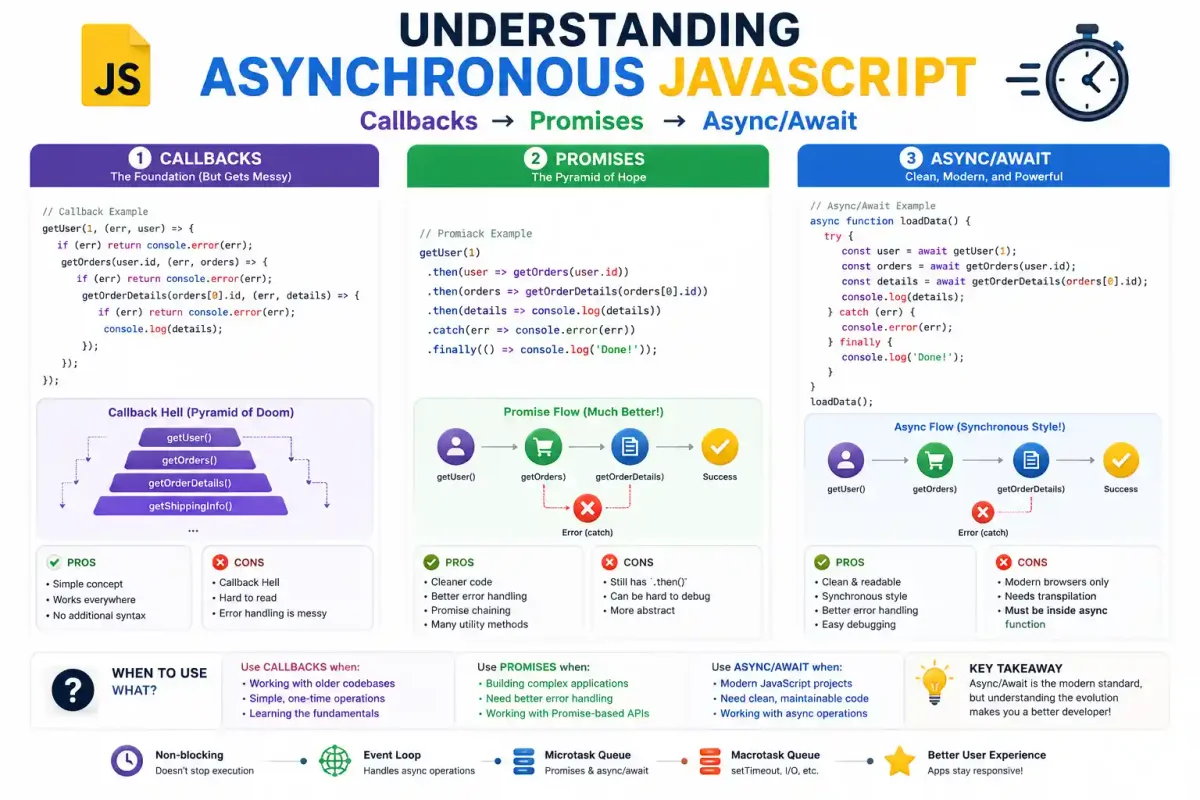
A callback is simply a function passed as an argument to another function, to be executed later once an asynchronous task completes. This was the original async pattern in early JavaScript and Node.js.
The Classic Pattern
// A simple callback example simulating a network request
function fetchUserData(userId, callback) {
    // We use setTimeout to simulate network latency
    setTimeout(() => {
        const data = { id: userId, username: "sysadmin_pro" };
        callback(null, data); // Error is null, data is passed
    }, 2000);
}

function displayData(error, data) {
    if (error) {
        console.error('Error fetching data:', error);
        return;
    }
    console.log('Successfully retrieved:', data);
}

// Using the callback
fetchUserData(42, displayData);
console.log('This log executes immediately! The event loop is not blocked.');
JavaScript did not wait for fetchUserData to complete. It logged “This log executes immediately!” instantly. Only later, when the background timer finished, was the callback placed back onto the call stack and executed.
The Problem: Callback Hell
Callbacks work fine for single operations, but in modern production environments, you rarely do just one thing. When you need to perform multiple async operations sequentially, the code indents further and further to the right.
// Welcome to Callback Hell (The Pyramid of Doom)
getUserData(userId, (err, userData) => {
    if (err) return console.error(err);

    getOrders(userData.id, (err, orders) => {
        if (err) return console.error(err);

        getOrderDetails(orders[0].id, (err, details) => {
            if (err) return console.error(err);

            getShippingInfo(details.shippingId, (err, shipping) => {
                if (err) return console.error(err);

                console.log("Finally finished:", shipping);
                // Imagine maintaining this in a massive Express route...
            });
        });
    });
});
This pattern is a nightmare to read, debug, and maintain. If one of those database calls crashes, figuring out which scope dropped the error by analyzing Linux logs is painful. We needed a better abstraction.
Chapter 2: Promises - The Game Changer
Introduced natively in ES6, Promises provided a clean solution to Callback Hell. A Promise is an object representing the eventual completion (or failure) of an asynchronous operation and its resulting value.
The Three States of a Promise
- Pending: The initial state. The database query is still running.
- Fulfilled (Resolved): The operation completed successfully. We got the data.
- Rejected: The operation failed (e.g., database timeout or DNS failure).
(If you are rusty on network resolution, read what DNS is and how it works)
Creating and Consuming a Promise
Here is how we wrap an asynchronous operation inside a Promise:
const fetchServerStatus = new Promise((resolve, reject) => {
    setTimeout(() => {
        const isServerUp = true;

        if (isServerUp) {
            resolve({ status: 200, message: "Docker containers are healthy" });
        } else {
            reject(new Error("Nginx Reverse Proxy is down"));
        }
    }, 1000);
});
Instead of passing callbacks, we chain methods onto the returned Promise object:
fetchServerStatus
    .then(response => {
        console.log(response.message);
        return response.status;
    })
    .then(statusCode => {
        console.log(`Status Code: ${statusCode}`);
    })
    .catch(error => {
        console.error('Alert Triggered:', error.message);
    })
    .finally(() => {
        console.log('Cleanup: Closing database connection pools.');
    });
The Power of Chaining
This is where Promises shine. Instead of nested pyramids, we chain operations flatly. If you are querying MySQL vs PostgreSQL, your ORM likely returns a Promise.
getUserData(userId)
    .then(userData => {
        return getOrders(userData.id);
    })
    .then(orders => {
        return getOrderDetails(orders[0].id);
    })
    .then(details => {
        return getShippingInfo(details.shippingId);
    })
    .then(shipping => {
        console.log('Shipping info:', shipping);
    })
    .catch(error => {
        // This single block catches ANY error that occurs anywhere in the chain!
        console.error('Transaction Failed. Rolling back changes:', error);
    });
Advanced Promise Methods for Concurrency
When optimizing applications for deployment on a Linux VPS, reducing total response time is critical. If you have three independent database queries, you should not run them sequentially.
// Promise.all - Wait for ALL promises to resolve concurrently
// This cuts a 3-second task down to 1 second.
const fetchUser = fetch('https://api.example.com/user');
const fetchPosts = fetch('https://api.example.com/posts');
const fetchMetrics = fetch('https://api.example.com/metrics');

Promise.all([fetchUser, fetchPosts, fetchMetrics])
    .then(([userRes, postsRes, metricsRes]) => {
        console.log('All three independent queries finished in parallel!');
    })
    .catch(error => {
        // If ANY single promise fails, the entire Promise.all block rejects immediately.
        console.error('One request failed, aborting:', error);
    });
Other useful utilities include Promise.race() (returns as soon as the fastest promise finishes) and Promise.allSettled() (waits for all to finish, regardless of success or failure).
Chapter 3: Async/Await - The Modern Standard
While Promises fixed Callback Hell, chaining .then() blocks still felt slightly disconnected from traditional synchronous programming logic. In ES2017, JavaScript introduced async/await.
It is “syntactic sugar” built directly on top of Promises, making asynchronous code look and behave exactly like synchronous code.
The Async/Await Syntax
async function fetchCompleteUserProfile(userId) {
    try {
        // Execution pauses here until the Promise resolves
        const userData = await getUserData(userId);
        console.log('User fetched:', userData.username);

        // Execution pauses here again
        const orders = await getOrders(userData.id);
        console.log(`Found ${orders.length} orders.`);

        const details = await getOrderDetails(orders[0].id);
        const shipping = await getShippingInfo(details.shippingId);

        return { user: userData, shipping };

    } catch (error) {
        // Standard try/catch blocks now work for async code!
        console.error('Database query failed:', error);
        throw error;
    }
}
Notice how clean this is? Each await keyword pauses the execution of that specific function until the promise resolves. However, the rest of your Node.js application (like handling incoming traffic via Nginx or Traefik) keeps running unblocked in the background.
Real-World Scenarios & Best Practices
As a DevOps engineer, you will write a lot of automation scripts and internal dashboards. Let’s look at how async/await fits into modern infrastructure tools.
1. Fetching Remote Data
Whether you are hitting the GitHub API for CI/CD status in GitHub Actions, parsing metrics from Prometheus, or interacting with your Coolify self-hosted PaaS, you will use the native fetch API.
async function checkServerHealth(serverIp) {
    try {
        // Fetch API natively returns a Promise
        const response = await fetch(`https://${serverIp}/api/health`);

        if (!response.ok) {
            throw new Error(`HTTP Error! Status: ${response.status}`);
        }

        const healthData = await response.json(); // .json() also returns a Promise!
        return healthData.status === "healthy";

    } catch (error) {
        console.error(`Health check failed for ${serverIp}:`, error.message);
        // Trigger a webhook to an alerting system like Uptime Kuma or Sentry
        return false;
    }
}
(For more on HTTP protocols, read our HTTP basics guide)
2. File System Operations
When writing backend services that interact with the host OS—like generating Let’s Encrypt SSL certificates or writing to secure Docker containers—you should always use the Promise-based versions of the fs module to avoid blocking the event loop.
const fs = require('fs/promises');

async function writeAuditLog(logEntry) {
    try {
        const logString = `[${new Date().toISOString()}] ${logEntry}\n`;
        // Non-blocking file append
        await fs.appendFile('/var/log/app/audit.log', logString);
        console.log('Log written securely.');
    } catch (error) {
        console.error('Disk write failed. Check Linux file permissions.', error);
    }
}
(If you encounter write errors, review our guide on understanding Linux file permissions)
Common Pitfalls and How to Avoid Them
Pitfall 1: Forgetting the await Keyword
If you forget await, the variable receives the pending Promise object itself, not the resolved data.
// ❌ WRONG
async function checkAuth() {
    // verifyToken returns a Promise. We didn't await it!
    const isValid = verifyToken();

    // isValid is an object "Promise { <pending> }".
    // Objects are truthy in JS, so this if-statement ALWAYS runs!
    if (isValid) {
        grantAdminAccess(); // Massive security flaw!
    }
}

// ✅ CORRECT
async function checkAuth() {
    const isValid = await verifyToken();
    if (isValid === true) {
        grantAdminAccess();
    }
}
Pitfall 2: Accidental Sequential Blocking in Loops
When developers first learn await, they often put it inside a for loop. This completely destroys concurrency because it forces independent tasks to run one at a time.
// ❌ SLOW: Waits for Server 1 to finish before starting Server 2.
async function pingServers(serverList) {
    const results = [];
    for (const server of serverList) {
        const result = await ping(server);
        results.push(result);
    }
    return results;
}

// ✅ FAST: Fires all pings concurrently using Promise.all
async function pingServers(serverList) {
    // map() returns an array of pending Promises
    const pingPromises = serverList.map(server => ping(server));

    // Wait for all to finish concurrently
    const results = await Promise.all(pingPromises);
    return results;
}
Pitfall 3: Failing to Catch Errors
An unhandled promise rejection in modern Node.js or Deno will crash the entire application process. Always wrap your await calls in try/catch blocks, or handle them at the top level of your Express/Fastify routes. To keep your Node applications running reliably even after a crash, always manage your background processes with a tool like PM2 or deploy them securely inside a container managed by Portainer or DokPloy.
Modern Tooling and Asynchronous Workflows
Asynchronous JavaScript is the backbone of almost every modern DevOps and Full-Stack tool you will encounter.
- When you write E2E tests in Cypress or Playwright, you are heavily awaiting browser interactions.
- When you automate workflows using an n8n Automation Engine, the nodes execute asynchronously.
- When you stream data into Elasticsearch or publish events to Apache Kafka / RabbitMQ, you rely on non-blocking I/O.
- When you set up Uptime Kuma self-hosted monitoring to ping your domains, the dashboard uses async polling.
Embracing this non-blocking philosophy allows you to scale massive infrastructure (like Proxmox VE Home Labs or high-traffic Nginx Proxy Manager instances) using minimal hardware.
If you are managing self-hosted infrastructure, check out our backup strategies for self-hosted servers using tools like BorgBackup, Restic, and MinIO to ensure your databases survive catastrophic failure. Additionally, lock down your hosts with our secure home server checklist, UFW firewall guide, and Fail2ban guide.
Official Documentation
For deep technical dives into the JavaScript Event Loop and V8 Engine specs, refer to these official resources:
- MDN Web Docs: async function: https://developer.mozilla.org/en-US/docs/Web/JavaScript/Reference/Statements/async_function
- MDN Web Docs: Promise: https://developer.mozilla.org/en-US/docs/Web/JavaScript/Reference/Global_Objects/Promise
- Node.js Event Loop Architecture: https://nodejs.org/en/docs/guides/event-loop-timers-and-nexttick/
- V8 JavaScript Engine: https://v8.dev/
Frequently Asked Questions (FAQ)
What is the difference between synchronous and asynchronous JavaScript?
Synchronous JavaScript executes line by line, blocking the entire application until the current operation (like a network request or heavy calculation) completes. Asynchronous JavaScript allows the main thread to offload slow operations to the background event loop, allowing the application to process other tasks concurrently without freezing.
Why should I use async/await instead of Promises?
While async/await is technically just syntactic sugar over Promises, it provides a significantly cleaner, more readable syntax that looks exactly like traditional synchronous code. It completely eliminates deeply nested .then() chains and allows you to use standard try/catch blocks for error handling.
Can I use the await keyword without an async function?
In older versions of JavaScript, await could only be used inside a function explicitly marked as async. However, modern JavaScript environments (like Node.js 14+ and modern browsers) support “Top-Level Await” inside ES Modules, allowing you to use await directly at the top level of a file.
What happens if I forget to type the await keyword?
If you forget to use await before an asynchronous function call, JavaScript will not pause execution. Instead, the function will instantly return a pending Promise object. Because objects are “truthy” in JavaScript, this often leads to silent logical bugs where if statements pass unexpectedly.
How do I handle multiple async requests at the exact same time?
If you have multiple asynchronous requests that do not depend on each other (e.g., fetching a user profile and fetching site settings), you should use Promise.all(). This executes all the promises concurrently in parallel, drastically reducing the total response time of your API endpoint.
Does asynchronous JavaScript run on multiple threads?
No. JavaScript (in Node.js and the browser) runs on a single main thread. However, the underlying environment (like libuv in Node.js or Web APIs in the browser) utilizes background worker threads written in C++ to handle the actual I/O operations (like file reads or network requests), passing the result back to the main thread when finished.
What is the difference between Promise.all() and Promise.allSettled()?
Promise.all() will immediately throw an error (reject) if any single promise in the array fails, dropping the successful results. Promise.allSettled() waits for all promises to finish regardless of success or failure, returning an array of objects detailing the status (fulfilled or rejected) of each individual promise.
How do I catch errors in async/await functions?
You should wrap your await calls inside a standard try/catch block. If any awaited Promise rejects, the execution immediately jumps to the catch block, allowing you to handle the error, log it, or return a fallback value to the user gracefully.
Why is running await inside a standard for-loop bad?
If you place an await inside a standard for or for...of loop, the loop will pause completely on every iteration until the promise resolves. This forces tasks that could be run concurrently to execute sequentially, devastating performance. Use .map() and Promise.all() to run loop iterations in parallel instead.
Can I use callbacks and async/await in the same codebase?
Yes, but it is generally discouraged to mix paradigms within the same function as it causes confusion. If you must interact with an older, callback-based library (like legacy Node.js APIs), you can wrap the callback function inside a new Promise, allowing you to await it cleanly in modern code.

Discussion
Loading comments...