

Every second, Google processes around 100,000 search queries. To the end-user, it feels like magic: you type in a phrase, hit enter, and a list of hyper-relevant web pages appears instantly.
But behind this simple interface lies one of the most complex distributed computing networks on the planet. Search engines do not search the “live web” when you run a query. If they did, it would take days to return an answer. Instead, they search a massive, pre-built database called an index.
When I first started building web applications, I didn’t care much about SEO. I assumed if I built something great, people would find it. Then I launched a massive directory app, sat back, and got exactly zero traffic for three months. That’s when I learned a brutal lesson: if a search engine can’t efficiently crawl and understand your code, you effectively don’t exist on the internet.
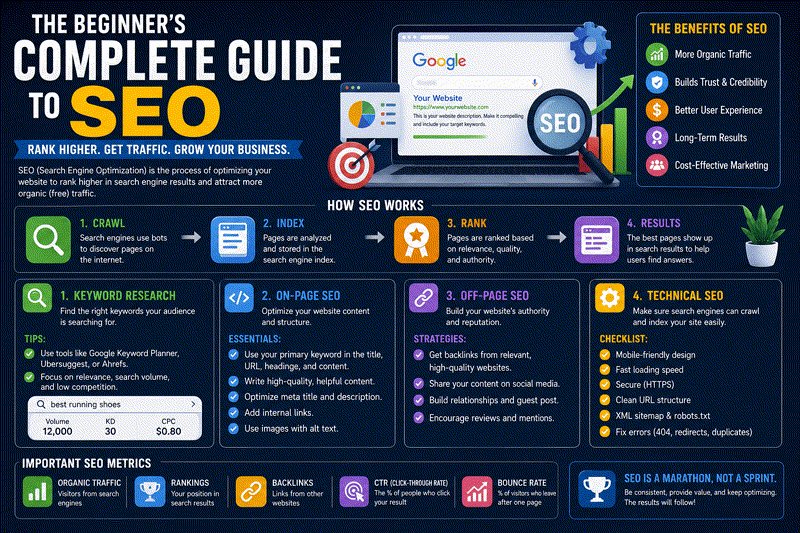
Understanding how bots discover, parse, render, and store your data is the bedrock of any successful optimization strategy. If you are entirely new to this, start with our Beginner’s Guide to SEO before diving into the deep technical mechanics below.
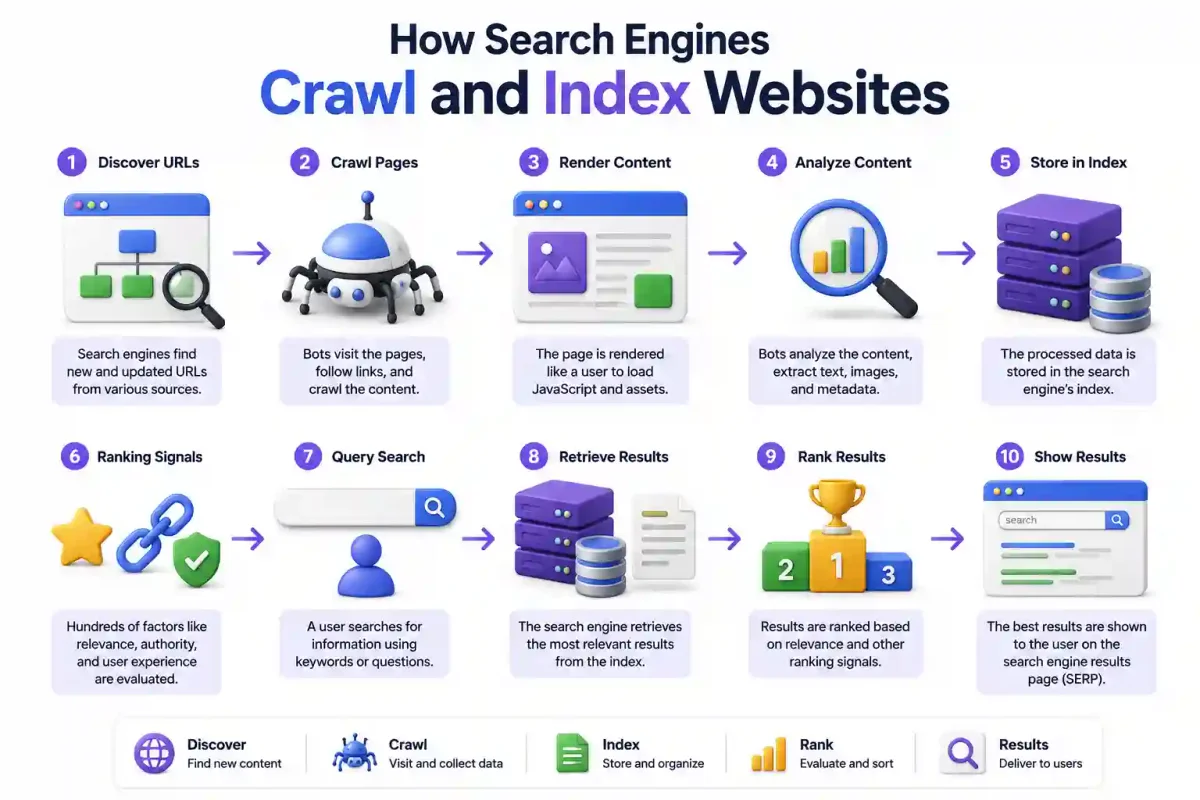
Here is the step-by-step technical breakdown of how search engines crawl and index your website.
1. The Discovery Phase
Before a search engine can crawl a page, it must first know the URL exists. You don’t just launch a server on AWS (see our AWS vs Azure vs Google Cloud comparison) and automatically show up in Google.
Search engines discover URLs through three primary channels:
- Hyperlinks (The Spider Web): Crawlers follow links from pages they have already indexed. If a reputable tech site links to your new blog post about installing Docker on Ubuntu, Googlebot will eventually follow that link and discover your page.
- XML Sitemaps: This is an XML file you submit directly via Google Search Console. It acts as a map of all your important pages.
- Direct Submission APIs: If you run a fast-paced news site or job board, you can use the Google Indexing API to ping their servers the millisecond you publish a new page. (This requires parsing API responses, which you can debug with our JSON validator tool).
2. The Crawl: Server Interactions
Once a URL is discovered, it enters the “crawl frontier” (a massive queue). Eventually, a crawler (like Googlebot or Bingbot) is dispatched to fetch it.
The crawler acts exactly like a human user opening a browser. It sends an HTTP GET request to your server. If you want a deep dive into the network protocols involved here, read our guide on what happens when you type a URL into a browser.
Crawl Budget and Log Analysis
Search engines have finite computing resources. The amount of time Google allocates to crawling your specific website is called your Crawl Budget. If you run a massive e-commerce site with millions of pages and poor server performance, the bot will exhaust its budget and leave before indexing your most important products.
To protect your crawl budget, you must implement server-side optimizations:
- Eliminate Redirect Chains: Every 301 redirect forces the crawler to open a new TCP connection. Never chain redirects (
A -> B -> C). Always resolve them directly (A -> C). - Handle Parameterized URLs: URL parameters like
?session_id=123create infinite URL variations of the exact same content. Userobots.txtto block bots from crawling tracking parameters. This logic applies whether you’re configuring a simple blog or a massive Kubernetes cluster. - Resolve Soft 404s: A “soft 404” happens when a page returns a successful
200 OKstatus, but the page content says “Product Not Found”. This forces the bot to crawl a useless page. Your web server (whether it’s Nginx or Caddy) must return a proper404 Not Foundheader. - Log Analysis: You should regularly check your Linux system logs to see exactly which URLs Googlebot is hitting and which are returning 500 errors. You might want to use a tool like Cron Expression Generator to set up automated nightly log rotation scripts using systemd.
Security Note: Bad actors often spoof their User-Agent to look like Googlebot to bypass firewalls. You should use a reverse proxy (like Nginx Proxy Manager) combined with Fail2ban to block IPs that fail reverse DNS verification. This is especially true if you are hosting tools like Vaultwarden or Coolify on the same server, where security is paramount. You don’t want a password manager exposed to malicious crawlers performing OSINT investigations. Or even worse, falling victim to advanced Google Dorking.
3. The Render Phase: Headless Chrome
In the late 90s, search engines only read the raw HTML returned by the server. If a word was in the source code, it was indexed.
Today, modern web development relies heavily on JavaScript frameworks like React, Vue, and Svelte (see our React vs Vue vs Svelte comparison). If a bot only reads the raw HTML of a React app, it just sees an empty <div id="root"></div>.
To solve this, modern search engines must render the page just like a browser does.
The Two-Stage Execution Pipeline
Google uses a Web Rendering Service (WRS) powered by an evergreen, headless version of Chromium. Because downloading, parsing, and executing JavaScript requires massive CPU overhead, Google splits the process into two stages:
- Stage 1 (Immediate Indexing): The crawler fetches the raw HTML. It immediately extracts and indexes whatever static content is available.
- Stage 2 (Deferred Rendering): If the page relies on JavaScript to build the DOM, the URL is placed in a separate rendering queue. It might sit there for hours or days before headless Chrome actually executes the JavaScript and generates the final visible DOM.
Rendering Pitfalls
- Timeout Limits: Googlebot will not wait 30 seconds for your bloated API to return data. The execution timeout is usually around 5 seconds. If your database query is slow, Googlebot indexes a blank page.
- Resource Blocking: If your
robots.txtblocks CSS or critical JavaScript files, the WRS renders a broken, unstyled mess. This can severely hurt your rankings.
4. Entity Extraction and Natural Language Processing
Once the WRS generates the final DOM, the parser takes over. This is where search engines have truly evolved. They no longer just count keyword density; they try to understand semantic meaning.
Using Natural Language Processing (NLP), the engine analyzes sentences to extract Entities (people, places, concepts) and maps the relationships between them.
For example, if the crawler reads a blog post about installing n8n with Docker Compose, it extracts “n8n” (Software Entity), “Docker Compose” (Tool Entity), and understands the relationship between them. This data is mapped into the Knowledge Graph.
Structured Schema Markup
You can bypass the guesswork of NLP by explicitly telling the search engine what your content is using JSON-LD Schema Markup.
Instead of hoping Google realizes a page is a recipe, you inject a JSON payload that defines the exact prep time, ingredients, and calories. You can use our JSON formatter to ensure your schema payloads are perfectly minified before deployment.
5. Granular Indexability Controls
As a webmaster, you need precise control over what the search engine stores. You achieve this using robot tags and HTTP headers.
The X-Robots-Tag
A meta tag in your HTML (<meta name="robots" content="noindex">) works great for web pages. But what if you want to prevent Google from indexing a private PDF or an internal database dump generated by your automated backup scripts?
You must use the X-Robots-Tag HTTP header sent directly by your web server.
HTTP/1.1 200 OK
Content-Type: application/pdf
X-Robots-Tag: noindex, nofollow
noindex, follow: Don’t index this page, but crawl the links on it.noindex, nofollow: Completely ignore this page and everything it links to.
Pro Tip: If a page stays noindex, follow for too long, search engines will eventually stop visiting it altogether and treat it as a nofollow.
Canonicalization
If you have three URLs pointing to the exact same content, you must use a <link rel="canonical" href="..."> tag to tell the search engine which version is the “master” copy. Failing to do this forces the search engine to guess, which splits your ranking power across duplicate pages. Understanding how HTTP works for beginners will help you debug these header conflicts.
6. Storing Data in the Inverted Index
After analysis, the page data is stored in the search index.
This is not a standard relational database (like PostgreSQL or MySQL). It functions as an inverted index—similar to the index at the back of a textbook.
Instead of storing a list of documents and what words they contain, it stores a list of words and points to all the documents that contain those words. This architecture is why a query across billions of pages returns results in milliseconds.
If you are building your own internal search engines for a self-hosted Nextcloud or Paperless-ngx instance, they use similar underlying search technologies like Elasticsearch or Meilisearch, which often run in Docker. If you are comparing Docker vs Podman, rest assured that these concepts apply to both container engines. If you need help managing those containers, try Portainer or Dokploy. If you need to map internal IP addresses to hostnames, you could set up a local DNS server like Pi-hole. Just remember to learn the top 20 Linux security commands so your database isn’t publicly exposed.
7. Ranking Signals and Query Processing
Once a page is in the index, it waits. When a user types a query, the retrieval engine springs into action.
The system uses advanced machine learning models (like RankBrain) to understand the Search Intent. Is the user trying to buy something, learn something, or navigate to a specific website? (This intent modeling is particularly crucial for voice search optimization and developing a holistic content marketing strategy). If you’re building semantic search into your own tools, you might even be using OpenWebUI to run local LLMs that mimic this behavior.
The query processor matches the intent against the inverted index to pull candidate pages. Then, the Ranking Engine scores them.
The exact ranking algorithms are closely guarded secrets, but we know they evaluate:
- Semantic Relevance: How well the content answers the query.
- Authority (Backlinks): How many other trusted websites link to this page.
- Page Experience: Does the site use HTTPS? (See our guide on Let’s Encrypt TLS). Is it mobile-friendly? Does it load fast?
To master how these signals translate to traffic, read our comprehensive Search Engine Optimization (SEO) guide.
8. Displaying the Search Results Page (SERP)
Finally, the sorted results are delivered to the user.
But search results are no longer just a list of ten blue links. Modern SERPs include:
- Featured Snippets: Direct answers extracted from the page text.
- Local Packs: Map widgets for businesses.
- People Also Ask (PAA): Accordion menus of related questions.
If you want to track how users interact with these features when they land on your site, you need to configure a solid analytics pipeline. Review our Web Analytics Tracking Guide for implementation strategies. You can also self-host privacy-friendly analytics on a secure Proxmox home lab. If you notice users dropping off immediately, verify you don’t have broken links using a check website before clicking a link methodology to ensure your outbound links aren’t blacklisted.
Conclusion
Search engines are engineering marvels. They continuously crawl the open web, render complex JavaScript payloads, extract semantic entities, and organize the world’s information into a searchable index.
As a developer, your job is to remove friction. By ensuring your server responds quickly, your JavaScript renders cleanly, and your canonical tags are correct, you allow search bots to do their job efficiently.
If you are managing your own infrastructure, I highly recommend setting up Uptime Kuma to monitor your server’s response times. A slow server doesn’t just frustrate users; it physically prevents search engines from crawling your site. Make sure you also understand basic Linux file permissions and how to install software on Linux to keep your hosting environment secure and fast.
Frequently Asked Questions (FAQ)
What is the difference between crawling and indexing?
Crawling is the process where a search engine bot (like Googlebot) visits a URL and downloads the page content. Indexing is the subsequent process where the search engine analyzes that downloaded content, understands its semantic meaning, and stores it in its massive database to be shown in search results.
How long does it take for Google to index a new page?
There is no fixed timeframe. It can take anywhere from a few minutes to several weeks. Websites with high domain authority and frequent updates are crawled much faster. You can speed this up by manually requesting indexing via Google Search Console or submitting an updated XML sitemap.
Does a robots.txt file prevent indexing?
No. This is a massive misconception. The robots.txt file prevents crawling, but if Google discovers links to your blocked page from external websites, it can still index the URL (though it won’t know what content is on the page). To prevent indexing entirely, you must use a noindex meta tag or HTTP header.
Why did Google index a blank page for my website?
If you built a Single Page Application (SPA) using React or Vue, your content is rendered via JavaScript on the client-side. If your API calls take longer than Google’s rendering timeout limit (usually around 5 seconds), the Web Rendering Service will snapshot the page before the content loads, resulting in a blank indexed page.
What is a soft 404 error?
A soft 404 occurs when a webpage displays a “Page Not Found” message to the user, but the web server incorrectly returns a 200 OK HTTP status code to the search engine. This confuses crawlers, wasting your crawl budget on non-existent pages.
What is crawl budget?
Crawl budget is the limited amount of time and resources a search engine bot dedicates to crawling a specific website. It is determined by your server’s performance and your site’s popularity. Optimizing crawl budget ensures the bot spends time on your important pages rather than duplicate URLs.
What is the inverted index?
The inverted index is the core data structure used by search engines. Instead of storing documents and listing the words inside them, it stores a massive list of words and points to all the documents that contain those words, allowing for lightning-fast keyword retrieval.
How do search engines process JavaScript?
Modern search engines use a Web Rendering Service (WRS), essentially a headless web browser, to execute JavaScript, fetch external CSS, and build the final Document Object Model (DOM) before analyzing the content for indexing.
What is Schema Markup?
Schema Markup (JSON-LD) is structured data injected into a webpage’s code that explicitly tells search engines what entities exist on the page (e.g., this is a Recipe, it takes 30 minutes, and has 400 calories). It removes the guesswork for Natural Language Processing algorithms.
Should I use noindex-follow or noindex-nofollow?
Use noindex, follow when you want a category or tag page excluded from search results, but you still want crawlers to follow the links on that page to discover your articles. Use noindex, nofollow when the page and its outbound links are completely private or irrelevant to search engines.


Discussion
Loading comments...