

Let me tell you a frustrating story. When I first learned how to code, I spent three straight weeks building what I thought was the ultimate developer tool. I deployed it on a shiny new VPS server, pushed the code, and waited for the internet to beat a path to my door.
After a month, I checked my analytics. I had exactly three visitors. One of them was me, one was my mom, and the third was a malicious bot trying to brute-force my login page (thankfully, I had read up on the top 20 Linux security commands).
The harsh reality of the internet is that if you build it, they will not come. Not unless search engines know exactly what you built, who it is for, and why it is better than the competition.
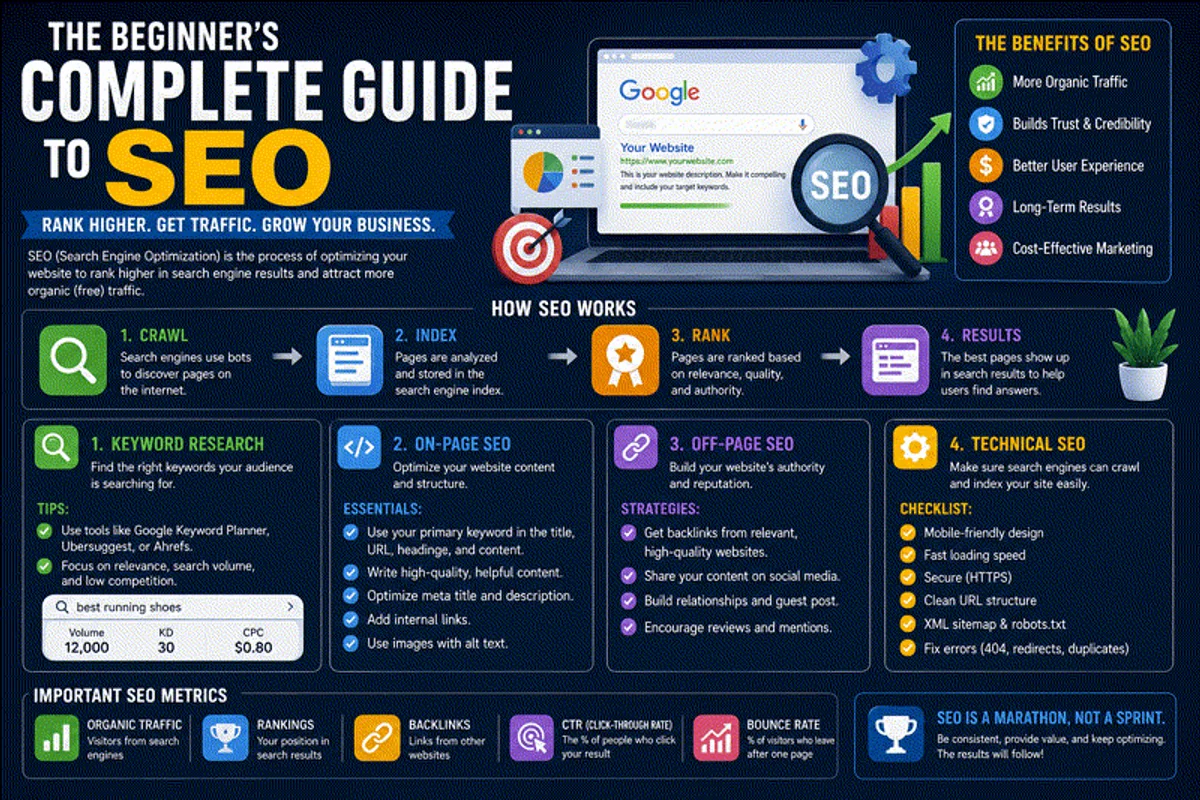
Search Engine Optimization (SEO) is the art and science of bridging that gap. Whether you are running a personal blog, deploying enterprise apps on Kubernetes, or just trying to get your small business noticed, mastering SEO is non-negotiable.
Here is the zero-BS, developer-friendly guide to getting your website to page one of Google.
1. How Search Engines Actually Work
Before we try to manipulate the system, we need to understand the system.
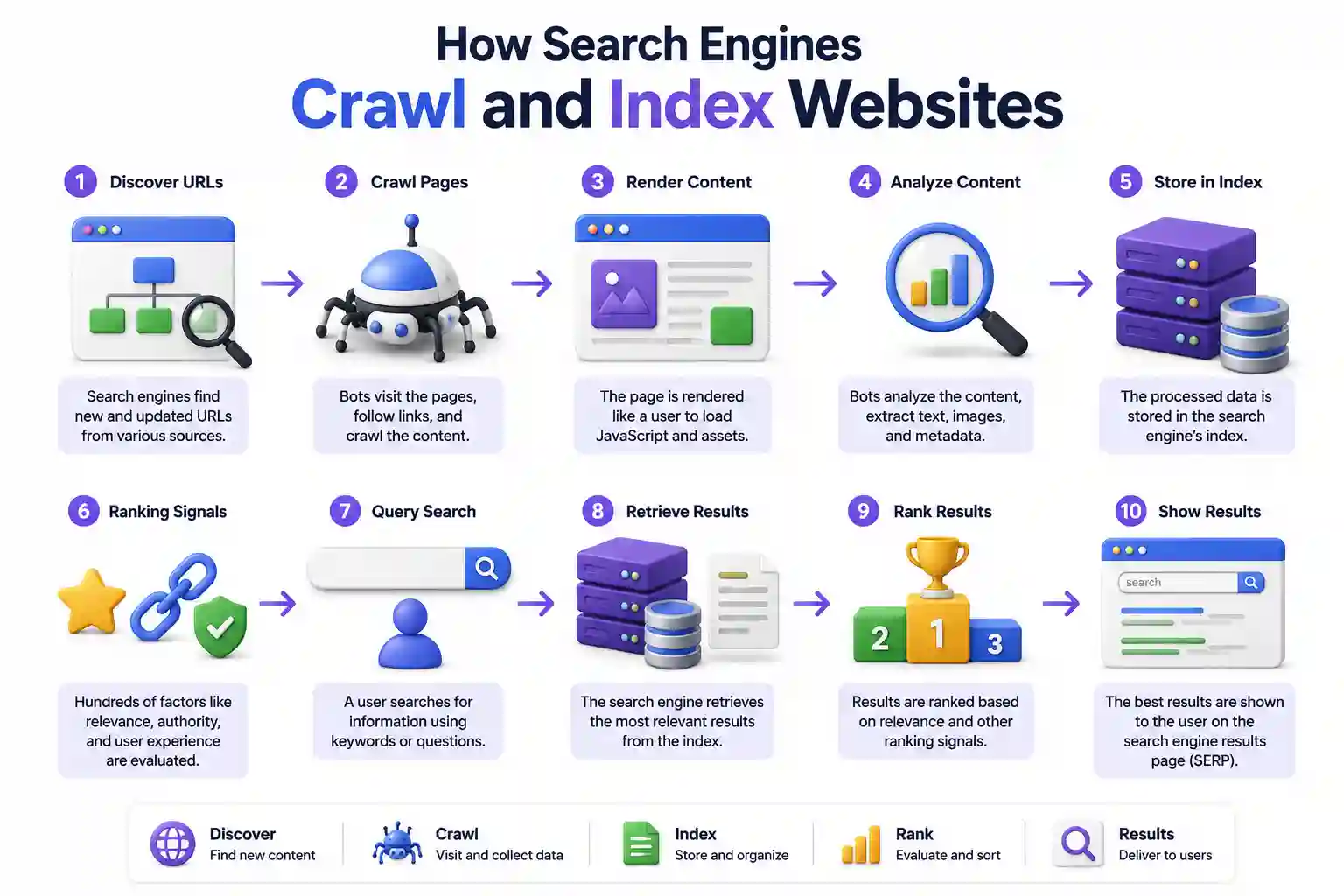
When you type a query into Google, it does not instantly scan the entire internet. It searches a pre-compiled database called an index. If you want a deep dive into the engineering behind this, read our technical breakdown of how search engines crawl and index websites.
For now, you just need to understand the three distinct phases:
- Crawling: Automated bots (like Googlebot) follow links around the web, discovering new pages. This is why having proper DNS records (read what is DNS) is essential so crawlers can resolve your domain.
- Indexing: The bots read the content, render the JavaScript, and store the information in a massive database.
- Ranking: When a user searches, complex machine learning algorithms sort the indexed pages based on hundreds of ranking signals. This organic process differs significantly from paid placement, which you can learn about in our Search Engine Marketing (SEM) guide.
Your job as a webmaster is to make all three of those steps as frictionless as possible. If you need a bird’s-eye view of how this fits into your overall content marketing strategy, or how you optimize for search engine optimization, start there.
2. Technical SEO: The Foundation
Technical SEO is where developers thrive. This is about server performance, network protocols, and code structure. If your technical SEO is broken, no amount of brilliant writing will save you.
Server Speed and Hosting
Page speed is a massive ranking factor. Google uses metrics called Core Web Vitals to measure exactly how fast your page loads and becomes interactive.
- If you are trying to rank a site hosted on a slow, shared server, you will fail. Compare your hosting options using our AWS vs Azure vs Google Cloud guide.
- If you prefer self-hosting, tools like Coolify or Dokploy make deploying blazing-fast static sites incredibly easy.
HTTPS is Mandatory
In 2026, if your site doesn’t have a valid SSL certificate, browsers will display a terrifying red warning to your users, and Google will refuse to rank you. Setting this up used to be tedious, but today, you can easily enable HTTPS with Let’s Encrypt. Better yet, use a modern web server that handles it automatically. Read our Caddy web server guide or set up Nginx Proxy Manager.
Client-Side vs Server-Side Rendering
If you are building an app, the framework you choose deeply impacts SEO. Single Page Applications (SPAs) that rely entirely on client-side JavaScript can struggle to be indexed quickly. If you are comparing React vs Vue vs Svelte, strongly consider using meta-frameworks like Next.js or Astro that support Server-Side Rendering (SSR) or Static Site Generation (SSG). Search engines prefer parsing static HTML.
3. On-Page SEO: Content and Structure
Once your server is fast and secure, you have to optimize the actual content on the page. On-page SEO is entirely under your control.
Keyword Research and Intent
You can’t rank if you don’t know what people are searching for. If you write an article about “Containerization Technologies,” but everyone is actually searching for “how to install Docker on Ubuntu”, you will miss your audience entirely.
You must also match Search Intent. If someone searches for “best password managers,” they want a comparison list, not a technical tutorial on how to self-host Vaultwarden. Give the user exactly what they expect to see.
Title Tags and Meta Descriptions
The title tag is the clickable headline in the search results. It is the single most important on-page SEO element.
- Keep it under 60 characters.
- Put the primary keyword near the front.
- Example: “Best Password Managers in 2026 (Free & Paid)” (Linking to a high-intent page like our best password managers review).
The meta description is the short summary below the title. While it doesn’t directly influence rankings, it drastically impacts your Click-Through Rate (CTR).
The Header Hierarchy (H1, H2, H3)
Search engines read your headers to understand the structure of your document.
- You must have exactly one H1 tag per page (usually your article title).
- Use H2s for main sections and H3s for sub-sections.
- Do not skip levels (e.g., jumping from H1 directly to H3). This creates a logical document outline. It’s the same logic you use when writing clean, readable code in your Git and GitHub repositories.
Clean URL Structures
Nobody wants to click on example.com/p?id=9872&cat=5.
Use clean, descriptive URLs like example.com/blog/linux-file-permissions-explained. Use hyphens, not underscores, and keep everything in lowercase.
4. Off-Page SEO: Authority and Trust
Off-page SEO is everything that happens outside of your website that impacts your rankings. Mostly, this comes down to Backlinks.
What are Backlinks?
A backlink is simply a hyperlink from another website to yours. Search engines view backlinks as votes of confidence. However, the algorithm is smart. A link from the New York Times is worth infinitely more than a link from a spammy directory.
How to Build Backlinks
The best way to build links is to create content that is genuinely useful.
- Build open-source tools. (If you build a useful JSON formatter or a JSON validator, developers will naturally link to it).
- Write comprehensive tutorials. If you write the definitive guide on how HTTP works for beginners, coding bootcamps will link to it as a resource for their students.
- Share original research. Run a benchmark comparing Docker vs Podman and publish the raw data.
- Contribute to community ecosystems. If you write a plugin for Jellyfin, a sync script for Syncthing, or a custom template for Portainer, those communities will naturally backlink to your repository.
Do not buy links. Google’s spam algorithms (like Penguin) are ruthless. If you are caught participating in link schemes, your site will be blacklisted. It is worse than getting hit by an aggressive OSINT investigation. Users will also learn to distrust you if they constantly have to check a website before clicking a link to ensure it isn’t spam. And if you run self-hosted services like Paperless-ngx or Pi-hole on that domain, your IP could get flagged.
5. The Advanced Edge: Schema and Security
If you want to move from beginner to advanced, you need to implement structured data and airtight security.
JSON-LD Schema Markup
Schema markup is code you inject into your page that explicitly tells search engines what your content is. Instead of hoping Google’s NLP figures out your page is a recipe, you provide a structured JSON payload defining the calories, prep time, and ingredients. (Always validate your schema payloads before deploying to avoid syntax errors).
Security as a Ranking Factor
Google does not want to send users to hacked websites. If your site is compromised and serving malware, you will be de-indexed overnight.
- Use complex administrative passwords generated by a secure password generator.
- If you run a backend API using a Node.js Express REST API, ensure your endpoints are protected against injection attacks.
- Configure a strict UFW firewall to block unnecessary ports.
- Regularly check your Linux file permissions to ensure the web server user doesn’t have root access. If you are confused by octal permissions, use our Linux permission calculator.
6. Monitoring and Analytics
You cannot improve what you do not measure.
The first thing you must do after launching a site is register it with Google Search Console (GSC). GSC is a free tool that acts as a direct line of communication between you and Google. It will tell you exactly what keywords you rank for, which pages are broken, and if you have received any manual penalties.
Next, implement privacy-friendly web analytics. You can self-host analytics platforms on your own Proxmox home lab to avoid sending your users’ data to third-party advertising networks. For a full breakdown on tracking methodology, read our Web Analytics Tracking Guide.
Conclusion
SEO is not a dark art, and it is not a hack. It is simply the process of creating excellent content and ensuring that search engine infrastructure can easily parse, categorize, and serve that content to users.
If you are a developer, stop treating SEO as an afterthought. Build it into your architecture from day one. Set up Uptime Kuma to ensure your site never goes down, use a systemd timer (or generate one with our cron expression generator) to automate your sitemap generation, and focus on delivering value.
The traffic will follow.
Official Documentation
- Google Search Central: https://developers.google.com/search
- Google Search Console: https://search.google.com/search-console
- Schema.org Vocabulary: https://schema.org/
- Bing Webmaster Tools: https://www.bing.com/webmasters
Frequently Asked Questions (FAQ)
What is SEO and why is it important?
Search Engine Optimization (SEO) is the process of optimizing your website to rank higher in search engine results. It is crucial because it provides a consistent stream of free, high-intent organic traffic, which builds credibility and yields long-term results without ongoing advertising costs.
How long does it take to see results from SEO?
SEO is a long-term strategy. It typically takes anywhere from 3 to 6 months to start seeing significant improvements in traffic and rankings after implementing optimizations, as search engines need time to crawl, index, and assess your content’s authority.
What is the difference between On-Page and Off-Page SEO?
On-Page SEO involves optimizing elements directly on your website, such as title tags, headers, URL structures, and content quality. Off-Page SEO focuses on actions taken outside your site, primarily acquiring high-quality backlinks from other reputable websites to build domain authority.
Why is mobile-friendliness a crucial ranking factor?
With over 60% of searches occurring on mobile devices, Google uses “mobile-first indexing,” which means it evaluates the mobile version of your site to determine its ranking. A site that isn’t optimized for mobile will provide a poor user experience and consequently rank much lower.
What are Core Web Vitals?
Core Web Vitals are a set of specific metrics standardized by Google that measure real-world user experience on a webpage. They focus on three main areas: loading speed (Largest Contentful Paint), interactivity (Interaction to Next Paint), and visual stability (Cumulative Layout Shift).
Does my choice of web hosting affect my SEO?
Yes, absolutely. Slow web hosting will increase your server response time (TTFB), which negatively impacts your Core Web Vitals and increases your bounce rate. Search engines prefer fast, reliable servers because they provide a better experience for the end-user.
What is an XML Sitemap?
An XML sitemap is a structured file located on your web server that lists all the important URLs on your website. It acts as a roadmap for search engine crawlers, helping them discover new or updated pages much faster than if they had to rely solely on internal hyperlinks.
Why do I need to use HTTPS for SEO?
Google officially made HTTPS a ranking signal years ago. If your site still uses HTTP, browsers will flag it as “Not Secure,” which instantly scares users away, increasing bounce rates. Furthermore, modern web protocols (like HTTP/2 and HTTP/3) which drastically improve speed, require HTTPS to function.
Can I just buy backlinks to rank faster?
No. Buying backlinks violates Google’s Webmaster Guidelines. While it might work temporarily, Google’s sophisticated spam algorithms (like Penguin) are specifically designed to detect unnatural link patterns. If caught, your site will face a manual penalty and be removed from search results entirely.
Which free tools can I use to start tracking my SEO performance?
Google Search Console and Google Analytics are essential free tools every website owner should set up. They help track search queries, user behavior, indexation status, Core Web Vitals, and identify technical issues directly from Google’s perspective.

Discussion
Loading comments...