

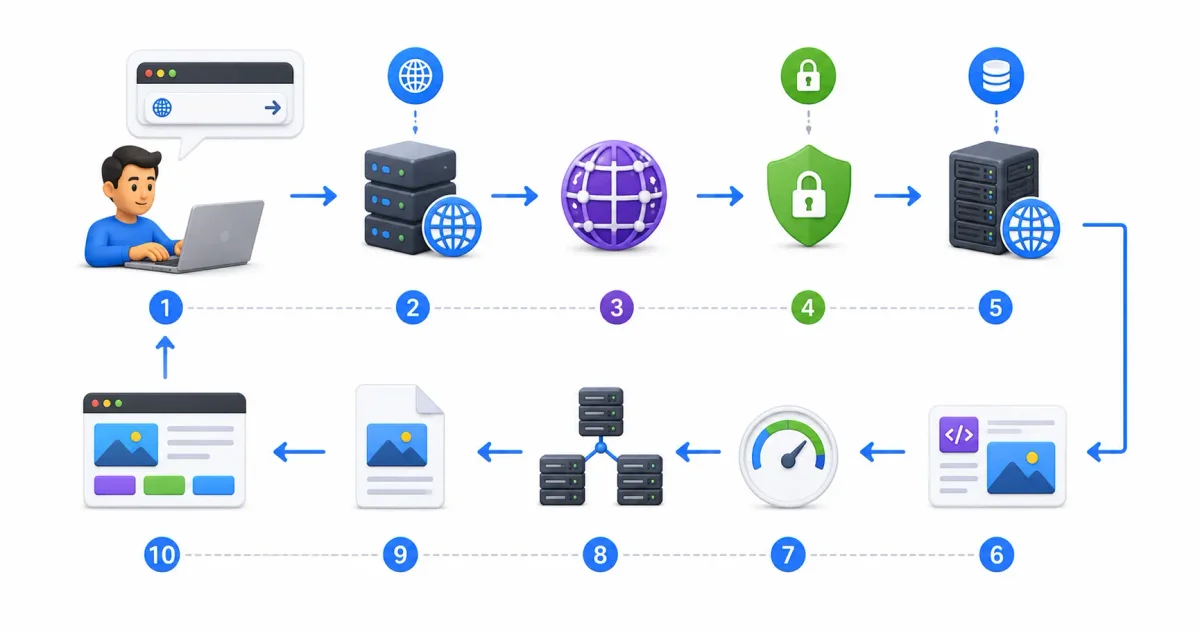
It is an action performed billions of times every single day: you open a web browser, type a domain name like google.com or freetechlearner.com into the address bar, press the Enter key, and within a fraction of a second, a fully interactive, styled web page appears on your screen.
To the average web user, this interaction feels instantaneous and simple. But to a computer scientist, systems architect, or DevOps engineer, that fraction of a second represents a breathtaking symphony of physical hardware interrupts, cryptographic handshakes, multi-tier DNS lookups, BGP network routing, and browser rendering pipeline calculations.
Whether you are evaluating what is cloud computing, configuring cloud hosting in our AWS vs Azure vs Google Cloud comparison, or deploying web applications via Azure Static Web Apps, understanding the end-to-end request lifecycle is foundational to web development and troubleshooting.
In this deep architectural breakdown, we will slow down time and trace every microsecond of the journey: from physical keyboard interrupts to DNS resolution, TCP/IP handshakes, TLS 1.3 encryption, HTTP/3 QUIC multiplexing, and browser DOM engine rendering.
⚡ The Master Request Lifecycle (Macro Sequence)
Here is the complete step-by-step sequence of events triggered when you press Enter:
- Hardware Interrupt & Parsing ➔ CPU receives keypress interrupt; browser parses URL scheme & domain
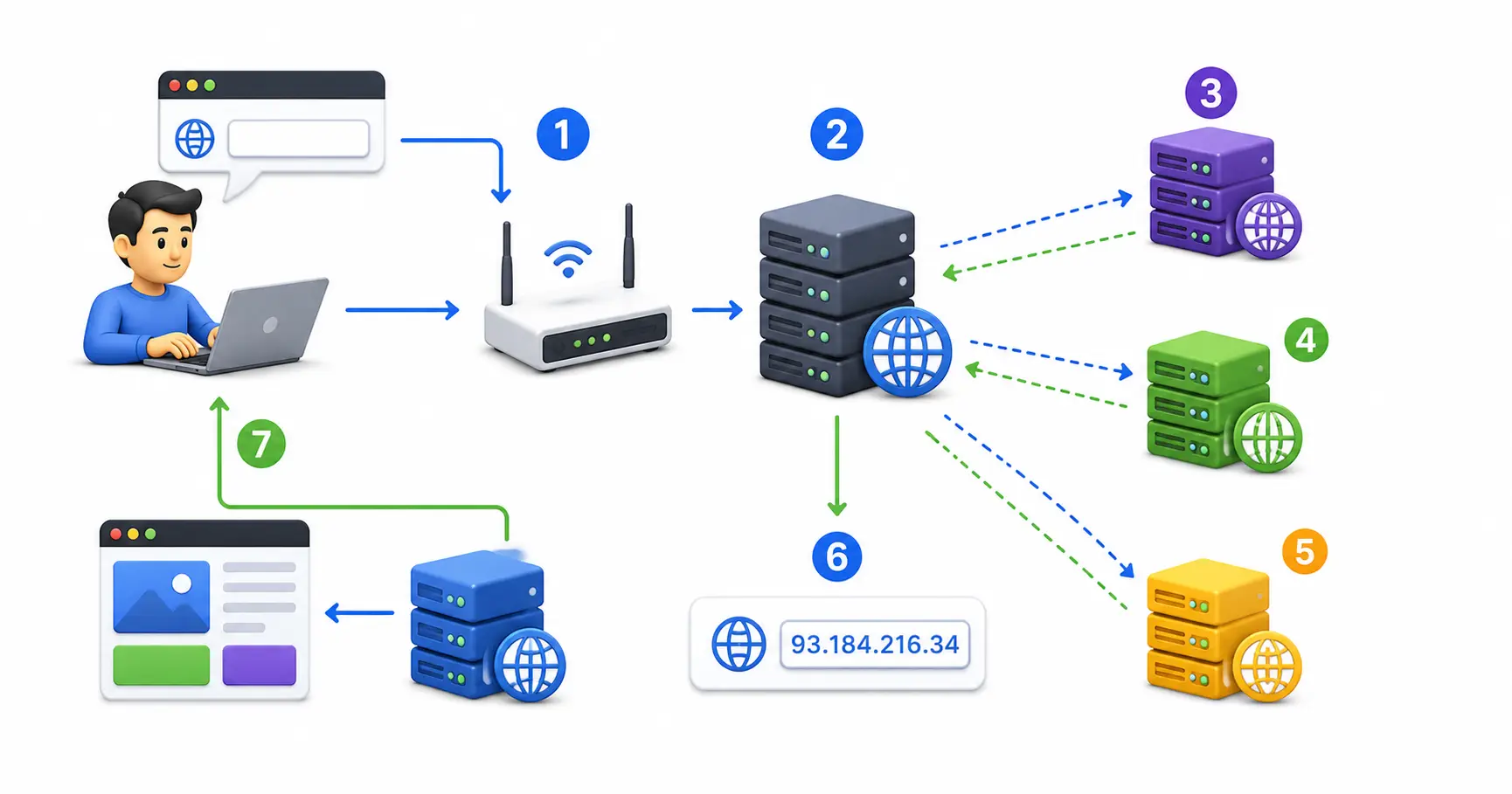
- DNS Recursive Resolution ➔ Browser ➔ OS Cache ➔ Resolver ➔ Root ➔ TLD ➔ Authoritative Server
- ARP Resolution ➔ Operating system resolves local gateway MAC address via ARP / Neighbor Discovery
- TCP 3-Way Handshake ➔ SYN ➔ SYN-ACK ➔ ACK connection established over port 443
- TLS 1.3 Encryption ➔ Client Hello ➔ Server Hello + Certificate ➔ Diffie-Hellman Secret Key Exchange
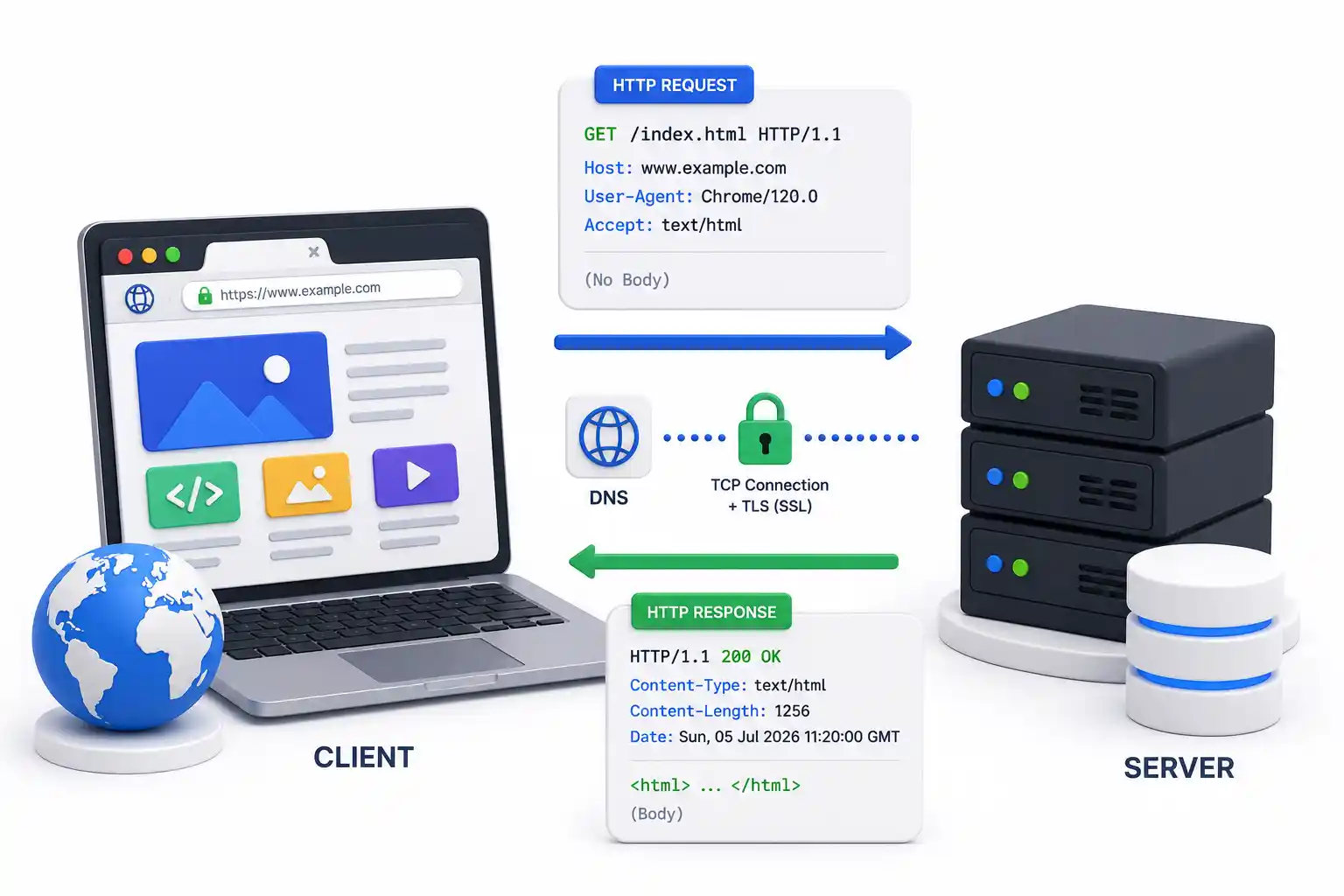
- HTTP/3 Request & Response ➔ Encrypted HTTP request sent ➔ Server processes ➔ 200 OK HTML payload returned
- Critical Rendering Path ➔ HTML Parsing (DOM) + CSS Parsing (CSSOM) ➔ Render Tree ➔ Layout ➔ Paint
1. Step 1: Hardware Interrupts & URL Parsing
The request journey begins in physical hardware before any network packets leave your computer.
The Physical Keypress Sequence
- Mechanical Circuit Closure: Pressing the
Enterkey closes a physical switch on your keyboard. - Keyboard Controller Scan Code: A microchip inside the keyboard generates a hardware scan code representing
Enter. - CPU Hardware Interrupt: The keyboard controller sends an interrupt signal to the CPU over the USB or Bluetooth bus, telling the CPU: “Stop current calculations for a microsecond; user input has arrived.”
- OS Event Dispatching: The OS kernel intercepts the hardware interrupt and dispatches a keypress event to the active “in-focus” browser application (Chrome, Firefox, Safari, or Edge).
URL Deconstruction & Parsing
Modern browser address bars act as “Omniboxes.” The browser runs an internal parsing algorithm to determine if the input is a search query or a valid URL:
- Search Query (e.g.
linux logs): Formats a search URL (e.g.https://www.google.com/search?q=linux+logs). - Valid URL (
https://www.freetechlearner.com:443/blog/azure/what-is-dns-explained-2026?sort=newest#overview): The browser breaks the string into logical components:- Protocol Scheme (
https://): Instructs the browser to use HTTPS (TLS-encrypted HTTP). - Domain Name (
freetechlearner.com): Human-readable server hostname. Read our detailed guide on what is DNS explained. - Port Number (
:443): Target network port (Port 443 for HTTPS; Port 80 for HTTP). - Resource Path (
/blog/azure/what-is-dns-explained-2026): Specific file or route requested on the server. - Query Parameters (
?sort=newest): Key-value parameters passed to backend databases. - Fragment / Hash (
#overview): Client-side element bookmark; never sent over the network.
- Protocol Scheme (
2. Step 2: DNS Resolution (The Internet Phonebook)
Computers cannot route packets using human-readable names like freetechlearner.com. They require numerical IP addresses. The browser initiates a multi-tiered Domain Name System (DNS) lookup to find the corresponding IP address.
The Hierarchical DNS Resolution Chain
- Browser Cache Check: The browser checks its internal DNS cache (stored in memory for 60 to 300 seconds).
- OS Hosts File & System Cache: If missing, the OS checks
/etc/hosts(Linux/macOS) orC:\Windows\System32\drivers\etc\hosts(Windows) and system DNS caches. - Recursive Resolver (ISP / 1.1.1.1 / 8.8.8.8): The OS queries your configured recursive DNS resolver (e.g. Cloudflare
1.1.1.1or Google8.8.8.8). - Root Name Server (
.): If uncached, the resolver queries one of 13 global Root server clusters, which respond with the TLD server address for.com. - TLD Name Server (
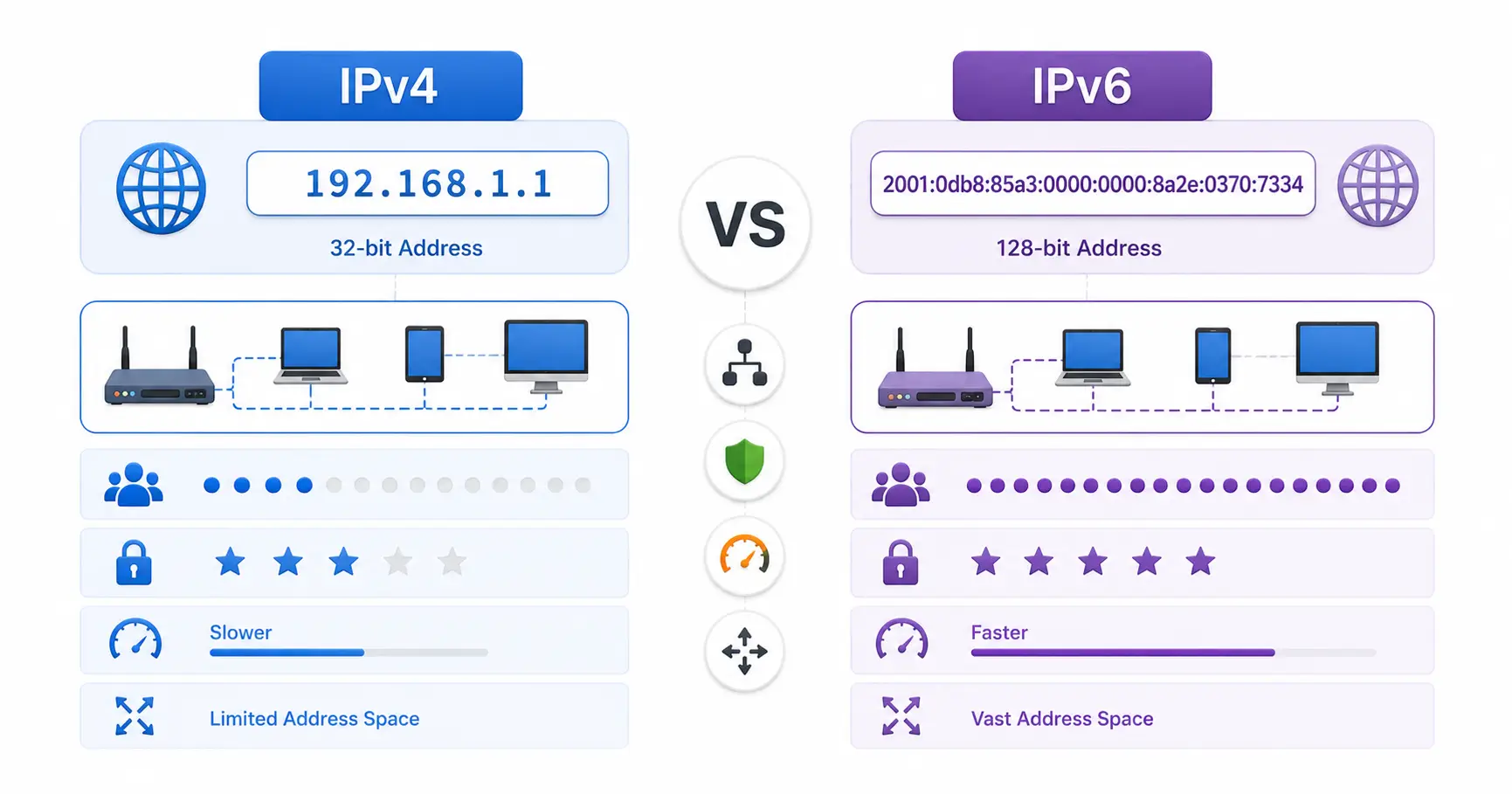
.com): The resolver queries the.comTop-Level Domain server, which returns the Authoritative Name Server forfreetechlearner.com. - Authoritative Name Server: The final server holding the official zone records returns the A Record (IPv4 32-bit address) or AAAA Record (IPv6 128-bit address). Compare network protocols in our IPv4 vs IPv6 guide.
3. Step 3: Local Network ARP & Gateway Routing
Once the target IP address (e.g. 104.21.55.12) is resolved, your computer must package data packets for physical transport across your local area network (LAN).
ARP & Neighbor Discovery Protocol
To send an IP packet to your local router (default gateway), your network interface card (NIC) needs the router’s physical Media Access Control (MAC) Address:
- Address Resolution Protocol (ARP for IPv4): Your OS checks its internal ARP cache. If missing, it broadcasts an ARP request: “Who has 192.168.1.1? Tell 192.168.1.50.” The router responds with its physical MAC address (
a4:b2:c8:11:22:33). - Neighbor Discovery Protocol (NDP for IPv6): On IPv6 subnets, Neighbor Solicitation ICMPv6 messages perform the equivalent MAC discovery.
- BGP Autonomous System Routing: Once the packet reaches your ISP router, Border Gateway Protocol (BGP) routes the packet across autonomous global optical fiber backbones to the destination data center.
4. Step 4: The TCP 3-Way Handshake
Before any web data or HTTP requests can be sent, the client and server must establish a reliable, stateful connection using the Transmission Control Protocol (TCP).
The 3-Way Handshake Sequence
- Client Sends SYN (Synchronize): Client generates a random Sequence Number ($SEQ = X$) and sends a TCP packet with the
SYNflag set to server port 443. - Server Responds SYN-ACK: Server accepts the connection, generates its own Sequence Number ($SEQ = Y$), and sends a packet with
SYNandACKflags set ($ACK = X + 1$). - Client Confirms ACK (Acknowledge): Client sends a final
ACKpacket ($ACK = Y + 1$). The stateful TCP socket connection is now open!
5. Step 5: TLS 1.3 Cryptographic Handshake
Because the scheme is https://, plain TCP is not enough. The connection must be encrypted using Transport Layer Security (TLS 1.3) to prevent eavesdropping, tampering, or man-in-the-middle attacks.
TLS 1.3 Handshake Sequence
- Client Hello: Client sends supported cipher suites, TLS version (1.3), and a Diffie-Hellman key exchange share.
- Server Hello & Certificate: Server selects cipher suite, returns its key share, and sends its Digital TLS Certificate issued by a trusted Certificate Authority (CA).
- Certificate Validation: Client verifies the certificate’s digital signature against its built-in CA root trust store, checking expiration dates and revocation status. Learn about certificate renewal in our Let’s Encrypt guide.
- Symmetric Key Derivation: Both parties independently calculate the shared Session Secret Key using Diffie-Hellman key exchange. All subsequent traffic is encrypted using AES-GCM or ChaCha20 symmetric encryption!
6. Step 6: HTTP/2 & HTTP/3 QUIC Request Delivery
With an encrypted channel established, the browser generates and transmits an HTTP request.
HTTP/3 over QUIC Protocol Acceleration
In modern 2026 browsers, HTTP/3 replaces traditional TCP with QUIC (UDP-based transport), merging the transport and cryptographic handshakes into a single round-trip:
HTTP/3 Request Packet:
GET /blog/azure/what-is-dns-explained-2026 HTTP/3
Host: www.freetechlearner.com
User-Agent: Mozilla/5.0 (X11; Linux x86_64)
Accept: text/html,application/xhtml+xml
Accept-Encoding: gzip, deflate, br, zstd
Cookie: session_id=abc123xyz
Server-Side Ingress Processing
When the packet arrives at the server data center:
- Load Balancer & Reverse Proxy: Cloud load balancers terminate SSL and route requests to an ingress proxy like Nginx Proxy Manager, Traefik, or Caddy. Review our Nginx Proxy Manager security guide.
- Web Server & Application Execution: The application server (Node.js, Astro, Python, or Go) processes the request, queries backend databases like PostgreSQL or MySQL (see our PostgreSQL vs MySQL guide), and generates an HTML response payload.
- HTTP 200 OK Response: Server streams the response payload back to the browser with headers:
HTTP/3 200 OK
Content-Type: text/html; charset=UTF-8
Content-Encoding: br
Cache-Control: max-age=3600, public
7. Step 7: Critical Rendering Path (Browser Engine)
The rendering engine transforms assets into visual pixels across the software development life cycle (see our SDLC guide for beginners):
- 1. DOM Tree Construction: The browser parses raw HTML bytes into tokens and nodes, constructing the Document Object Model (DOM) Tree using modern HTML vs HTML5 standards; optimize search rendering using our beginner’s guide to SEO and learn how search engines crawl websites.
- 2. CSSOM Tree Construction: The browser parses external CSS stylesheets and inline
<style>blocks to construct the CSS Object Model (CSSOM) Tree. - 3. Render Tree Generation: Combines DOM and CSSOM trees, filtering out hidden elements (
display: none), to determine which nodes are visible across frontend frameworks like React, Vue, or Svelte. - 4. Layout Phase (Reflow): Calculates the exact geometric position and size of every visible node relative to the device viewport, handling async JavaScript updates and REST API payloads over HTTP protocols and JSON data structures.
- 5. Paint & Compositing: Fills in pixels (text, colors, borders, shadows) across GPU layers and composites them onto your physical display screen!
🔒 Security Hardening Across the Request Pipeline
Securing web applications throughout this request lifecycle requires applying Zero Trust security layers:
- Enforce HTTPS Encryption: Always enforce TLS 1.3 redirection using Let’s Encrypt certificates. Follow our guide on enabling HTTPS with Let’s Encrypt.
- Reverse Proxy Hardening: Route application traffic behind Nginx Proxy Manager or Caddy. Read our Nginx Proxy Manager security guide.
- Firewall & Intrusion Defense: Protect host Linux servers with UFW firewalls, and automatically block malicious IP address scanners using Fail2ban or CrowdSec. Follow our step-by-step tutorials on UFW firewall guide, Fail2ban guide, and CrowdSec beginner guide.
- Secret Management: Protect database credentials in Vaultwarden; see our Vaultwarden self-hosted guide and generate strong keys using our password generator. Compare security options in our guides on best password managers and passkeys vs passwords.
- Container & Host Auditing: Scan container images for vulnerabilities using Trivy via our securing Docker containers guide. Secure SSH access following our Ubuntu SSH hardening guide, run checks using the top 20 Linux security commands, inspect audit trails via Linux logs explained, and audit host compliance with Lynis via our Lynis security audit guide.
🛠️ Comparing Free & Cloud Hosting Paradigms
Depending on your web development needs, compare hosting platforms across the web ecosystem:
| Platform | Best For | SSL & CDN | Cost | Key Differentiator |
|---|---|---|---|---|
| Azure Static Web Apps | Jamstack, Astro, React, Enterprise Azure sites | Included (Free) | Free Tier | Built-in Azure Functions & PR previews. Read our Azure SWA guide |
| Free Hosting (Vercel/Cloudflare) | Static sites, Next.js, portfolios | Included (Free) | Free Tier | Zero cost. Read our guide to hosting a website for free |
| Self-Hosted VPS (Hetzner) | Full root OS access, Docker stacks | Self-managed | $5 – $20/mo | Full control. Read our VPS guide & deploying Node.js on a VPS |
| Coolify / DokPloy (PaaS) | Open-source Heroku alternative | Self-managed | Server cost | Open-source control. Read our Coolify setup guide and DokPloy setup guide |
| Local AI Workloads | Offline LLMs, Ollama | Mesh VPN | Hardware | 100% data privacy. Compare in our Local AI vs Cloud AI guide |
💻 Developer & Sysadmin Web Utilities
Bookmark these interactive web utilities to format data, test expressions, and generate server configs:
- Container Setup: Docker Compose Generator
- Reverse Proxy Configs: Nginx Config Generator
- Init Scripts: Systemd Service File Generator
- Data Formatting: JSON Formatter & JSON Validator
- Secret Generation: Password Generator & ENV Generator
- SEO Metadata: Schema Markup Generator
- Expression Testing: Regex Tester
- Linux Learning: Linux Command Explorer & Linux Permission Calculator
- Automation: Cron Expression Generator & Gitignore Generator
📖 Official Documentation & References
- W3C HTML & DOM Specification: https://www.w3.org/TR/html52
- IETF RFC 9110 (HTTP Semantics): https://datatracker.ietf.org/doc/html/rfc9110
- IETF RFC 8446 (TLS 1.3 Specification): https://datatracker.ietf.org/doc/html/rfc8446
- IETF RFC 9000 (QUIC Transport Protocol): https://datatracker.ietf.org/doc/html/rfc9000
- MDN Web Docs (Critical Rendering Path): https://developer.mozilla.org/en-US/docs/Web/Performance/Critical_rendering_path
❓ Frequently Asked Questions
What happens in the first millisecond after I press Enter?
Pressing Enter generates an electrical circuit closure on your keyboard, triggering a hardware CPU interrupt. The operating system intercepts this event and passes it to the active browser application, which parses the text string to determine if it is a valid URL or a search query.
What is the difference between DNS A Records and AAAA Records?
A DNS A Record resolves a domain name to a 32-bit IPv4 address (e.g., 104.21.55.12). A DNS AAAA Record resolves a domain name to a 128-bit IPv6 address (e.g., 2606:4700:3033::6815:370c).
What is a TCP 3-Way Handshake?
A TCP 3-Way Handshake is the process used to establish a stateful, reliable connection between a client and a server. It consists of three packets: SYN (Client requests connection), SYN-ACK (Server acknowledges and requests back), and ACK (Client confirms connection).
Why is TLS 1.3 faster than TLS 1.2?
TLS 1.3 reduces the cryptographic handshake from two round-trips (2-RTT) down to a single round-trip (1-RTT). It also supports 0-RTT (Zero Round-Trip Time) resumption for returning visitors, allowing encrypted data transmission on the very first packet.
How does HTTP/3 differ from HTTP/2?
HTTP/2 uses TCP, which can suffer from “head-of-line blocking” if a single packet is lost. HTTP/3 replaces TCP with QUIC (a UDP-based transport protocol), allowing independent streams to transmit data without blocking each other if a packet drops.
What is the Critical Rendering Path in a web browser?
The Critical Rendering Path is the sequence of steps a browser takes to convert HTML, CSS, and JavaScript into visible pixels on your screen: DOM Construction ➔ CSSOM Construction ➔ Render Tree Generation ➔ Layout (Reflow) ➔ Paint & Compositing.
What is ARP, and why is it needed?
The Address Resolution Protocol (ARP) resolves network-layer IP addresses into physical data-link layer MAC addresses (e.g., a4:b2:c8:11:22:33). It allows your computer to transmit packets to your local router gateway on a LAN.
What is the DOM (Document Object Model)?
The DOM is an in-memory tree representation of an HTML document created by the browser engine. Each HTML element (like <div>, <p>, or <img>) becomes a node in the DOM tree that can be manipulated by JavaScript.
How does BGP route internet traffic?
Border Gateway Protocol (BGP) is the routing protocol of the global internet. It allows independent networks (Autonomous Systems) owned by ISPs and telecom providers to exchange routing information and find the most efficient path across global optical fiber lines.
What is the difference between Reflow (Layout) and Repaint?
Reflow (Layout) occurs when changes affect the geometry or position of elements on the page, requiring the browser to recalculate element dimensions. Repaint occurs when visual properties change without affecting layout geometry (e.g., changing background color or text visibility).
Discussion
Loading comments...