
Linux Tools
Docker Compose Generator
Generate docker-compose.yml files from a visual multi-service builder.
A fast, client-side .gitignore generator. Select the programming languages, frameworks, operating systems, and IDEs used in your project, and this tool will dynamically merge the official .gitignore templates into a single, deduplicated file ready to be committed. Essential for keeping node_modules, logs, build artifacts, and secrets out of your repository.
The Gitignore Generator dynamically creates a comprehensive `.gitignore` file by combining best-practice templates for any mix of technologies you select.
Our tool automatically deduplicates rules. For example, if both Node.js and React templates ignore node_modules/, the final .gitignore will only list it once, keeping your file clean and optimized.
Yes! There is a custom rules text box where you can add paths specific to your project, like my-secret-keys/. They will be automatically appended to the generated output.
No. The entire database of .gitignore templates is loaded in your browser, meaning the generation happens instantly and completely offline for maximum privacy.
A .gitignore file is a plain text file that tells Git which files or directories it should completely ignore and not track. This keeps your repository clean and prevents committing sensitive or generated files.
Typically, you should place your .gitignore file in the root directory of your project repository. Git will apply those rules to the root folder and all subdirectories inside it.
You should almost always ignore dependency folders (like node_modules or vendor), build outputs (like dist/), OS files (like .DS_Store), and sensitive credential files (like .env).
Yes. You can place a .gitignore file in a subdirectory, and its rules will only apply to that specific subdirectory and its children, overriding the root .gitignore if necessary.
If a file is already committed, adding it to .gitignore won't work immediately. You must first untrack it using the terminal command git rm -r --cached <file_name>.
A trailing slash indicates that the rule only applies to a directory (e.g., logs/). If you omit the slash, Git will ignore both files and directories named "logs".
An asterisk is a wildcard character. For example, *.log tells Git to ignore any file that ends with the .log extension, regardless of its name.

Learn how to install and configure Jellyfin, the free and open-source alternative to Plex. Stream movies, TV, and music from your own hardware with zero subscriptions.
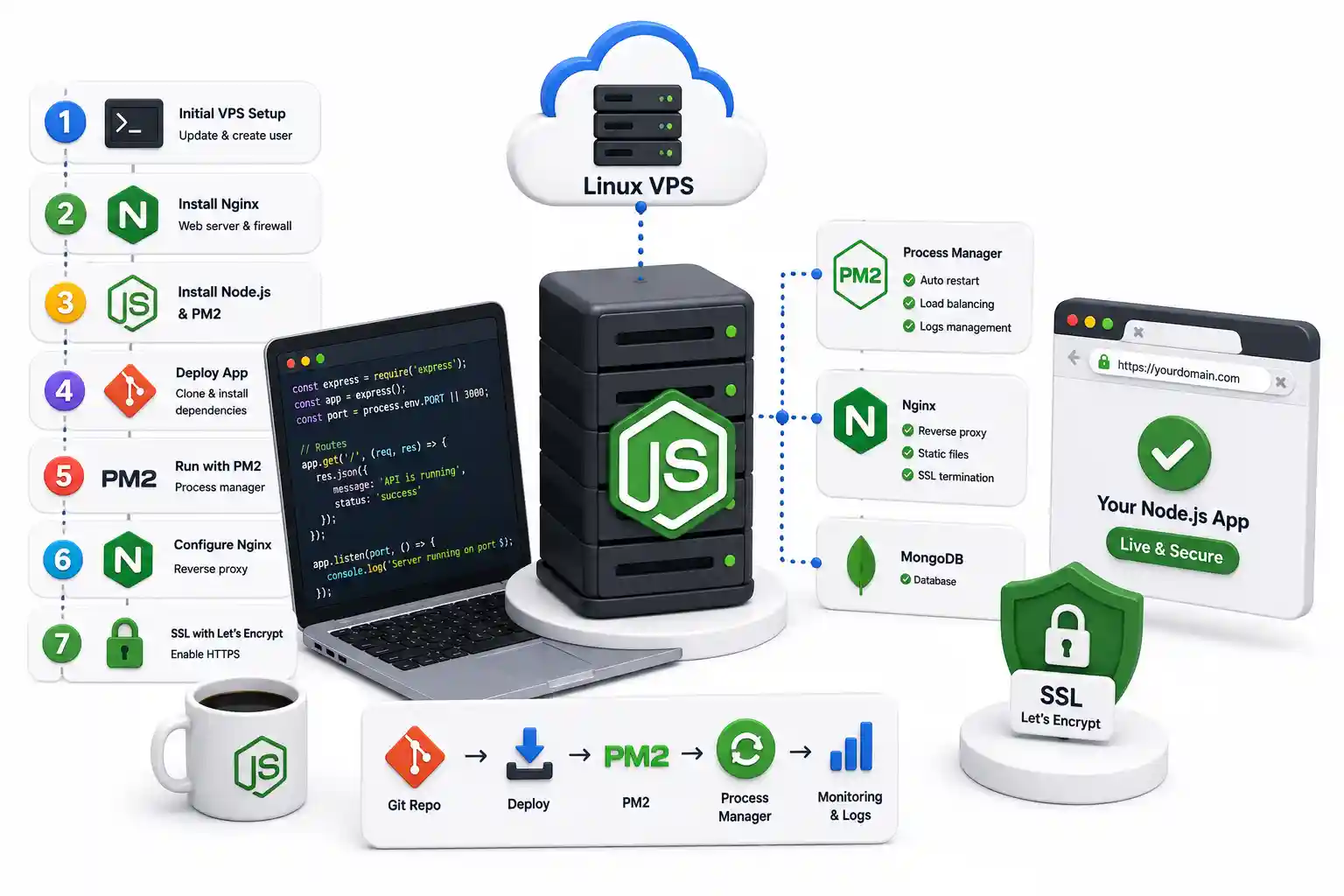
A production-grade tutorial on deploying Node.js to a Linux VPS. Configure PM2, Nginx reverse proxies, Let's Encrypt TLS, UFW firewalls, and automated CI/CD pipelines.

Discover Kakoune, the modal Linux terminal editor that flips Vim's paradigm. Master multi-cursor workflows, POSIX integration, and client-server editing.
Explore our full collection of free, privacy-first developer and SEO tools.
Browse All 134+ ToolsStart typing to search across articles, tools & courses