
Developer Tools
HTML Minifier
Compress and minify HTML code online to reduce file size and improve website load speed.
A powerful, 100% client-side JavaScript minifier powered by Terser. Instantly remove whitespace, strip comments, drop console logs, and mangle variable names to drastically reduce your JS file sizes. Perfect for preparing scripts for production deployment while maintaining complete data privacy.
The FreeTechLearner JavaScript Minifier is an essential web optimization tool that strips unnecessary characters (like spaces, tabs, and comments) from your JS files. It also applies advanced optimizations like variable mangling and dead-code removal to shrink your file sizes to the absolute minimum.
Variable Mangling safely replaces long local variable and function names (like "calculateTotal") with very short ones (like "a" or "x") to save space, without breaking your code.
Yes! Simply check the "Remove Console Logs" option before minifying, and all console.log() statements will be stripped from the final output.
No. This tool uses Terser directly within your web browser. Your code never leaves your device, ensuring complete privacy.
In general, no. Minifiers like Terser are designed to safely transform syntax without changing its logic. However, if your original code has severe syntax errors or relies on implicit globals improperly, minification can expose those bugs.
Yes, it fully supports modern JavaScript features including Arrow Functions, async/await, and classes.
Minifying is primarily focused on reducing file size. Obfuscating is focused on making the code difficult for humans to understand to protect intellectual property. While variable mangling does obfuscate code slightly, true obfuscation uses much more complex techniques.
The savings vary depending on your coding style, but it is common to see file sizes reduced by 30% to 60%, especially if your original code is heavily commented and uses long variable names.
You should only minify code for production deployments. During development, you should use the unminified versions to easily debug and trace errors using browser developer tools.
Debugging minified code directly is very difficult. In professional environments, developers use Source Maps, which map the minified code back to the original source. If you don't have a source map, you can use a tool like our JS Beautifier to make it readable again.
You can format minified code using our JavaScript Beautifier tool to make it readable again. However, original comments and original variable names (if mangled) cannot be recovered.
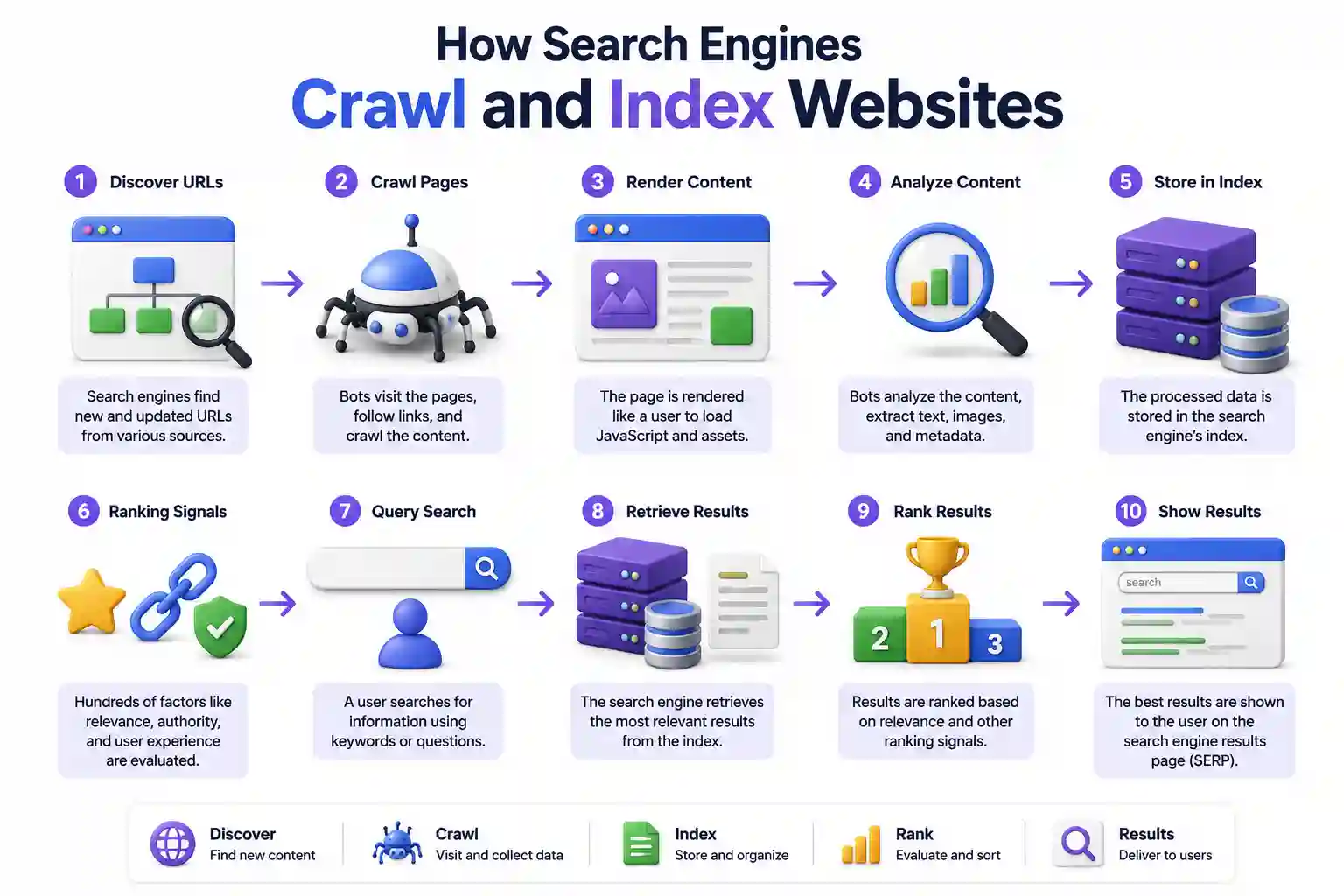
How do search engines work? Learn the step-by-step technical process of how search engines crawl, render, index, and rank websites to deliver search results.

Learn how to deploy modern web applications to Azure Static Web Apps with free hosting, custom domains, free SSL, global CDN, and GitHub Actions CI/CD.

Discover 30+ underrated AI tools for research, coding, design, privacy, and DevOps productivity that most engineers overlook. Free and open-source options included.
Explore our full collection of free, privacy-first developer and SEO tools.
Browse All 134+ ToolsStart typing to search across articles, tools & courses