
SEO Tools
Meta Tag Preview Tool
Preview how your pages look in Google search results and social media.
Preview how your Open Graph tags look when shared on Facebook, Twitter, and LinkedIn.
The Open Graph Preview Tool generates a live, pixel-perfect simulation of how your webpage will look when someone shares your URL on Facebook, Twitter, and LinkedIn.
Open Graph (OG) tags are HTML meta tags that control how your page appears when shared on social media platforms like Facebook, LinkedIn, and Twitter/X.
While OG tags do not directly influence Google search rankings, they significantly improve click-through rates (CTR) on social media, driving more traffic and social signals to your site.
The og:image specifies the thumbnail image that will be displayed when your link is shared. It is the most important tag for capturing user attention on social feeds.
The optimal size for an Open Graph image is 1200 x 630 pixels. This maintains a 1.91:1 aspect ratio, which looks great across all major platforms.
Your regular <title> is designed for Google search results (max 60 characters). Your og:title can be slightly longer and more conversational, tailored specifically for social media audiences.
Twitter will fall back to Open Graph tags if Twitter-specific tags (like twitter:card) are missing. However, providing both ensures maximum compatibility and optimal display.
Facebook caches Open Graph data. If you change your tags, you must use the Facebook Sharing Debugger tool and click "Scrape Again" to force Facebook to fetch the new data.
Yes! LinkedIn relies heavily on standard Open Graph tags (og:title, og:image, og:description) to generate its link previews.
The og:type tag tells the platform what kind of content you are sharing. Common values are website (for homepages) and article (for blog posts and news).
Yes. Our Open Graph Preview tool simulates exactly how your tags will look, allowing you to perfect your snippet before pushing code to production.

A guide detailing the 5 phases of the OSINT Intelligence Cycle: Direction, Collection, Processing, Analysis, and Dissemination.
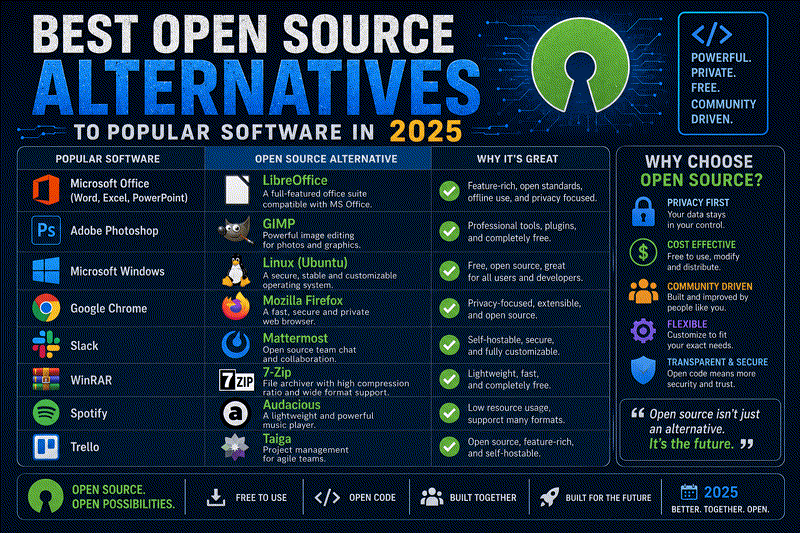
Discover the best free, open-source alternatives to proprietary software. Find secure, privacy-respecting FOSS replacements for office, dev, and personal use.

A comprehensive systems engineer's guide to the best open-source Linux software in 2026. Discover elite FOSS utilities, terminal tools, and productivity applications.
Explore our full collection of free, privacy-first developer and SEO tools.
Browse All 134+ ToolsStart typing to search across articles, tools & courses