

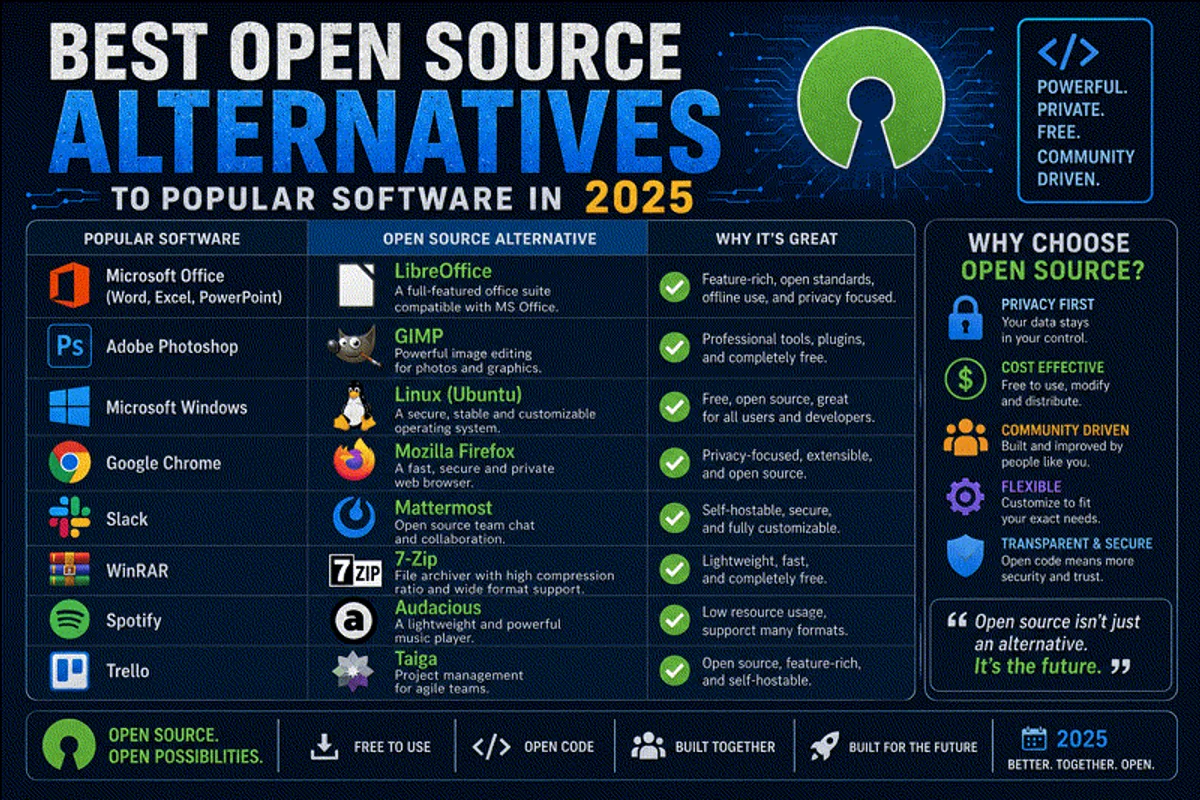
A few years ago, I reviewed my monthly expenses and realized I was bleeding hundreds of dollars a month on software subscriptions. Everything from my text editor to my cloud storage required a monthly fee. Worse, the companies taking my money were constantly harvesting telemetry data from my machines.
That was the breaking point. I decided to pivot entirely to Free and Open Source Software (FOSS).
The open-source software movement has matured dramatically over the past decade. If you want to spin up a server on a cheap VPS rather than paying exorbitant fees across AWS vs Azure vs Google Cloud, you can. Open source gives you genuine End-to-End Encryption and total control. You don’t need paid SaaS tools even for things like Search Engine Optimization; you can host the analytics yourself.
In this guide, I’ll walk you through my absolute favorite open-source alternatives across ten major categories.
1. Office and Note-Taking Suites
If you are paying for Microsoft 365, you can stop right now. LibreOffice is the undisputed king of open-source desktop productivity. It handles DOCX, XLSX, and PPTX files beautifully.
If you’re a developer who spends most of their time in a terminal, you probably don’t need a heavy GUI word processor. I highly recommend learning a modern terminal editor. Check out my guide on the Micro text editor or explore my full list of the top 13 Linux CLI text editors.
For organizing documents, rather than paying for Evernote, I digitized all my physical files using a self-hosted instance of Paperless-ngx. It OCRs the PDFs and makes them instantly searchable. If I need real-time collaborative document editing with my team, I run OnlyOffice integrated directly into my Nextcloud server.
2. Email and Team Communication
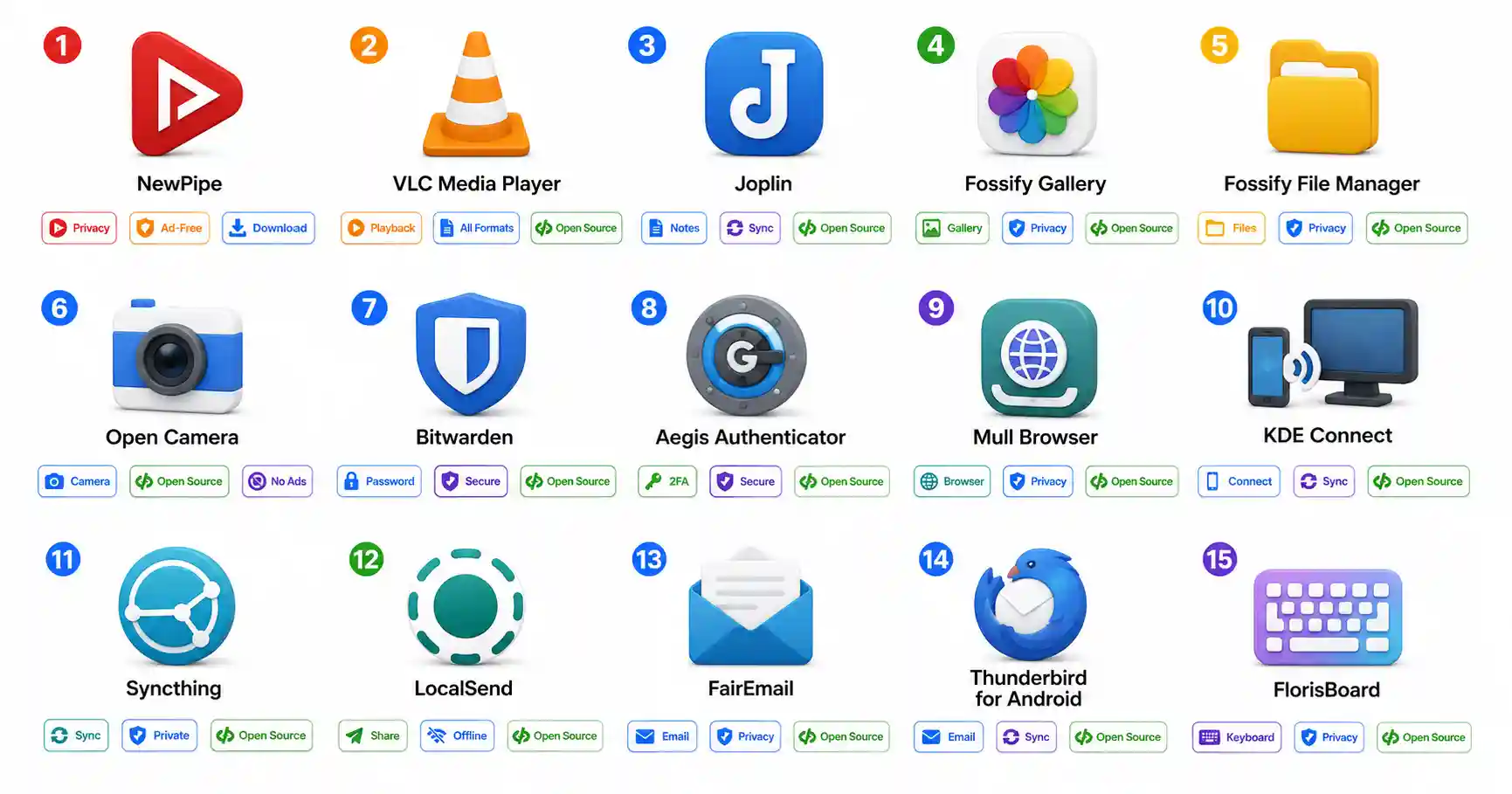
Replacing Gmail and Slack might sound daunting, but it is entirely possible. Thunderbird is the gold standard for desktop email clients, especially after its recent visual overhaul.
If you are ambitious enough to run your own mail server, you’ll need a deep understanding of background processes. You should read up on how systemd works to keep those mail daemons running. Securing email transit is non-negotiable; always enable HTTPS with Let’s Encrypt on your webmail interfaces.
For team communication, Matrix (Element) is incredible. To route traffic to my self-hosted Element instance, I rely on the Caddy web server or Nginx Proxy Manager to handle the reverse proxying and SSL termination.
3. Web Browsers and Privacy Tools
Google Chrome is a surveillance tool. That isn’t hyperbole; its entire business model is built on profiling you. Switch to Firefox or Brave immediately.
To take network privacy a step further, I strongly suggest deploying Pi-hole on your home network to sinkhole advertising and tracking domains at the DNS level.
When you browse with hardened tools, you start realizing how much data websites leak. If you want to see what information is publicly accessible on you, study how OSINT works and run a quick Google Dorking investigation against your own name. A good browser will also warn you about malicious domains, but you should always check a website before clicking a link using dedicated scanning tools.
4. Video, Media, and File Management
You do not need to pay Adobe hundreds of dollars a year for Premiere Pro. Kdenlive and DaVinci Resolve (the free tier) are spectacular alternatives for video editing.
For consuming media, cancel your streaming services and build your own Netflix using Jellyfin. If you need to rip videos from platforms for offline viewing or editing, the best tool in the world is yt-dlp.
When you need to move massive video files between your editing rig and your server, don’t rely on slow cloud services. Use standard SFTP for direct transfers, or set up Syncthing for automated, decentralized peer-to-peer file synchronization.
5. Security and Password Management
Never pay for LastPass or 1Password. Open-source password managers are inherently more trustworthy because security researchers can audit the encryption implementations line by line.
Start by generating unbreakable credentials using a secure password generator. If you want to know how the big players stack up, read my comparison of the best password managers.
Personally, I use an offline vault on my phone and PC. You can read my complete guide on setting up KeePassDX for Android and Linux. If you prefer a cloud-like experience that syncs instantly across family devices, host your own Vaultwarden server.
6. Cloud Infrastructure and Containers
Stop giving money to AWS for simple container hosting. By setting up a Proxmox home lab on an old mini-PC, you can host dozens of virtual machines for the cost of electricity.
If you are running your services on a standard Ubuntu server, learning the basics of installing Docker on Ubuntu will change your life. Containers make open-source software deployment trivial. If you want to get into the technical weeds of container runtimes, read my benchmark comparing Docker vs Podman.
To manage all those containers without touching the command line, deploy Portainer. It gives you a beautiful web UI to monitor your infrastructure.
7. Web Analytics and SEO
If you run a website, you don’t have to surrender your users’ data to Google Analytics. Tools like Plausible or Matomo offer brilliant, privacy-respecting open-source analytics. (I wrote a full breakdown of this in my web analytics tracking guide).
To ensure those tracking endpoints and your main website stay online, deploy Uptime Kuma. It will ping you on Telegram or Discord the second your site goes down.
When you manage your own sites, you have to understand exactly how search engines crawl and index websites. If you’re new to this space and want organic traffic without paying for ads, start with my beginner’s guide to SEO.
8. Code Editing and Deployment
VSCodium is the telemetry-free, open-source build of Microsoft’s VS Code. It gives you the exact same extension ecosystem without the corporate surveillance.
When you write code, you need to track it securely. Instead of relying entirely on proprietary cloud providers, master the fundamentals of Git and GitHub, and consider pushing to a self-hosted Gitea or Forgejo instance.
For deploying your code, Vercel and Netlify are great, but they get incredibly expensive at scale. Instead, I use open-source PaaS (Platform as a Service) solutions. I highly recommend trying Coolify or deploying Dokploy. They allow you to deploy a Node.js REST API or a React frontend directly from your Git repository to your own server in seconds.
9. Server Security and Firewalls
When you switch to self-hosted open-source software, you become your own sysadmin. You must take security seriously.
Your first line of defense should be a strict firewall. Read my guide on configuring the UFW firewall to block all unnecessary ports. Next, protect your SSH and web endpoints from brute-force attacks by installing Fail2ban.
Internally, you need to ensure your service accounts cannot access data they shouldn’t. Understanding Linux file permissions is critical. To wrap your head around securing a fresh server, go through my checklist of the top 20 Linux security commands before you expose anything to the public web.
10. DevOps and Networking Utilities
Finally, to debug all these open-source tools, you need a solid grasp of how the internet actually works.
If your self-hosted services are unreachable, you need to know exactly what happens when you type a URL. Often, the issue is DNS resolution, so brushing up on what DNS is and how it works will save you hours of troubleshooting.
When configuring APIs or webhooks between open-source tools, you must understand the underlying protocols. Read my primer on how HTTP works for beginners. And when those APIs spit out unreadable data blocks, keep a handy JSON formatter bookmarked to make sense of the payloads.
Conclusion
The open-source ecosystem in 2026 offers genuine, high-quality alternatives to virtually every category of proprietary software. While no alternative is perfect for every single edge case, the combination of zero cost, enhanced privacy, community support, and total data ownership makes a compelling argument.
Start small. Replace your browser today. Set up an offline password vault tomorrow. Before long, you’ll have liberated your entire digital workflow.
Official Documentation
- LibreOffice: https://www.libreoffice.org/
- VSCodium: https://vscodium.com/
- Thunderbird: https://www.thunderbird.net/
- Matrix / Element: https://element.io/
Frequently Asked Questions (FAQ)
Why should I choose open source software over proprietary software?
Open source software offers numerous benefits including significant cost savings (as most are free), enhanced privacy and security since the code can be audited, no vendor lock-in, and the ability to customize tools to your exact needs without telemetry tracking.
What is the best open source alternative to Microsoft Office?
LibreOffice is the most comprehensive open source office suite available. It includes applications for word processing, spreadsheets, and presentations, and offers strong compatibility with Microsoft Office formats like DOCX and XLSX.
Is there a good open source alternative to Adobe Premiere Pro?
Yes, Kdenlive and Shotcut are both excellent, fully open-source non-linear video editors. If you need professional-grade color grading and Hollywood-level tools, DaVinci Resolve offers a free tier (though it is not entirely open source).
What is the difference between VS Code and VSCodium?
While Visual Studio Code’s core source is open, the official binary distributed by Microsoft includes proprietary telemetry and background tracking. VSCodium is a community-driven, clean build of VS Code that completely removes this telemetry and Microsoft branding.
How can I safely transition to using open source software?
It is best to transition gradually. Start by replacing one or two applications at a time (like your web browser), run the open source tools alongside your proprietary software initially, and take time to learn the new workflows.
Can open source software be used securely in enterprise environments?
Absolutely. In fact, the vast majority of the modern web runs on open-source infrastructure (Linux, Apache, Nginx, Docker, Kubernetes). The ability for independent researchers to audit the code generally makes open-source tools more secure than closed-source alternatives.
How do open-source developers make money if the software is free?
Many open-source projects are funded through donations, corporate sponsorships, or dual-licensing models. Others offer the core software for free but charge for managed enterprise hosting, priority technical support, or premium features.
Do open-source alternatives have a steep learning curve?
It depends on the tool. Browsers like Firefox and Brave operate identically to Chrome. However, tools like GIMP (a Photoshop alternative) have different UI paradigms that may require watching a few tutorials to remap your muscle memory.
Is open-source software compatible with Windows and macOS?
Yes. The vast majority of major open-source applications (LibreOffice, VLC, OBS Studio, Firefox, KeePassXC) offer pre-compiled, native binaries that run flawlessly on Windows, macOS, and Linux.
Can I contribute to open source if I don’t know how to code?
Yes! Open-source communities desperately need help with writing documentation, translating interfaces, designing graphics, reporting bugs, and helping moderate community support forums.

Discussion
Loading comments...