

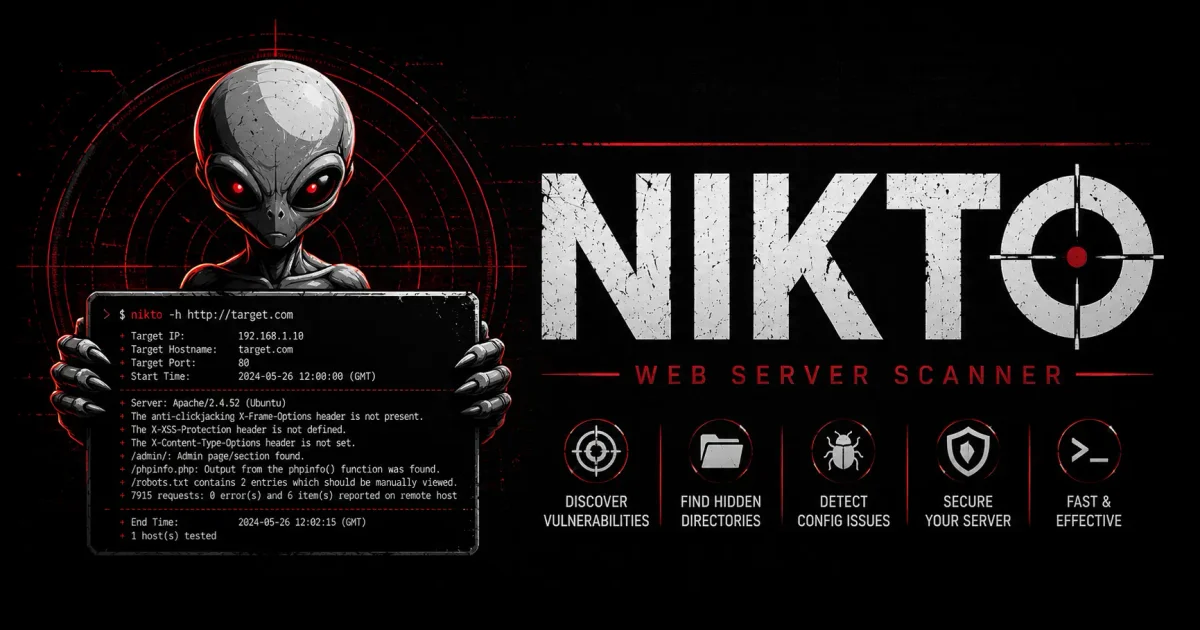
When conducting a comprehensive security audit of a modern web application, penetration testers and security engineers rely on sophisticated Dynamic Application Security Testing (DAST) tools like Burp Suite Professional, OWASP ZAP, or Acunetix. These frameworks are designed to crawl deep into the custom-written logic of the application itself, testing input fields for SQL injections, APIs for broken authentication, and forms for cross-site scripting (XSS) payloads.
However, focusing solely on the application’s internal code logic is a dangerous oversight.
A web application might be coded securely by developers. It might have robust input validation and strong authentication logic. But if the underlying web server daemon hosting the application (such as Apache, Nginx, or Microsoft IIS) is outdated, misconfigured, or lacking basic security headers, the system remains vulnerable. The house is built of titanium, but the front door is made of cheap paper.
This scenario is where Nikto dominates the landscape.
Nikto is a classic, lightweight, open-source command-line vulnerability scanner written in Perl. It does not fuzz complex application logic. Instead, it interrogates the physical environment hosting the application. It checks for over 6,700 dangerous default files, outdated server daemons, missing HTTP security headers, and administrative server misconfigurations.
In this tutorial, we will explore the foundational architecture of Nikto, guide you through installation across operating systems, teach you the advanced command-line syntax required for professional auditing, and break down how to interpret the vulnerability reports it generates.
1. The Core Engine: How Nikto Works
Unlike modern tools, Nikto is not an artificially intelligent, heuristically learning scanner. It operates fundamentally as a dictionary-based, pattern-matching engine.
When you aim Nikto at a target URL and pull the trigger, it queries its internal, regularly updated database of known vulnerabilities. This database is continuously updated by the global open-source security community and maps directly to the Common Vulnerabilities and Exposures (CVE) database and the Open Source Vulnerability Database (OSVDB).
What Does Nikto Check?
- Software Versioning Analysis: It analyzes the raw HTTP response banners sent back by the server (e.g.,
Server: Apache/2.4.29 (Ubuntu)). It compares this string to its database. If that specific version of Apache has a known, unpatched remote-code-execution vulnerability listed publicly in the Exploit Database, Nikto throws a red alert. - Dangerous Default Setup Files: Many system administrators install complex software packages (like phpMyAdmin databases, WordPress installations, or enterprise Tomcat servers) and forget to delete the default setup scripts. Nikto checks thousands of specific file paths (e.g.,
/setup.php,/install.txt,/backup.sql.gz,/config.bak) to see if they are still publicly accessible to the internet. - HTTP Security Header Analysis: It checks the security posture of the server’s HTTP headers. Is the server missing the
Content-Security-Policyheader, allowing XSS attacks? Is theX-Frame-Optionsheader missing, leaving the site vulnerable to Clickjacking attacks? Nikto reports missing defenses. - Dangerous HTTP Methods: It probes the web server using alternative HTTP methods. If the server allows the
PUTmethod, an attacker might be able to upload a malicious PHP webshell file directly to the server without needing a standard file upload form. If it allows theTRACEmethod, the server is vulnerable to Cross-Site Tracing (XST) attacks, bypassingHttpOnlycookie protections.
2. Installation and Setup
Nikto is written in the Perl programming language. Because Perl is a cross-platform interpreted scripting language, Nikto can run on practically any operating system, provided the core Perl interpreter is installed.
🐧 Installing on Linux (Debian/Ubuntu/Kali)
If you are using a dedicated security OS like Kali Linux, Parrot OS, or CSI Linux, Nikto is pre-installed and accessible directly from the terminal. If you are using a standard Debian or Ubuntu distribution, you can install it via the APT package manager:
sudo apt update
sudo apt install nikto -y
🍎 Installing on macOS (Apple Silicon & Intel)
macOS users can install the Nikto package using the popular Homebrew package manager. Homebrew will handle the Perl dependencies and path configurations:
brew update
brew install nikto
🪟 Running on Windows 11
Running Perl scripts natively on Windows command prompts is often unstable and prone to environment variable path errors. The best, most stable way to run Nikto on a Windows machine is to install the Windows Subsystem for Linux (WSL2), launch an Ubuntu terminal environment, and install Nikto using the Linux apt install command listed above.
Alternatively, if you must run it natively, you can install the Strawberry Perl package for Windows, download the Nikto source files directly from the official GitHub repository, and execute the nikto.pl file directly from the Windows Command Prompt.
3. Mastering the Advanced Command-Line Syntax
To use Nikto effectively in a professional penetration testing environment, you must understand how to control its scanning engine.
The Foundational Basic Scan
The simplest execution requires the -h (host) flag followed by the target IP address or domain.
nikto -h http://target-company.comForcing SSL/TLS Negotiation (-ssl)
By default, Nikto attempts to scan port 80 (HTTP). If the target server automatically redirects to port 443 (HTTPS), Nikto often fails to follow the redirect properly and the scan will fail. You must explicitly force it to use SSL encryption from the first packet.
nikto -h https://target-company.com -sslSpecifying Custom Ports (-p)
Internal corporate infrastructure frequently runs sensitive administrative dashboards on non-standard TCP ports (like 8080, 8443, 9090, or 10000). You can direct Nikto to target a specific port, or a range of ports, using the -p flag.
nikto -h http://192.168.1.50 -p 8443Reporting and Output Formatting (-o and -Format)
If you are performing a penetration test for a corporate client, you cannot simply copy and paste raw terminal text. You need structured, parseable data. Nikto allows you to output the findings into HTML, XML, or CSV formats.
nikto -h http://example.com -o /home/user/Desktop/audit-report.html -Format htmCrucial Note: Generating an XML report allows you to seamlessly import the Nikto findings directly into offensive security tools like the Metasploit Framework or data visualization tools.
4. Advanced Tuning: Controlling the Noise
An industry-wide criticism of Nikto is that it is “noisy.” A standard, default scan sends thousands of HTTP requests per minute. It checks for obscure vulnerabilities associated with archaic software that no one uses anymore. This volume of traffic generates gigabytes of logs on the target server and will trigger Intrusion Detection Systems (IDS) and Next-Generation Firewalls on the network.
You can drastically reduce the noise and speed up the scan by using the -Tuning flag. This flag tells Nikto to only run specific categories of tests.
The Tuning Categories
You append a specific string of numbers or letters directly to the -Tuning flag based on what you want to find:
1: Interesting Files (Checks for logs, hidden directories).2: Misconfigurations / Default Setup Files (The highest yield category).3: Information Disclosure (Leaked internal paths, server banners).4: Injection Vulnerabilities (Basic XSS/SQLi checks - better left to Burp Suite).5: Remote File Retrieval (Path Traversal checks).6: Denial of Service (Checks if the server is vulnerable to crash payloads).7: Remote File Execution.8: Command Execution.9: SQL Injection.a: Authentication Bypass.b: Software Identification.
A Real-World Tuning Example
If you are auditing a newly deployed Nginx web server, you do not need to test for archaic SQL injection flaws (Tuning 9); you only need to test for misconfigured headers and dangerous leftover setup files.
nikto -h https://example.com -Tuning 23b -sslThis command runs only tests for Default Files (2), Information Disclosure (3), and Software Identification (b). This scan will finish in a fraction of the time and generate significantly less noise.
5. Evasion: Bypassing Web Application Firewalls (WAF)
Because Nikto’s default scanning behavior is aggressive and well-known, every major Web Application Firewall (WAF) (like Cloudflare, AWS WAF, Imperva, or F5 BIG-IP) has built-in signature rules to block it upon the first packet.
If you run a default Nikto scan against a heavily Cloudflare-protected site, you will receive a list of 403 Forbidden errors, and your IP address will be banned from the network.
To bypass basic WAFs and intrusion detection systems, you must employ evasion techniques. Nikto includes the -evasion flag, which modifies how the HTTP requests are formatted in an attempt to confuse the firewall’s signature detection engine.
Common Evasion Flags
1: Random URI encoding (Encodes characters non-standardly, trying to bypass string matching).2: Directory self-reference (Injects/./into the URL paths).3: Premature URL ending.4: Prepend long, random strings to the URL.5: Fake parameter injection (Trying to trick the WAF into ignoring the payload).A: Use a raw Carriage Return (\r) as a request spacer instead of the standard\r\n.
An Evasion Command Example
nikto -h https://example.com -evasion 12A -Tuning 23 -sslCrucial Evasion Tip: Additionally, you should always spoof the User-Agent header. Basic WAFs block any HTTP requests containing the word Nikto in the user-agent string. You must modify the nikto.conf configuration file to change the default user-agent to a standard Mozilla Firefox or Google Chrome string.
6. Analytical Interpretation of the Output
Blindly running the scanner is useless. Understanding how to read and prioritize Nikto’s output is the mark of a professional. Let’s analyze a sample output block:
- Target IP:          10.10.10.25
- Target Hostname:    internal-corporate-portal.local
- Target Port:        80
---------------------------------------------------------------------------
+ Server: Apache/2.2.14 (Ubuntu)
+ The anti-clickjacking X-Frame-Options header is not present.
+ The X-XSS-Protection header is not defined.
+ Allowed HTTP Methods: GET, HEAD, POST, OPTIONS, TRACE
+ OSVDB-877: HTTP TRACE method is active, suggesting the host is vulnerable to XST
+ OSVDB-3092: /admin/setup.php: This might be interesting.
+ OSVDB-3268: /images/?pattern=/etc/passwd: Directory indexing found.
Triaging the Findings:
- The Server Banner (
Apache/2.2.14): This is a critical finding. Apache version 2.2.14 is ancient and contains known remote code execution (RCE) vulnerabilities. The server must be patched immediately. - Missing Security Headers: The lack of the
X-Frame-Optionsheader means a hostile attacker could embed this secure portal inside an invisible<iframe>on a malicious phishing domain, tricking the administrator into clicking sensitive buttons they cannot see (A Clickjacking attack). - Dangerous HTTP TRACE: The
TRACEmethod is enabled. This allows for Cross-Site Tracing (XST) attacks, which can bypass modernHttpOnlycookie flags and steal secure administrator session tokens directly from the browser. - The Leftover Setup Script: The
/admin/setup.phpfile was discovered. If this PHP script is still active, an attacker might be able to re-run the database installation process, overwriting the core administrator password and seizing control of the database.
7. Defensive Measures: Securing the Fortress
If your Nikto scan finds vulnerabilities on your corporate server, you must take administrative action.
- Patch Management: The simplest, most effective defense is keeping your core web server daemons (Apache/Nginx/IIS) up to date. This neutralizes 90% of Nikto’s CVE-based findings.
- Disable Server Signatures: Configure your server to hide its version number.
- In Nginx, set
server_tokens off;in thenginx.conffile. - In Apache, set
ServerSignature OffandServerTokens Prod.
- In Nginx, set
- Implement Security Headers: Modify your server configuration to inject strict HTTP security headers on every response. Enforce
Strict-Transport-Security(HSTS),X-Content-Type-Options: nosniff, and a rigidContent-Security-Policy(CSP). - Disable Dangerous Methods: Deny the
TRACE,TRACK, andPUTHTTP methods in your server configuration unless required by a specific custom API.
Frequently Asked Questions (FAQ)
1. What is Nikto and how does it differ from modern DAST tools? Nikto is a lightweight, open-source command-line vulnerability scanner. Unlike modern DAST tools that fuzz complex custom application logic, Nikto focuses on interrogating the underlying physical web server environment for outdated software, missing HTTP headers, and dangerous default files.
2. How can I install Nikto on Windows?
While Nikto is a Perl script, running it natively on Windows can be unstable. The recommended method is to install the Windows Subsystem for Linux (WSL2), open an Ubuntu terminal, and install Nikto using the sudo apt install nikto command.
3. How do I reduce the noise and speed up a Nikto scan?
You can drastically reduce scan noise and duration by using the -Tuning flag followed by specific category identifiers. For example, -Tuning 23b directs Nikto to only test for misconfigured default files, information disclosure, and software identification.
4. Why does Nikto fail when scanning HTTPS websites?
By default, Nikto targets port 80 (HTTP) and can struggle with automatic redirects. To successfully scan an HTTPS-secured server, you must explicitly append the -ssl flag to your command.
5. Can Nikto bypass Web Application Firewalls (WAF)?
Yes, though aggressive default scans are easily detected. You can use the -evasion flag with parameters (like 1 for URI encoding or A for custom carriage returns) alongside a spoofed User-Agent string to help bypass basic WAF signatures.
Conclusion: The First Line of Reconnaissance
Nikto is a foundational tool in the modern cybersecurity arsenal. While modern dynamic scanners excel at testing the custom logic of a web application, Nikto remains unmatched in its ability to rapidly expose the structural flaws of the underlying web server hosting it. By mastering the tuning parameters, intelligently evading web application firewalls, and properly interpreting the HTTP header warnings, you can identify and patch critical infrastructure vulnerabilities long before threat actors get the chance to exploit them.


Discussion
Loading comments...