

Imagine managing security for a high-security office building.
One approach relies on simple badges assigned to specific job titles. A receptionist badge unlocks the front lobby; a maintenance badge unlocks the utility closet. It is simple, logical, and easy for any supervisor to audit.
The other approach uses granular biometric access lists. Every single room, elevator, desk drawer, and cabinet has an explicit security classification tag (Unclassified, Confidential, Top Secret). Users can only open a drawer if their personal clearance tag matches the drawer’s classification tag exactly. It is incredibly secure, but if someone forgets to tag a newly added file cabinet, nobody can open it!
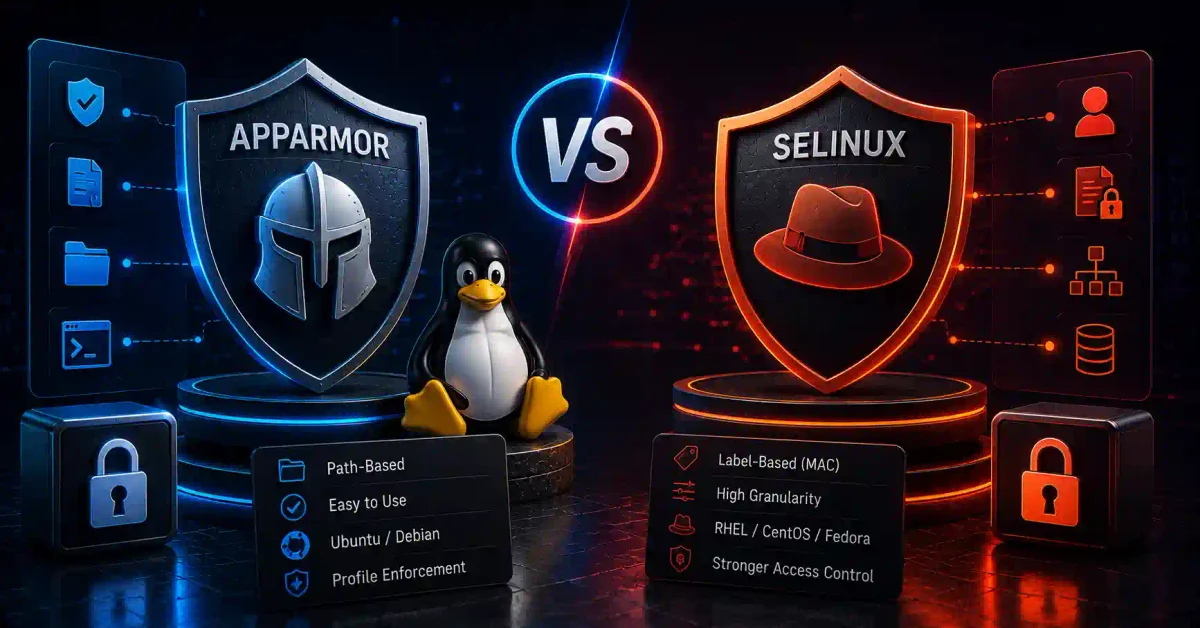
That is the fundamental difference between AppArmor and SELinux.
Both systems implement Mandatory Access Control (MAC) on Linux. They exist to stop zero-day exploits, contain compromised web servers, and prevent a hacked application from taking over your operating system.
In this guide, we will compare AppArmor and SELinux side-by-side. We will look at path-based vs label-based security, enforcement modes, profile management, distribution defaults, container security, and system hardening strategies.
⚡ Quick Security Enforcement Flow
Here is how Linux handles incoming process requests under Mandatory Access Control:
- Process Initiates Action → Web server (Nginx or Apache) attempts to open
/etc/shadow - DAC Permission Check → Kernel checks standard Linux file permissions; if process runs as
root, DAC approves → - MAC Security Module Check → AppArmor or SELinux intercepts the request before execution →
- Policy Lookup → MAC engine evaluates process security profile against target resources →
- Access Verdict → If policy permits → Action granted. If policy denies → Action blocked & audit event logged to
auditd/journalctl
To understand traditional permissions prior to MAC checks, read our guide on Linux file permissions explained.
📊 AppArmor vs SELinux Feature Breakdown
Here is a side-by-side technical comparison of both security modules:
| Security Feature | AppArmor (Application Armor) | SELinux (Security-Enhanced Linux) |
|---|---|---|
| Control Model | Path-based Access Control (Bound to file paths) | Label-based Access Control (Bound to extended file attributes) |
| Primary Default Distros | Ubuntu, Debian, SUSE Linux Enterprise | Red Hat Enterprise Linux (RHEL), Fedora, AlmaLinux, Rocky Linux |
| Learning Curve | Low to Moderate (Human-readable text profiles) | Steep (Complex policy languages, type enforcement, context tags) |
| Configuration Profiles | Stored in /etc/apparmor.d/ | Managed via Type Enforcement (.te), semanage, and chcon |
| Operating Modes | Enforce, Complain, Disabled | Enforcing, Permissive, Disabled |
| File Rename Sensitivity | Sensitive (Renaming a file breaks path match) | Resilient (File keeps security context label regardless of path) |
| Container Support | Native Docker & Podman profile support | MCS (Multi-Category Security) isolation in Docker/Podman |
| Audit Log Location | /var/log/syslog or /var/log/audit/audit.log | /var/log/audit/audit.log |
1. Why Standard Linux Permissions Aren’t Enough (DAC vs MAC)
Traditional Linux security relies on Discretionary Access Control (DAC). Under DAC, access is based on file ownership and permission bits (rwxr-xr-x).
The Flaw in Standard Linux Permissions
- If a hacker finds a zero-day vulnerability in your Nginx web server or Node.js application running as
root(or a user withsudoprivileges), the attacker gains full control over the machine. - Under standard DAC, if
rootrequests access to/etc/shadowor/var/www/html, the OS kernel grants it immediately without question.
# Standard DAC permission check
-rw------- 1 root root secret.txt   → Only root user can read
-rw-r--r-- 1 www-data www-data index.html → Anyone can read
How Mandatory Access Control (MAC) Fixes This
Mandatory Access Control (MAC) adds an extra protective layer enforced by the Linux kernel. Even if a process runs as root, the MAC security module enforces strict policy rules:
- Default Deny Stance: Even if
rootexecutes a compromised script, AppArmor or SELinux checks whether the web server profile explicitly permits reading/etc/shadow. - Zero Trust Boundary: If the security profile says “Nginx can only read
/var/www/html”, any attempt to access system files is blocked instantly.
2. AppArmor: Path-Based Protection Simplified
Developed originally by Immunix and SUSE, AppArmor is default security module on Ubuntu, Debian, and openSUSE.
How AppArmor Works (Path-Based Access)
AppArmor ties security rules directly to file system paths. An AppArmor profile specifies exactly which file paths, directories, network ports, and capabilities a binary can touch.
Here is a simplified look at an AppArmor profile for a web daemon (/etc/apparmor.d/usr.sbin.nginx):
/usr/sbin/nginx {
  # Allow reading configuration files
  /etc/nginx/** r,

  # Allow reading web root files
  /var/www/html/** r,

  # Allow writing logs
  /var/log/nginx/* w,

  # Explicitly deny access to sensitive keys
  deny /etc/shadow rw,
}
Key Advantages of AppArmor
- Human-Readable Syntax: Profiles use plain text paths and intuitive permissions (
rfor read,wfor write,kfor file locking,pxfor execution). - Easy Profile Generation: AppArmor includes interactive learning tools (
aa-genprofandaa-logprof). You run your app in learning mode, use it normally, and AppArmor generates a profile for you! - Low Maintenance Overhead: Administrators do not need to manage complex file labeling or security contexts across software updates.
- Fine-Grained Capability Controls: AppArmor profiles can explicitly restrict POSIX capabilities like
cap_sys_admin,cap_net_bind_service, orcap_raw_ioto prevent kernel exploitation. - Network Socket Restrictions: Limit specific processes to TCP, UDP, or raw Unix domain sockets to restrict unauthorized outbound network connections.
AppArmor Operating Modes
AppArmor operates in three distinct modes:
- Enforce Mode: Policies are actively enforced. Unauthorized actions are blocked and logged.
- Complain Mode: Policies are monitored. Unauthorized actions are allowed to proceed, but warnings are logged. Perfect for testing new software!
- Disabled: Profile is unloaded from the Linux kernel.
Essential AppArmor Management Commands
- Check AppArmor Status:
sudo aa-status - Place Profile into Complain Mode:
sudo aa-complain /usr/sbin/nginx - Place Profile into Enforce Mode:
sudo aa-enforce /usr/sbin/nginx - Reload All Profiles:
sudo systemctl reload apparmor
3. SELinux: Label-Based Security for Enterprise Systems
Originally developed by the United States National Security Agency (NSA) and Red Hat, SELinux is the default security system on RHEL, Fedora, AlmaLinux, and Rocky Linux.
How SELinux Works (Label-Based Access Control)
Unlike AppArmor, SELinux completely ignores file paths. Instead, it relies on Security Context Labels attached to every process, file, directory, and network socket in the operating system.
An SELinux security label consists of four elements:
user : role : type : level
system_u : system_r : httpd_t : s0
The most critical field for sysadmins is the Type (known as Type Enforcement). SELinux evaluates rules matching process types to target file types:
- Process Context Type:
httpd_t(The Nginx or Apache process) - File Context Type:
httpd_sys_content_t(Files in/var/www/html) - SELinux Rule: Processes with type
httpd_tcan read files with typehttpd_sys_content_t.
Why Label-Based Security is Resilient
If a sysadmin moves a web file from /var/www/html/index.html to /opt/mywebsite/index.html:
- AppArmor might block access because the file path changed.
- SELinux continues to allow access as long as the file retains its
httpd_sys_content_tsecurity label!
SELinux Booleans & Custom Policy Modules
SELinux provides Booleans—simple runtime toggle switches that enable or disable specific features without recompiling policies:
- List Booleans:
getsebool -a - Allow HTTPD Network Access:
sudo setsebool -P httpd_can_network_connect 1 - Allow HTTPD to Access Home Directories:
sudo setsebool -P httpd_enable_homedirs 1
When custom applications produce Access Vector Cache (AVC) denials in /var/log/audit/audit.log, sysadmins use audit2allow to generate custom loadable SELinux policy modules (.pp) instantly without disabling protection.
SELinux Operating Modes
- Enforcing: SELinux actively blocks unauthorized access and logs events.
- Permissive: SELinux permits unauthorized access, but logs violations to
/var/log/audit/audit.log. Useful for troubleshooting! - Disabled: SELinux kernel hooks are turned off completely.
Essential SELinux Management Commands
- Check SELinux Status:
sestatus - Switch to Permissive Mode Temporarily:
sudo setenforce 0 - Switch to Enforcing Mode:
sudo setenforce 1 - View Security Labels on Files:
ls -Z /var/www/html - Restore Default SELinux File Contexts:
sudo restorecon -Rv /var/www/html
🆚 Head-to-Head Comparison: Which Should You Use?
Choosing between AppArmor and SELinux usually depends on your Linux distribution choice and operational requirements.
Use AppArmor If:
- You are running Ubuntu, Debian, or openSUSE infrastructure.
- You prefer clear, human-readable configuration files stored in
/etc/apparmor.d/. - Your team wants fast profile generation using
aa-genprofwithout learning SELinux policy syntax. - You manage containerized workloads on Ubuntu VPS servers.
Use SELinux If:
- You run enterprise workloads on Red Hat Enterprise Linux (RHEL), AlmaLinux, Rocky Linux, or Fedora.
- Your organization requires strict Multi-Level Security (MLS) or military-grade access control policies.
- You need label-based resilience where moving files across directories does not break security permissions.
- You rely on SELinux Multi-Category Security (MCS) to isolate multi-tenant containers.
🔒 Hardening Server Infrastructure with MAC & Zero Trust
Enforcing Mandatory Access Control is a foundational requirement for securing enterprise servers and cloud workloads.
Complete System Hardening Checklist
- Keep Security Modules Enforcing: Never set AppArmor to disabled or SELinux to
permissivepermanently in production! Use log tools (aa-logproforaudit2allow) to refine rules instead of turning protection off. - Harden Network Firewalls: Layer host security modules with UFW or
firewalldpacket filtering. Follow our step-by-step UFW firewall guide and firewall security overview. - Automated Intrusion Defense: Protect web services and SSH from brute-force attacks by pairing MAC with Fail2ban or CrowdSec. Read our tutorials on Fail2ban guide and CrowdSec beginner guide.
- Hardened Ingress Proxying: Secure web traffic using Nginx Proxy Manager, Traefik, or Caddy with SSL encryption. Review our Nginx Proxy Manager security guide and Let’s Encrypt guide. Generate web server configs using our Nginx config generator.
- Secure Mesh Networks: Restrict administrative SSH access to private encrypted networks managed by Tailscale or WireGuard. Compare mesh setups in our Tailscale vs WireGuard comparison and review how a VPN works.
- Container Isolation: Run containerized applications in Docker or Podman (see our benchmark on Docker vs Podman and installing Docker on Ubuntu). Apply custom AppArmor/SELinux profiles and scan container images for vulnerabilities using Trivy via our securing Docker containers guide. Generate deployment manifests using our Docker Compose generator.
- Secret Management: Protect database credentials and API tokens using Vaultwarden; see our Vaultwarden self-hosted guide and generate strong keys using our password generator. Compare security options in our guides on best password managers, passkeys vs passwords, and SSO guide for 2026.
- System Auditing & Host Health: Audit SSH access using our Ubuntu SSH hardening guide, inspect host system logs using Linux logs explained, run daily security checks using the top 20 Linux security commands, and perform compliance scans using Lynis via our Lynis security audit guide.
🛠️ Self-Hosted Cloud & Orchestration Alternatives
Combine Linux kernel security modules with modern self-hosted management panels and cloud environments:
- Managed Cloud Hosting: Evaluate cloud provider security in our AWS vs Azure vs Google Cloud comparison, deploy static web apps via Azure Static Web Apps, or explore free hosting platforms in how to host a website for free.
- Container Orchestration: Manage container clusters with Kubernetes; see our guide to Kubernetes explained simply.
- Self-Hosted PaaS Panels: Deploy web apps on private VPS instances using Coolify or DokPloy. Read our Coolify self-hosting guide and DokPloy setup guide.
- Visual Management Panels: Monitor Docker containers using Portainer; read our Portainer self-hosted guide.
- Home Lab Virtualization: Run hypervisors using Proxmox VE; see our Proxmox home lab setup guide. Back up server configurations using our backup strategies for self-hosted servers, store files in Nextcloud, block ads with Pi-hole, and automate workflows using n8n via Docker Compose.
- Private Local AI: Run local AI models securely using Ollama and Open WebUI. Read our guide on local AI vs cloud AI, our Ollama Linux installation guide, and Open WebUI setup guide. Integrate AI models using the Model Context Protocol (MCP).
💻 Developer & Sysadmin Web Utilities
Bookmark these interactive web utilities to streamline configuration, secret generation, and system administration:
- Container Setup: Docker Compose Generator
- Reverse Proxy Configs: Nginx Config Generator
- Init Scripts: Systemd Service File Generator
- Data Formatting: JSON Formatter & JSON Validator
- Secret Generation: Password Generator & ENV Generator
- SEO Metadata: Schema Markup Generator
- Expression Testing: Regex Tester
- Linux Learning: Linux Command Explorer & Linux Permission Calculator
- Automation: Cron Expression Generator & Gitignore Generator
📖 Official Documentation & Standards References
- AppArmor Documentation: https://gitlab.com/apparmor/apparmor/-/wikis/Documentation
- SELinux Project Documentation: https://github.com/SELinuxProject/selinux
- Red Hat Enterprise Linux Security Guide: https://access.redhat.com/documentation/en-us/red_hat_enterprise_linux
- Ubuntu AppArmor Profile Setup: https://ubuntu.com/server/docs/security-apparmor
- NIST Guide to General Server Hardening (SP 800-123): https://csrc.nist.gov/publications/detail/sp/800-123/final
❓ Frequently Asked Questions
What is the main difference between AppArmor and SELinux?
AppArmor uses path-based access control, binding security policies directly to file system paths (/var/www/html). SELinux uses label-based access control, assigning extended security context labels (httpd_sys_content_t) to files, processes, and ports.
Which is easier to manage: AppArmor or SELinux?
AppArmor is generally considered much easier for beginners and sysadmins. Its profiles use human-readable text syntax, and tools like aa-genprof can automatically generate profiles by monitoring application behavior. SELinux requires learning complex type enforcement syntax and managing file contexts.
Can I run AppArmor and SELinux at the same time?
Technically, the Linux kernel supports multiple security modules, but running both AppArmor and SELinux simultaneously is strongly discouraged. It causes major performance overhead, policy conflicts, and extreme troubleshooting complexity. Stick to your distribution’s default module.
Which Linux distributions use AppArmor by default?
AppArmor is enabled by default on Ubuntu, Debian, and openSUSE / SUSE Linux Enterprise Server (SLES).
Which Linux distributions use SELinux by default?
SELinux is enabled by default on Red Hat Enterprise Linux (RHEL), Fedora, AlmaLinux, Rocky Linux, and CentOS Stream.
What happens when AppArmor or SELinux blocks a process?
When an action violates a policy, the security module denies access to the process (returning a Permission Denied error) and logs an audit event to system logs (/var/log/audit/audit.log or /var/log/syslog).
What is Complain Mode in AppArmor and Permissive Mode in SELinux?
Both modes allow unauthorized actions to proceed while logging audit warnings. They are designed for testing new software or generating security profiles without breaking application functionality in production.
How do AppArmor and SELinux improve container security?
In Docker and Podman, containers share the host OS kernel. AppArmor and SELinux restrict what a containerized process can do if an attacker breaks out of the container boundary, preventing root takeover of the underlying Linux host.
Does setting SELinux to Permissive mode weaken server security?
Yes. In Permissive mode, SELinux logs policy violations but does not block any unauthorized actions. It should only be used temporarily for troubleshooting, never as a permanent state in production environments.
What should I do if a legitimate application is blocked by SELinux?
Instead of disabling SELinux, inspect the audit log using audit2allow or sealert. These tools analyze AVC denial logs and generate specific policy modules to grant the exact permissions required.
Discussion
Loading comments...