

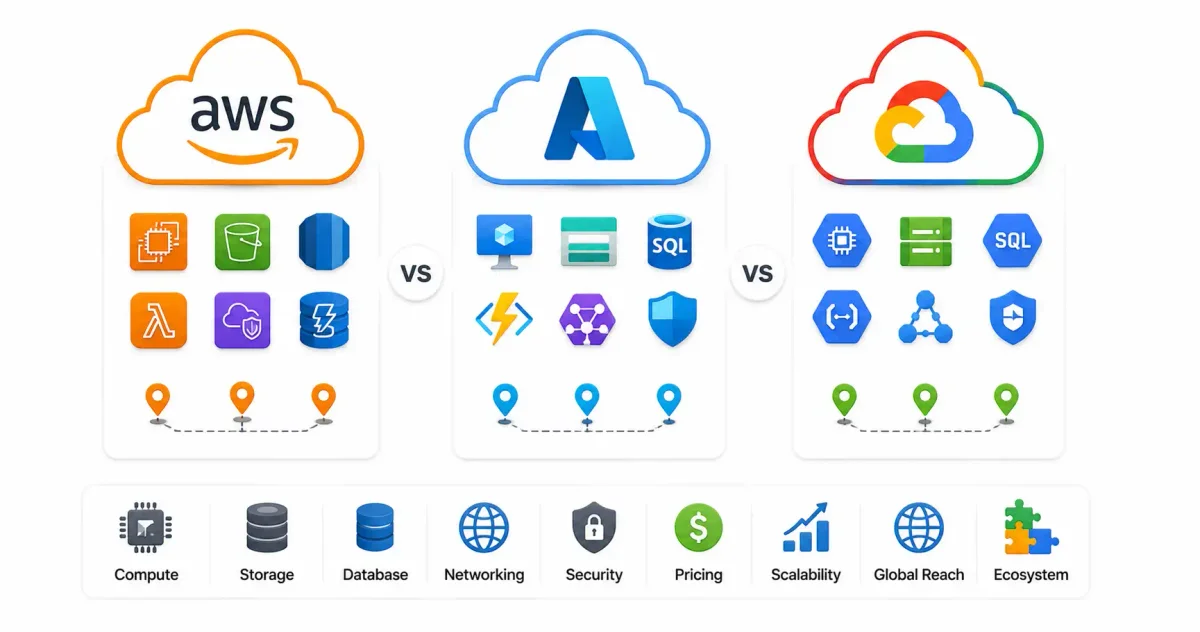
The competition between hyperscale cloud providers in 2026 has reached unprecedented intensity. For over fifteen years, the “Big Three”—Amazon Web Services (AWS), Microsoft Azure, and Google Cloud Platform (GCP)—have expanded global data center footprints, slashed infrastructure costs, and deployed hundreds of managed services to capture enterprise IT workloads.
However, the baseline requirements of public cloud computing—renting virtual machines (IaaS) and object storage—have become completely commoditized. Today, cloud purchasing decisions are no longer driven merely by raw CPU compute costs or geographic region counts. The hyperscale battlegrounds of 2026 are fought across four critical architectural fronts: Generative AI ecosystem integration, managed Kubernetes orchestration, multi-cloud data analytics, and hybrid security compliance.
Whether you are deciding what is cloud computing for your startup, choosing hosting for Node.js apps via our guide to hosting a website for free, or deciding between local AI vs cloud AI deployments, selecting the right hyperscaler shapes your engineering talent pool, financial commitments, and architecture for years to come.
In this deep architectural comparison, we will evaluate AWS, Azure, and Google Cloud across core services, AI platforms, managed Kubernetes engines, pricing structures, security models, and enterprise migration strategies.
Hyperscaler Master Feature Matrix
Before analyzing each provider individually, here is how the Big Three compare across core service categories:
| Feature Category | Amazon Web Services (AWS) | Microsoft Azure | Google Cloud Platform (GCP) |
|---|---|---|---|
| Market Share (Est.) | ~31% (Market Leader) | ~25% (Enterprise Growth) | ~11% (Data & AI Specialist) |
| Primary Strength | Broadest service catalog & largest talent pool | Native Active Directory & Windows enterprise integration | Superior big data analytics & native Kubernetes heritage |
| Virtual Machines (IaaS) | Amazon EC2 | Azure Virtual Machines | Compute Engine |
| Object Storage | Amazon S3 | Azure Blob Storage | Cloud Storage |
| Serverless Compute | AWS Lambda | Azure Functions | Cloud Run / Cloud Functions |
| Managed Kubernetes | Amazon EKS | Azure AKS | Google GKE (Industry Gold Standard) |
| Flagship AI Platform | Amazon Bedrock & SageMaker | Azure OpenAI Service | Vertex AI & Gemini Models |
| Relational Database | Amazon Aurora / RDS | Azure SQL Database / Flexible Server | Cloud Spanner / Cloud SQL |
| Big Data Analytics | Amazon Redshift & Athena | Azure Synapse Analytics | Google BigQuery |
| Hybrid Cloud Framework | AWS Outposts | Azure Arc | Anthos (Google Distributed Cloud) |
1. Amazon Web Services (AWS): The Undisputed Market Leader
Launched in 2006, AWS practically invented modern public cloud computing. By entering the market years ahead of competitors, Amazon established an enormous lead that it continues to hold in 2026. AWS powers a vast portion of global internet infrastructure, including enterprise platforms like Netflix, Twitch, and Airbnb.
Core Compute and Storage Services
AWS boasts the deepest and most granular infrastructure portfolio available:
- Compute (EC2 & Lambda): Amazon EC2 (Elastic Compute Cloud) offers hundreds of specialized instance types, including custom ARM-based Graviton CPUs that deliver up to 40% better price-performance than x86 chips. For event-driven workloads, AWS Lambda remains the pioneer of serverless execution.
- Object Storage (S3): Amazon S3 (Simple Storage Service) is so ubiquitous that its API protocol has become the de facto global standard for object storage, adopted by self-hosted S3 implementations like MinIO. Learn how to pair object storage with self-hosted apps in our Nextcloud complete setup guide.
- Networking (VPC & Route 53): AWS Virtual Private Cloud (VPC) delivers highly configurable subnets, security groups, and route tables. Domain management is handled via Route 53; review our guide on what is DNS explained to understand domain resolution patterns.
The AI Advantage: Amazon Bedrock & Custom Silicon
While Microsoft gained early consumer attention through OpenAI, AWS built a developer-focused, platform-agnostic AI ecosystem called Amazon Bedrock. Instead of locking engineers into a single model, Bedrock provides a unified API interface to access multiple frontier models, including Anthropic’s Claude 3.5, Meta’s Llama 3, Stability AI, and Amazon’s Titan models.
Furthermore, AWS leads competitors in custom silicon investments. Their proprietary Trainium and Inferentia chips allow teams to train and serve machine learning models at up to 50% lower costs than renting expensive third-party GPUs. To explore open model deployments, read our hands-on Ollama Linux installation guide.
Key Strengths & Operational Limitations
- Strengths: Unmatched ecosystem maturity, largest certified engineering talent pool globally, and a proven track record of multi-region uptime across global Availability Zones.
- Limitations: The AWS Management Console contains over 200 distinct services with abstract naming conventions (e.g., Macie, Fargate, Athena). FinOps management is notoriously complex, requiring continuous cost oversight.
2. Microsoft Azure: The Enterprise Corporate Standard
Under Satya Nadella’s leadership, Microsoft executed one of the most successful corporate pivots in technology history, transforming from a desktop software company into a cloud superpower. Today, Azure is the default cloud provider for Fortune 500 enterprises already invested in Microsoft software ecosystems.
Core Compute and Enterprise Integration
Azure’s architecture is built to connect seamlessly with existing on-premises enterprise IT:
- Active Directory & Entra ID: Azure Entra ID (formerly Azure Active Directory) provides unified identity management across Office 365, Windows endpoints, and cloud resources. For single sign-on concepts, see our SSO guide for 2026.
- Hybrid Cloud (Azure Arc): Azure Arc allows enterprise IT teams to manage and govern servers hosted on bare metal, AWS, or GCP directly from the Azure portal.
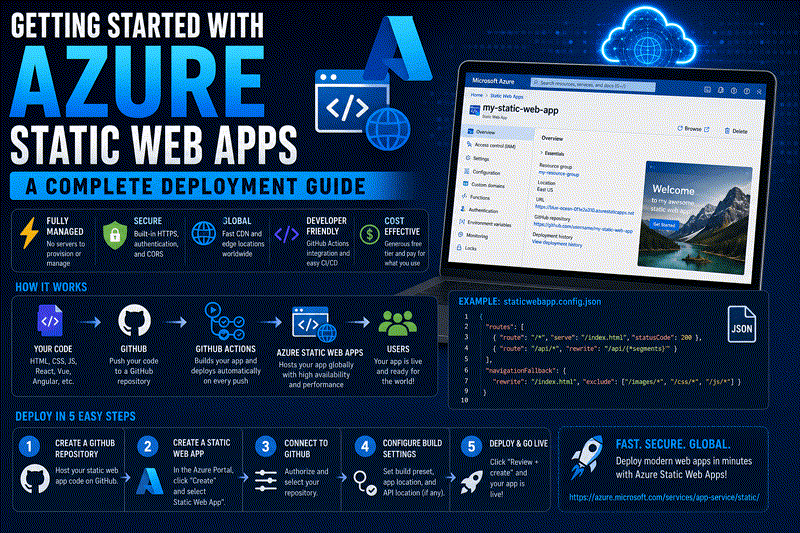
- Developer Web Apps (Azure Static Web Apps): Azure offers streamlined static site hosting; follow our step-by-step tutorial on getting started with Azure Static Web Apps.
The AI Advantage: Azure OpenAI Service
Microsoft’s multi-billion-dollar partnership with OpenAI gives Azure exclusive enterprise hosting rights for GPT-4o and DALL-E models. Through Azure OpenAI Service, enterprises deploy GPT models inside their private Azure virtual networks (VNets) with guaranteed data privacy boundaries, ensuring enterprise prompts are never used to train base models.
Key Strengths & Operational Limitations
- Strengths: Unbeatable licensing discounts (hybrid benefit for Windows Server and SQL Server), seamless Active Directory integration, and preferred status for corporate procurement teams.
- Limitations: Management portals occasionally suffer from UI fragmentation, and deployment errors can present cryptic error codes compared to AWS’s CLI-first approach.
3. Google Cloud Platform (GCP): The Data & AI Innovator
Google Cloud Platform (GCP) leverages the exact same distributed infrastructure that powers Search, YouTube, and Gmail. While holding a smaller overall market share (~11%), GCP is widely recognized as the technology leader in big data analytics, container orchestration, and artificial intelligence research.
Core Infrastructure & Kubernetes Heritage
Google’s engineering contributions have fundamentally shaped modern cloud software architecture:
- Kubernetes Heritage (GKE): Google invented Kubernetes before open-sourcing it to the CNCF. Consequently, Google Kubernetes Engine (GKE) is universally regarded as the most advanced, reliable, and developer-friendly managed Kubernetes service on the market. Read our simplified guide to Kubernetes explained simply.
- Big Data (BigQuery): Google BigQuery is a serverless, highly scalable data warehouse that executes SQL queries across petabytes of data in seconds without requiring index management.
- Global Network Backbone: Unlike competitors who rely partly on third-party telecom transit, GCP routes global traffic across Google’s private fiber-optic undersea cables, minimizing latency. Read about network transport in our guide on IPv4 vs IPv6 explained.
The AI Advantage: Vertex AI & Gemini Models
Google DeepMind drives GCP’s AI platform, Vertex AI. Vertex provides a unified developer workspace for training, tuning, and deploying ML models. Google’s flagship Gemini 1.5 Pro models feature a massive 2-million token context window, allowing developers to process multi-hour videos and entire codebases natively.
Key Strengths & Operational Limitations
- Strengths: Superior big data analytics (BigQuery), best-in-class managed Kubernetes (GKE), and intuitive clean management interface.
- Limitations: Smaller enterprise sales footprint compared to Microsoft, leading some conservative procurement teams to favor Azure or AWS.
4. Container Orchestration & Microservices Comparison
Modern cloud architectures rely heavily on containerization. Comparing how each provider handles managed Kubernetes and serverless container execution is essential for microservice design.
Managed Kubernetes: EKS vs AKS vs GKE
Containerized workloads running on Docker or Podman are typically deployed into managed Kubernetes clusters at scale:
| Metric / Capability | AWS EKS | Azure AKS | Google GKE |
|---|---|---|---|
| Control Plane Fee | $0.10 / hour (~$$72$/mo per cluster) | Free tier available ($0 for basic) | Free tier available (One free cluster/mo) |
| Autoscaling Speed | Moderate (Cluster Autoscaler) | Fast (KEDA integration) | Ultra-Fast (GKE Autopilot native) |
| Kubernetes Version Updates | Manual control required | Automated upgrade channels | Seamless zero-downtime auto-upgrades |
| Serverless Pod Execution | AWS Fargate for EKS | Azure Container Apps / Virtual Nodes | GKE Autopilot (Native pod-based billing) |
For lightweight single-node container management before scaling to full Kubernetes clusters, sysadmins often deploy management panels like Portainer, DokPloy, or Coolify. Review our tutorials on Portainer self-hosted Docker management, DokPloy setup guide, and Coolify self-hosting guide.
5. Pricing Structures & Cost Optimization (FinOps)
Cloud pricing is notoriously complex. Understanding the discount structures across the Big Three is critical for preventing runaway monthly bills.
On-Demand vs Reserved vs Savings Plans
All three hyperscalers offer three primary purchasing tiers:
- On-Demand (Pay-As-You-Go): Highest hourly rate, zero long-term commitment. Ideal for testing and unpredictable spikes.
- Reserved Instances / Committed Use (1-Year or 3-Year Commitments): Commit to specific instance types or regions in exchange for 40% to 70% discounts off on-demand rates.
- AWS: Offers Savings Plans (flexible compute spend commitments across EC2, Lambda, and Fargate).
- Azure: Offers Azure Reserved VM Instances and Hybrid Benefit (reuse existing Windows/SQL Server licenses).
- GCP: Offers Committed Use Discounts (CUDs) and unique Sustained Use Discounts (automatic discounts applied when VMs run continuously for a full month without requiring upfront lock-in).
Database Cost Considerations
Relational database hosting (PostgreSQL, MySQL) accounts for a massive portion of cloud spend. Compare database engines using our guide on PostgreSQL vs MySQL in 2026. AWS Aurora, Azure SQL Flexible Server, and GCP Cloud SQL all offer managed automated backups, high-availability failover, and read replicas.
To generate infrastructure templates automatically, developers use our interactive web utilities like the Docker Compose generator and Nginx config generator.
6. Cloud Security, Zero Trust & Infrastructure Hardening
Securing hyperscale cloud infrastructure requires applying Zero Trust principles across identity, network routing, storage encryption, and server access.
Identity, Network, and Host Hardening
- Identity & Access Management (IAM): Enforce Least Privilege access across AWS IAM, Azure Entra ID, and GCP IAM. Never use root billing accounts for daily operational tasks. Implement passkeys or multi-factor authentication; see our comparison of passkeys vs passwords.
- Zero-Trust Mesh Networks: Secure administrative access to virtual machines and database ports without opening public firewall ports by using Tailscale or WireGuard. Follow our Tailscale vs WireGuard guide and review how a VPN works.
- Ingress Protection & Reverse Proxies: Route web application traffic through reverse proxies like Nginx Proxy Manager, Traefik, or Caddy with SSL. Learn setup from our Nginx Proxy Manager security guide and Let’s Encrypt guide.
- Active Perimeter Firewalling: Configure host firewalls with UFW, and automatically block brute-force scanners using Fail2ban or CrowdSec. Follow our step-by-step guides on UFW firewall rules, Fail2ban guide, and CrowdSec beginner guide.
- Secret Vault Management: Protect database credentials and API keys in secure vaults like Vaultwarden rather than plaintext config files. See our Vaultwarden self-hosted guide and generate keys with our password generator.
- Container & Host Auditing: Scan container images for CVEs using Trivy by following our guide on securing Docker containers. Secure SSH access following our Ubuntu SSH hardening guide, run system checks using the top 20 Linux security commands, inspect audit trails via Linux logs explained, review Linux file permissions, explore encryption tools and IDS vs IPS concepts, and audit host compliance with Lynis via our Lynis security audit guide. Generate environment configurations using our ENV generator and schedule cron audits with our cron expression generator.
7. Multi-Cloud & Infrastructure as Code (IaC) Deployment
To prevent vendor lock-in, modern engineering teams manage infrastructure using open-source, vendor-agnostic Infrastructure as Code (IaC) tools.
Terraform & Ansible Infrastructure Automation
Rather than manually clicking buttons in the AWS, Azure, or GCP web consoles, architects define cloud resources declaratively:
- Terraform / OpenTofu: Provisions VMs, VPC networks, S3 buckets, and managed Kubernetes clusters across AWS, Azure, and GCP using identical HCL syntax.
- Ansible: Configures host operating systems, installs software packages, and hardens Linux security post-provisioning.
- Self-Hosted Application Deployment: Once cloud VMs are running Node.js apps or APIs, refer to our tutorials on deploying Node.js applications on a Linux VPS and understanding REST API design.
8. Decision Framework: Which Cloud Provider Should You Choose?
Use this decision matrix to determine which hyperscaler best matches your organizational profile:
| Organization Profile | Recommended Cloud Provider | Strategic Rationale |
|---|---|---|
| Early-Stage Startup / SaaS Platform | AWS (or GCP) | Broadest third-party tool ecosystem, largest talent pool, generous startup credits. |
| Established Corporate / Windows Enterprise | Microsoft Azure | Unbeatable Active Directory integration, existing Microsoft volume licensing discounts. |
| Big Data Analytics / AI Research Firm | Google Cloud (GCP) | Unmatched big data querying with BigQuery, industry-leading managed Kubernetes (GKE). |
| Multi-Model AI Product Development | AWS (Amazon Bedrock) | Single API access to Claude 3.5, Llama 3, and Titan without vendor lock-in. |
| Air-Gapped / Privacy-First Organization | Hybrid / Self-Hosted | Deploy local GPU clusters running Ollama behind private mesh VPNs. Read our local AI vs cloud AI guide. |
To explore alternative deployment options, see our guide to VPS hosting concepts and our roundup of hidden AI tools.
9. Official Documentation & References
- AWS Official Documentation: https://docs.aws.amazon.com
- Microsoft Azure Documentation: https://learn.microsoft.com/azure
- Google Cloud Documentation: https://cloud.google.com/docs
- CNCF Kubernetes Documentation: https://kubernetes.io/docs
- HashiCorp Terraform Documentation: https://developer.hashicorp.com/terraform
10. Frequently Asked Questions
Which cloud provider is cheapest in 2026: AWS, Azure, or GCP?
For raw entry-level compute, prices are fiercely competitive and almost identical. However, cost advantages depend on workload specifics: Azure is cheapest for enterprises with existing Microsoft software licenses (via Hybrid Benefit); GCP is cheapest for continuous workloads due to automatic Sustained Use Discounts; AWS is cheapest for high-volume serverless apps using ARM Graviton chips and Savings Plans.
Which cloud provider is easiest to learn for beginners?
Google Cloud Platform (GCP) is generally considered to have the cleanest, most intuitive user interface and command-line interface (gcloud SDK). AWS has a steeper learning curve due to its massive catalog of 200+ abstractly named services, while Azure’s portal can feel fragmented for non-Windows sysadmins.
What is the difference between AWS Bedrock, Azure OpenAI, and GCP Vertex AI?
AWS Bedrock provides a multi-vendor API gateway to access Claude, Llama, and Titan models; Azure OpenAI Service offers exclusive enterprise hosting for OpenAI models (GPT-4o) inside private Azure virtual networks; GCP Vertex AI offers a comprehensive MLOps development workspace integrated with Google’s Gemini 1.5 Pro models.
Can I run a multi-cloud architecture across AWS, Azure, and GCP?
Yes. Many modern enterprises use Infrastructure as Code tools like Terraform to deploy multi-cloud infrastructure. For example, a company might host core application microservices on AWS EC2, run big data analytics on GCP BigQuery, and manage enterprise user identity through Azure Entra ID.
What is the market share breakdown between AWS, Azure, and Google Cloud?
As of 2026, AWS leads the global market with approximately 31% market share, Microsoft Azure holds second place with roughly 25%, and Google Cloud (GCP) holds third place with about 11%. The remaining market is shared among niche providers like IBM, Oracle Cloud, Alibaba Cloud, and specialized VPS hosts like Hetzner and DigitalOcean.
What is managed Kubernetes, and why do I need it?
Managed Kubernetes (EKS, AKS, GKE) automates the complex control plane administration, master node upgrades, etcd database backups, and security patching of a Kubernetes cluster. It allows DevOps teams to focus on deploying containerized application pods rather than managing Kubernetes master infrastructure manually.
How do I prevent unexpected bill spikes on cloud providers?
Set up automated budget alerts, configure billing alarms at 50%, 75%, and 90% of expected monthly thresholds, remove unattached EBS volumes or elastic IP addresses, enforce resource tagging policies, and utilize Reserved Instances or Savings Plans for predictable 24/7 production workloads.
What is the difference between IaaS, PaaS, and Serverless?
IaaS (Infrastructure as Service): You rent virtual machines (EC2, Azure VMs) and manage the OS, security patches, and software stack; PaaS (Platform as Service): The provider manages the OS and runtime environment (Azure App Service, Elastic Beanstalk), you only deploy code; Serverless: The provider handles event-driven scaling down to zero (AWS Lambda, Cloud Run), and you pay strictly per millisecond of execution time.
Which certification is most valuable for a DevOps engineer in 2026?
The AWS Certified Solutions Architect – Associate / Professional remains the most broadly requested certification due to AWS’s market share. However, Certified Kubernetes Administrator (CKA) is the most valuable vendor-agnostic certification, valid across EKS, AKS, GKE, and self-hosted clusters.
How do I secure cloud infrastructure against cyberattacks?
Enforce Multi-Factor Authentication (or Passkeys) on all IAM accounts, disable public SSH/RDP ports by using private mesh VPNs like Tailscale or WireGuard, route web traffic through reverse proxies with SSL termination, configure UFW or cloud security group firewalls, scan container images with Trivy, and audit compliance with Lynis.
Discussion
Loading comments...