

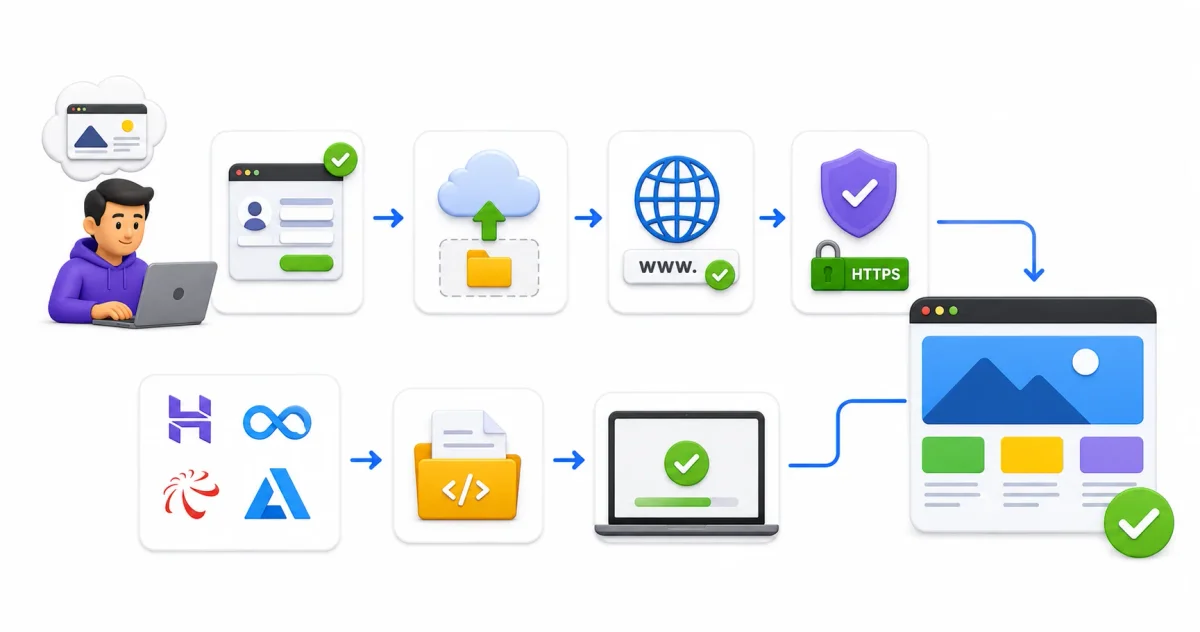
A decade ago, launching a website required purchasing domain names, renting shared cPanel servers, manually uploading files over FTP, and configuring Apache web servers. If a post went viral, shared hosting servers quickly buckled under traffic spikes.
In 2026, web hosting has been completely revolutionized. Thanks to modern Jamstack architecture, edge computing, and global Content Delivery Networks (CDNs), hosting professional, production-grade web applications costs exactly zero dollars.
Cloud providers offer generous “Hobby Tiers” as strategic entry points. By hosting developers’ personal projects for free, cloud platforms capture engineering loyalty early—knowing those same developers will eventually bring enterprise accounts to their platforms.
Whether you are launching a developer blog, a personal portfolio, a documentation portal, or a SaaS landing page, this comprehensive guide evaluates the top 5 free hosting platforms in 2026, breaking down bandwidth limits, custom domain support, SSL integration, build speeds, and security boundaries.
⚡ Modern Web Deployment Pipeline
Modern free hosting relies on Git-integrated continuous deployment pipelines. Here is how your code travels from local machine to global edge servers:
- Local Code Edit ➔ Write HTML, CSS, JavaScript, or framework components in your editor
- Git Commit & Push ➔ Push code updates to GitHub, GitLab, or Bitbucket
- Webhook Trigger ➔ Hosting platform detects new commit via automated webhook
- Edge Build & Bundle ➔ Cloud runner compiles your static assets (Astro, Next.js, React, Vue)
- Global CDN Propagation ➔ Static assets distributed to 100+ global edge locations
- Free SSL Auto-Provisioning ➔ HTTPS TLS 1.3 certificate issued and attached automatically
If you are evaluating enterprise cloud infrastructure beyond free hosting, check out our AWS vs Azure vs Google Cloud comparison and our guide on Azure Static Web Apps deployment.
📊 Free Hosting Platforms Comparison Matrix
Here is how the top 5 free hosting platforms compare across key technical metrics:
| Platform | Free Monthly Bandwidth | Custom Domain Support | SSL Certificates | Git Provider Support | Standout Feature |
|---|---|---|---|---|---|
| 1. Cloudflare Pages | Unlimited Bandwidth | Unlimited Custom Domains | Automatic TLS 1.3 | GitHub, GitLab | Unlimited bandwidth & edge Workers |
| 2. Vercel | 100 GB / month | Custom Domains Included | Automatic TLS 1.3 | GitHub, GitLab, Bitbucket | Best Next.js & React integration |
| 3. Netlify | 100 GB / month | Custom Domains Included | Automatic TLS 1.3 | GitHub, GitLab, Bitbucket | Built-in Forms, Auth & Split Testing |
| 4. GitHub Pages | 100 GB / month | 1 Custom Domain per Repo | Automatic TLS 1.3 | GitHub Native | Direct GitHub repo integration |
| 5. Azure Static Web Apps | 100 GB / month | 2 Custom Domains | Automatic TLS 1.3 | GitHub, Azure DevOps | Managed Azure Functions APIs |
1. Cloudflare Pages: Unlimited Bandwidth Champion
Cloudflare Pages is built on top of Cloudflare’s massive global edge network, spanning over 300 cities worldwide. It is arguably the most generous free hosting platform on the market because it imposes zero monthly bandwidth caps.
Why Developers Choose Cloudflare Pages
- Unlimited Monthly Bandwidth: Unlike competitors who cap free bandwidth at 100 GB, Cloudflare allows unmetered static traffic on its free plan.
- Direct Integration with Cloudflare Workers: Add serverless edge computing functions written in JavaScript, TypeScript, or WebAssembly without managing backend servers.
- DDoS & Web Application Firewall Protection: Inherits Cloudflare’s enterprise-grade DDoS mitigation out of the box.
- Unlimited Custom Domains: Attach multiple custom domains to a single project with automatic TLS 1.3 certificate issuance.
Free Tier Specifications & Limits
- Bandwidth: Unlimited unmetered bandwidth
- Builds: 500 builds per month
- Concurrent Builds: 1 concurrent build stream
- Asset Size Limit: 25 MB per individual file
Best For: High-traffic static blogs, documentation hubs, and heavy media sites where bandwidth overage costs are a concern.
2. Vercel: The Undisputed React & Next.js Leader
Vercel is the company behind Next.js, the most popular React framework in the world. Unsurprisingly, their hosting platform offers perhaps the most seamless, frictionless deployment experience across the software development life cycle; see our SDLC guide for beginners.
Key Architectural Highlights
- Automatic Framework Detection: Vercel automatically configures build commands and output directories for 30+ web frameworks (Astro, Next.js, React, Vue, Svelte, Nuxt); compare frontend options in our React vs Vue vs Svelte framework guide and understand modern markup standards in HTML vs HTML5.
- Pull Request Preview Environments: Every opened Pull Request generates an isolated staging URL so team members can review live changes before merging code to production.
- Serverless & Edge Functions: Run Node.js backend logic (such as handling a contact form) without setting up an actual server; review building a REST API with Node.js, handling async JavaScript, and parsing JSON data over standard HTTP protocols. Connect to cloud databases by following our PostgreSQL vs MySQL comparison.
- Instant Rollbacks: Revert production deployments to any previous commit with a single click.
Free Tier Specifications & Limits
- Bandwidth: 100 GB per month
- Build Execution: 6,000 build minutes per month
- Serverless Invocations: 100,000 function invocations per month
- Image Optimization: 1,000 transformed images per month
Best For: Developers building with Next.js, React, Astro, or SvelteKit who want instant preview URLs and seamless Git deployments.
3. Netlify: The Jamstack Pioneer
Netlify pioneered the modern Jamstack architecture and remains a favorite for developers who want powerful backend capabilities without writing server code.
Standout Feature Capabilities
- Netlify Forms: Collect contact form submissions automatically by simply adding
data-netlify="true"to any standard HTML form. No database or backend script required! - Netlify Identity: Built-in user authentication for managing site members, user logins, and protected route access.
- Split Testing (A/B Testing): Distribute traffic between two different Git branches to test marketing copy and UI layouts without client-side redirects.
- Snippet Injection: Inject tracking scripts, analytics, or meta tags directly at the CDN edge level.
Free Tier Specifications & Limits
- Bandwidth: 100 GB per month
- Build Minutes: 300 build minutes per month
- Form Submissions: 100 free form submissions per month
- Identity Users: 1,000 active users included for free
Best For: Pure static sites (HTML/CSS/JS) needing easy form collection, identity management, and A/B testing out of the box.
4. GitHub Pages: Simple, Native Repository Hosting
GitHub Pages is GitHub’s built-in static hosting service. It turns any GitHub repository into a live website directly from your source files or a designated docs/ folder.
Core Architectural Benefits
- Zero Third-Party Authentication: Uses your existing GitHub login and repository permissions.
- Native Jekyll & GitHub Actions Support: Automatically compiles markdown files using Jekyll or executes custom GitHub Actions workflows.
- One-Click Custom Domains: Add a custom domain by committing a simple
CNAMEtext file to your repository root. - Free HTTPS Enforcement: Provisions free TLS certificates automatically via Let’s Encrypt.
Free Tier Specifications & Limits
- Bandwidth: 100 GB per month
- Repository Size Limit: 1 GB total project size
- Individual File Size: 100 MB max per file
- Build Timeout: 10 minutes per deployment
Best For: Open-source documentation, simple developer portfolios, and personal GitHub projects.
5. Azure Static Web Apps: Enterprise Integration
Azure Static Web Apps is Microsoft’s cloud hosting solution tailored for Jamstack apps requiring serverless API integration and enterprise identity boundaries. Follow our full guide on getting started with Azure Static Web Apps.
Highlights & Enterprise Features
- Integrated Azure Functions APIs: Route frontend requests directly to backend serverless functions without configuring CORS rules.
- Microsoft Entra ID (Active Directory) Integration: Lock down internal routes to corporate users authenticated via Microsoft or GitHub accounts. Read our SSO guide for 2026.
- PR Preview Staging: Automatically provisions up to 3 active preview staging environments for open pull requests.
- Global CDN Distribution: Caches static content at 100+ Azure edge locations worldwide.
Free Tier Specifications & Limits
- Bandwidth: 100 GB per month
- Custom Domains: 2 custom domains per app (Free SSL included)
- App Storage: 0.5 GB per app
- Staging Environments: 3 active preview environments
Best For: Developers building applications inside the Azure enterprise ecosystem or needing managed Azure Functions backend integration.
💡 Beyond Free SaaS: Self-Hosted Cloud Alternatives
If your project requires complete OS root access, unlimited custom databases, or total data sovereignty, relying on free SaaS tiers may present limits. In those scenarios, self-hosting on a cheap VPS provides full flexibility.
The Self-Hosted Stack
- Low-Cost VPS Providers: Rent a $5/month virtual private server from Hetzner, DigitalOcean, or Linode. Learn VPS fundamentals in our guide on what is a VPS explained.
- Self-Hosted PaaS Panels: Install Coolify or DokPloy to get a private, open-source Heroku/Vercel alternative running on your own server. Follow our Coolify self-hosting guide and DokPloy setup guide.
- Container Management: Manage containerized web stacks using Portainer or Docker Compose. Review our tutorials on Portainer Docker management and installing Docker on Ubuntu.
- Private AI Workloads: Host offline AI tools locally using Ollama and Open WebUI. Read our guide on local AI vs cloud AI and our hands-on Ollama Linux installation guide.
🔒 Security Hardening & Zero-Trust Domain Setup
Even on free hosting tiers, securing custom domains, DNS records, and user data is essential.
Security Checklist for Free Sites
- Enforce HTTPS Encryption: Always check the “Enforce HTTPS” box on Vercel, Netlify, Cloudflare, or GitHub Pages. HTTPS uses TLS 1.3 to encrypt traffic in transit. Read about certificate authority issuance in our Let’s Encrypt guide.
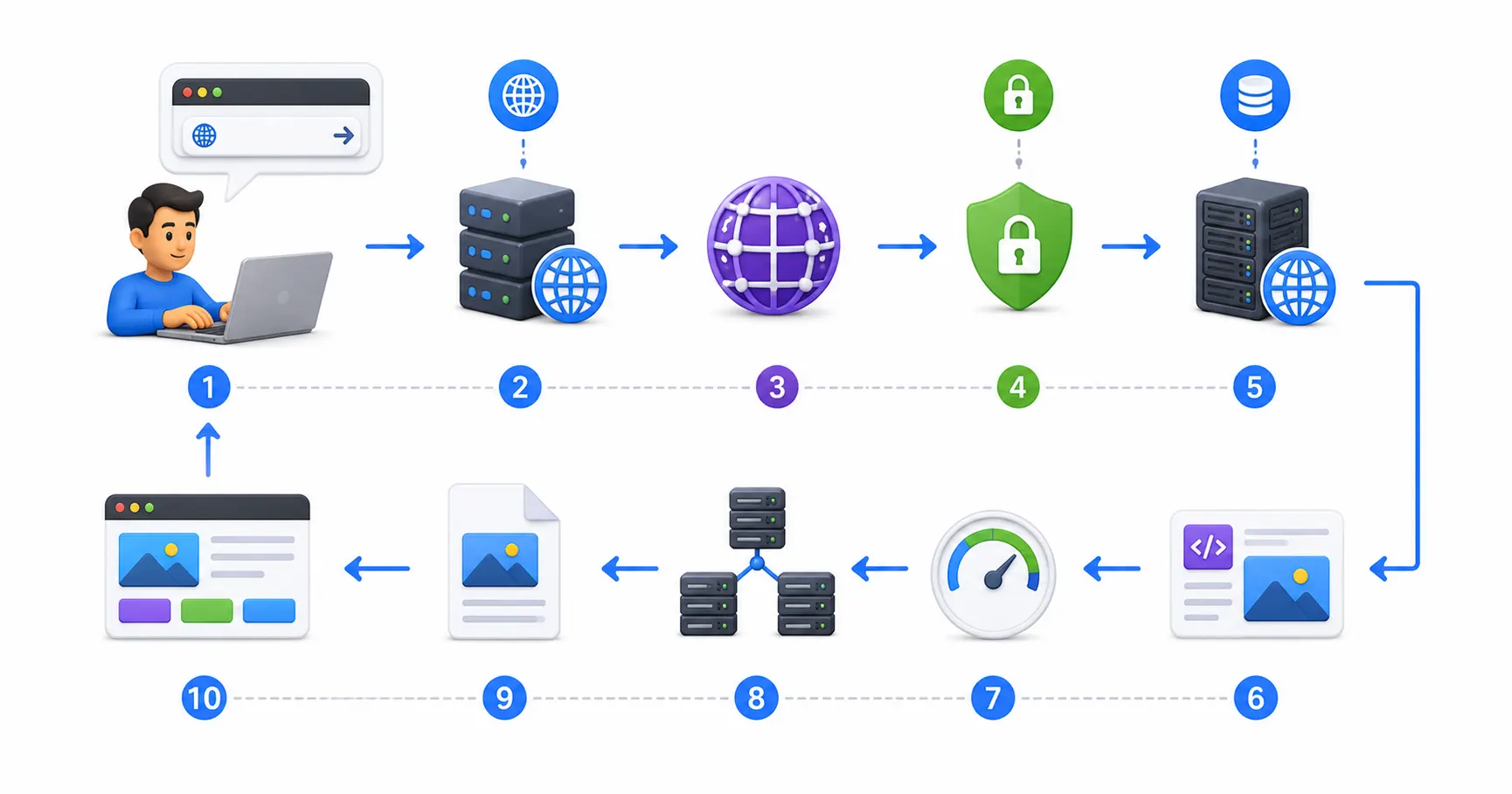
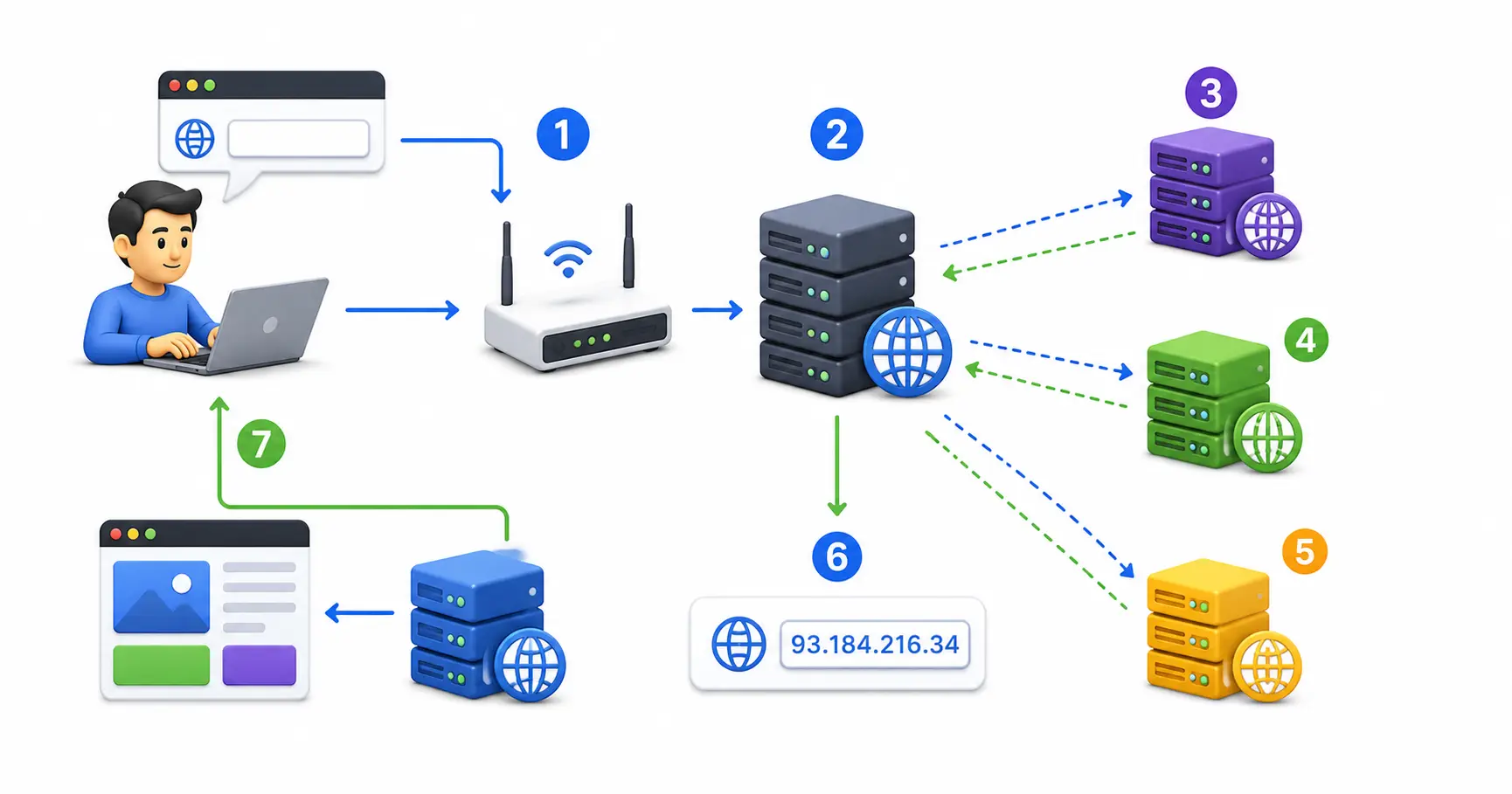
- Configure DNS Records Properly: Point custom domains using CNAME records for subdomains (
www) or ALIAS/ANAME/Flattened CNAME records for apex root domains (example.com). Learn domain mechanics in what is DNS explained and what happens when you type a URL. - Hardened Ingress Proxying: Put custom domain traffic behind Nginx Proxy Manager, Traefik, or Caddy. Review our Nginx Proxy Manager security guide.
- Firewall & Intrusion Defense: Protect self-hosted VPS backends using UFW, Fail2ban, and CrowdSec. Follow our tutorials on UFW firewall rules, Fail2ban security, and CrowdSec beginner guide.
- Secret Management: Never commit API keys or database passwords to public GitHub repositories. Use environment variables and store credentials securely in Vaultwarden; see our Vaultwarden self-hosted guide and generate strong keys using our password generator. Compare security options in our guides on best password managers and passkeys vs passwords.
- Container & System Auditing: Scan container images with Trivy using our guide on securing Docker containers. Secure SSH access following our Ubuntu SSH hardening guide, run checks using the top 20 Linux security commands, and audit host compliance with Lynis via our Lynis security audit guide.
🛠️ Step-by-Step Selection Workflow: Which Platform Fits You?
Follow this simple decision tree to choose the ideal free hosting platform for your specific project:
- Building with Next.js or React? ➔ Choose Vercel (Best zero-config integration & preview URLs)
- Building a static site needing free contact forms? ➔ Choose Netlify (Built-in Netlify Forms & Identity)
- High-traffic blog expecting millions of hits? ➔ Choose Cloudflare Pages (Uncapped unlimited bandwidth)
- Simple open-source documentation on GitHub? ➔ Choose GitHub Pages (Direct GitHub repo integration)
- Enterprise site using Azure Functions & C# / Node.js? ➔ Choose Azure Static Web Apps (Managed Azure Functions)
- Need full OS root control or private databases? ➔ Choose Self-Hosted VPS + Coolify (Open-source control)
To optimize your static site for search engines before deploying, consult our beginner’s guide to SEO and learn how search engines crawl websites.
💻 Interactive Developer Web Utilities
Bookmark these web utilities to simplify development, formatting, and deployment workflows:
- Container Setup: Docker Compose Generator
- Reverse Proxy Configs: Nginx Config Generator
- Init & Service Files: Systemd Service File Generator
- Data Formatting: JSON Formatter & JSON Validator
- Secret Generation: Password Generator & ENV Generator
- SEO Metadata: Schema Markup Generator
- Expression Testing: Regex Tester
- Linux Learning: Linux Command Explorer & Linux Permission Calculator
- Workflow Automation: Cron Expression Generator & Gitignore Generator
📖 Official Documentation & References
- Cloudflare Pages Documentation: https://developers.cloudflare.com/pages
- Vercel Documentation: https://vercel.com/docs
- Netlify Documentation: https://docs.netlify.com
- GitHub Pages Documentation: https://docs.github.com/pages
- Azure Static Web Apps Documentation: https://learn.microsoft.com/azure/static-web-apps
❓ Frequently Asked Questions
Can I really host a professional website completely free with no hidden fees?
Yes. Platforms like Cloudflare Pages, Vercel, Netlify, GitHub Pages, and Azure Static Web Apps provide permanent free hobby tiers. As long as your website stays within monthly bandwidth limits (or uses Cloudflare’s uncapped bandwidth), hosting is 100% free with no credit card required.
Can I attach my own custom domain name (e.g. example.com) on free plans?
Yes. All 5 platforms featured in this guide allow you to attach custom domain names on their free plans. They also provision and renew SSL/TLS encryption certificates automatically at zero extra cost.
Which free hosting platform offers unlimited bandwidth?
Cloudflare Pages is the only major free hosting platform that offers unmetered, unlimited monthly bandwidth on its free tier. Competitors like Vercel, Netlify, GitHub Pages, and Azure cap free bandwidth at 100 GB per month.
How do Git push deployments work on free hosting platforms?
When you connect your GitHub, GitLab, or Bitbucket account to Vercel, Netlify, or Cloudflare Pages, a webhook is installed. Every time you push code changes to your repository (git push), the platform automatically detects the commit, runs your build script, and deploys the output globally.
What is the difference between static hosting and traditional WordPress hosting?
Traditional WordPress hosting requires a database (MySQL) and a server-side language (PHP) compiling pages dynamically on every page request. Static hosting pre-renders your pages into static HTML, CSS, and JavaScript files during the build process, serving them instantly from a global CDN without needing a database.
What happens if my website exceeds the free monthly bandwidth limit?
If your site exceeds free monthly bandwidth limits (e.g. 100 GB on Vercel or Netlify), the platform may temporarily pause your site, charge overage fees if a credit card is attached, or prompt you to upgrade to a paid subscription ($20/month). To avoid bandwidth limits entirely, use Cloudflare Pages.
Can I host backend Node.js APIs or database connections for free?
Yes. Platforms like Vercel, Netlify, Cloudflare, and Azure Static Web Apps include free serverless function executions. You can write lightweight backend Node.js, Python, or TypeScript functions to handle contact form submissions, API calls, or database queries without maintaining a dedicated backend server.
What is a Pull Request Preview URL?
When working on a team, opening a Pull Request (PR) on GitHub triggers hosting platforms (like Vercel, Netlify, or Azure SWA) to build a temporary staging environment. It generates a unique URL where you can test live changes before merging code into your production website.
How do I collect contact form submissions without a backend server?
Netlify provides built-in form handling automatically when you add data-netlify="true" to any standard HTML form. Alternatively, you can use free form services like Formspree, Web3Forms, or write a lightweight serverless function on Vercel or Cloudflare Workers.
What is the best framework to use for building free static websites in 2026?
Astro is widely regarded as one of the best frameworks for content-rich static websites and blogs because it ships zero client-side JavaScript by default. For dynamic web apps requiring heavy interactivity, Next.js (React), Nuxt (Vue), and SvelteKit are top choices.
Discussion
Loading comments...