

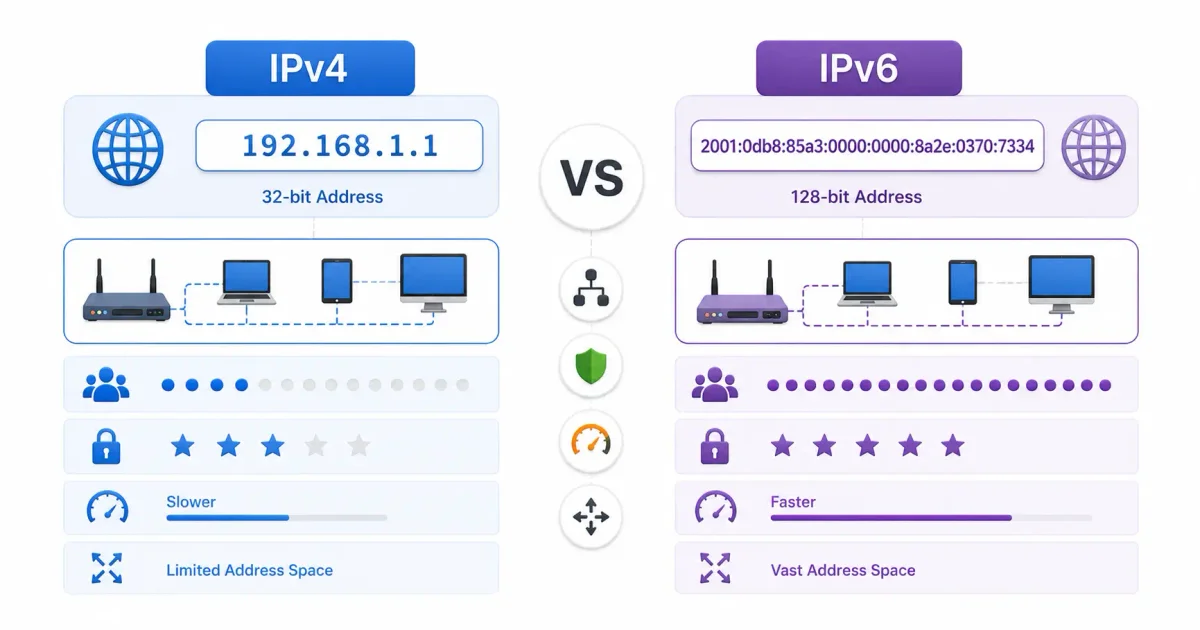
Every single device connected to the internet—your smartphone, developer workstation, smart home appliance, and the cloud virtual machines running global infrastructure—requires a unique logical address to communicate across networks. In computer networking, this address is an Internet Protocol (IP) Address.
For over four decades, global networking relied almost exclusively on IPv4 (Internet Protocol version 4). However, as humanity connected tens of billions of devices to the web, we encountered a mathematical certainty: we exhausted the 32-bit address pool. To prevent global network stagnation, the Internet Engineering Task Force (IETF) designed IPv6.
In 2026, network engineers operate in a “dual-stack” world where both protocols coexist across cloud providers, enterprise data centers, and consumer ISPs.
Whether you are evaluating what is cloud computing, configuring cloud networks in our AWS vs Azure vs Google Cloud comparison, or troubleshooting local server connections, understanding the architectural mechanics of IPv4 versus IPv6 is fundamental to systems administration.
In this deep networking guide, we will examine 32-bit versus 128-bit math, CIDR subnetting, Network Address Translation (NAT/CGNAT), DNS record resolution, dual-stack routing, and cloud infrastructure adoption.
⚡ The Packet Routing Flow: How IP Traffic Moves
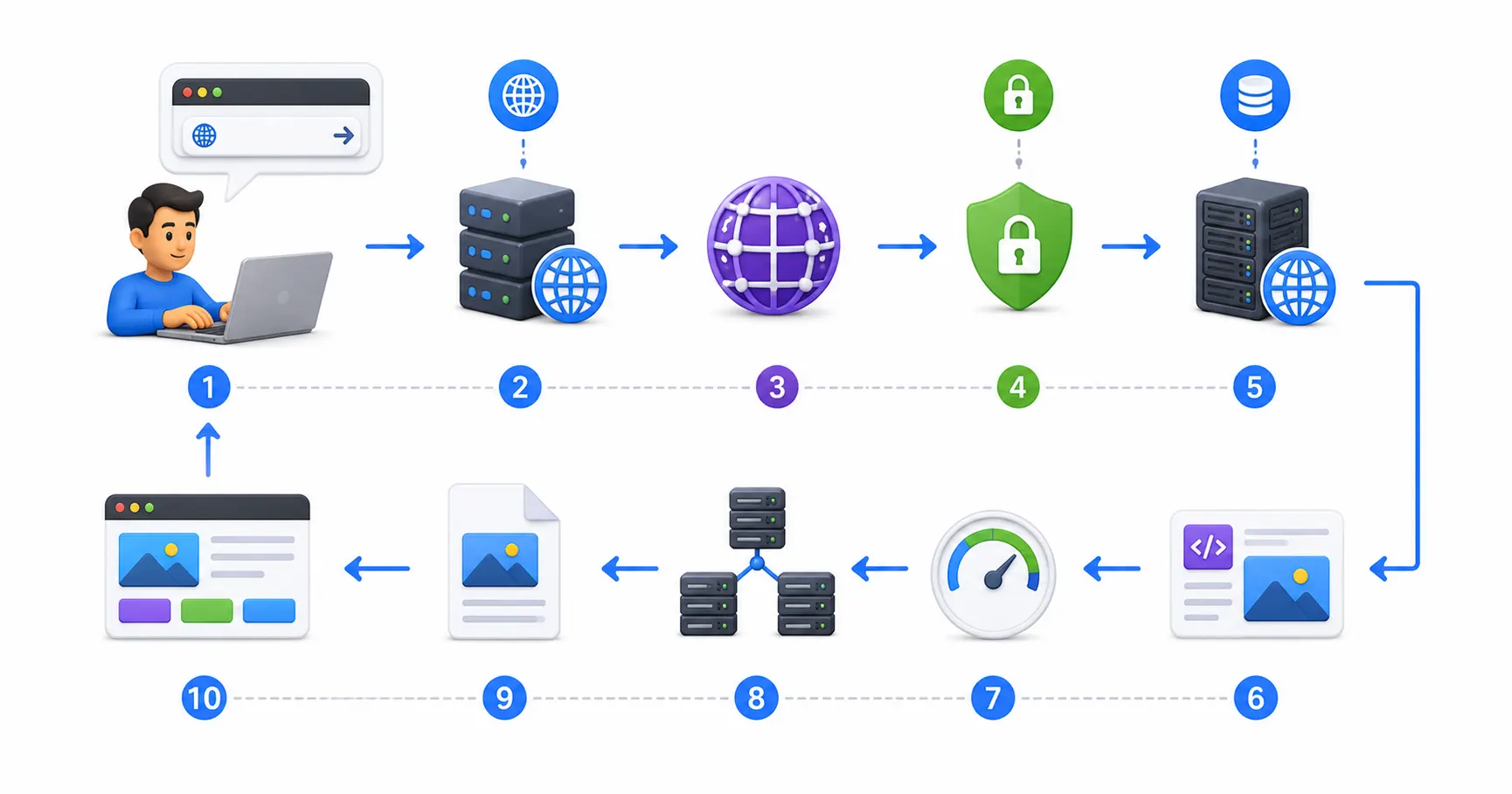
When your computer sends a request to a remote server, data travels through multiple protocol layers:
- Application Request ➔ Browser initiates HTTP/HTTPS request (e.g.
GET /api/v1/data) - DNS Resolution ➔ Operating system queries DNS server for A (IPv4) or AAAA (IPv6) records
- Transport Layer (TCP/UDP) ➔ Source and Destination port numbers attached to segment header
- Network Layer (IP) ➔ Source and Destination IP addresses attached (32-bit or 128-bit header)
- Router Packet Forwarding ➔ Intermediate routers examine IP header & forward across subnets
- Destination Ingress ➔ Server receives packet, strips IP header, and routes to backend daemon
To understand domain resolution prior to packet transport, read our detailed guide on what is DNS explained and inspect request lifecycles in what happens when you type a URL.
📊 IPv4 vs IPv6 Architectural Comparison Matrix
Here is how IPv4 and IPv6 contrast across key technical vectors:
| Architecture Vector | IPv4 (Internet Protocol v4) | IPv6 (Internet Protocol v6) |
|---|---|---|
| Address Length | 32-bit (4 bytes) | 128-bit (16 bytes) |
| Total Address Pool | $2^{32} \approx \text{\textbf{4.29 billion}}$ addresses | $2^{128} \approx \text{\textbf{340 undecillion}}$ addresses |
| Notation Format | Dotted-decimal (e.g. 192.168.1.1) | Hexadecimal colons (e.g. 2001:0db8:85a3::8a2e:0370:7334) |
| Header Size | Variable (20 to 60 bytes with options) | Fixed 40-byte header (Optimized for router processing) |
| NAT Dependence | Heavy reliance on NAT / CGNAT due to scarcity | Direct end-to-end global routability (No NAT required) |
| DNS Record Type | A Record (Maps domain to 32-bit IP) | AAAA Record (Quad-A, maps domain to 128-bit IP) |
| Autoconfiguration | DHCP (Dynamic Host Configuration Protocol) | SLAAC (Stateless Address Autoconfiguration) + DHCPv6 |
| IPSec Support | Optional addon protocol | Built natively into the IPv6 standard specification |
| Broadcast Support | Native Broadcast addresses (e.g. 255.255.255.255) | Broadcast eliminated; replaced by efficient Multicast |
1. IPv4: The 32-Bit Legacy Architecture
Defined in 1981 via RFC 791, IPv4 served as the foundation of the initial internet revolution.
The 32-Bit Mathematical Ceiling
IPv4 represents addresses as 32-bit binary integers. A single bit holds a binary value of 0 or 1.
- Binary Formula: $2^{32}$ total unique address combinations
- Total Calculation: $2^{32} = 4,294,967,296$ unique IP addresses
In 1981, when mainframes filled entire rooms and internet access was restricted to military and university research centers, 4.3 billion addresses appeared virtually infinite. The architects did not anticipate smartphones, smart TVs, cloud virtual machines, or Internet of Things (IoT) sensors.
Dotted-Decimal Notation & Octets
To make 32-bit binary strings human-readable, IPv4 divides 32 bits into four 8-bit blocks called octets, separated by dots:
- Binary Representation:
11000000 . 10101000 . 00000001 . 00000001 - Decimal Calculation: $(192) . (168) . (1) . (1)$
- Dotted-Decimal Address:
192.168.1.1
Each octet ranges from decimal 0 (00000000) to 255 (11111111).
Classless Inter-Domain Routing (CIDR)
Initially, IPv4 divided addresses into rigid classes (Class A, B, C). In 1993, CIDR (RFC 1519) replaced classful networks with slash notation (/24), specifying how many bits represent the network prefix versus host bits:
/24Subnet ➔ 24 network bits, 8 host bits ($2^8 = 256$ IPs, 254 usable host addresses)/16Subnet ➔ 16 network bits, 16 host bits ($2^{16} = 65,536$ IPs)/8Subnet ➔ 8 network bits, 24 host bits ($2^{24} = 16,777,216$ IPs)
Use our interactive web tool Linux Permission Calculator to practice bitwise math for Linux file modes and network masks.
2. The Band-Aid That Saved IPv4: NAT & Private Subnets
By February 2011, the Internet Assigned Numbers Authority (IANA) officially allocated its final top-level IPv4 address blocks. To prevent internet collapse, network engineers extended IPv4’s lifespan using Network Address Translation (NAT) and RFC 1918 Private Subnets.
Private vs Public Address Space (RFC 1918)
The IETF designated three IP ranges reserved exclusively for local private networks:
- Class A Private Range:
10.0.0.0to10.255.255.255(10.0.0.0/8) - Class B Private Range:
172.16.0.0to172.31.255.255(172.16.0.0/12) - Class C Private Range:
192.168.0.0to192.168.255.255(192.168.0.0/16)
These addresses are unroutable on the public internet. Thousands of independent homes and businesses can use 192.168.1.1 simultaneously without global IP collisions.
How NAT Transports Traffic
Network Address Translation acts as an intermediary between private subnets and the public web:
- Internal Device Query ➔ Laptop (
192.168.1.50:48291) sends request to router - Router NAT Translation ➔ Router rewrites packet header with Public IP (
203.0.113.10:59102) - Translation Table Logging ➔ Router logs source IP/port mapping in memory table
- Public Web Ingress ➔ Remote web server responds to Public IP (
203.0.113.10) - Return Packet Translation ➔ Router looks up port
59102, rewrites header back to192.168.1.50
Carrier-Grade NAT (CGNAT)
As ISPs ran out of public IPs to assign to customer homes, they deployed Carrier-Grade NAT (CGNAT) (RFC 6598, 100.64.0.0/10). Under CGNAT, hundreds of separate residential homes share a single public IPv4 address, causing major issues for home lab hosting, port forwarding, and self-hosted VPN servers.
3. IPv6: The 128-Bit Next-Generation Protocol
Designed to replace IPv4 permanently, IPv6 expands address space to 128 bits, providing virtually infinite addressing.
The 128-Bit Mathematical Scale
- Binary Formula: $2^{128}$ total unique address combinations
- Total Calculation: $340,282,366,920,938,463,463,374,607,431,768,211,456$ (340 Undecillion IPs)
To visualize this scale: IPv6 provides enough unique addresses to assign trillions of IPs to every single grain of sand on Earth!
Hexadecimal Colon Notation & Compression Rules
Because 128 bits expressed in decimal would be unreadable, IPv6 uses hexadecimal notation (digits 0-9 and letters a-f), divided into eight 16-bit blocks (hextets) separated by colons:
2001:0db8:85a3:0000:0000:8a2e:0370:7334
To simplify readability, IPv6 specifies two official compression rules (RFC 5952):
- Omit Leading Zeros: Leading zeros within a hextet can be omitted (
0000➔0,0db8➔db8). - Double Colon Compression (
::): A contiguous sequence of all-zero hextets can be replaced once per address with double colons (::).
Compressed Address Example:
- Uncompressed:
2001:0db8:0000:0000:0000:0000:1428:57ab - Compressed:
2001:db8::1428:57ab
4. Dual-Stack Networks & DNS Record Resolution
Because migrating 30+ billion global devices overnight is impossible, modern networks run Dual-Stack configurations where network interfaces hold both an IPv4 and an IPv6 address simultaneously.
DNS Resolution: A Records vs AAAA Records
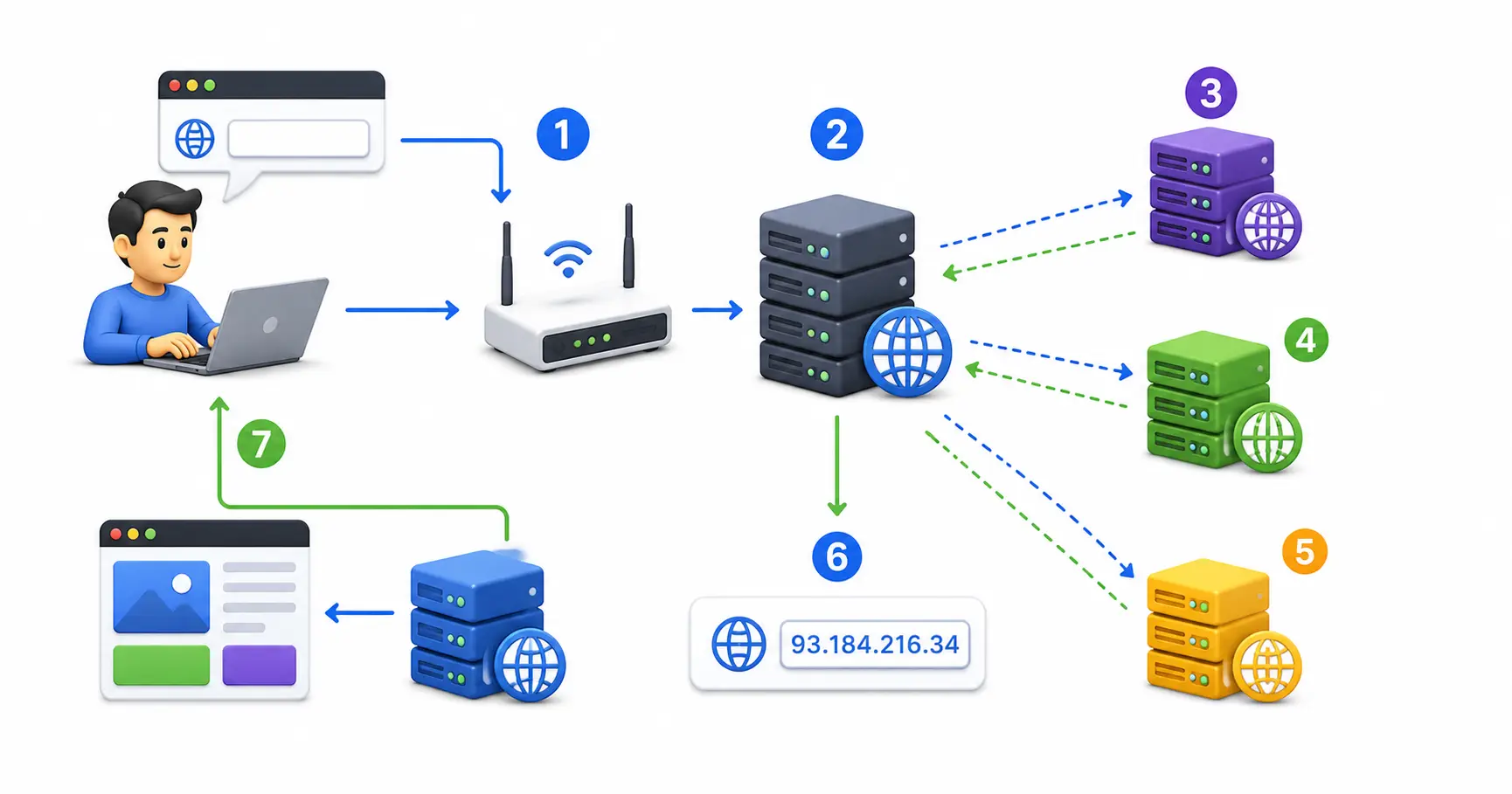
When an application queries a domain name, the DNS server returns record types based on protocol support:
- A Record (IPv4): Maps domain to a 32-bit address (
example.com➔93.184.216.34) - AAAA Record (Quad-A IPv6): Maps domain to a 128-bit address (
example.com➔2606:2800:220:1:248:1893:25c8:1946)
Modern operating systems utilize an algorithm called Happy Eyeballs (RFC 8305): they initiate connection attempts over IPv6 and IPv4 in parallel, locking onto whichever protocol establishes a TCP handshake first!
5. Dual-Stack Cloud Networking & Virtual Private Clouds (VPCs)
In modern enterprise architectures, cloud platforms require careful dual-stack subnet design across virtual networks:
- AWS VPC & Azure Virtual Networks: When provisioning virtual machines or managed clusters, assign dual-stack CIDR blocks. Learn about cloud infrastructure in our AWS vs Azure vs Google Cloud comparison and what is cloud computing.
- Managed Container Clusters: Orchestrate dual-stack container pods in Kubernetes using CNI plugins; read our guide to Kubernetes explained simply.
- Static Site & CDN Ingress: Deploy static frontends to edge networks using Azure Static Web Apps or host static sites for free following our guide on how to host a website for free.
- Self-Hosted Infrastructure: Run private cloud servers on hypervisors like Proxmox VE, back up network configurations using our backup strategies for self-hosted servers, and sync files with Nextcloud.
5. Security, Firewalls & Server Hardening in Dual-Stack Environments
A common sysadmin mistake when enabling IPv6 is configuring firewall rules for IPv4 while leaving the IPv6 interface completely exposed to the public internet!
Dual-Stack Security Hardening Checklist
- Configure Dual-Stack Firewalls: Ensure firewall rules apply to both IPv4 (
iptables/ufw) and IPv6 (ip6tables). - UFW Firewall Rules: Enable IPv6 support in
/etc/default/ufw(IPV6=yes). Follow our complete UFW firewall guide and general firewall security guide. - Automated Intrusion Prevention: Configure Fail2ban or CrowdSec to monitor both IPv4 dotted-decimal logs and IPv6 hexadecimal logs. Read our Fail2ban guide and CrowdSec beginner guide.
- Hardened Reverse Proxies: Route traffic through Nginx Proxy Manager, Traefik, or Caddy with SSL. Learn setup from our Nginx Proxy Manager security guide and Let’s Encrypt guide. Generate web server configs using our Nginx config generator.
- Zero-Trust Mesh Networks: Bypass CGNAT issues by linking local servers over private mesh networks managed by Tailscale or WireGuard. Compare mesh setups in our Tailscale vs WireGuard comparison and review how a VPN works.
- Secret Management: Protect database connection strings and passwords using Vaultwarden; see our Vaultwarden self-hosted guide and generate strong keys using our password generator. Compare security options in our guides on best password managers and passkeys vs passwords.
- Container & System Auditing: Package apps using Docker or Podman (compare in our Docker vs Podman benchmark) and scan container images for CVEs using Trivy via our securing Docker containers guide. Generate deployment manifests using our Docker Compose generator. Secure SSH access following our Ubuntu SSH hardening guide, run system checks using the top 20 Linux security commands, inspect system logs using Linux logs explained, and audit compliance with Lynis via our Lynis security audit guide.
🛠️ Linux CLI Commands for Inspecting IPv4 and IPv6
Sysadmins use these terminal commands to inspect network interface bindings and test connectivity:
Interface Inspection Commands
-
Display All IP Addresses:
ip addr show(Output displays
inetfor IPv4 andinet6for IPv6 addresses) -
Inspect IPv4 Routing Table:
ip -4 route show -
Inspect IPv6 Routing Table:
ip -6 route show
Network Diagnostic Commands
-
Ping IPv4 Address:
ping -4 8.8.8.8 -
Ping IPv6 Address:
ping -6 2001:4860:4860::8888 -
Query DNS A Record (IPv4):
dig A freetechlearner.com +short -
Query DNS AAAA Record (IPv6):
dig AAAA freetechlearner.com +short
Understand file permissions when editing network configs in /etc/netplan/ by reviewing our guide on Linux file permissions explained. Learn how to set up server environments in our guide to deploying Node.js apps on a Linux VPS or hosting static sites via Azure Static Web Apps.
💻 Developer & Sysadmin Web Utilities
Bookmark these interactive web utilities for network configuration, schema generation, and system administration:
- Container Setup: Docker Compose Generator
- Reverse Proxy Configs: Nginx Config Generator
- Init Scripts: Systemd Service File Generator
- Data Formatting: JSON Formatter & JSON Validator
- Secret Generation: Password Generator & ENV Generator
- SEO Metadata: Schema Markup Generator
- Expression Debugging: Regex Tester
- Linux Learning: Linux Command Explorer & Linux Permission Calculator
- Automation: Cron Expression Generator & Gitignore Generator
📖 Official Documentation & Standards References
- RFC 791 (IPv4 Specification): https://datatracker.ietf.org/doc/html/rfc791
- RFC 8200 (IPv6 Specification): https://datatracker.ietf.org/doc/html/rfc8200
- RFC 1918 (Private IPv4 Address Space): https://datatracker.ietf.org/doc/html/rfc1918
- RFC 5952 (IPv6 Text Representation Format): https://datatracker.ietf.org/doc/html/rfc5952
- IANA IP Address Space Registry: https://www.iana.org/numbers
❓ Frequently Asked Questions
Why do we need IPv6 if Network Address Translation (NAT) solved IPv4 exhaustion?
While NAT allowed multiple internal devices to share a single public IPv4 address, it introduced major problems: broken end-to-end peer-to-peer connectivity, high router CPU processing overhead, latency penalties, and obstacles for VoIP, online gaming, and self-hosted servers. IPv6 restores true end-to-end direct global routing without needing NAT.
How many total IP addresses does IPv6 provide compared to IPv4?
IPv4 provides $2^{32} \approx 4.29 \text{ billion}$ unique addresses. IPv6 provides $2^{128} \approx 340 \text{ undecillion}$ unique addresses ($3.4 \times 10^{38}$). This is enough unique addresses to assign trillions of IPs to every grain of sand on planet Earth!
Can IPv4 devices communicate directly with IPv6 devices?
No. IPv4 and IPv6 packet headers are fundamentally incompatible. Devices running on IPv4-only networks cannot directly parse IPv6 headers without translation mechanisms like NAT64/DNS64 or proxy gateways. Dual-stack networks run both protocol stacks in parallel so devices can talk to both systems.
What is the difference between a DNS A Record and a AAAA Record?
A DNS A Record maps a domain name to a 32-bit IPv4 address (e.g. 192.0.2.1). A DNS AAAA Record (Quad-A) maps a domain name to a 128-bit IPv6 address (e.g. 2001:db8::1).
What is Carrier-Grade NAT (CGNAT)?
CGNAT (RFC 6598) is a system where internet service providers place thousands of residential customer homes behind a single shared public IPv4 address. CGNAT prevents home users from port-forwarding local servers or VPNs without using mesh VPN tools like Tailscale or Cloudflare Tunnels.
Does IPv6 make my internet connection faster?
In many cases, yes. IPv6 headers are a fixed 40 bytes (compared to IPv4’s variable 20-60 byte headers), allowing hardware routers to process packets faster in silicon. Furthermore, IPv6 eliminates NAT processing delays at intermediate routers, lowering end-to-end latency.
Is NAT needed in IPv6?
No. Because IPv6 provides virtually infinite addresses, every device can be assigned a globally unique, publicly routable IPv6 address. Security is handled by stateful firewalls (blocking unsolicited incoming traffic) rather than hiding devices behind NAT.
How do I check if my current network supports IPv6?
You can test your IPv6 connectivity by visiting test sites like test-ipv6.com or running ping -6 2001:4860:4860::8888 (Google’s public IPv6 DNS) in your Linux terminal.
What is SLAAC in IPv6?
Stateless Address Autoconfiguration (SLAAC) is an IPv6 feature that allows devices to generate their own unique IPv6 address automatically upon joining a network by listening to Router Advertisement (RA) packets, eliminating the absolute requirement for a centralized DHCP server.
Why haven’t all websites switched to IPv6 yet?
Migrating global infrastructure requires upgrading legacy routers, updating enterprise firewall rules, retraining IT staff, and replacing legacy hardware that lacks IPv6 firmware support. Consequently, providers run dual-stack networks during the multi-decade transition period.
Discussion
Loading comments...