

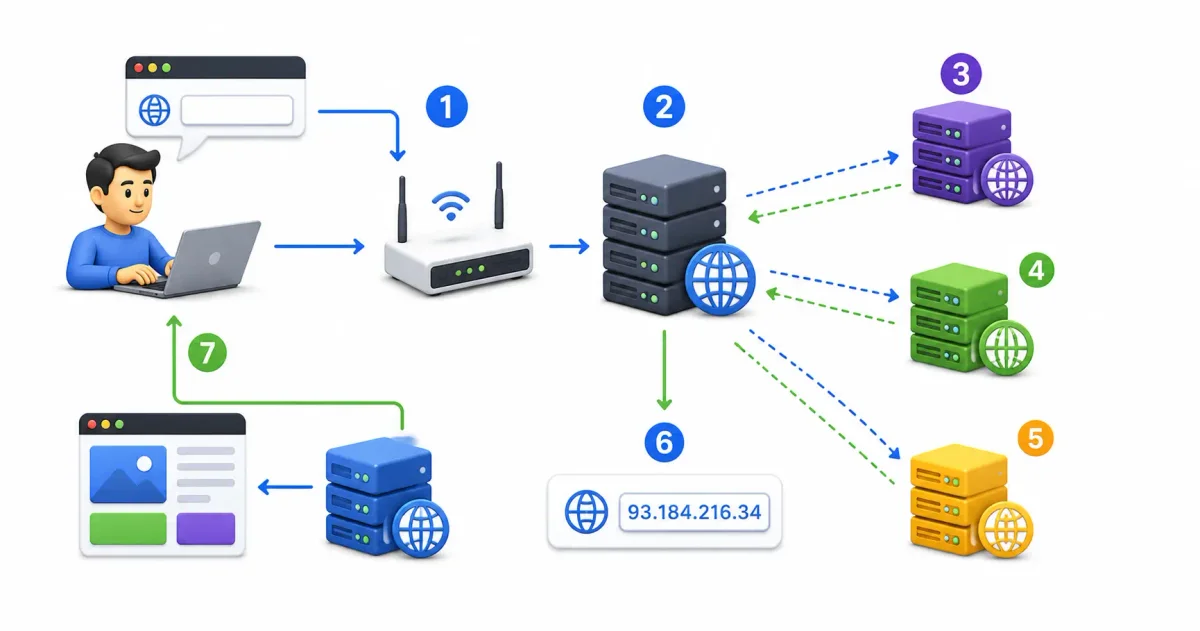
Every time you open a web browser, transmit a corporate email, stream media, or connect an API, a globally distributed database executes silently in the background: the Domain Name System (DNS).
Frequently described as the “Phonebook of the Internet,” DNS is far more than a simple directory lookup table. In 2026, DNS functions as a highly redundant, cryptographically secured traffic routing engine that translates human-friendly domain names (freetechlearner.com) into machine-routable IP addresses (104.21.55.12).
Whether you are configuring domain records for Azure Static Web Apps, setting up free hosting via our guide on how to host a website for free, or evaluating network transport protocols in our IPv4 vs IPv6 guide, mastering DNS is mandatory for systems administrators and web developers. A single typo in a DNS record can knock a multinational corporate app offline in seconds.
In this technical networking guide, we will examine the core human-versus-machine translation problem, break down the 4-tier DNS resolution hierarchy, detail key record types (A, AAAA, CNAME, MX, TXT, NS, CAA), trace request lifecycles, and explore modern DNS security protocols (DNSSEC, DoH, DoT).
⚡ The DNS Resolution Pipeline (Step-by-Step Flow)
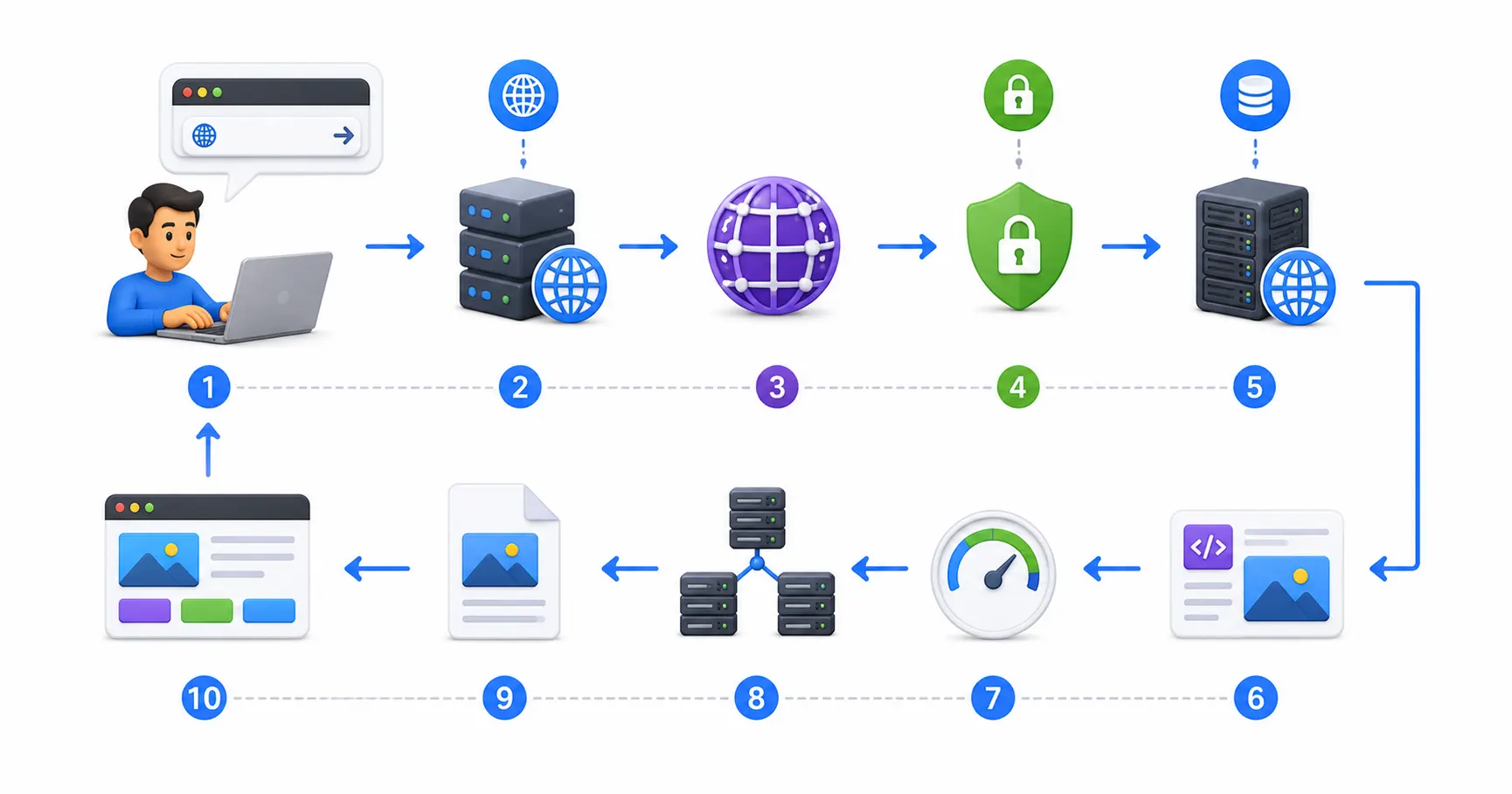
Here is how a DNS resolution query travels when you request a domain for the first time:
- Browser Lookup Request ➔ User types
freetechlearner.com; browser checks internal memory cache - OS Cache Check ➔ System inspects
/etc/hostsfile and operating system DNS resolver cache - Recursive Resolver Query ➔ Request sent to recursive resolver (Cloudflare
1.1.1.1or Google8.8.8.8) - Root Name Server (
.) Query ➔ Resolver asks Root Server for.comTop-Level Domain (TLD) server IP - TLD Server (
.com) Query ➔ Resolver asks TLD server forfreetechlearner.comAuthoritative server IP - Authoritative Server Query ➔ Resolver requests A/AAAA record from domain’s primary DNS server
- Caching & Return IP ➔ Resolver caches IP based on Time-to-Live (TTL) & returns IP to browser
- Connection Handshake ➔ Browser initiates TCP/TLS handshake over Port 443. Read what happens when you type a URL.
📊 Essential DNS Record Types Matrix
DNS zone files store various record types that specify host routing, mail server destinations, and domain validation keys:
| Record Type | Full Name | Primary Operational Purpose | Example Record Format |
|---|---|---|---|
| A Record | Address Record | Maps hostname to a 32-bit IPv4 address | example.com. IN A 93.184.216.34 |
| AAAA Record | Quad-A Record | Maps hostname to a 128-bit IPv6 address | example.com. IN AAAA 2606:2800:220:1:248:1893:25c8:1946 |
| CNAME Record | Canonical Name | Aliases one hostname to another existing hostname | www.example.com. IN CNAME agreeable-sea-012.azurestaticapps.net. |
| MX Record | Mail Exchanger | Directs incoming domain email to target mail servers | example.com. IN MX 10 mail.example.com. |
| TXT Record | Text Record | Stores human/machine text for SPF, DKIM, DMARC, and domain ownership verification | example.com. IN TXT "v=spf1 include:_spf.google.com ~all" |
| NS Record | Name Server | Specifies the authoritative DNS servers for a domain zone | example.com. IN NS ns1.cloudflare.com. |
| SOA Record | Start of Authority | Contains primary zone admin metadata, serial numbers, and refresh timers | example.com. IN SOA ns1.example.com. admin.example.com. ... |
| CAA Record | CA Authorization | Restricts which Certificate Authorities (like Let’s Encrypt) can issue SSL certificates | example.com. IN CAA 0 issue "letsencrypt.org" |
1. Human Names vs Machine Numbers: The DNS Problem
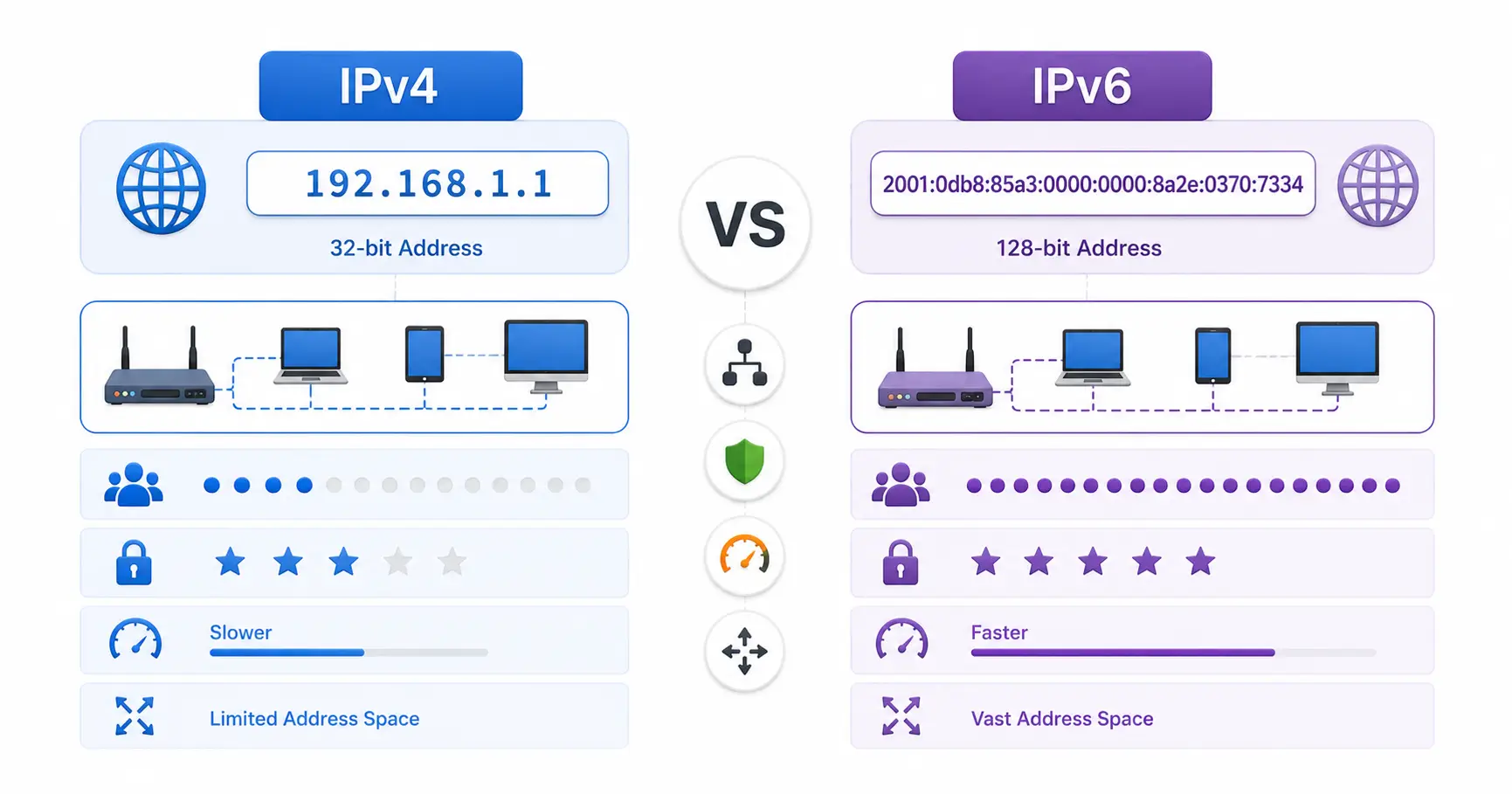
Routers operating across global optical backbones understand only binary IP addresses:
- IPv4 Address:
104.21.55.12(32-bit dotted-decimal notation) - IPv6 Address:
2606:4700:3033::6815:370c(128-bit hexadecimal colon notation)
Because the human brain is optimized for language rather than strings of 32-bit binary integers, DNS acts as the essential abstraction layer, mapping human-friendly text strings to machine-routable IP addresses.
2. The 4-Tier DNS Hierarchy
DNS does not rely on a single monolithic database. It operates as a global, decentralized, hierarchical database divided into 4 server tiers.
Tier 1: The Root Name Servers (.)
At the apex of the global DNS tree sit 13 logical Root Server IP addresses (named a.root-servers.net through m.root-servers.net), managed by organizations like ICANN, NASA, Verisign, and the US Army Research Lab.
- Anycast Distribution: While represented by 13 logical IPs, these servers are replicated across over 1,500 physical data centers globally using Anycast routing to ensure fault tolerance.
- Operational Role: Root servers do not store individual website IPs. They return the IP addresses of the TLD servers responsible for specific extensions (
.com,.org,.io).
Tier 2: Top-Level Domain (TLD) Name Servers
TLD servers manage specific top-level domain extensions:
- Generic TLDs (gTLDs):
.com,.org,.net,.edu,.gov,.io - Country-Code TLDs (ccTLDs):
.uk,.de,.ca,.in,.jp
When queried for freetechlearner.com, the .com TLD server returns the IP addresses of the specific Authoritative Name Servers configured for freetechlearner.com.
Tier 3: Authoritative Name Servers
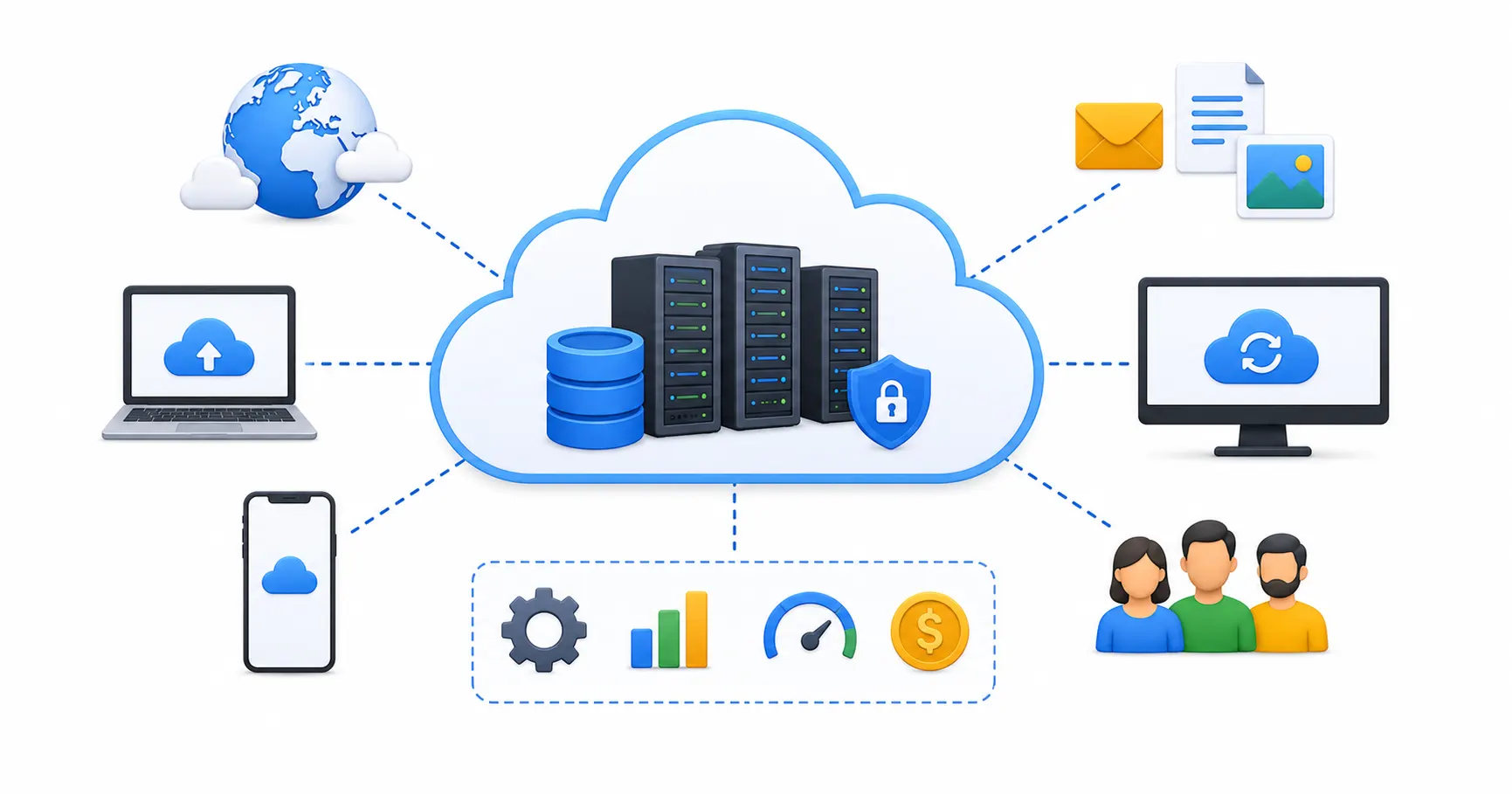
The Authoritative Name Server is the definitive source of truth for a domain name. It holds the official DNS zone file containing your domain’s A, AAAA, CNAME, MX, and TXT records. Cloud DNS providers (Cloudflare, AWS Route 53, Azure DNS, Google Cloud DNS) host authoritative name servers.
Tier 4: Recursive DNS Resolvers
Recursive resolvers are the worker engines of DNS. Operated by your Internet Service Provider (ISP) or public DNS providers (Cloudflare 1.1.1.1, Google 8.8.8.8, Quad9 9.9.9.9), the recursive resolver performs the step-by-step query traversal on behalf of client devices.
3. Deep Dive into Key DNS Record Configurations
Configuring domain records accurately is critical when launching web applications or email services.
1. A Records vs CNAME Records
- A Record (Address): Points a domain or subdomain directly to an IP address. Use A records for root domains (
example.com ➔ 104.21.55.12). - CNAME Record (Canonical Name): Points a subdomain to another domain name. Use CNAME records when pointing subdomains to external services (
www.example.com ➔ myapp.azurestaticapps.net). - CNAME Flattening (ALIAS / ANAME): Traditional DNS standards (RFC 1034) prohibit CNAME records on root apex domains (
example.com). Modern DNS providers like Cloudflare use “CNAME Flattening” to resolve CNAME target IPs dynamically at the root domain level.
2. TXT Records for Email Security (SPF, DKIM, DMARC)
TXT records store arbitrary text metadata used primarily for domain ownership verification and anti-phishing email security:
- SPF (Sender Policy Framework): Specifies which mail servers are authorized to send email on behalf of your domain:
v=spf1 include:_spf.google.com ~all - DKIM (DomainKeys Identified Mail): Stores a public cryptographic key used to verify that outgoing emails were not altered in transit.
- DMARC: Specifies how receiving mail servers should handle emails that fail SPF or DKIM checks (e.g.
p=rejectorp=quarantine).
3. CAA Records for Certificate Authority Security
A Certification Authority Authorization (CAA) record specifies which Certificate Authorities are allowed to issue SSL/TLS certificates for your domain. Adding a CAA record preventing unauthorized CAs from issuing certificates for your domain:
example.com. IN CAA 0 issue "letsencrypt.org"Read about SSL/TLS certificate management in our complete Let’s Encrypt guide.
4. DNS Caching, TTL & Propagation
To prevent billions of global devices from overwhelming Root and Authoritative servers on every web request, DNS relies heavily on multi-layer Caching.
Time-to-Live (TTL) Mechanics
Every DNS record includes a Time-to-Live (TTL) parameter, measured in seconds:
- High TTL (e.g. 86400 seconds / 24 hours): Cached longer by resolvers; reduces DNS query load but delays record changes during software migrations across the software development life cycle; see our SDLC guide for beginners.
- Low TTL (e.g. 300 seconds / 5 minutes): Cached briefly; enables rapid IP updates during server failovers when building async JavaScript web apps and REST APIs in Node.js communicating over standard HTTP protocols and HTML5 standards.
The Propagation Process
When you update a DNS record, the change is instant on your Authoritative Name Server. However, global DNS Propagation takes time because cached records in recursive resolvers worldwide must reach their TTL expiration before fetching the updated IP address.
5. Security & Privacy: DNSSEC, DoH, and DoT
Legacy DNS queries travel over unencrypted UDP packets on Port 53, leaving them vulnerable to spoofing, eavesdropping, and DNS cache poisoning attacks. Modern security protocols lock down this infrastructure layer.
Modern DNS Security Protocols
- DNSSEC (DNS Security Extensions): Adds digital cryptographic signatures to DNS records. Resolvers verify these signatures against a chain of trust, preventing DNS spoofing and cache poisoning attacks.
- DNS over HTTPS (DoH): Encrypts DNS queries by wrapping them inside HTTPS payloads on Port 443, masking DNS queries from ISP snooping and public Wi-Fi eavesdroppers.
- DNS over TLS (DoT): Encrypts DNS queries using TLS over a dedicated port (Port 853), securing transport between client resolvers and name servers.
- Self-Hosted DNS Blocking (Pi-hole / AdGuard Home): Network engineers often run self-hosted DNS sinks like Pi-hole or AdGuard Home on home lab servers to block ad trackers and malicious domains network-wide. Follow our Pi-hole self-hosted guide.
6. Host Hardening & Zero-Trust Security Practices
Securing DNS and cloud infrastructure requires implementing comprehensive security hardening across your Linux hosts:
- Hardened Reverse Proxies: Route HTTPS application traffic through reverse proxies like Nginx Proxy Manager, Traefik, or Caddy with SSL. Follow our Nginx Proxy Manager security guide and Let’s Encrypt guide.
- Zero-Trust Mesh Networks: Connect remote developer laptops and servers securely using Tailscale or WireGuard. Compare mesh setups in our Tailscale vs WireGuard comparison and review how a VPN works.
- Firewalls & Intrusion Defense: Protect host Linux servers with UFW, Fail2ban, and CrowdSec. Follow our tutorials on UFW firewall guide, Fail2ban guide, and CrowdSec beginner guide.
- Secret Management: Protect database connection strings and passwords using Vaultwarden; see our Vaultwarden self-hosted guide and generate strong keys using our password generator. Compare security options in our guides on best password managers and passkeys vs passwords.
- Container Security & Host Auditing: Package apps using Docker or Podman (compare in our Docker vs Podman benchmark) and scan container images for CVEs using Trivy via our securing Docker containers guide. Generate deployment manifests using our Docker Compose generator. Secure SSH access following our Ubuntu SSH hardening guide, run system checks using the top 20 Linux security commands, inspect system logs using Linux logs explained, and audit compliance with Lynis via our Lynis security audit guide.
🛠️ Comparing Cloud & Self-Hosted Hosting Paradigms
Depending on your web development and infrastructure needs, compare hosting platforms across the web ecosystem:
| Hosting Option | Best For | Domain & DNS Setup | SSL & CDN | Cost | Key Differentiator |
|---|---|---|---|---|---|
| Azure Static Web Apps | Jamstack, Astro, React, Enterprise Azure sites | Automated CNAME validation | Included (Free) | Free Tier | Managed Azure Functions & PR staging. Read our Azure SWA guide |
| Free Hosting (Vercel/Cloudflare) | Static sites, Next.js, portfolios | Instant CNAME setup | Included (Free) | Free Tier | Zero cost. Read our guide to hosting a website for free |
| Self-Hosted VPS (Hetzner) | Full root OS access, custom Docker stacks | Manual DNS A/AAAA records | Self-managed | $5 – $20/mo | Complete OS control. Read our VPS guide & deploying Node.js on a VPS |
| Coolify / DokPloy (PaaS) | Self-hosted Heroku alternative | Automated wildcard DNS | Self-managed | Server cost | Open-source control. Read our Coolify setup guide and DokPloy setup guide |
| Local AI Workloads | Offline LLMs, Ollama | Private mesh DNS | Mesh VPN | Hardware | 100% data privacy. Compare in our Local AI vs Cloud AI guide |
💻 Developer & Sysadmin Web Utilities
Bookmark these interactive web utilities for DNS testing, schema generation, and system administration:
- Container Setup: Docker Compose Generator
- Reverse Proxy Configs: Nginx Config Generator
- Init Scripts: Systemd Service File Generator
- Data Formatting: JSON Formatter & JSON Validator
- Secret Generation: Password Generator & ENV Generator
- SEO Metadata: Schema Markup Generator
- Expression Debugging: Regex Tester
- Linux Learning: Linux Command Explorer & Linux Permission Calculator
- Automation: Cron Expression Generator & Gitignore Generator
📖 Official Documentation & Standards References
- RFC 1034 (DNS Concepts and Facilities): https://datatracker.ietf.org/doc/html/rfc1034
- RFC 1035 (DNS Implementation and Specification): https://datatracker.ietf.org/doc/html/rfc1035
- RFC 4033 (DNSSEC Introduction and Requirements): https://datatracker.ietf.org/doc/html/rfc4033
- RFC 8484 (DNS over HTTPS - DoH): https://datatracker.ietf.org/doc/html/rfc8484
- ICANN Official DNS Resources: https://www.icann.org/resources/pages/dns-2012-02-25-en
❓ Frequently Asked Questions
What is DNS in simple terms?
DNS (Domain Name System) is the “Phonebook of the Internet.” It is a globally distributed database that translates human-readable domain names (like google.com) into machine-routable IP addresses (like 142.250.190.46).
What is the difference between an A Record and a CNAME Record?
An A Record maps a domain directly to a numerical 32-bit IPv4 address (e.g. example.com ➔ 93.184.216.34). A CNAME Record (Canonical Name) aliases a subdomain to another existing domain name (e.g. www.example.com ➔ myapp.azurestaticapps.net).
What is a Recursive DNS Resolver?
A Recursive DNS Resolver is the worker engine operated by your ISP or a public provider (like Cloudflare 1.1.1.1 or Google 8.8.8.8). It receives DNS requests from your operating system and queries Root, TLD, and Authoritative servers in sequence to find the target IP address.
What is DNS Time-to-Live (TTL)?
Time-to-Live (TTL) is a setting in a DNS record (measured in seconds) that tells resolvers how long to cache the record before asking Authoritative servers for a fresh update. High TTLs reduce DNS query load, while low TTLs enable rapid IP updates during server migrations.
What is DNSSEC and why is it important?
DNSSEC (DNS Security Extensions) adds digital cryptographic signatures to DNS records. Resolvers verify these signatures against a chain of trust, protecting users from DNS cache poisoning, spoofing, and rogue redirection attacks.
What is DNS propagation, and why does it take up to 48 hours?
DNS propagation is the time required for updated DNS records to spread across all recursive resolvers globally. Because resolvers cache records according to their previous TTL values, global propagation can take minutes or up to 24-48 hours depending on TTL settings.
What is the difference between DoH (DNS over HTTPS) and DoT (DNS over TLS)?
Both encrypt DNS traffic to prevent ISP snooping. DoH (DNS over HTTPS) wraps DNS queries inside standard HTTPS traffic on Port 443, blending in with web traffic. DoT (DNS over TLS) sends encrypted DNS queries over a dedicated network port (Port 853).
What is a CAA Record?
A Certification Authority Authorization (CAA) record specifies which Certificate Authorities (like Let’s Encrypt or DigiCert) are allowed to issue SSL/TLS certificates for your domain, preventing unauthorized CAs from issuing fraudulent certificates.
What are TXT records used for in email security?
TXT records store text metadata used for domain ownership verification and email authentication frameworks: SPF (defines authorized sending servers), DKIM (attaches public cryptographic keys to verify email headers), and DMARC (instructs receivers how to handle failed SPF/DKIM checks).
What is Pi-hole?
Pi-hole is a self-hosted open-source DNS sinkhole that runs on a home lab server or Raspberry Pi. It intercepts DNS queries across your local network and blocks ad tracking and malware domains before they reach your devices.
Discussion
Loading comments...