

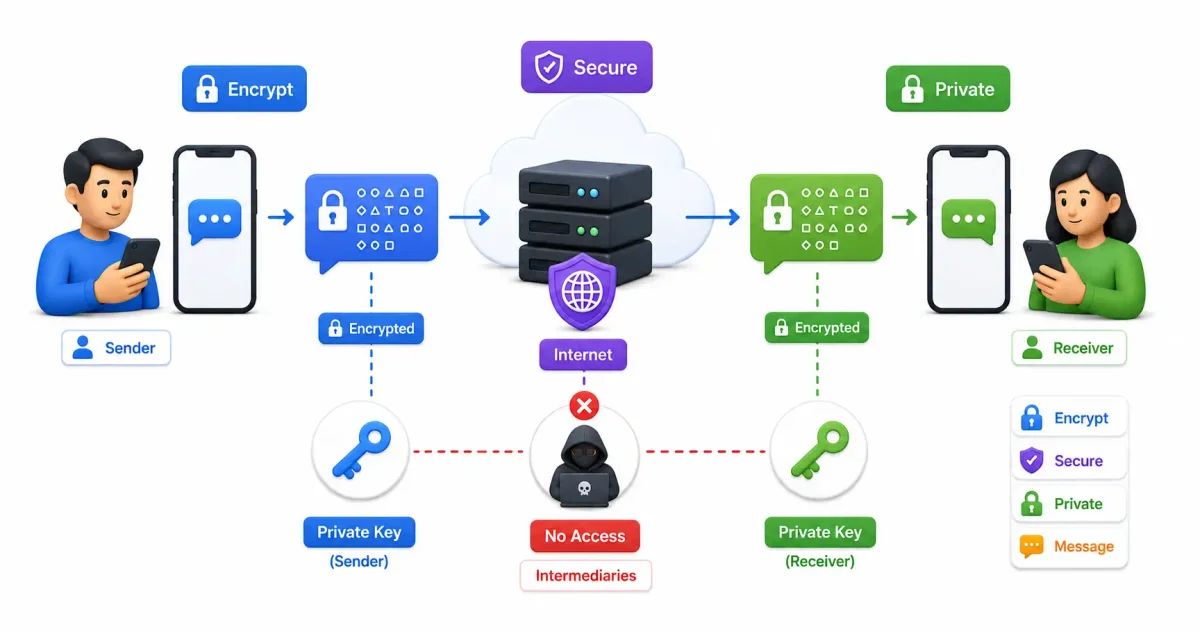
End-to-end encryption is one of the most important privacy technologies used on the internet today. It protects private messages, voice calls, video calls, password vaults, cloud files, and sensitive business communication from being read by anyone except the intended sender and recipient.
In simple terms, end-to-end encryption (E2EE) means your data is encrypted on your device and decrypted only on the recipient’s device. The app provider, internet service provider, Wi-Fi owner, network attacker, or cloud server may help deliver the message, but they should not be able to read its contents.
This matters more than ever in 2026. People use phones and cloud apps for banking, healthcare, work, family conversations, identity documents, passwords, and private photos. Without strong encryption, that data can be exposed through breaches, surveillance, insecure backups, phishing, or compromised networks.
If you want a broader foundation first, read our guide to encryption tools in 2026. If your main concern is private messaging, also see our guide on how to protect your WhatsApp account.
What Is End-to-End Encryption?
End-to-end encryption is a secure communication method where only the sender and the intended recipient can read the content. The message is encrypted before it leaves the sender’s device and stays encrypted while it travels across the internet. It is decrypted only on the recipient’s device.
Think of it like sending a letter inside a locked box. You lock the box before sending it, and only the recipient has the right key. The delivery company can carry the box, but it cannot open it.
E2EE helps protect you from:
- Hackers intercepting messages on public Wi-Fi
- Internet service providers reading message content
- App providers scanning private conversations
- Cloud breaches exposing message contents
- Malicious network administrators
- Unauthorized access during transmission
The key idea is simple: the service can deliver your data, but it should not hold the key needed to read your data.
How End-to-End Encryption Works
Most modern E2EE systems use a combination of public-key cryptography, symmetric encryption, and secure key exchange.
Here is the basic flow:
Sender device              Internet / server              Recipient device
-------------              -----------------              ----------------
Write message
Generate keys
Encrypt message  ------->  Stores or relays ciphertext --> Decrypt message
Send ciphertext            Cannot read content             Read message
Step 1: Keys Are Created
Your device creates cryptographic keys. In many systems, this includes:
- Public key: Can be shared with others so they can encrypt messages for you.
- Private key: Stays on your device and is used to decrypt messages sent to you.
The private key is the important secret. If the private key stays protected, intercepted messages remain unreadable.
Step 2: The Message Is Encrypted on Your Device
When you send a message, your app encrypts it before it leaves your phone or computer. The readable text becomes ciphertext, which looks like random data.
For example:
Plain message:  Meeting at 5 PM
Ciphertext:     x9a7f2b00c4e91d8...
Anyone who intercepts the ciphertext should see unreadable data, not the original message.
Step 3: The Server Delivers Encrypted Data
The app server still has a job. It may route your message, store it temporarily, notify the recipient, and sync devices. But with proper E2EE, the server should not have the key required to decrypt message content.
This is why E2EE is different from normal HTTPS. HTTPS encrypts traffic between your device and a server, but the server can usually read the data after it arrives. E2EE is designed so even the server cannot read the message content.
Step 4: The Recipient’s Device Decrypts It
The recipient’s device uses its private key to decrypt the message. The readable message appears only after it reaches the right endpoint.
End-to-End Encryption vs Other Encryption Types
Encryption is not a single thing. Different systems protect data in different places.
| Encryption Type | What It Protects | Who Can Usually Read It | Common Example |
|---|---|---|---|
| End-to-end encryption | Data from sender to recipient | Only endpoints | Signal, WhatsApp messages |
| Encryption in transit | Data moving to a server | Client and server | HTTPS websites |
| Encryption at rest | Stored data | Whoever controls storage keys | Encrypted drives, databases |
| Client-side encryption | Data before cloud upload | Depends on key control | Some cloud encryption tools |
| Full-disk encryption | A whole device drive | Device owner after unlock | BitLocker, FileVault, VeraCrypt |
The main advantage of E2EE is that the provider should not be able to access the message content. This reduces the damage from server breaches, insider abuse, and broad data requests.
For storage-focused protection, read our guide to best encryption tools. For network privacy, read VPN explained for beginners.
Why End-to-End Encryption Matters
E2EE is not only for journalists or cybersecurity experts. It protects ordinary people every day.
1. It Protects Private Conversations
Your messages may include family details, medical updates, financial information, legal issues, workplace discussions, travel plans, or personal photos. E2EE keeps this content private from the systems that carry it.
2. It Reduces Data Breach Impact
If a messaging provider is breached, properly encrypted message content should remain unreadable without user keys. Metadata may still be exposed, but message text, files, and call content are much harder to reveal.
3. It Helps Journalists, Lawyers, and Activists
People working with sensitive sources, legal matters, political speech, or human rights issues need secure communication. E2EE can protect contacts and conversations from interception.
4. It Improves Business Confidentiality
Companies discuss contracts, customer data, source code, credentials, financial plans, and internal decisions over chat and email. E2EE helps keep those conversations away from competitors, criminals, and untrusted intermediaries.
5. It Limits Mass Surveillance
Without E2EE, service providers and network operators can become collection points for private communication. Strong encryption makes bulk content collection more difficult.
Real-World Uses of E2EE
End-to-end encryption is used in several common categories.
Messaging and Calls
Apps like Signal, WhatsApp, and Apple’s iMessage use E2EE for many types of personal communication. Signal is widely respected because its app and protocol are open source and designed around privacy.
Email is harder to encrypt well because standard email was not originally built around E2EE. Services like Proton Mail and Tuta make encrypted email easier, especially when both sender and recipient use the same encrypted provider.
For traditional email security problems, see our guide on how to know if your email is hacked.
Password Managers
Good password managers encrypt your vault so the provider cannot simply read your stored passwords. Tools like Bitwarden are popular because they combine open-source clients with strong vault encryption. See our best password managers in 2026 and Vaultwarden setup guide for more.
Cloud Storage
Some cloud providers use zero-knowledge or client-side encryption so files are encrypted before upload. You can also use tools like Cryptomator, VeraCrypt, or self-hosted workflows to protect files before storing them online.
If you want more control over your files, compare E2EE cloud options with Syncthing private file sync and Nextcloud self-hosting.
Popular End-to-End Encrypted Apps
Signal
Best for: Private messaging and calls
Official site: signal.org
Signal is often considered the gold standard for secure messaging. It uses the Signal Protocol, supports encrypted text, voice, video, group chats, disappearing messages, and safety number verification.
Why people trust it:
- Open-source clients
- E2EE by default
- Minimal data collection
- Strong security reputation
- Nonprofit structure
Best for: Everyday messaging with large user adoption
Official security page: whatsapp.com/security
WhatsApp uses end-to-end encryption for personal messages and calls by default. This makes it practical because many friends, family members, and small businesses already use it.
Important privacy note: WhatsApp message content is encrypted, but metadata and account information can still matter. Cloud backups are also a major privacy setting to review. Read our WhatsApp security guide before relying on WhatsApp for sensitive conversations.
iMessage
Best for: Apple ecosystem users
iMessage provides encrypted communication between Apple users. It is convenient and deeply integrated into iPhone, iPad, and Mac devices.
Important privacy note: backup settings can affect the security model. If messages are included in cloud backups, you should understand how those backups are protected.
Telegram Secret Chats
Best for: Optional encrypted one-to-one chats
Official FAQ: telegram.org/faq
Telegram is often misunderstood. Regular Telegram cloud chats are not end-to-end encrypted by default. E2EE is available in Secret Chats, which must be started separately.
If you want default E2EE for ordinary chats, Signal or WhatsApp are usually better choices.
Proton Mail
Best for: Encrypted email
Official security page: proton.me/mail/security
Proton Mail uses encryption to protect mailbox contents and supports end-to-end encrypted email between Proton users. It can also send password-protected encrypted messages to external recipients.
Email encryption is still more complex than messaging encryption, but Proton Mail makes it much easier for non-technical users.
End-to-End Encryption Protocols
Signal Protocol
The Signal Protocol is one of the most important modern E2EE protocols. It is used by Signal and has influenced several other secure messaging systems.
Key ideas include:
- Forward secrecy: If a current key is exposed, older messages should remain protected.
- Post-compromise security: Future messages can become secure again after key recovery.
- Double Ratchet algorithm: Message keys change continuously.
- Asynchronous messaging: People can send encrypted messages even when the recipient is offline.
This is why Signal Protocol is widely respected in the cybersecurity community.
OTR
Off-the-Record Messaging, or OTR, is an older secure messaging protocol. It introduced important ideas like deniability and forward secrecy, but it is less common in modern mobile messaging than Signal Protocol.
PGP and OpenPGP
PGP and OpenPGP are commonly associated with encrypted email and file encryption. They are powerful, but usability can be difficult for beginners. Key management, verification, and recovery require care.
TLS
TLS powers HTTPS websites. It is extremely important, but it is not the same as E2EE. TLS protects traffic between your device and a server. The server can usually decrypt and process that data.
For website security basics, see our Let’s Encrypt HTTPS guide.
Challenges and Limitations of E2EE
E2EE is powerful, but it is not magic. It protects message content during transmission, but several risks remain.
Metadata Can Still Leak
E2EE hides content, but it may not hide:
- Who you talked to
- When you talked
- How often you communicated
- Your IP address
- Device information
- Group membership patterns
This metadata can still reveal sensitive patterns. A VPN may hide some network-level information from local networks and ISPs, but it does not make you anonymous. Read VPN explained for the tradeoffs.
Device Security Still Matters
If malware is running on your phone, it may read messages before encryption or after decryption. E2EE does not protect against a compromised endpoint.
Protect your devices with:
- Strong screen lock
- Updated operating system
- App updates
- Device encryption
- Two-factor authentication
- Careful app permissions
- Anti-phishing habits
For practical security habits, read how to spot phishing emails and top Linux security commands.
Backups Can Weaken Privacy
Encrypted messages may become less private if they are backed up to cloud storage without strong encryption. Some apps offer end-to-end encrypted backup options, but users must enable or configure them correctly.
Always review backup settings for WhatsApp, iCloud, Google Drive, and email apps before assuming everything is protected.
Identity Verification Is Often Ignored
E2EE works best when users verify who they are talking to. Many apps show QR codes, safety numbers, or security fingerprints. If you never verify them, you may miss signs of account takeover or man-in-the-middle attacks.
Abuse Detection Becomes Harder
E2EE can make it harder for platforms to scan message content for spam, malware, or abuse. This creates a real debate between privacy, safety, law enforcement, and platform responsibility.
The important point is this: weakening encryption for everyone creates risks for everyone. A backdoor for one group can become a vulnerability for criminals, hostile governments, and attackers.
How to Enable End-to-End Encryption
Some apps enable E2EE automatically. Others require manual settings.
Signal
Signal messages and calls are end-to-end encrypted by default.
Recommended steps:
- Install Signal from the official app store or signal.org.
- Open a chat.
- Tap the contact profile.
- View and verify the safety number.
- Enable disappearing messages for sensitive chats.
WhatsApp personal chats and calls use E2EE by default.
Recommended steps:
- Open a WhatsApp chat.
- Tap the contact or group name.
- Tap Encryption.
- Compare the QR code or numeric code with the other person.
- Review backup encryption in WhatsApp settings.
Also enable two-step verification. Our WhatsApp account protection guide covers the full checklist.
Telegram
Telegram regular cloud chats are not E2EE by default.
To use E2EE:
- Open the Telegram contact.
- Open the contact profile or menu.
- Choose Start Secret Chat.
- Use that Secret Chat for sensitive messages.
Proton Mail
For Proton-to-Proton email, encryption is handled automatically. For messages to non-Proton users, use Proton’s password-protected encrypted message option when needed.
E2EE Best Practices
Use these habits to get real security benefits:
- Use E2EE apps by default for private conversations.
- Verify safety numbers or QR codes for sensitive contacts.
- Turn on disappearing messages where appropriate.
- Protect your phone with a strong PIN or passphrase.
- Keep your operating system and apps updated.
- Enable two-factor authentication on important accounts.
- Review cloud backup settings.
- Avoid screenshots of sensitive messages.
- Do not share private information with unknown contacts.
- Watch for phishing links, even inside encrypted chats.
Remember: E2EE protects the communication channel. It cannot protect you from sending secrets to the wrong person or clicking a malicious link.
FAQ: End-to-End Encryption
Is end-to-end encryption 100% secure?
No security system is 100% secure. E2EE strongly protects message content during transmission, but device compromise, weak passwords, metadata, insecure backups, and phishing can still expose private information.
Can governments read E2EE messages?
With properly implemented E2EE, governments and service providers should not be able to decrypt message content directly from the server. However, they may request metadata, access cloud backups, seize devices, or use malware against endpoints.
Is WhatsApp really end-to-end encrypted?
Yes, WhatsApp personal messages and calls are end-to-end encrypted. However, metadata, business chats, linked devices, and backup settings can affect privacy. Users should review their settings carefully.
Does Telegram use end-to-end encryption?
Telegram supports E2EE only in Secret Chats and some call features. Regular Telegram cloud chats are not end-to-end encrypted by default.
Is Signal better than WhatsApp?
For privacy-focused users, Signal is usually stronger because it is built around minimal data collection and open-source secure messaging. WhatsApp is easier for many people because it has much larger adoption.
Is HTTPS the same as end-to-end encryption?
No. HTTPS protects data between your device and a website server. The website can still read the data. E2EE is designed so the service provider cannot read the message content.
Can E2EE protect me from phishing?
No. E2EE protects message content from outsiders, but it does not stop someone from sending you a malicious link. You still need phishing awareness and account security.
Should I use encrypted backups?
Yes, especially for sensitive chats and password vaults. Without encrypted backups, your private messages may be protected in the app but exposed in cloud storage.
Final Thoughts
End-to-end encryption is one of the strongest tools available for private digital communication. It keeps your message content between you and the intended recipient, even when servers and networks are involved.
The best approach is practical:
- Use Signal for sensitive conversations.
- Review WhatsApp encryption and backup settings.
- Use Proton Mail or similar tools for encrypted email.
- Store passwords in a trusted password manager.
- Keep your devices secure and updated.
- Learn to recognize phishing and account takeover attempts.
E2EE is not a replacement for good security habits, but it is a major layer of protection. If you care about privacy in 2026, it should be part of your daily communication toolkit.
Next, read our guides on encryption tools, VPN privacy, and best password managers to build a stronger personal security setup.
Frequently Asked Questions (FAQ)
What does End-to-End Encryption (E2EE) mean?
End-to-End Encryption is a security method where your messages, files, or calls are encrypted on your device and can only be decrypted by the intended recipient’s device. Nobody in the middle—not the internet provider, not the hackers, not even the messaging company itself—can read the content.
Are WhatsApp and iMessage truly end-to-end encrypted?
Yes, WhatsApp and iMessage use end-to-end encryption by default for messages between users. However, if you back up your chat history to iCloud or Google Drive without enabling encrypted backups, those backups can be accessed by Apple or Google.
Is Telegram end-to-end encrypted?
By default, Telegram is NOT end-to-end encrypted. Standard chats are encrypted between you and Telegram’s servers, meaning Telegram can read them. To use E2EE on Telegram, you must manually start a “Secret Chat.”
Why isn’t regular email end-to-end encrypted?
Standard email protocols (like SMTP and IMAP) were designed decades ago without encryption in mind. While modern email providers encrypt the connection (TLS) so hackers can’t intercept it over Wi-Fi, the providers themselves (like Google or Microsoft) can still read your emails. To get E2EE email, you must use a service like ProtonMail or set up PGP encryption.
Can law enforcement decrypt E2EE messages?
No. Because the service provider does not hold the decryption keys, they cannot hand over your messages to law enforcement even if served with a warrant. This is why E2EE is frequently debated in political and legal circles.
Discussion
Loading comments...