

In the complex world of Open-Source Intelligence (OSINT), Penetration Testing, and Incident Response, the hardest part of an investigation is rarely finding the data. The most challenging aspect is making logical sense of the tidal wave of unstructured information you just collected.
During a reconnaissance campaign against a cybercriminal syndicate, a hostile state-sponsored threat actor, or a corporate entity, an investigator will often collect an overwhelming amount of raw data. You might scrape 50 suspicious IP addresses, enumerate 120 subdomains, extract 30 encrypted email addresses, uncover 5 offshore shell companies, and map 15 distinct social media profiles.
If you attempt to store this volume of intelligence in flat text files, Word documents, or Excel spreadsheets, it becomes difficult to comprehend the relationships between disparate data points.
How do you determine if an anonymous Twitter profile registered in 2026 shares the same recovery email address as the person who registered a malicious phishing domain three years ago?
To solve this problem, professional intelligence agencies, law enforcement, and corporate Security Operation Centers (SOCs) rely on the power of Graphical Link Analysis.
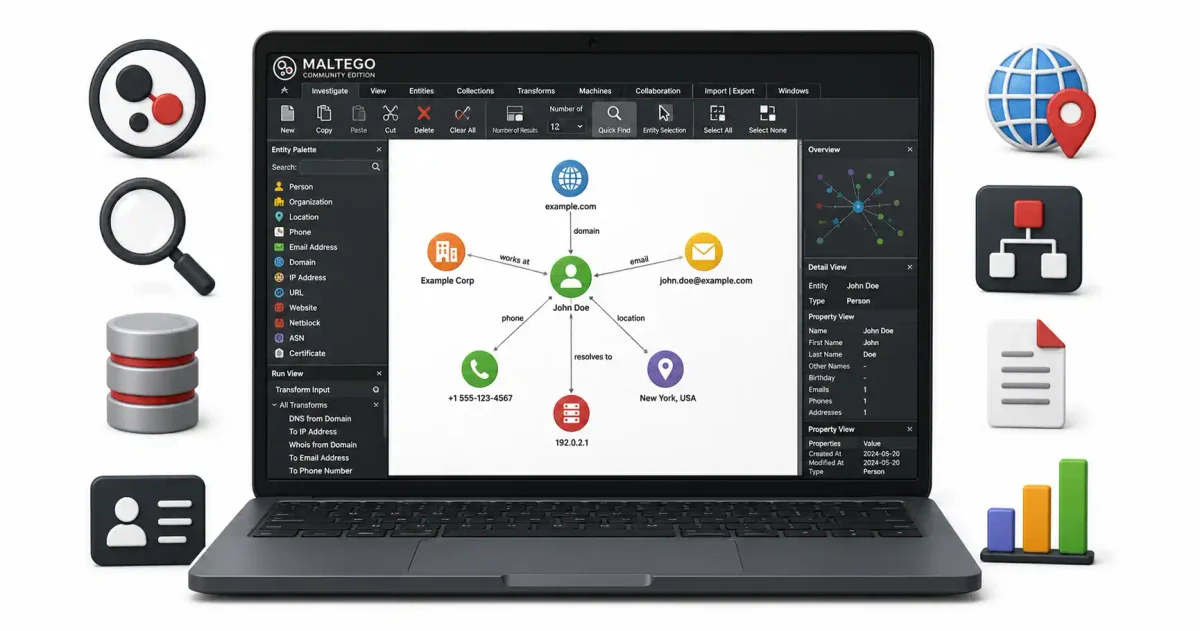
Maltego is a global industry standard for data visualization and relationship mapping. By providing an interactive graphical canvas, Maltego allows you to visually connect seemingly disparate pieces of information, automatically query thousands of public databases, and map the threat landscape.
In this guide for 2026, we will demystify Maltego. We will explore the foundational architecture of Maltego Community Edition (CE), the Transform Hub, execute real-world domain and identity reconnaissance scenarios, and learn how to automate intelligence gathering workflows using Maltego Machines.
1. The Core Architecture: Understanding the Maltego Engine
Maltego is a proprietary software application developed by the intelligence firm Paterva. While enterprise-level commercial licenses have associated costs, the Community Edition (CE) is offered free of charge for university students, cybersecurity hobbyists, and non-commercial open-source security researchers.
To successfully use Maltego and understand how it constructs a visual graph, you must understand its four foundational pillars:
Pillar 1: Entities (The Visual Nodes)
An Entity is a standardized visual icon placed onto the graph canvas that represents a single, distinct piece of intelligence data. Maltego comes pre-loaded out of the box with dozens of entity types, categorized logically:
- Infrastructure Entities: Domain Name, IPv4 Address, DNS Record, Full Website URL, BGP AS Number.
- Personal Entities: Person Name, Email Address, Physical Phone Number, Alias/Online Username, Cryptographic Hash.
- Social Entities: Facebook Account, Twitter Profile, LinkedIn Organization, Dark Web Forum Post. When you start an investigation, you drag your initial starting point (the “seed” entity) from the Entity Palette onto the canvas.
Pillar 2: Transforms (The Scripts)
Transforms are the core of Maltego’s functionality. A Transform is a script (usually a Python script or a REST API call) that takes the data from one Entity, queries a public database, and returns a list of related Entities, placing them onto the canvas and drawing the connections.
- The Classic Example: If you place a “Domain Name” entity (
target-company.com) on the canvas and run the “To IP Address [DNS Lookup]” Transform, Maltego queries a DNS server and drops a new “IPv4 Address” entity (192.168.1.1) onto the canvas, drawing a line linking it to the original domain.
Pillar 3: The Transform Hub (The Intelligence Marketplace)
The Transform Hub is Maltego’s internal marketplace. It contains packages of Transforms built by third-party intelligence vendors. Many packages are free (like Shodan, Censys, and AlienVault OTX), while others require paid enterprise API subscriptions (like SocialNet, Pipl, or Dark Web data brokers).
Pillar 4: Links (The Edges)
Links are the visual lines that connect Entities on the canvas. They establish the relationship between points. Links can optionally contain text labels (e.g., “Resolves To,” “Owned By,” “Friends With,” “Communicated With”), allowing an investigator to comprehend why two nodes are connected.
2. Installation and The License Gateway
Maltego operates as a Java-based desktop client, allowing it to run natively on Linux, macOS, and Windows operating systems.
🐧 Installing on Linux (The Hacker’s Path)
If you are running a dedicated OSINT virtual machine (which is recommended, as discussed in our guide to Building Your First OSINT Toolkit), such as Kali Linux or CSI Linux, Maltego is pre-installed by default.
If you are on a standard Debian or Ubuntu machine, download the .deb package from the official Maltego website and install it via the terminal:
sudo dpkg -i Maltego-v4.x.deb🍎/🪟 Installing on macOS and Windows 11
Download the .dmg or .exe installer from the official website. You must ensure you have a current version of the Java Runtime Environment (JRE) installed, as Maltego relies on Java for its graphical rendering engine.
Navigating the License Gateway
When you launch Maltego for the first time, you will face the License Gateway.
- Select the Maltego CE (Free) option.
- You will be prompted to create a free account on the Maltego Community portal. This requires a valid email address and CAPTCHA verification.
- Log in using your credentials. The software will generate a local license key on your hard drive and initialize the Transform Hub.
3. Configuring the Transform Hub
Before you place nodes on the canvas, you must configure your Maltego installation with external intelligence feeds. By default, Maltego comes with the “Standard Transforms” package, which handles basic DNS lookups and search engine queries.
To conduct an investigation, click on the Transform Hub tab and install third-party intelligence connectors.
The Essential Free Packages:
- Shodan: This is highly recommended. It allows you to take an IP address and query the Shodan search engine to find open ports, banners, and vulnerabilities without actively scanning the target. (Requires a free Shodan API key. See our Shodan Tutorial).
- Censys: Similar to Shodan, this is excellent for pulling SSL/TLS Certificate Transparency logs to find corporate subdomains.
- VirusTotal: Essential for malware analysis. If you have a suspicious file hash or a malicious IP address, this transform queries VirusTotal to see if any antivirus engines have flagged it as a threat.
- HaveIBeenPwned: Allows you to query an email address entity to see which corporate data breaches it was involved in.
4. Practical Scenario 1: Corporate Infrastructure Reconnaissance
Let’s execute a real-world intelligence scenario. A corporate client has hired you to perform an external vulnerability assessment on their company infrastructure, target-corporation.com. You need to map out the servers they own.
- Planting The Seed: Open a new graph (
Ctrl+N). Open the Entity Palette on the left. Drag a Domain entity onto the canvas. Double-click the text and rename it totarget-corporation.com. - DNS Enumeration: Right-click the domain node to open the Context Menu. Navigate to the DNS category and select To DNS Name [Find Subdomains].
- The Result: Maltego queries various search engines and DNS brute-force dictionaries. Multiple “DNS Name” nodes appear on your screen (e.g.,
dev.target-corporation.com,mail.target-corporation.com,staging-vpn.target-corporation.com), linked to the central domain. - IP Resolution: Highlight the subdomain nodes by dragging a box around them. Right-click the group and select To IP Address [DNS Lookup].
- The Result: Maltego queries the A-records. The graph updates, linking those subdomains to IPv4 addresses. You now know the target relies on a consolidated cluster of servers.
- Infrastructure Pivoting: Right-click those IP addresses and run the To AS Number (BGP) transform. The graph reveals that seven IPs belong to Amazon Web Services (AWS) data centers, but one IP belongs to an offshore hosting provider.
The Conclusion: Within a few minutes, and passively without triggering a firewall alarm, you have identified a suspicious or potentially compromised server attached to the client’s infrastructure.
5. Practical Scenario 2: Hunting a Threat Actor Persona
Maltego is not just for mapping corporate servers; it is also useful for tracking human identities and social media personas. Let’s assume you are tracking a hacker who uses the alias CyberGhost_2026.
- Planting The Seed: Drag an Alias / Phrase entity onto the canvas and rename it to
CyberGhost_2026. - Search Engine Correlation: Right-click the alias and run To Website [Using Search Engines]. Maltego queries Google, Bing, Yandex, and DuckDuckGo simultaneously. It returns several URL entities.
- Data Filtering: Analytical review is required here. Manually delete URL nodes that point to unrelated pages. You are left with a URL pointing to a Reddit profile and one URL pointing to a GitHub repository.
- Email Extraction: Convert the GitHub URL into a Person entity. Run an email extraction transform against the GitHub API, revealing the threat actor’s recovery email address:
[email protected]. - Breach Correlation: Right-click the discovered Email entity and run the HaveIBeenPwned transform. The graph expands, showing that this email address was registered on a cybercriminal forum that was hacked in 2024.
The Conclusion: You have successfully traced an alias across multiple platforms, extracted an email address, and connected the actor’s involvement to a dark web forum.
6. Automation: The Power of Maltego Machines
Running transforms manually by right-clicking individual nodes can be tedious and prone to human error. If you want to run a standardized footprinting campaign against a corporate target, you can use Maltego Machines.
A Machine is a pre-written macro (a script) that executes a sequence of Transforms based on conditional logic.
Executing the “Footprint L1” Machine
- Navigate to the Machines tab in the top ribbon menu.
- Select Run Machine and choose Footprint L1 (Fast, Basic footprinting).
- The Machine will pause and ask you for a starting domain. Enter
target.com. - Click finish and step back from the keyboard.
The Machine will automatically run domain enumeration. When it finds subdomains, it will resolve them to IP addresses. It will check those IP addresses for open ports using the Shodan API. It will also extract email addresses from the main corporate website. It accomplishes in 60 seconds what would normally take an analyst hours of manual work.
7. Operational Security (OPSEC) in Maltego
When conducting investigations using Maltego against threat actors, you must understand how your data routes across the internet.
1. Cloud Transform Routing (Passive & Safe)
By default, the majority of Maltego’s built-in transforms are executed on Paterva’s cloud servers located in Europe. When you run a DNS lookup against a target, your computer sends the request to Maltego’s servers. Maltego’s servers run the query against the target, and then send the result back to your local graph. The target’s firewall logs will show an IP address belonging to Paterva, not your home IP address. This method is safe and passive.
2. Local Transforms (Active & Potentially Dangerous)
Some third-party transforms are designed to run locally. If you install a transform package that executes Nmap port scans, that software runs directly from your computer’s network interface. It sends packets directly from your IP address to the target’s firewall. If you are investigating a capable entity, running local transforms without routing your machine through a VPN or a proxy chain can leak your IP address to the target, potentially compromising the investigation.
3. API Key Leakage
When you configure third-party APIs (like Shodan, Censys, or VirusTotal) in the Transform Hub, those API keys are tied to your identity and billing information. Some API providers sell their access logs to threat intelligence firms. Ensure your OSINT API keys are registered to anonymous burner email addresses rather than your personal or corporate email accounts.
Frequently Asked Questions (FAQ)
What is Maltego used for?
Maltego is a visual link analysis and data mining tool used for OSINT investigations. It maps relationships between entities like people, domains, IP addresses, email addresses, and social media accounts into interactive graphs that reveal hidden connections.
Is Maltego Community Edition free?
Yes. Maltego Community Edition (CE) is free to use. It has some limitations compared to the paid versions, such as a maximum of 12 results per transform and restricted access to certain premium data sources, but it is fully functional for learning and basic investigations.
What is a Maltego Transform?
A Transform is an automated query that takes one piece of data (like a domain name) and returns related data (like associated IP addresses, email addresses, or subdomains). Transforms are the core building blocks of Maltego’s investigative power.
Can Maltego be used for illegal hacking?
Maltego itself is a legal OSINT tool that only queries publicly available data sources and APIs. However, using the information gathered through Maltego to access unauthorized systems or harm individuals is illegal. Always operate within legal and ethical boundaries.
What is a Maltego Machine?
A Machine is a pre-built automated workflow that chains multiple Transforms together in sequence. Instead of running each Transform manually, a Machine automatically executes an entire investigation pipeline — such as enumerating subdomains, resolving IPs, and checking for open ports — in one click.
Conclusion: The Ultimate OSINT Weapon
Maltego Community Edition is a vital part of the OSINT analyst’s digital toolkit. It bridges the gap between raw data collection and actionable intelligence. By mastering the Entity palette, leveraging third-party API Transforms in the Hub, and building relational graphs, you can visually expose the hidden connections that cybercriminals try to conceal.
Always remember to maintain your OPSEC, carefully filter your data, and use Maltego Machines to automate your intelligence workflows. The truth is visible on the graph.
Discussion
Loading comments...