

In modern cybersecurity, the reconnaissance phase often dictates the success of an engagement. Whether you are a penetration tester mapping a corporate target’s attack surface, a Security Operations Center (SOC) analyst tracking a threat actor, or a journalism student verifying a leaked document, gathering actionable intelligence is a critical first step.
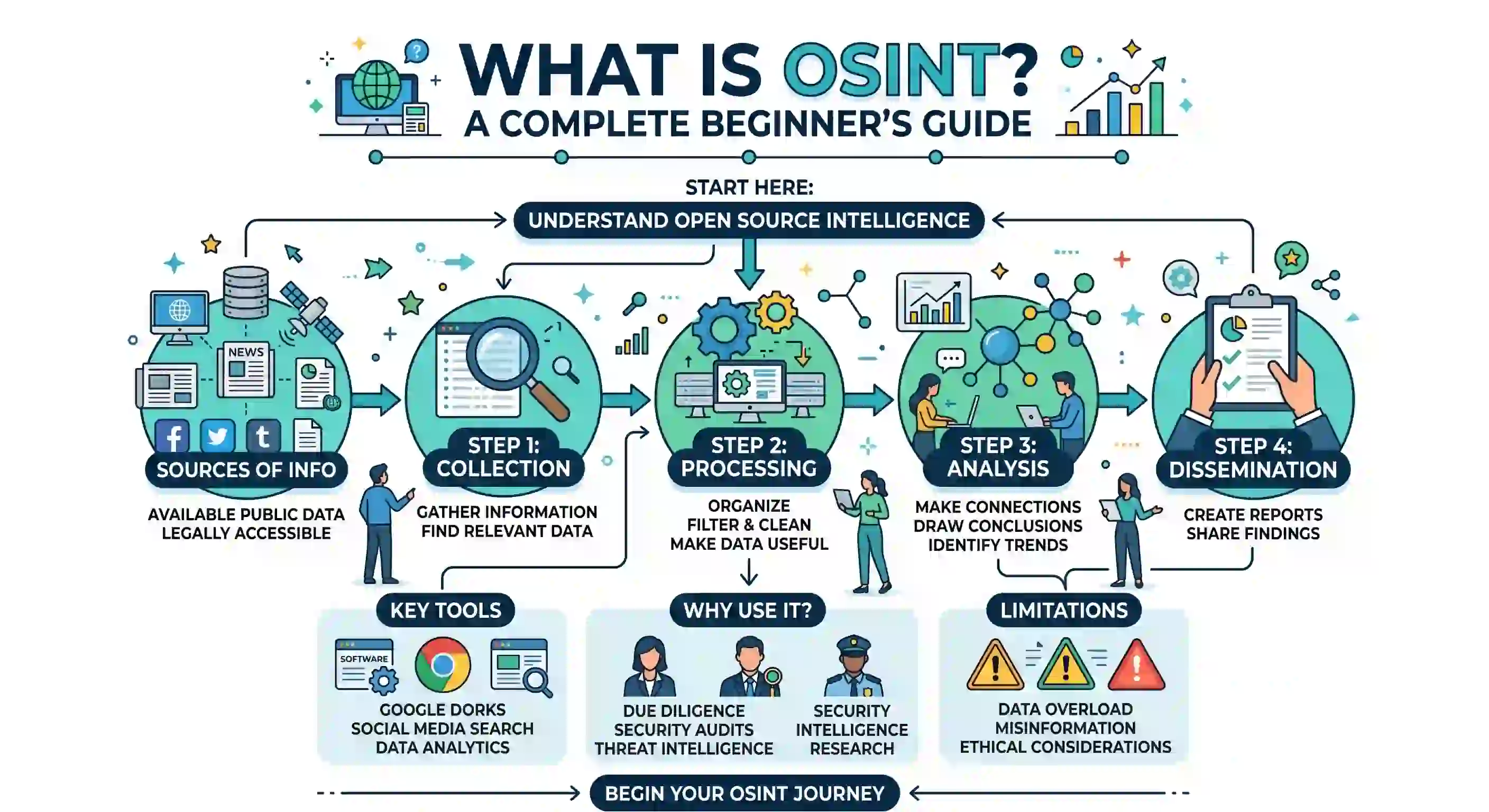
This structured gathering process is known as Open Source Intelligence (OSINT). However, the volume of data generated on the public internet is staggering. Manually searching Google, reading thousands of LinkedIn profiles, and querying DNS servers can be an exercise in futility.
To adapt and excel in the OSINT landscape, you need to automate your investigative workflow using specialized tools.
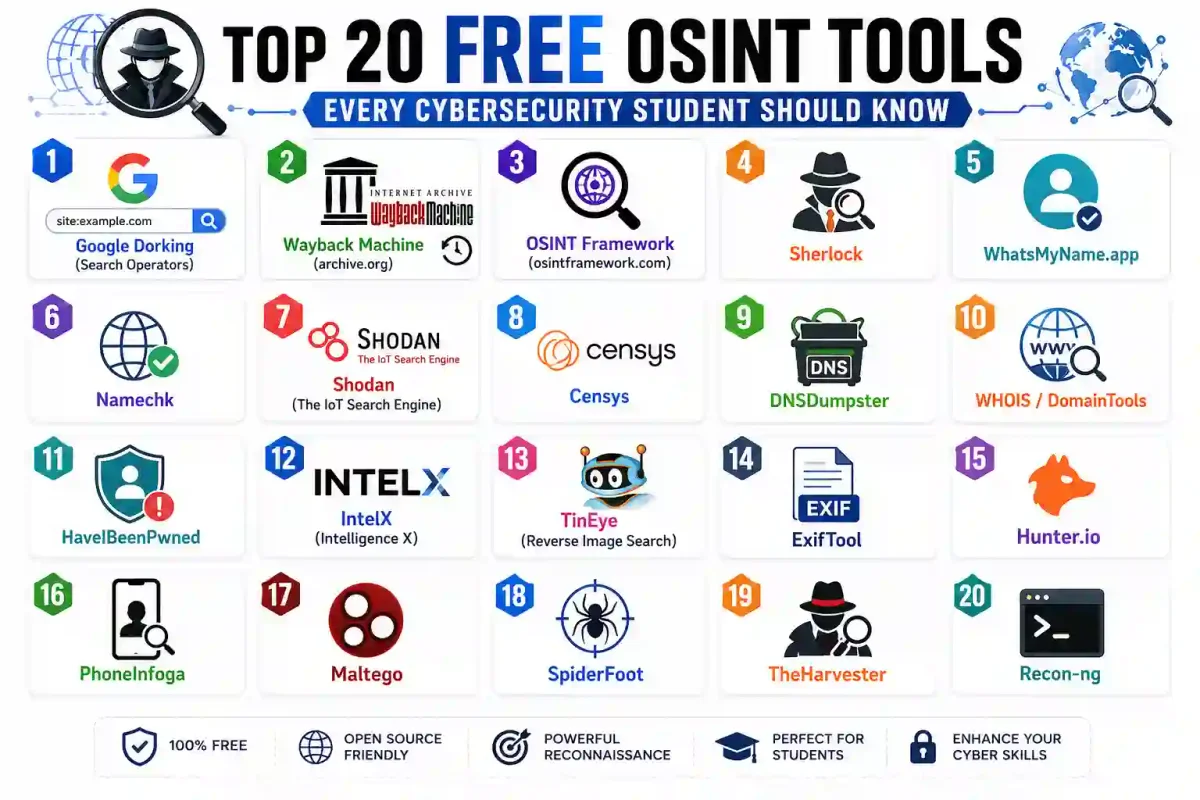
The OSINT community is known for developing, maintaining, and sharing advanced software free of charge. In this guide, we have categorized and detailed the Top 20 Free OSINT Tools that every cybersecurity student, hobbyist, and professional should know in 2026.
Category 1: Advanced Search & Historical Archiving
The foundation of a deep investigation begins with search engines and historical archives. These tools allow you to bypass standard search results and query raw data from the source.
1. Google Dorking (Advanced Search Operators)
Before you download a Python script, master the search engine you already use. Google Dorking uses advanced operators to force the algorithm to return specific file types or URL structures, ignoring standard web pages.
- The Power: You can find exposed SQL database dumps, sensitive
.envfiles containing API keys, and open directory servers. - Must-Know Operators:
site:,filetype:,intitle:,inurl:. - Actionable Guide: Read our tutorial on How to Perform a Google Dorking Investigation.
2. The Wayback Machine (Archive.org)
The internet is not permanent. Threat actors delete phishing domains, corporations scrub press releases, and whistleblowers delete social media accounts. The Wayback Machine takes regular snapshots of billions of web pages.
- The Power: If you have a dead URL returning a
404 Not Founderror, the Wayback Machine will often show you what that page looked like in the past, preserving digital evidence.
3. OSINT Framework (osintframework.com)
This is not a standalone tool, but rather an interactive directory of OSINT resources organized in a web-based mind map.
- The Power: If you have an indicator—such as a cryptocurrency wallet address—and need to investigate it, clicking the “Cryptocurrency” node on the OSINT Framework will provide direct links to blockchain analysis tools.
4. Intelligence X (IntelX)
IntelX is a European search engine and data archive. Unlike Google, which respects robots.txt files, IntelX archives the dark web, unindexed paste sites, and data breaches.
- The Power: It is an excellent tool for searching leaked corporate email addresses or IP addresses found in historical darknet forum leaks.
5. Search That Hash (search-that-hash.com)
When you discover a cryptographic string in a leaked database, you may need to identify and crack it. Search That Hash is an automated meta-search engine for this purpose.
- The Power: Input a cryptographic hash (e.g., MD5, SHA-1, SHA-256), and it searches over 40 hash-cracking APIs and rainbow table databases simultaneously, often returning the clear-text password.
Category 2: Username Correlation & Identity Verification
When investigating individuals, username correlation is a primary pivot point.
6. Sherlock
If a threat actor uses the alias DarkGhost99 on a hacking forum, they likely use the same alias on Reddit, GitHub, and Steam. Sherlock is a Python command-line tool that automates this search.
- The Power: Type
sherlock DarkGhost99in your terminal, and the script queries over 350 social media platforms simultaneously, returning a list of URLs where the alias is registered.
7. Maigret
An evolution of Sherlock, Maigret goes further than verifying if an account exists.
- The Power: When Maigret finds an account, it extracts public profile information, parsing web pages for registered names, bio information, and locations, generating an HTML intelligence report.
8. WhatsMyName.app
For analysts who cannot run Python scripts locally or are working on locked-down machines, WhatsMyName is a web-based alternative to Sherlock.
- The Power: It is fast, updated by the OSINT community, and provides hits across various social media networks.
9. Pipl (The Core Concepts)
While Pipl has shifted toward a paid commercial model, its underlying concepts remain a standard for connecting a digital identity (an email or username) to a physical person.
- The Power: Cross-referencing public records to help de-anonymize online personas.
10. Namechk
Originally designed to see if a brand name was available, OSINT investigators repurposed Namechk to visually determine which domain extensions and social media networks an alias is registered on.
Category 3: Infrastructure & Network Intelligence
When assessing a corporate network, you map the servers. These tools analyze the logical architecture of the internet.
11. Shodan (The Search Engine for IoT)
Google indexes websites; Shodan indexes servers. Shodan crawls the internet, scanning IPv4 addresses across ports to see what software is running.
- The Power: You can search for vulnerable, outdated versions of Apache, locate unauthenticated industrial control systems (SCADA), or find public webcams lacking passwords.
- Actionable Guide: Learn how to write Shodan queries in our guide: How to Use Shodan for Cybersecurity Research.
12. Censys
An alternative to Shodan, Censys provides visibility into the internet’s infrastructure. It is known for its integration with SSL/TLS Certificate Transparency logs.
- The Power: If a target company registers an internal staging server and requests an SSL certificate, Censys logs it, allowing you to discover subdomains before the company configures the DNS.
13. DNSDumpster
A free domain research tool that discovers host records (A, AAAA, MX, and TXT).
- The Power: Input a domain name, and DNSDumpster lists discovered subdomains while generating a visual map showing the relationships between web servers, email servers, and hosting providers.
14. Hurricane Electric BGP Toolkit (bgp.he.net)
A useful tool for understanding the architecture of the internet. Border Gateway Protocol (BGP) is how ISPs route traffic.
- The Power: By querying an IP address, you can determine what corporation owns that block of IP addresses (ASN), who their upstream internet providers are, and the server’s geographic location.
Category 4: Deep Image & Media Forensics
Images contain hidden data and can be tracked across the internet like text.
15. ExifTool
When you take a photo with a smartphone, the phone embeds metadata (EXIF data) into the image file. ExifTool is a CLI utility that extracts this data.
- The Power: ExifTool can reveal the GPS coordinates of where the photo was taken, the make and model of the camera, and the time the photo was created, reducing the photographer’s anonymity.
16. TinEye
A reverse image search engine. Unlike standard Google Images (which uses contextual machine learning), TinEye uses hash-matching algorithms.
- The Power: If you find an edited profile picture of a social media bot, TinEye will scan images to find the original source photo, helping confirm if the account is inauthentic.
17. Yandex Image Search
The search engine Yandex has one of the most effective facial recognition algorithms publicly available.
- The Power: While some search engines restrict facial recognition for privacy reasons, Yandex will take a photo of a face and match it to other photos of that person across various websites.
Category 5: Email Correlation & Breach Data
An email address is a central component of an individual’s digital identity. These tools leverage breach data to uncover information.
18. HaveIBeenPwned (HIBP)
Maintained by Troy Hunt, HIBP tracks compromised email addresses from data breaches (like the LinkedIn, Adobe, and Yahoo breaches).
- The Power: Entering an email address reveals a history of digital platforms the target has used.
- Actionable Guide: Learn how to pivot from email breaches in our guide: Investigating an Email Address.
19. Hunter.io
Hunter is designed for corporate B2B sales teams, but it is a valuable OSINT tool. It crawls the web looking for public corporate email addresses.
- The Power: Enter
target-company.com, and Hunter reveals the corporate email naming convention (e.g.,[email protected]) and lists verified employee emails, providing a target list for an authorized phishing simulation.
Category 6: Automation & Workflow Aggregation
Executing the previous 19 tools manually can be time-consuming. Professionals often use aggregation frameworks to automate the investigative process.
20. TheHarvester and SpiderFoot (The Ultimate Automators)
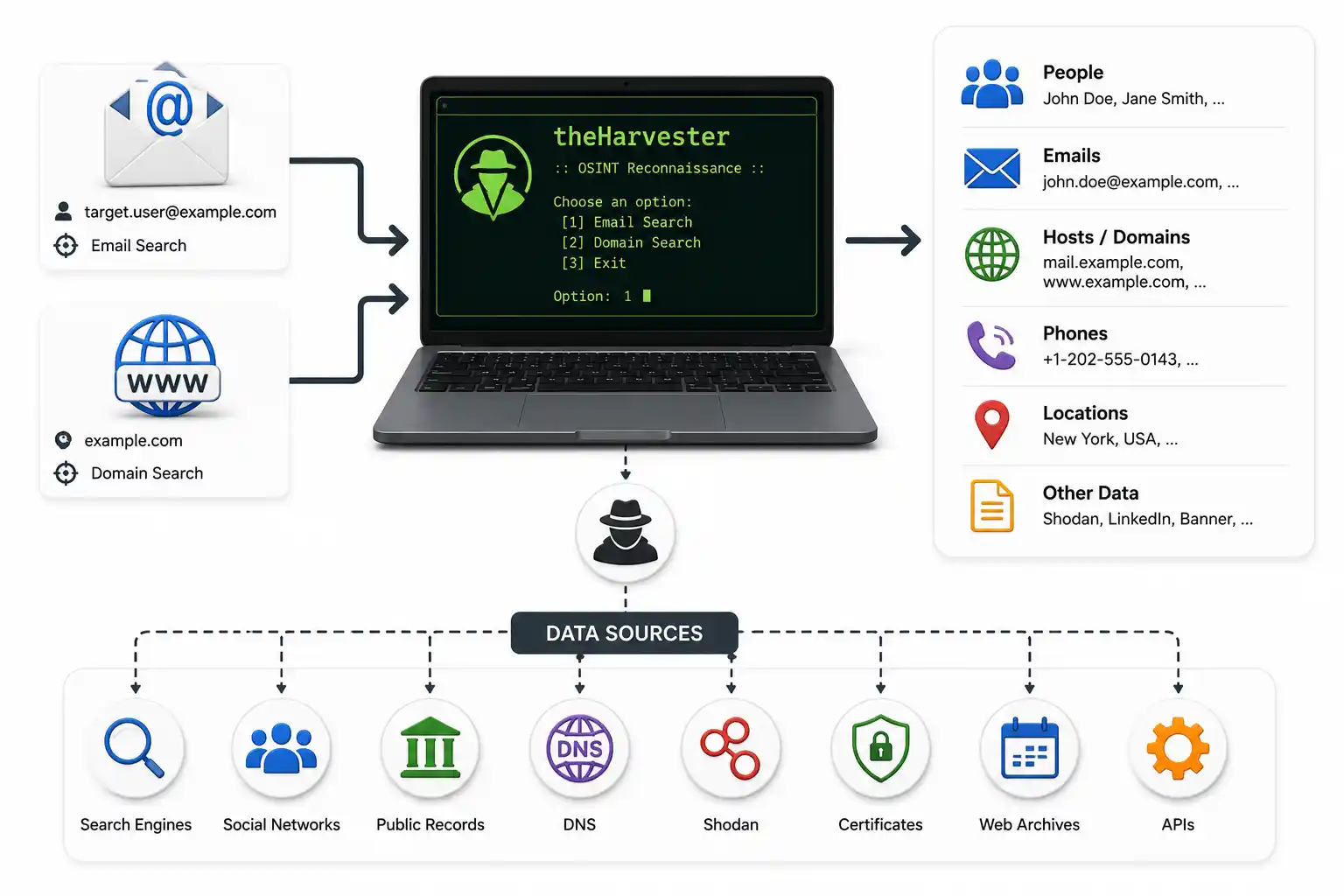
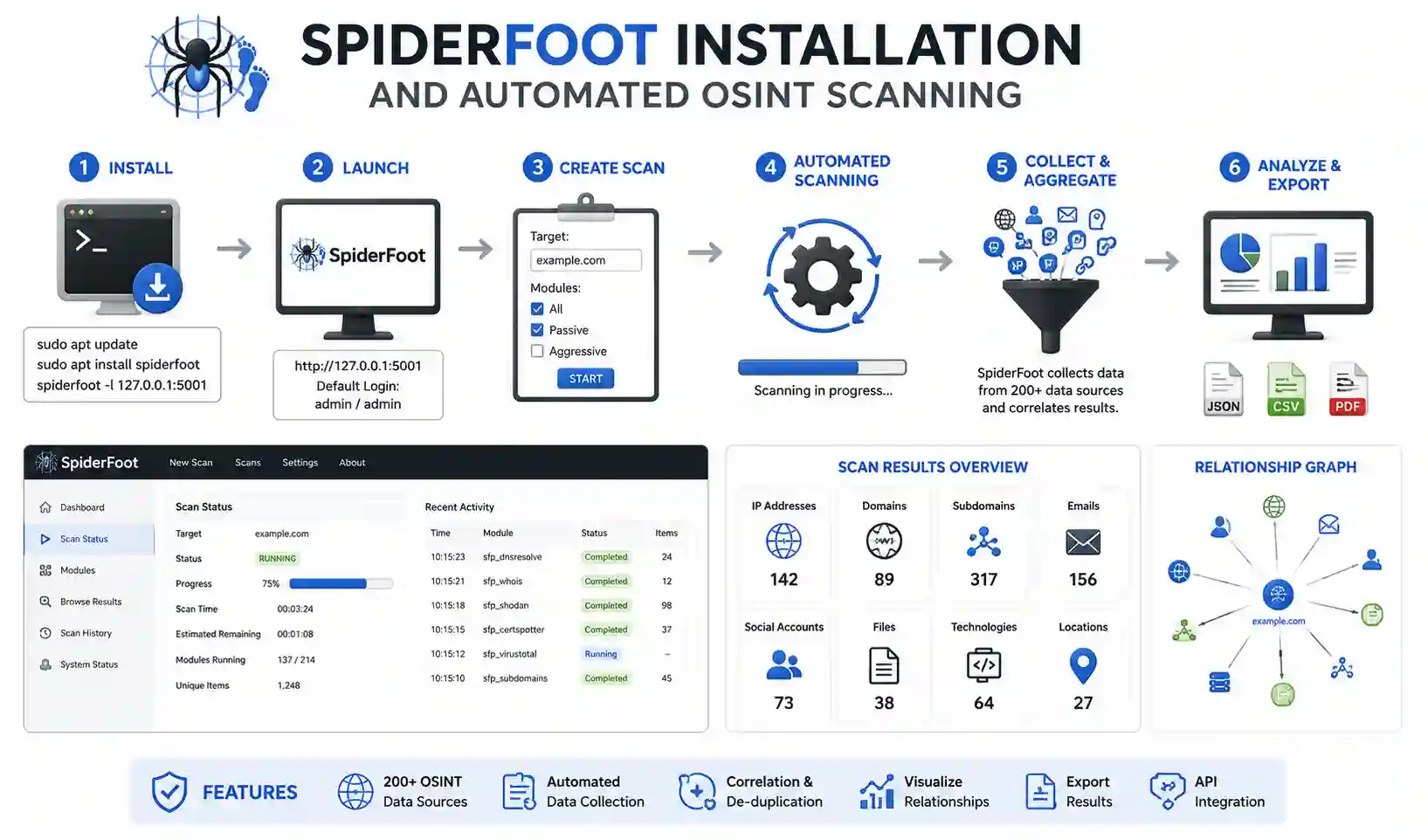
theHarvester is a Python script that queries search engines and APIs simultaneously to gather subdomains, employee emails, and IP addresses. SpiderFoot is an automation engine that integrates with over 100 data sources and APIs (including Shodan, HIBP, and AlienVault).
- The Power: Input an IP address, domain name, or username, click “Start,” and SpiderFoot runs investigative modules, presenting the intelligence in a web dashboard.
Frequently Asked Questions (FAQ)
What is the best free OSINT tool for beginners?
For beginners, the best free OSINT tools are Google (using advanced search operators or “dorks”), theHarvester (for email discovery), and HaveIBeenPwned (for checking data breaches). These require minimal setup and provide immediate results.
Do I need to pay for OSINT tools?
No, the vast majority of core OSINT tools are completely free and open-source. While premium enterprise tools (like Maltego Pro or Shodan Enterprise) exist, a skilled analyst can accomplish almost everything using free tools, public APIs, and custom Python scripts.
What OSINT tool is best for mapping digital infrastructure?
Shodan is considered the gold standard for mapping internet-connected devices, open ports, and infrastructure. Other excellent free alternatives include Censys, DNSDumpster, and sublist3r for subdomain enumeration.
Can I use OSINT tools on my personal computer?
It is highly recommended not to. For OPSEC (Operational Security) reasons, cybersecurity professionals run OSINT tools inside an isolated Virtual Machine (like Kali Linux, Trace Labs OSINT VM, or Buscador) routed through a VPN. This prevents your personal IP address from being logged during investigations.
Where can I practice using OSINT tools safely?
You can practice safely by participating in Capture The Flag (CTF) events, joining crowdsourced missing person investigations like Trace Labs, or auditing your own personal domain and email addresses to see what information is publicly available.
Conclusion: The Analyst Over the Tool
The 20 free OSINT tools listed in this guide are powerful. They empower an analyst operating from a standard laptop to map the physical infrastructure of a company or de-anonymize a threat actor.
However, a tool is only as good as the analyst wielding it. Do not simply run Python scripts without understanding the data they return. Verify intelligence using the “Rule of Two,” and ensure your investigations operate within the boundaries of legal and ethical OSINT frameworks. Build your toolkit today, secure your OPSEC environment, and start analyzing the data.
Discussion
Loading comments...