

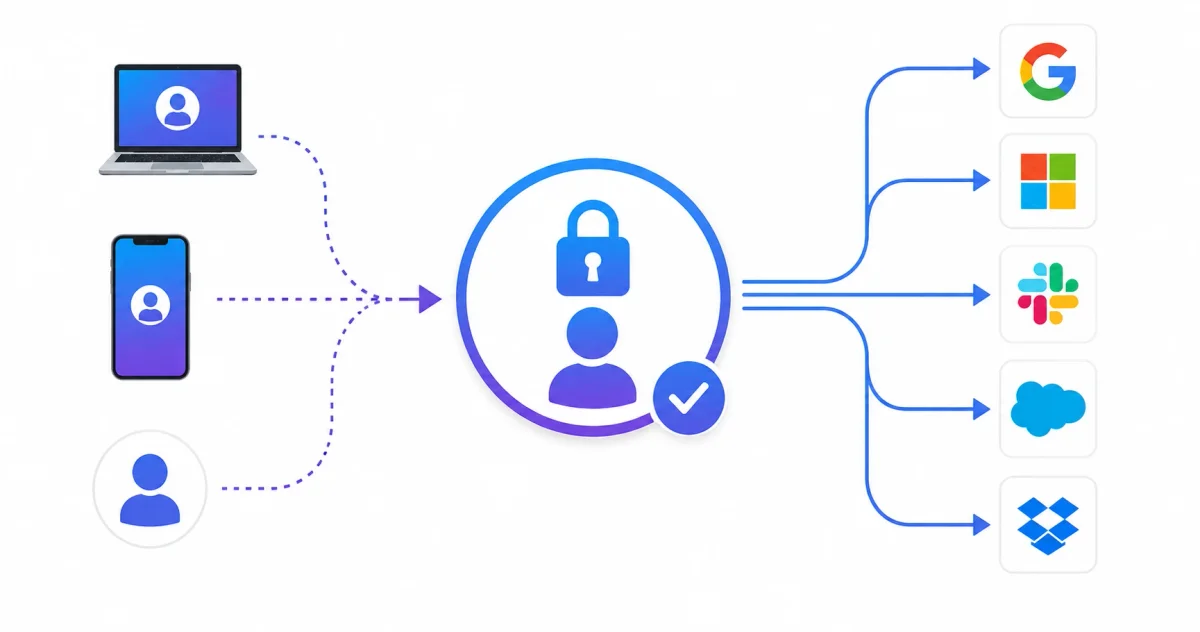
Imagine having a master key that opens every door in a large office building. Instead of carrying dozens of different keys, you have one key that works everywhere. That’s exactly what Single Sign-On (SSO) does for your digital life.
Single Sign-On (SSO) is an authentication method that allows users to access multiple applications and services with just one set of login credentials. In 2026, SSO has become essential for businesses and individuals managing dozens of online accounts.
This guide will explain everything you need to know about SSO, from basic concepts to implementation and security considerations.
What is Single Sign-On (SSO)?
The Simple Explanation
SSO is like a universal login. Instead of remembering separate usernames and passwords for each application, you log in once and automatically gain access to all connected services.
Without SSO:
┌─────────────────────────────────────────────┐
│                                             │
│  User → Application 1 → Login              │
│  User → Application 2 → Login              │
│  User → Application 3 → Login              │
│  User → Application 4 → Login              │
│                                             │
│  Need to remember multiple passwords        │
│  Users get frustrated and use weak ones    │
└─────────────────────────────────────────────┘

With SSO:
┌─────────────────────────────────────────────┐
│                                             │
│  User → Login Once (SSO)                   │
│          ↓                                  │
│  Access All Applications (1, 2, 3, 4)      │
│                                             │
│  One password to remember                   │
│  Strong passwords can be used              │
│  Better security                           │
└─────────────────────────────────────────────┘
How SSO Works
┌─────────────────────────────────────────────┐
│         SSO Authentication Flow             │
├─────────────────────────────────────────────┤
│                                             │
│  1. User tries to access Application        │
│                                             │
│  2. Application redirects to SSO Provider   │
│                                             │
│  3. User logs in to SSO Provider (once)    │
│                                             │
│  4. SSO Provider sends token to Application │
│                                             │
│  5. Application grants access               │
│                                             │
│  6. User can access all connected apps      │
│     without logging in again               │
│                                             │
│  7. Session expires → Re-authenticate       │
└─────────────────────────────────────────────┘
Key SSO Terminology
Important Terms to Know
┌─────────────────────────────────────────────┐
│         SSO Terminology                     │
├─────────────────────────────────────────────┤
│                                             │
│  Identity Provider (IdP)                   │
│  └── The system that manages user identities│
│      Examples: Google, Microsoft, Okta      │
│                                             │
│  Service Provider (SP)                     │
│  └── The application users want to access   │
│      Examples: Salesforce, Dropbox, Gmail  │
│                                             │
│  Authentication Token                      │
│  └── Proof that user is authenticated      │
│                                             │
│  SAML (Security Assertion Markup Language) │
│  └── Standard protocol for SSO             │
│                                             │
│  OAuth (Open Authorization)                │
│  └── Protocol for authorization            │
│                                             │
│  OpenID Connect (OIDC)                     │
│  └── Authentication layer on top of OAuth  │
│                                             │
│  Federation                                │
│  └── Connecting different identity systems │
└─────────────────────────────────────────────┘
Types of SSO
1. Enterprise SSO
Used within organizations to access internal applications and secure infrastructures, such as servers using secure SSH configurations.
Enterprise SSO:
├── Used by companies
├── Access to internal apps
├── Managed by IT department
├── Integrates with Active Directory
├── Examples: Okta, Azure AD, Ping Identity
└── Benefits:
    ├── Better security
    ├── Easier management
    ├── Employee productivity
    └── Centralized control
2. Social SSO
Use social media accounts to log in to other services.
Social SSO:
├── Log in with Google, Facebook, Twitter
├── No new password to remember
├── Quick and convenient
├── Examples: "Login with Google" buttons
└── Benefits:
    ├── No new account creation
    ├── Fast sign-up
    ├── Uses existing social accounts
    └── Good for consumers
3. Web SSO
Used for web applications and services.
Web SSO:
├── Browser-based authentication
├── Works across multiple websites
├── Uses cookies and tokens
├── Examples: Google, Microsoft accounts
└── Benefits:
    ├── Single login for web apps
    ├── Consistent experience
    ├── Works on any device
    └── Easier password management
4. Federated SSO
Connects different organizations’ identity systems.
Federated SSO:
├── Across multiple organizations
├── Trust relationships between IdPs
├── Examples: University systems, healthcare
└── Benefits:
    ├── Cross-organization access
    ├── Shared trust
    ├── No duplicate accounts
    └── Seamless user experience
SSO Protocols
1. SAML (Security Assertion Markup Language)
The most common enterprise SSO protocol.
┌─────────────────────────────────────────────┐
│          SAML Flow                          │
├─────────────────────────────────────────────┤
│                                             │
│  Service Provider → Identity Provider       │
│  (Application)    → (Authentication System) │
│                                             │
│  1. User tries to access app                │
│  2. App redirects to IdP                   │
│  3. User authenticates                     │
│  4. IdP sends SAML assertion               │
│  5. App verifies and grants access         │
│                                             │
│  SAML Benefits:                            │
│  ✅ Industry standard                       │
│  ✅ Highly secure                          │
│  ✅ Works with many applications            │
│  ✅ Enterprise-ready                       │
│                                             │
│  SAML Components:                          │
│  ├── SAML Assertion (user identity)        │
│  ├── SAML Request (app requesting auth)    │
│  └── SAML Response (auth result)           │
└─────────────────────────────────────────────┘
2. OAuth 2.0
For authorization (not authentication).
OAuth 2.0:
├── Authorization framework
├── Not for authentication
├── Grants access to resources
├── Examples: Allow app to access Google Drive
└── Benefits:
    ├── Secure delegation
    ├── User control
    ├── Industry standard
    └── Widely used

OAuth Flow:
├── User authorizes app
├── App gets authorization code
├── App exchanges for access token
├── App uses token to access resources
└── Tokens can be revoked
3. OpenID Connect (OIDC)
Authentication layer built on OAuth 2.0.
OpenID Connect:
├── Authentication layer on OAuth 2.0
├── User identity verification
├── Modern and simpler than SAML
├── Examples: Google login, Microsoft login
└── Benefits:
    ├── Simpler implementation
    ├── Uses OAuth 2.0
    ├── JSON-based (easy to use)
    └── Works well with APIs

OIDC Components:
├── ID Token (contains user info)
├── Access Token (for API access)
├── Refresh Token (get new tokens)
└── UserInfo endpoint (get user details)
SSO Benefits
For Users
┌─────────────────────────────────────────────┐
│        User Benefits                        │
├─────────────────────────────────────────────┤
│                                             │
│  ✅ One Password to Remember               │
│  ✅ No More Password Fatigue                │
│  ✅ Faster Login (no typing)               │
│  ✅ Access All Apps Instantly               │
│  ✅ No Need to Create New Accounts          │
│  ✅ Better User Experience                  │
│  ✅ Less Frustration                        │
│                                             │
│  Example:                                  │
│  ┌─────────────────────────────────────────┐│
│  │   "I just log in once and can access   ││
│  │    email, documents, and tools         ││
│  │    without typing passwords again"      ││
│  └─────────────────────────────────────────┘│
└─────────────────────────────────────────────┘
For Businesses
┌─────────────────────────────────────────────┐
│        Business Benefits                    │
├─────────────────────────────────────────────┤
│                                             │
│  ✅ Reduced IT Support Costs                │
│  ✅ Fewer Password Reset Requests           │
│  ✅ Centralized User Management            │
│  ✅ Better Security Controls               │
│  ✅ Compliance and Auditing                 │
│  ✅ Faster Onboarding/Offboarding          │
│  │  (Pair with an automated bouncer like   ││
│  │   [Fail2Ban](/blog/cybersecurity/fail2ban-guide-2026) to secure access points)││
│  ✅ Improved Productivity                   │
│  ✅ Consistent Authentication Policy        │
│                                             │
│  Statistics (2026):                        │
│  └── 70% reduction in password resets      │
│  └── 50% faster user onboarding            │
│  └── 80% fewer security breaches           │
└─────────────────────────────────────────────┘
Popular SSO Providers
Enterprise SSO Providers
| Provider | Best For | Features | Price |
|---|---|---|---|
| Okta | Enterprise businesses | Universal directory, Lifecycle management | $$$$ |
| Azure AD | Microsoft shops | Deep Microsoft integration | $$$ |
| Google Workspace | Google users | Google integration, easy setup | $$$ |
| OneLogin | Mid-size companies | Simple setup, good support | $$$ |
| Ping Identity | High security | Strong security, advanced features | $$$$ |
| Auth0 | Developers | Developer-friendly, flexible | $$$ |
Free/Consumer SSO Options
| Provider | Best For | Features | Price |
|---|---|---|---|
| Personal use, small business | Free, easy setup | Free | |
| Microsoft | Personal use, small business | Free, good integration | Free |
| Social logins | Easy for consumers | Free | |
| Apple | iOS users | Privacy-focused | Free |
How to Implement SSO
Step 1: Choose Your SSO Provider
Considerations:
├── Budget: Free vs. Paid
├── Applications: What you need to connect
├── Users: Number of users
├── Technical Expertise: Ease of setup
├── Security Requirements: Compliance needs
└── Integration: Existing systems

Popular Choices:
├── Okta (Enterprise, many features)
├── Azure AD (If using Microsoft)
├── Google (Small business/personal)
└── Auth0 (Developer-friendly)
Step 2: Connect Applications
Types of Integration:
├── Pre-built Connectors (easy)
│   └── Hundreds of apps available
│
├── SAML Integration (standard)
│   └── Most enterprise apps support
│
├── OAuth/OIDC Integration (modern)
│   └── Modern web apps support
│
├── Custom Integration (developers)
│   └── For custom applications
│
└── LDAP Integration (legacy)
    └── Older systems
Step 3: Set Up Users
User Management:
├── Import Existing Users
│   └── From HR system or directory
│
├── Create New Users
│   └── Manual or automated
│
├── Sync with Directory
│   └── Active Directory, LDAP
│
├── Self-Registration
│   └── Users sign up themselves
│
└── User Groups
    └── Control access by role
Step 4: Configure Security
┌─────────────────────────────────────────────┐
│        SSO Security Configuration           │
├─────────────────────────────────────────────┤
│                                             │
│  ✅ Enforce Strong Passwords                │
│  ✅ Enable Multi-Factor Authentication      │
│  ✅ Set Session Timeouts                    │
│  ✅ Configure Access Policies               │
│  ✅ Set Up Audit Logging                    │
│  ✅ Enable Conditional Access               │
│  ✅ Regular Security Audits                 │
│                                             │
│  Conditional Access Examples:              │
│  ├── Only allow from company IPs           │
│  ├── Require MFA for sensitive apps        │
│  ├── Block high-risk sign-ins              │
│  └── Require device compliance             │
└─────────────────────────────────────────────┘
SSO Security Best Practices
1. Strong Authentication
┌─────────────────────────────────────────────┐
│        Authentication Best Practices        │
├─────────────────────────────────────────────┤
│                                             │
│  ✅ Use Strong Passwords                    │
│  ✅ Enforce Password Policies               │
│  ✅ Enable MFA (Multi-Factor Auth)          │
│  ✅ Use Biometrics                         │
│  ✅ Regular Password Rotation               │
│  ✅ Don't Use SMS as Only MFA              │
│                                             │
│  MFA Methods (Best to Worst):              │
│  1. Hardware Key (YubiKey)                 │
│  2. Authenticator App (Google Auth)        │
│  3. Push Notification                       │
│  4. SMS (least secure)                     │
└─────────────────────────────────────────────┘
[!WARNING] Simple MFA methods like SMS are vulnerable to SIM-swapping and phishing attacks. Use hardware keys or authenticator apps for strong security.
2. Session Management
Session Best Practices:
├── Set Session Timeouts
│   └── 8 hours or less (higher security)
│   └── 24 hours (convenient)
│
├── Idle Session Timeout
│   └── 15-30 minutes of inactivity
│
├── Single Sign-Out
│   └── Log out from all apps at once
│
├── Session Revocation
│   └── Can revoke sessions immediately
│
└── Monitor Active Sessions
    └── See where users are logged in
3. Access Control
Access Control Best Practices:
├── Principle of Least Privilege
│   └── Give minimum access needed
│
├── Role-Based Access Control (RBAC)
│   └── Access by role, not individual
│
├── Just-in-Time Access
│   └── Access only when needed
│
├── Conditional Access
│   └── Access based on conditions
│
└── Regular Access Reviews
    └── Review user permissions regularly
4. Monitoring and Auditing
┌─────────────────────────────────────────────┐
│        Monitoring Best Practices            │
├─────────────────────────────────────────────┤
│                                             │
│  ✅ Log All Authentication Events           │
│  ✅ Monitor Failed Logins                   │
│  ✅ Check Unusual Activity                  │
│  ✅ Review Admin Actions                    │
│  ✅ Audit User Access                       │
│  ✅ Detect Anomalous Behavior               │
│                                             │
│  What to Monitor:                          │
│  ├── Login attempts (success/fail)         │
│  ├── MFA events                            │
│  ├── Administrative changes                 │
│  ├── User provisioning                     │
│  ├── Session activities                    │
│  └── Policy changes                        │
│                                             │
│  Alert on:                                 │
│  ├── Multiple failed logins                │
│  ├── Logins from new locations             │
│  ├── Unusual login times                   │
│  ├── Admin privilege changes               │
│  └── Policy changes                        │
└─────────────────────────────────────────────┘
Common SSO Challenges
1. Integration Complexity
Challenges:
├── Legacy applications (no SSO support)
├── Different protocols (SAML, OAuth, LDAP)
├── Custom applications (need development)
├── Third-party apps (limited integration)
└── Multiple identity providers

Solutions:
├── Use identity federation
├── Implement custom connectors
├── Use API gateways
├── Consider identity proxy solutions
└── Plan gradual migration
2. User Adoption
Challenges:
├── Users resist change
├── Remembering master password
├── New login flow (learning curve)
└── Trust issues with SSO

Solutions:
├── Train users (why and how)
├── Smooth transition period
├── Clear communication
├── Support availability
└── Track adoption metrics
3. Security Concerns
Challenges:
├── Single point of failure
├── Master password risk
├── SSO provider compromise
├── Session hijacking
└── Inconsistent security policies

Solutions:
├── Strong MFA
├── Regular security audits
├── Session management
├── Risk-based authentication
└── Continuous monitoring
SSO vs. Other Authentication Methods
Comparison Table
| Feature | SSO | Traditional Login | Password Managers |
|---|---|---|---|
| One Login | ✅ | ❌ | ✅ |
| Auto-Fill | ✅ | ❌ | ✅ |
| Password Management | ✅ | ❌ | ✅ |
| Centralized Control | ✅ | ❌ | ❌ |
| Security | High | Low | High |
| User Experience | Excellent | Poor | Good |
| Implementation | Complex | Simple | Simple |
| Cost | High | Low | Low |
Real-World SSO Examples
Example 1: Google Workspace SSO
Google Workspace SSO:
├── Use your Google account
├── Access Gmail, Drive, Docs, Calendar
├── One login for all Google services
├── Works with third-party apps
└── Benefits:
    ├── Simple setup
    ├── Familiar interface
    ├── Strong security (Google)
    └── Free for personal use
Example 2: Microsoft Azure AD SSO
Microsoft Azure AD:
├── Enterprise SSO solution
├── Connects to thousands of apps
├── Integrates with Office 365
├── Works with Active Directory
└── Benefits:
    ├── Microsoft ecosystem
    ├── Advanced security
    ├── Compliance features
    └── Enterprise-ready
Example 3: Okta SSO
Okta SSO:
├── Leading enterprise SSO provider
├── Universal directory
├── Lifecycle management
├── Adaptive MFA
└── Benefits:
    ├── Many integrations
    ├── Strong security
    ├── Easy to manage
    └── Good support
Quick Reference
SSO Implementation Checklist
┌─────────────────────────────────────────────┐
│        SSO Implementation Checklist         │
├─────────────────────────────────────────────┤
│                                             │
│  PHASE 1: PLANNING                         │
│  □ Define business requirements            │
│  □ Identify applications to connect        │
│  □ Choose SSO provider                     │
│  □ Plan user migration                     │
│  □ Set budget and timeline                 │
│                                             │
│  PHASE 2: SETUP                           │
│  □ Configure SSO provider                  │
│  □ Connect applications                    │
│  □ Set up user directory                   │
│  □ Configure security policies             │
│  □ Test thoroughly                         │
│                                             │
│  PHASE 3: DEPLOYMENT                      │
│  □ Train users                             │
│  □ Migrate users in phases                 │
│  □ Monitor adoption                        │
│  □ Collect feedback                        │
│  □ Optimize based on feedback              │
│                                             │
│  PHASE 4: MAINTENANCE                     │
│  □ Regular security reviews                │
│  □ User access reviews                     │
│  □ Monitor logs and alerts                 │
│  □ Regular updates                        │
│  □ Adjust policies as needed              │
└─────────────────────────────────────────────┘
Conclusion
SSO is essential in 2026 for businesses and individuals managing multiple accounts. It improves security, user experience, and reduces administrative overhead.
Key Takeaways:
- SSO simplifies access to applications
- Better security than multiple passwords
- Works for both enterprise and consumer
- Choose the right provider for your needs
- Implement with strong security practices
Your Action Plan:
- Evaluate your current authentication needs
- Research SSO providers
- Start with a pilot program
- Implement gradually
- Monitor and adjust
Ready to learn more about identity and access management? Explore our Complete IAM Guide for more protection strategies.
Frequently Asked Questions (FAQs)
Q: Is SSO secure? A: Yes, when implemented correctly. It’s actually more secure than managing multiple passwords.
Q: What happens if the SSO provider goes down? A: You may lose access to all applications. This is why high-availability providers are important.
Q: Can I use SSO for personal accounts? A: Yes, many services offer SSO (Google, Apple, Microsoft) for personal use.
Q: Does SSO work across different companies? A: Yes, this is called Federation. Different organizations can share SSO.
Q: What’s the difference between SSO and password manager? A: SSO is automated authentication, while password managers store passwords for manual input.
Q: Do I still need MFA with SSO? A: Yes, MFA is even more important with SSO since one login gives access to everything.
Q: Can SSO be hacked? A: Like any system, it can be targeted. But with proper security (MFA, monitoring), it’s very secure.


Discussion
Loading comments...