

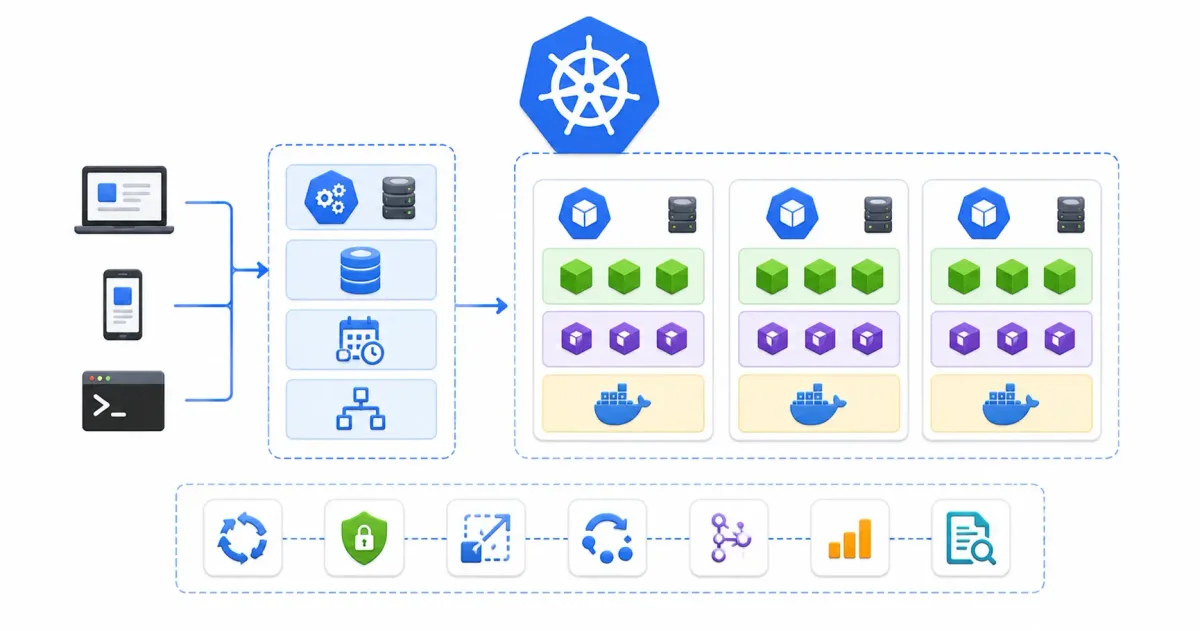
If you spend any time in cloud engineering, DevOps, or system administration, you have undoubtedly encountered Kubernetes (frequently abbreviated as K8s). While official documentation can feel dense and intimidating, the core problem Kubernetes solves is straightforward: it automates the management, scaling, self-healing, and networking of containerized applications at scale.
Managing a single container running a application on a developer laptop is easy. But managing hundreds of microservice containers across dozens of virtual machines in production—handling traffic spikes, server crashes, rolling updates, and security boundaries—is an operational nightmare without automation.
Whether you are evaluating managed cloud engines in our AWS vs Azure vs Google Cloud comparison, setting up container orchestration on a VPS, or choosing between local AI vs cloud AI setups, understanding Kubernetes is essential for modern technical infrastructure.
In this beginner-friendly yet technically thorough guide, we will break down the shipping container analogy, dissect the Control Plane versus Worker Node architecture, explore core object primitives (Pods, Services, Deployments, StatefulSets), contrast Kubernetes with Docker, and demonstrate production management workflows.
⚡ The Container Orchestration Flow
To visualize how Kubernetes manages application life cycles, follow this execution flow:
- Developer Writes Manifest ➔ Defines desired state in YAML (e.g. “Run 3 replicas of Node.js app”)
- kubectl Applies Manifest ➔ Command-line tool submits YAML payload to
kube-apiserver - etcd Stores State ➔ Distributed key-value store logs desired state with strict consensus
- Scheduler Assigns Node ➔
kube-schedulerselects healthiest Worker Node based on CPU/RAM capacity - kubelet Pulls Image ➔ Node daemon instructs container runtime (containerd/CRI-O) to pull image
- Pod Status Health Check ➔ Liveness & Readiness probes continuously monitor application health
- Self-Healing Automation ➔ If a container crashes,
kube-controller-managerrestarts a new Pod instantly
🚢 The Shipping Container Analogy
To understand why Kubernetes is necessary, let’s break down the classic port shipping analogy:
- The Cargo (Your Application): The source code, static files, and configuration files you want to run.
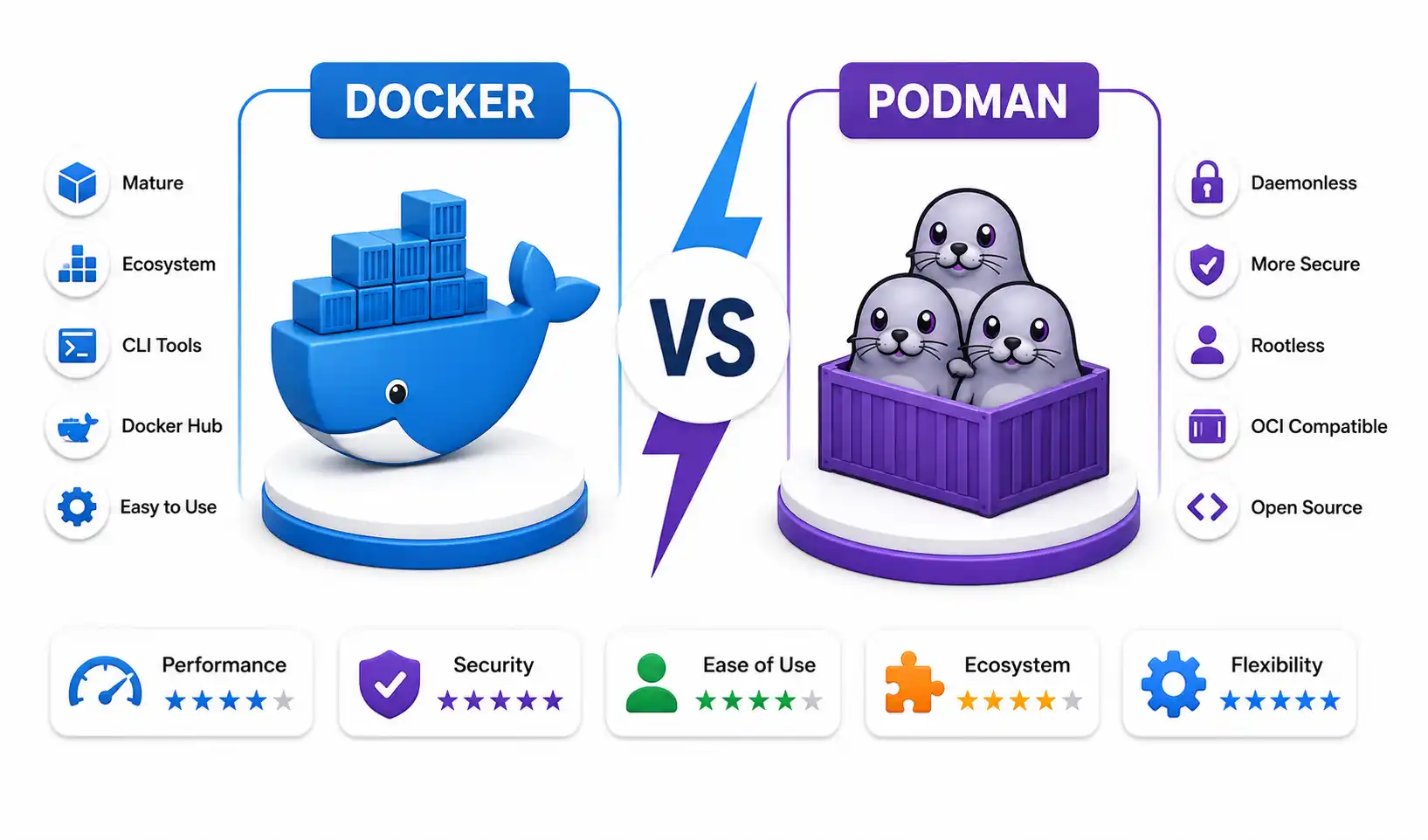
- The Shipping Container (Docker / Podman): Bundles code and dependencies together so it runs identically on developer laptops, bare-metal servers, or cloud VMs. Learn container fundamentals in our guide on installing Docker on Ubuntu and our benchmark of Docker vs Podman.
- The Cargo Ship (Worker Node): The physical or virtual machine supplying CPU, RAM, and storage resources to hold multiple containers.
- The Harbor Master & Port Crane (Kubernetes): Coordinates the entire fleet. If a ship sinks, Kubernetes moves containers to a new ship. When cargo demand surges, it orders more ships. When new software versions arrive, it swaps out containers without stopping port operations.
📊 Kubernetes Architecture: Control Plane vs Worker Nodes
A Kubernetes Cluster consists of two functional layers: the Control Plane (the administrative brain) and Worker Nodes (the execution compute).
Control Plane Components (Master Node Brain)
| Component | Operational Role | Key Function |
|---|---|---|
| kube-apiserver | API Gateway & Control Hub | The central REST endpoint for all cluster interactions (kubectl, dashboard, nodes) |
| etcd | Distributed Database | High-availability key-value store logging cluster state and configuration secrets |
| kube-scheduler | Workload Placement Engine | Assigns newly created Pods to specific Worker Nodes based on resource requirements |
| kube-controller-manager | Automation & Self-Healing | Runs background loops (Node Controller, ReplicaSet Controller) enforcing desired state |
Worker Node Components (Compute Execution)
| Component | Operational Role | Key Function |
|---|---|---|
| kubelet | Node Manager Daemon | Primary node agent ensuring assigned containers are running cleanly in Pods |
| kube-proxy | Network Routing Proxy | Manages IP routing rules and iptables/IPVS load balancing across cluster nodes |
| Container Runtime | Low-level Container Engine | Underlying runtime (containerd or CRI-O) that executes container processes |
📦 Core Kubernetes Object Primitives Explained
Kubernetes manages infrastructure using declarative objects defined in YAML or JSON.
1. Pods (The Smallest Deployable Unit)
In Kubernetes, you never deploy individual containers directly. You deploy Pods. A Pod is a wrapper around one or more tightly coupled containers that share the exact same network namespace (IP address), storage volumes, and IPC memory:
- Single-Container Pod: The standard pattern (e.g. one Node.js application container per Pod).
- Multi-Container Pod (Sidecar Pattern): A main application container paired with an auxiliary sidecar container (e.g. a log shipper like Loki/Vector or a service mesh proxy).
2. Deployments & ReplicaSets (Scaling & Rolling Updates)
A Deployment describes the desired state for your application. It manages ReplicaSets, which ensure a specified number of identical Pods remain active:
- Self-Healing: If a Pod crashes or its underlying node fails, the Deployment manager spins up a replacement Pod automatically.
- Zero-Downtime Rolling Updates: Gradually replaces old Pods with new versions (
v1➔v2) one by one, verifying health before terminating old instances.
3. Services (Stable Networking & Load Balancing)
Because Pods are ephemeral and receive dynamic IP addresses upon restart, applications cannot connect to Pod IPs directly. A Service provides a persistent IP address and DNS name in front of a group of Pods:
- ClusterIP (Internal Default): Exposes the Service on an internal cluster IP, accessible only inside the cluster.
- NodePort: Exposes the Service on a static port across every Worker Node’s IP address.
- LoadBalancer: Integrates with cloud providers (AWS ELB, Azure Load Balancer, GCP Cloud Load Balancing) to assign a public IP address.
4. Ingress Controllers (HTTP/HTTPS Routing)
An Ingress acts as a smart HTTP/HTTPS reverse proxy router for cluster services. Instead of creating expensive public LoadBalancer services for every app, an Ingress Controller (like Nginx Ingress, Traefik, or HAProxy) routes external traffic based on domain hosts and paths (e.g. api.example.com ➔ api-service).
Review our guide to Nginx Proxy Manager security and enabling HTTPS with Let’s Encrypt for reverse proxy concepts.
5. ConfigMaps & Secrets (Configuration Decoupling)
Never hardcode configuration files or secret tokens inside container images:
- ConfigMaps: Store non-sensitive configuration keys, environment variables, or config files.
- Secrets: Store base64-encoded sensitive keys, SSH credentials, or TLS certificates. For external secret management, see our Vaultwarden self-hosted guide and generate keys using our password generator.
6. Persistent Volumes & StatefulSets (Database Hosting)
While stateless applications (like Node.js or React web servers) restart easily on any Pod, stateful databases (like PostgreSQL or MySQL) require persistent storage. Learn database differences in our PostgreSQL vs MySQL comparison.
Kubernetes handles database persistence using StatefulSets and PersistentVolumeClaims (PVCs):
- PersistentVolume (PV): Represents actual storage capacity in the cluster (e.g. cloud block storage or local NVMe drives).
- PersistentVolumeClaim (PVC): A request for storage by a Pod. Kubernetes automatically binds the PVC to an available PV.
- StatefulSets: Manages stateful Pods with sticky network identities and dedicated storage mounts, ideal for database clusters. Always back up volume data using our backup strategies for self-hosted servers, store files in Nextcloud, and automate workflows with n8n via Docker Compose.
🆚 Kubernetes vs Docker: Clearing Up the Confusion
A common point of confusion for beginners is comparing Docker with Kubernetes. They are not mutually exclusive competitors—they operate at different layers of the container stack.
Container Layer Hierarchy:
[ Application Code ] ➔ [ Docker / Podman (Container Package) ] ➔ [ Kubernetes (Fleet Orchestrator) ]- Docker / Podman: Packages code, libraries, and binaries into portable container images and runs them on a single host.
- Kubernetes: Takes those container images and coordinates their execution across a multi-node cluster of servers, handling autoscaling, load balancing, multi-host networking, and health recovery.
🛠️ Step-by-Step Practical Manifest Example
Let’s look at a production-grade Kubernetes manifest file (deployment.yaml) that deploys 3 replicas of a web application:
apiVersion: apps/v1
kind: Deployment
metadata:
  name: web-app-deployment
  labels:
    app: web-app
spec:
  replicas: 3
  selector:
    matchLabels:
      app: web-app
  template:
    metadata:
      labels:
        app: web-app
    spec:
      containers:
      - name: node-web-server
        image: node:20-alpine
        ports:
        - containerPort: 3000
        resources:
          requests:
            memory: "128Mi"
            cpu: "250m"
          limits:
            memory: "512Mi"
            cpu: "500m"
        livenessProbe:
          httpGet:
            path: /health
            port: 3000
          initialDelaySeconds: 15
          periodSeconds: 10
---
apiVersion: v1
kind: Service
metadata:
  name: web-app-service
spec:
  type: ClusterIP
  selector:
    app: web-app
  ports:
  - port: 80
    targetPort: 3000
Essential kubectl Commands CLI Reference
Managing applications across the software development life cycle (see our SDLC guide for beginners) requires knowing key commands for inspecting async JavaScript apps and APIs (see building REST APIs with Node.js and deploying Node.js on a VPS):
- Apply Manifest:
kubectl apply -f deployment.yaml - List Active Pods:
kubectl get pods -o wide - Inspect Pod Logs:
kubectl logs -f <pod-name> - Describe Resource Status:
kubectl describe pod <pod-name> - Scale Deployment:
kubectl scale deployment web-app-deployment --replicas=5 - Execute Terminal Shell:
kubectl exec -it <pod-name> -- /bin/sh
Generate supporting infrastructure configs using our Docker Compose generator and Nginx config generator.
🔒 Security Hardening & Zero Trust in Kubernetes
Securing a Kubernetes cluster requires applying defense-in-depth across the API server, container runtimes, network policies, and host Linux OS.
Enterprise Security Checklist
- Role-Based Access Control (RBAC): Restrict
kubectlcluster access using fine-grained RBAC roles and service accounts. Use Entra ID or SSO; see our SSO guide for 2026. - Network Policies (Micro-segmentation): By default, all Pods in a cluster can communicate with all other Pods. Enforce Network Policies to restrict pod-to-pod communication. Connect cluster nodes securely over private mesh VPNs using Tailscale or WireGuard; review our Tailscale vs WireGuard comparison and how a VPN works.
- Node Host Hardening: Secure underlying Worker Node Linux servers. Enforce UFW firewall rules, install Fail2ban or CrowdSec, and lock down SSH access. Read our step-by-step tutorials on UFW firewall guide, Fail2ban guide, CrowdSec beginner guide, and Ubuntu SSH hardening.
- Container Image Vulnerability Scanning: Scan container images for security vulnerabilities before deploying to production using Trivy. Read our best practices for securing Docker containers.
- System Audit & Log Monitoring: Audit Linux host compliance with Lynis using our Lynis security audit guide, and inspect system logs via our Linux logs guide. Use the top 20 Linux security commands for auditing.
🛠️ Ecosystem Tools & Cloud Kubernetes Distributions
Depending on whether you manage cloud infrastructure, home labs, or edge devices, select the right Kubernetes distribution:
- Managed Cloud K8s (EKS, AKS, GKE): Managed cloud engines handle control plane backups and upgrades. Read about hosting alternatives in our guide on how to host a website for free and Azure Static Web Apps.
- Lightweight K8s (k3s / k0s / Minikube): k3s by Rancher is a lightweight, single-binary Kubernetes distribution perfect for home labs, Raspberry Pis, and single-node VPS servers. Learn to run local hypervisors in our Proxmox home lab setup guide.
- PaaS Alternatives (Coolify / DokPloy): If full Kubernetes clusters feel too complex for your current scale, deploy self-hosted PaaS solutions like Coolify or DokPloy. Read our Coolify self-hosting guide and DokPloy setup guide.
- Package Management (Helm): Helm acts as the package manager for Kubernetes (like
aptornpm), allowing you to install complex apps (like Prometheus, Grafana, or PostgreSQL) using pre-packaged Helm charts. - Visual Management Panels (Portainer): Manage containerized environments visually using Portainer; read our Portainer self-hosted guide.
💻 Developer & Sysadmin Web Utilities
Bookmark these interactive web tools for configuration generation and debugging:
- Container Setup: Docker Compose Generator
- Web Server Configs: Nginx Config Generator
- Service Files: Systemd Service File Generator
- Data Inspection: JSON Formatter & JSON Validator
- Secret Generation: Password Generator & ENV Generator
- SEO Metadata: Schema Markup Generator
- Expression Testing: Regex Tester
- Linux Learning: Linux Command Explorer & Linux Permission Calculator
- Automation: Cron Expression Generator & Gitignore Generator
📖 Official Documentation & References
- Kubernetes Official Documentation: https://kubernetes.io/docs
- kubectl CLI Command Reference: https://kubernetes.io/docs/reference/kubectl
- Helm Package Manager Docs: https://helm.sh/docs
- k3s Lightweight Kubernetes: https://docs.k3s.io
- CNCF Landscape: https://landscape.cncf.io
❓ Frequently Asked Questions
What is Kubernetes in simple terms?
Kubernetes (K8s) is an open-source container orchestration platform that automatically manages, scales, heals, and routes network traffic for containerized software applications across a cluster of servers.
What is the difference between Docker and Kubernetes?
Docker (or Podman) is a tool used to package code into individual container images and run them on a single machine. Kubernetes is a management system that coordinates hundreds of containers across a multi-server cluster, automating scaling, failover, and load balancing.
What is a Pod in Kubernetes?
A Pod is the smallest deployable computing unit in Kubernetes. It wraps one or more co-located containers (such as an application container and a sidecar logging container) that share the same IP address, storage volumes, and network namespace.
What is the difference between a Control Plane and a Worker Node?
The Control Plane (Master Node) is the brain of the cluster; it handles scheduling, maintaining cluster state in etcd, and managing self-healing controllers. Worker Nodes are the compute servers that run the actual application Pods.
What is kubectl?
kubectl is the official command-line interface (CLI) tool used by developers and sysadmins to send commands, apply YAML configuration manifests, and query the status of a Kubernetes cluster API server.
What happens if a container crashes in Kubernetes?
Kubernetes continuously runs health checks (Liveness Probes). If a container or Pod crashes, the kube-controller-manager automatically detects the failure and replaces it with a new Pod, restoring the desired application state without manual human intervention.
What is Helm in the Kubernetes ecosystem?
Helm is the official package manager for Kubernetes (similar to apt for Ubuntu or npm for Node.js). It uses pre-configured “Helm Charts” to deploy complex multi-resource applications (like PostgreSQL, Grafana, or WordPress) with a single command.
What is k3s, and how does it differ from full Kubernetes?
k3s is a lightweight, fully compliant Kubernetes distribution created by Rancher. It strips out legacy cloud drivers and packages all control plane components into a single 100MB binary, making it perfect for edge devices, home labs, and small VPS instances.
What is an Ingress Controller?
An Ingress Controller is an internal HTTP/HTTPS reverse proxy router (such as Nginx Ingress or Traefik) that manages external access to cluster services based on hostname, URL paths, and SSL/TLS certificates.
Do I need Kubernetes for a small personal website or blog?
No. For simple personal blogs or small web apps, Kubernetes adds unnecessary complexity. Hosting on free static platforms (like Vercel, Netlify, Cloudflare Pages, or Azure Static Web Apps) or using a simple VPS with Docker Compose or Coolify is far simpler and cheaper.
Discussion
Loading comments...