

As a senior infrastructure engineer, if there is one core technology that completely rewired how I approach Linux VPS deployments, it is Docker. Gone are the days of spending hours resolving fragile Python dependency conflicts or battling broken Apache modules on bare-metal servers.
Docker has fundamentally revolutionized the software development lifecycle (SDLC). By wrapping applications and their exact runtime dependencies into portable, immutable containers, we ensure that a Node.js backend runs identically on a local developer laptop as it does on a massive production Proxmox VE hypervisor.
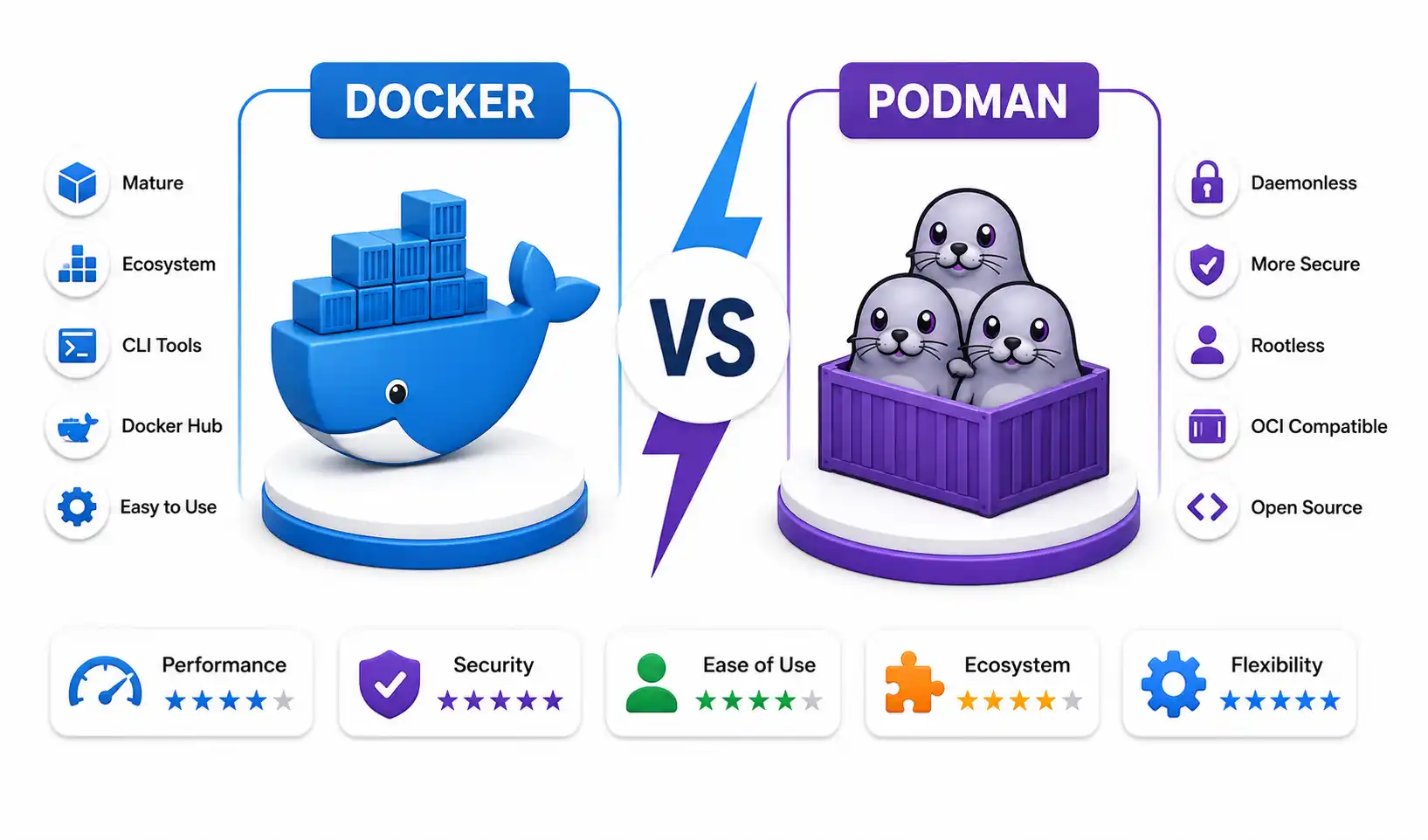
While alternative container engines exist (read my deep-dive into the Docker vs Podman technical benchmark), Docker Community Edition (CE) remains the undisputed king for single-node deployments, self-hosting environments, and local development.
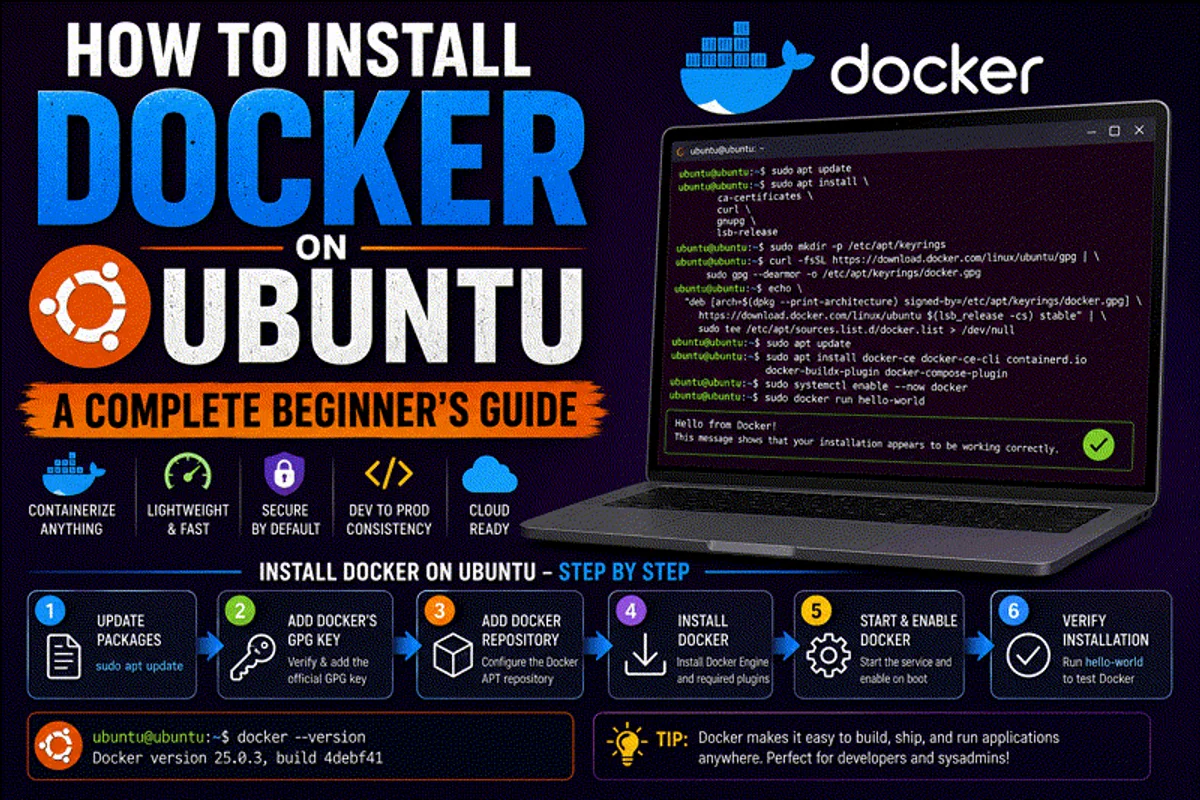
In this exhaustive 2026 guide, I will walk you through completely purging legacy Docker packages on Ubuntu, securely provisioning the official APT repositories, installing the modern daemon alongside Docker Compose v2, defining robust network architectures, and crafting highly optimized, multi-stage Dockerfiles.
1. Prerequisites for Production
Before you begin executing commands, ensure your server meets these foundational infrastructure requirements:
- Operating System: Ubuntu 22.04 (Jammy Jellyfish) or Ubuntu 24.04 (Noble Numbat) (Server or Desktop). (Note: These instructions also apply perfectly to Debian 12). Review our guide on the best Linux distros for beginners if you are still selecting an OS.
- Permissions: A non-root user account with
sudoprivileges. Never run daily operations as root. Check out our secure home server checklist. - Hardware: At least 4 GB of RAM and 20 GB of free SSD space. (Containers consume less memory than VMs, but pulling heavy images requires storage bandwidth).
- Network Security: Ensure your UFW firewall rules and SSH configurations are locked down before exposing container ports to the public internet.
2. Purge Legacy Container Engines
Ubuntu’s default repositories often contain outdated, unsupported versions of Docker (historically named docker, docker.io, or docker-engine). If you are learning how to install software on Linux, you must know that mixing unofficial distribution packages with official vendor repositories will absolutely break your daemon.
Execute this command to purge any legacy remnants:
sudo apt-get remove docker docker-engine docker.io containerd runc(If APT reports that none of these packages are installed, you are working with a perfectly clean slate).
3. Provision the Official Docker APT Repository
To guarantee you receive timely security patches and the latest daemon features, you must install Docker CE directly from Docker’s official package repositories, not Canonical’s snapshot repos.
Step A: Update System and Install Core Utilities
First, refresh your local index and install the foundational utilities required to process HTTPS repository connections and manage GPG keys:
sudo apt-get update
sudo apt-get install -y ca-certificates curl gnupg lsb-release
(For a deeper understanding of Linux command-line utilities, review our top 20 Linux security commands).
Step B: Import the Cryptographic GPG Key
We must establish cryptographic trust with Docker’s servers. This prevents man-in-the-middle attacks where a malicious actor attempts to serve you compromised binaries.
sudo install -m 0755 -d /etc/apt/keyrings
curl -fsSL https://download.docker.com/linux/ubuntu/gpg | sudo gpg --dearmor -o /etc/apt/keyrings/docker.gpg
sudo chmod a+r /etc/apt/keyrings/docker.gpg
(Need a refresher on Linux file modes? See our Linux file permissions guide).
Step C: Define the APT Source List
Inject the official repository path into your system’s package configuration directory:
echo \
  "deb [arch=$(dpkg --print-architecture) signed-by=/etc/apt/keyrings/docker.gpg] https://download.docker.com/linux/ubuntu \
  $(. /etc/os-release && echo "$VERSION_CODENAME") stable" | \
  sudo tee /etc/apt/sources.list.d/docker.list > /dev/null
4. Install Docker CE and Docker Compose
With the repository securely established, refresh your package index so APT registers the new Docker source, and initiate the installation.
sudo apt-get update
sudo apt-get install -y docker-ce docker-ce-cli containerd.io docker-buildx-plugin docker-compose-plugin
What exactly did we just install?
docker-ce: The core background daemon that orchestrates containers.docker-ce-cli: The command-line interface you use to typedocker run.containerd.io: The low-level industry-standard container runtime that actually interfaces with the Linux kernel namespaces.docker-compose-plugin: The modern Docker Compose v2 engine.
Verify systemd Daemon Status
Modern Linux utilizes systemd to manage background services. Ensure the daemon started successfully and is enabled to survive a Linux boot process reboot:
sudo systemctl enable docker containerd
sudo systemctl status docker
5. Post-Installation: The Docker Group (Crucial Security Step)
By default, the Docker daemon binds to a Unix socket owned by the root user. If you attempt to type docker ps as a standard user, you will receive a harsh Permission denied error.
While you could prepend sudo to every command, this is tedious and dangerous. Instead, add your administrative user to the newly created docker group:
sudo usermod -aG docker $USERCRITICAL: This change does not take effect immediately. You must either completely log out of your SSH session and reconnect, or force the current shell to re-evaluate group memberships by executing: newgrp docker.
Test your access by pulling the diagnostic image:
docker run hello-world6. Docker Compose: Orchestrating the Stack
While the standard docker run command is fine for testing, no professional sysadmin manually types out 500-character shell commands to launch a production database.
We use Docker Compose, a declarative YAML tool that allows you to define massive, multi-container stacks—including Nginx Proxy Manager, PostgreSQL, and Redis—in a single file.
(Note: Because we installed docker-compose-plugin, we use the modern docker compose command with a space, dropping the legacy docker-compose hyphen).
Example: A Production-Ready Web Stack
Create a directory and build a docker-compose.yml file using Vim or Nano:
version: '3.8'
services:
  frontend:
    image: nginx:alpine
    restart: unless-stopped
    ports:
      - "8080:80"
    volumes:
      - ./html:/usr/share/nginx/html:ro
    depends_on:
      - database

  database:
    image: postgres:16-alpine
    restart: unless-stopped
    environment:
      POSTGRES_DB: production_db
      POSTGRES_USER: sysadmin
      POSTGRES_PASSWORD: secure_password_here
    volumes:
      - db_data:/var/lib/postgresql/data

volumes:
  db_data:
Launch the entire stack into the background (detached mode):
docker compose up -dMonitor the live container logs:
docker compose logs -f7. Essential Docker CLI Commands
As a Linux engineer, these are the commands you will execute daily:
Container Lifecycle
# List only running containers
docker ps

# List ALL containers (including stopped/crashed)
docker ps -a

# Stop a container gracefully
docker stop <container_name>

# Destroy a container entirely
docker rm <container_name>

# Force kill and destroy a stubborn container
docker rm -f <container_name>
Image and Storage Management
Over time, downloading new images will consume your entire Btrfs or ext4 filesystem. You must aggressively prune unused data.
# List downloaded images
docker images

# Delete a specific image
docker rmi <image_id>

# Check total Docker disk usage
docker system df

# THE NUKE: Destroy all stopped containers, unused networks, and dangling images
docker system prune -a --volumes
Advanced Operations
# Drop into an interactive bash shell INSIDE a running container
docker exec -it <container_name> /bin/bash

# Inspect low-level container JSON data (IP addresses, mount points)
docker inspect <container_name>
8. Crafting an Optimized Dockerfile
A Dockerfile is the blueprint used to compile your custom application code into an immutable image. Let’s create an optimized, multi-stage build for a modern application, adhering strictly to secure container best practices.
# Stage 1: The Builder (Heavy dependencies)
FROM node:22-alpine AS builder
WORKDIR /app
COPY package*.json ./
RUN npm ci --only=production

# Stage 2: The Production Runtime (Extremely lightweight)
FROM node:22-alpine
WORKDIR /app

# Copy ONLY the compiled artifacts from the builder stage
COPY --from=builder /app/node_modules ./node_modules
COPY . .

# SECURITY: Never run the application as the root user
RUN addgroup -S appgroup && adduser -S appuser -G appgroup
USER appuser

# Document the exposed port
EXPOSE 3000

# Define the execution command
CMD ["node", "server.js"]
Compile the blueprint into an image, tagging it with a specific version number:
docker build -t my-production-api:1.0.0 .9. Next-Level Infrastructure Expansion
Once you have mastered the basics of deploying solitary containers, the self-hosting ecosystem opens up exponentially.
Instead of typing terminal commands, you can manage your fleet graphically using Portainer. You can automate application deployments directly from Git/GitHub repositories using modern Platform-as-a-Service (PaaS) tools like Coolify or DokPloy.
You can spin up massive self-hosted ecosystems on your Ubuntu server, including Nextcloud for private file sync, Syncthing, and Vaultwarden for password management.
To monitor your new stack, deploy Uptime Kuma to ping your containers, and automate container updates using Watchtower. Finally, secure your exposed endpoints using robust reverse proxies like Traefik or Caddy, backed by automated Let’s Encrypt SSL certificates, and protect the host entirely by tunneling traffic through a private WireGuard or Tailscale VPN network.
Official Documentation
- Docker Engine Official Installation Guide (Ubuntu): https://docs.docker.com/engine/install/ubuntu/
- Docker Compose Specification: https://docs.docker.com/compose/
- Dockerfile Reference Manual: https://docs.docker.com/engine/reference/builder/
- Docker CLI Command Reference: https://docs.docker.com/engine/reference/commandline/cli/
Frequently Asked Questions (FAQ)
What is the difference between Docker CE and Docker EE?
Docker Community Edition (CE) is the free, open-source version of the Docker engine utilized by developers and self-hosters worldwide. Docker Enterprise Edition (EE) is a premium, paid tier designed for massive corporations requiring certified image registries, elevated security scanning, and commercial support SLAs.
Why should I use Docker instead of traditional Virtual Machines?
Traditional Virtual Machines (like those running on KVM or VMware) require a complete, heavy guest Operating System to be booted for every application, wasting massive amounts of RAM and CPU cycles. Docker containers share the host machine’s Linux kernel directly, meaning they boot in milliseconds and incur virtually zero performance overhead.
Why must I remove the docker.io package before installing?
The docker.io and docker packages found in the default Ubuntu apt repositories are maintained by Canonical, not Docker Inc. They are often severely outdated and lack support for modern features like Docker Compose v2. Purging them ensures you are installing the official, cryptographically signed binaries.
Is it safe to add my user account to the docker group?
While highly convenient, it does carry security implications. The Docker daemon runs as root. By adding your user to the docker group, you are granting that user the ability to spawn containers that can potentially mount the host’s root filesystem, effectively granting passwordless root access. In strict production environments, this is discouraged in favor of sudo.
What is the purpose of a multi-stage Dockerfile?
A multi-stage build uses multiple FROM statements in a single Dockerfile. The first stage (the builder) contains heavy compilers and development tools required to build the application. The second stage copies only the compiled binary from the first stage into a fresh, tiny Alpine Linux base. This drastically reduces the final image size and eliminates security vulnerabilities associated with shipping development tools in production.
Why are Alpine Linux base images so popular?
Alpine Linux is a hyper-minimalist Linux distribution designed specifically for security and efficiency. A standard Ubuntu base image might be 70MB+, while an Alpine base image is roughly 5MB. Smaller images mean faster network pulls, reduced storage costs, and a significantly smaller attack surface for hackers.
How do I update a running Docker container?
Docker containers are immutable; you do not run apt upgrade inside them. To update an application, you must pull the newest image version (docker pull nginx:latest), stop and destroy the existing container (docker rm -f my-nginx), and then spawn a completely new container using the updated image.
What is Docker Compose and why do I need it?
While the docker run CLI command is fine for single containers, modern applications usually require a database, a caching layer (Redis), and a web server. Docker Compose allows you to define this entire architecture in a single declarative YAML file, enabling you to launch, network, and destroy the entire stack with one command (docker compose up -d).
Why is my Docker container losing data when it restarts?
Containers are entirely ephemeral by design. When a container is destroyed, any data written inside its internal filesystem vanishes forever. To persist data (like PostgreSQL databases or user uploads), you MUST map a Docker Volume or a local host directory to the container using the -v flag in the CLI or the volumes: block in Compose.
What is the difference between docker-compose (hyphen) and docker compose (space)?
docker-compose (with a hyphen) refers to the legacy v1 Python-based tool, which is now deprecated. docker compose (with a space) invokes the modern v2 engine, which is written in Go and integrated natively as a plugin directly into the core Docker CLI. Always use the v2 syntax.
Discussion
Loading comments...