

If you have ever researched how to host a high-traffic blog, run a dedicated gaming server, or deploy your own private Nextcloud instance to escape Big Tech, you have inevitably encountered the acronym VPS.
It is universally praised as the perfect middle ground of web hosting: offering significantly more power and control than cheap shared hosting, but at a fraction of the cost of renting a physical, dedicated machine.
But what actually is a Virtual Private Server? How does one physical machine act like multiple completely separate computers? And in the modern 2026 era of serverless computing and massive cloud platforms, is a traditional VPS still relevant?
In this comprehensive guide, we will peel back the technical layers of web hosting. We will explain the hardware and software mechanics of a VPS, break down the different types of virtualization, and help you determine exactly when you need to upgrade to one.
1. The Real Estate Analogy of Web Hosting
To understand the concept of a VPS, it is highly effective to compare the three main tiers of web hosting to residential real estate.
Tier 1: Shared Hosting (The Dorm Room)
In Shared Hosting, you rent a single room in a massive dormitory. You share the kitchen, the bathrooms, and the internet connection with hundreds of other people.
- The Problem: If one person in the dorm throws a massive party (a website goes viral and gets a traffic spike), or clogs the plumbing (runs a poorly coded database query), everyone in the building suffers. Your website slows down because you are all sharing the exact same pool of CPU and RAM. You also have zero control over the building’s thermostat; you must accept whatever software the landlord installs.
Tier 2: Dedicated Server (The Private Mansion)
You rent an entire, physical house. You own the kitchen, all the bathrooms, and the front door. You have total, absolute control over everything.
- The Problem: It is incredibly expensive. Furthermore, if the roof leaks or the furnace breaks (a hard drive fails), you are responsible for fixing it. It requires significant technical expertise to maintain.
Tier 3: The VPS (The High-Rise Apartment)
A Virtual Private Server is renting a luxury apartment inside a massive high-rise building. You are in the same physical building as other people, but you have a locked door. You have your own private kitchen (CPU) and your own private bathrooms (RAM).
- The Benefit: If your neighbor throws a massive party, the soundproof walls ensure your apartment is completely unaffected. You can paint the walls any color you want (install any Operating System) and you have absolute privacy. It provides the isolation of a mansion at the price of an apartment.
2. The Magic Behind It: Hypervisors and Virtualization
How does a web hosting company physically construct these “apartments”?
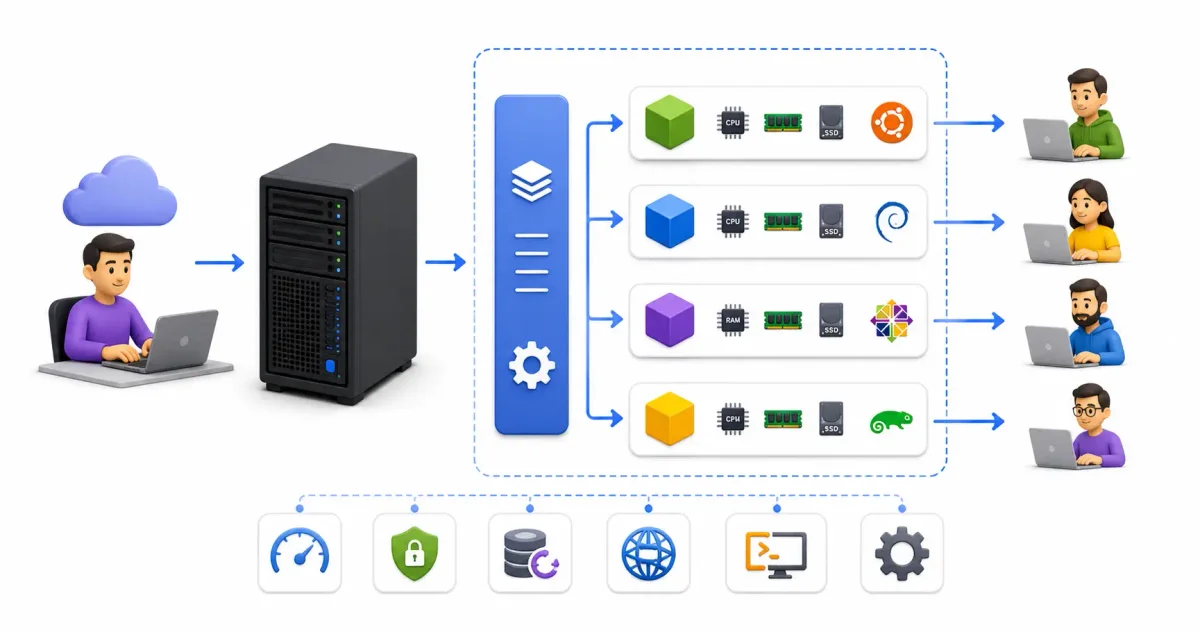
When you rent a VPS from a provider like DigitalOcean, Linode, or Hetzner, they do not hand you a small physical computer. Instead, they buy a massive, incredibly powerful enterprise server—a “Host Node”—that might have 128 CPU cores, 2 Terabytes of RAM, and massive arrays of NVMe SSD storage.
On top of this bare-metal hardware, they install a specialized operating system called a Hypervisor.
What is a Hypervisor?
A hypervisor (like KVM, VMware ESXi, or Proxmox) is software designed specifically to slice physical hardware into smaller, isolated virtual compartments.
When you purchase a $5/month VPS with 1 CPU core and 1GB of RAM, the Hypervisor logically cordons off exactly 1GB of the physical RAM and strictly assigns it to you. It then creates a Virtual Machine (VM).
To your perspective, this Virtual Machine is indistinguishable from a physical computer. It goes through a standard Linux boot process, it loads a kernel, and it runs its own isolated filesystem.
Because of the Hypervisor’s strict isolation rules, your VPS cannot see the data of the VPS running next to it, and the other VPS cannot steal your allocated RAM, even if their website goes viral.
3. Types of Virtualization Technologies
Not all VPSs are created equal. When shopping for a provider, you will usually see two different types of virtualization technologies advertised. Knowing the difference is critical, especially if you plan to run advanced software like Docker.
A. Full Virtualization (KVM / Hyper-V)
KVM (Kernel-based Virtual Machine) is the industry standard in 2026. This is “true” virtualization.
- How it works: The hypervisor simulates complete hardware for each VPS. Because the hardware is simulated, your VPS runs its own completely independent Linux Kernel.
- Why it matters: Because you have your own kernel, you can load custom network drivers, run advanced firewalls (like
iptablesornftables), and run container engines like Docker flawlessly. You can even install a completely different OS, like FreeBSD or Windows.
B. Container-Based Virtualization (LXC / OpenVZ)
This is an older, cheaper method of virtualization.
- How it works: Instead of simulating hardware, OpenVZ creates isolated “containers” that all share the exact same underlying Linux Kernel belonging to the Host Node.
- Why it matters: Because you share a kernel, you cannot load custom kernel modules. Running Docker inside an OpenVZ container is notoriously difficult and heavily restricted. The only benefit is that it is slightly cheaper for the hosting provider, allowing them to offer “budget” VPS plans. We highly recommend avoiding OpenVZ and always choosing KVM.
4. Managed vs. Unmanaged VPS
Once you understand the hardware, you must make a crucial purchasing decision regarding the software and maintenance.
1. Unmanaged VPS (The “Do It Yourself” Choice)
When you buy an Unmanaged VPS, the provider simply installs the operating system (like Ubuntu 24.04), emails you the root password and an IP address, and wishes you good luck.
- Your Responsibility: You must SSH into the server, install the web server (Nginx/Apache), secure the firewall, install security patches, and configure backups. If the server is hacked because you left a port open, the provider will not help you.
- Cost: Incredibly cheap (often $4 to $10 per month).
- Best for: Developers, Linux enthusiasts, and system administrators who want absolute control over their environment.
2. Managed VPS (The “Done For You” Choice)
With a Managed VPS, the hosting provider acts as your dedicated IT team. The server usually comes pre-installed with a graphical control panel (like cPanel or Plesk).
- Their Responsibility: The provider monitors the server 24/7, installs critical security patches, configures the firewall, and handles the database setups. If the server crashes at 3 AM, their team fixes it before you even wake up.
- Cost: Very expensive (often $50 to $150+ per month), as you are paying for human labor and expertise.
- Best for: Small business owners, digital marketing agencies, and bloggers who need guaranteed uptime but do not have the time or desire to learn Linux command-line administration.
5. Cloud Computing vs. Traditional VPS
In 2026, you often hear the terms “Cloud Server” (like AWS EC2 or an Azure Virtual Machine) used interchangeably with “VPS.” While they are technically very similar (both are virtual machines), there are distinct differences in how they are architected.
- Traditional VPS: Your virtual machine lives on one specific physical server in the data center. If that physical motherboard catches fire, your VPS goes offline until they fix the physical machine or restore you from a backup.
- Cloud Server: Your virtual machine is abstracted across a massive cluster of servers, and your hard drive is stored on a separate Storage Area Network (SAN). If a physical motherboard catches fire in a Cloud environment, the system detects it and instantly live-migrates your running Virtual Machine to a healthy server in milliseconds. You experience zero downtime.
Cloud servers also offer “pay-by-the-hour” billing and instant scalability. However, for a simple blog or a personal Nextcloud instance, a traditional, predictable $5/month VPS is usually far more cost-effective than navigating the complex billing of AWS.
6. Common Use Cases: Do You Need a VPS?
You should upgrade to a VPS if you fit into any of these categories:
- High-Traffic Websites: If your WordPress site takes more than 3 seconds to load on shared hosting, or you frequently get “Resource Limit Reached” errors, a VPS provides the dedicated RAM and CPU needed to cache database queries and serve pages instantly.
- Self-Hosting Privacy Advocates: If you want to de-Google your life, a VPS is required to run your own private Dropbox alternative (Nextcloud), password manager (Vaultwarden), or ad-blocker (Pi-Hole).
- Software Developers: A VPS is a perfect “remote playground.” It gives you a clean Linux environment to learn Docker, compile code, and run Node.js APIs without cluttering or breaking your personal laptop.
- Custom Applications: Shared hosting only supports PHP. If you want to deploy an application written in Python, Rust, Ruby on Rails, or Java, you absolutely require the root access provided by a VPS.
7. VPS Provider Comparison (2026)
Choosing the right provider depends on your budget, geographic needs, and technical requirements. Here is a practical comparison of the most popular VPS providers in 2026:
| Provider | Entry Plan (~$5/mo) | Virt. Type | Key Strength | Best For |
|---|---|---|---|---|
| Hetzner Cloud | 2 vCPU, 4GB RAM, 40GB SSD | KVM | Best price/performance in Europe | Self-hosters, developers, EU users |
| DigitalOcean | 1 vCPU, 1GB RAM, 25GB SSD | KVM | Excellent documentation and tutorials | Beginners, startups |
| Linode (Akamai) | 1 vCPU, 1GB RAM, 25GB SSD | KVM | Global data centers, strong network | Developers, global apps |
| Vultr | 1 vCPU, 1GB RAM, 25GB SSD | KVM | Most data center locations worldwide | Low-latency requirements |
| OVHcloud | 2 vCPU, 2GB RAM, 40GB SSD | KVM | Cheapest bare-metal options | High-traffic, European privacy |
| Oracle Cloud Free | 4 vCPU (ARM), 24GB RAM | KVM | Genuinely free forever tier | Budget/testing |
Recommendation for beginners: Start with Hetzner (Europe) or DigitalOcean (global). Both offer excellent documentation and KVM-based VPS plans that fully support Docker.
8. Your First 10 Minutes on a VPS: Initial Hardening
When you receive your VPS credentials, the server is completely open. Before doing anything else, you should perform a basic security hardening sequence. Here is the essential checklist:
Step 1: Update the System
sudo apt update && sudo apt upgrade -yStep 2: Create a Non-Root User
Working as the root user constantly is dangerous — one typo can destroy your server. Create a regular user account and give it sudo privileges:
adduser suresh
usermod -aG sudo suresh
Step 3: Set Up SSH Key Authentication
Password-based SSH logins are vulnerable to brute-force attacks. Generate a key pair on your local machine and then copy the public key to the server:
# On YOUR local machine:
ssh-keygen -t ed25519 -C "my-vps-key"

# Copy the public key to the VPS
ssh-copy-id -i ~/.ssh/id_ed25519.pub suresh@YOUR_SERVER_IP
Step 4: Disable Password Authentication
After confirming SSH key login works, edit the SSH config to disable password logins permanently:
sudo nano /etc/ssh/sshd_configSet these values:
PasswordAuthentication no
PermitRootLogin no
Then restart SSH: sudo systemctl restart sshd
Step 5: Configure a Firewall (UFW)
sudo apt install ufw
sudo ufw allow ssh          # Allow SSH (port 22)
sudo ufw allow 80/tcp       # HTTP
sudo ufw allow 443/tcp      # HTTPS
sudo ufw enable
sudo ufw status
For a deeper guide on UFW rules, see our UFW Firewall Guide.
9. Popular Self-Hosting Stacks for a VPS
A VPS becomes exponentially more useful when you run a curated stack of services. Here are the most popular configurations:
Stack 1: The Privacy-First Personal Cloud
Run on a Hetzner CX22 (~€3.79/month):
- Nextcloud — Google Drive + Google Docs replacement
- Vaultwarden — Bitwarden-compatible password manager
- Immich — Google Photos replacement
- Nginx Proxy Manager — manages SSL certificates and routing for all services
Stack 2: The Developer Sandbox
Run on a DigitalOcean Basic (~$6/month):
- Docker + Docker Compose — run any development environment in isolated containers
- Gitea — self-hosted Git server (GitHub alternative)
- PostgreSQL or MySQL — database backend for projects
- Traefik — automatic SSL and routing
Stack 3: The Blog & Content Platform
Run on any $4–6/month KVM VPS:
- Nginx or Caddy — web server with automatic HTTPS
- WordPress or Ghost — CMS platform
- MariaDB — database backend
- Redis — object cache for WordPress to dramatically speed up page loads
10. Frequently Asked Questions About VPS Hosting
How much RAM do I actually need?
For a single lightweight application (a personal blog or small API), 1GB of RAM is sufficient. For running Docker with a database and a caching layer (like Nextcloud with MariaDB and Redis), plan for 2–4GB. For a full self-hosting stack with 5+ services, 4–8GB is recommended.
Can I host multiple websites on one VPS?
Yes. This is called Virtual Hosting, and it is extremely common. You install a single web server (Nginx or Caddy) and configure it with multiple server blocks (Nginx) or a Caddyfile (Caddy), each mapping a different domain name to a different directory or container. One $6/month VPS can comfortably host 5–10 low-traffic websites.
What happens if my VPS uses all its RAM?
The Linux kernel activates the OOM Killer (Out-of-Memory Killer), which forcibly terminates the most memory-hungry process to free up RAM. This typically crashes your database or application. To prevent this, configure swap space on your VPS:
# Create a 2GB swap file
sudo fallocate -l 2G /swapfile
sudo chmod 600 /swapfile
sudo mkswap /swapfile
sudo swapon /swapfile
Do I need to know Linux to use a VPS?
For an unmanaged VPS, yes — a fundamental understanding of SSH, basic Linux commands, and firewall configuration is required. However, tools like CasaOS, YunoHost, and Umbrel offer graphical web interfaces that let you install self-hosted apps without ever touching the terminal.
Is my VPS private from the hosting company?
The hosting company controls the physical hypervisor your VPS runs on. A determined provider could theoretically inspect your VM’s memory. For sensitive data, use full-disk encryption with LUKS or store only encrypted files (via Nextcloud’s E2EE or Vaultwarden’s client-side encryption) on the server.
Conclusion
A Virtual Private Server is the ultimate gateway into the world of professional system administration. It offers the raw power, deep control, and strict isolation of enterprise hardware at a price accessible to hobbyists and students.
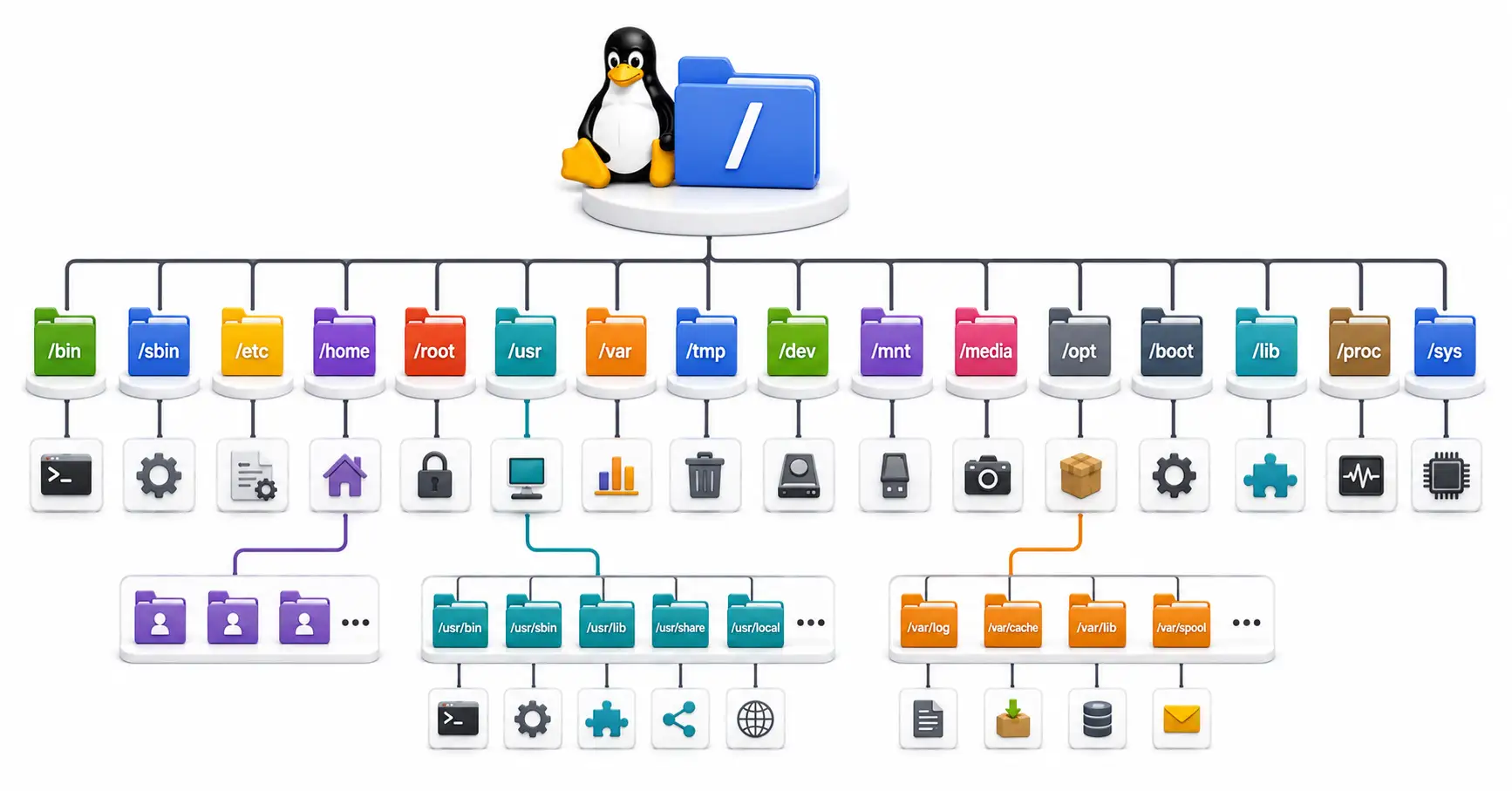
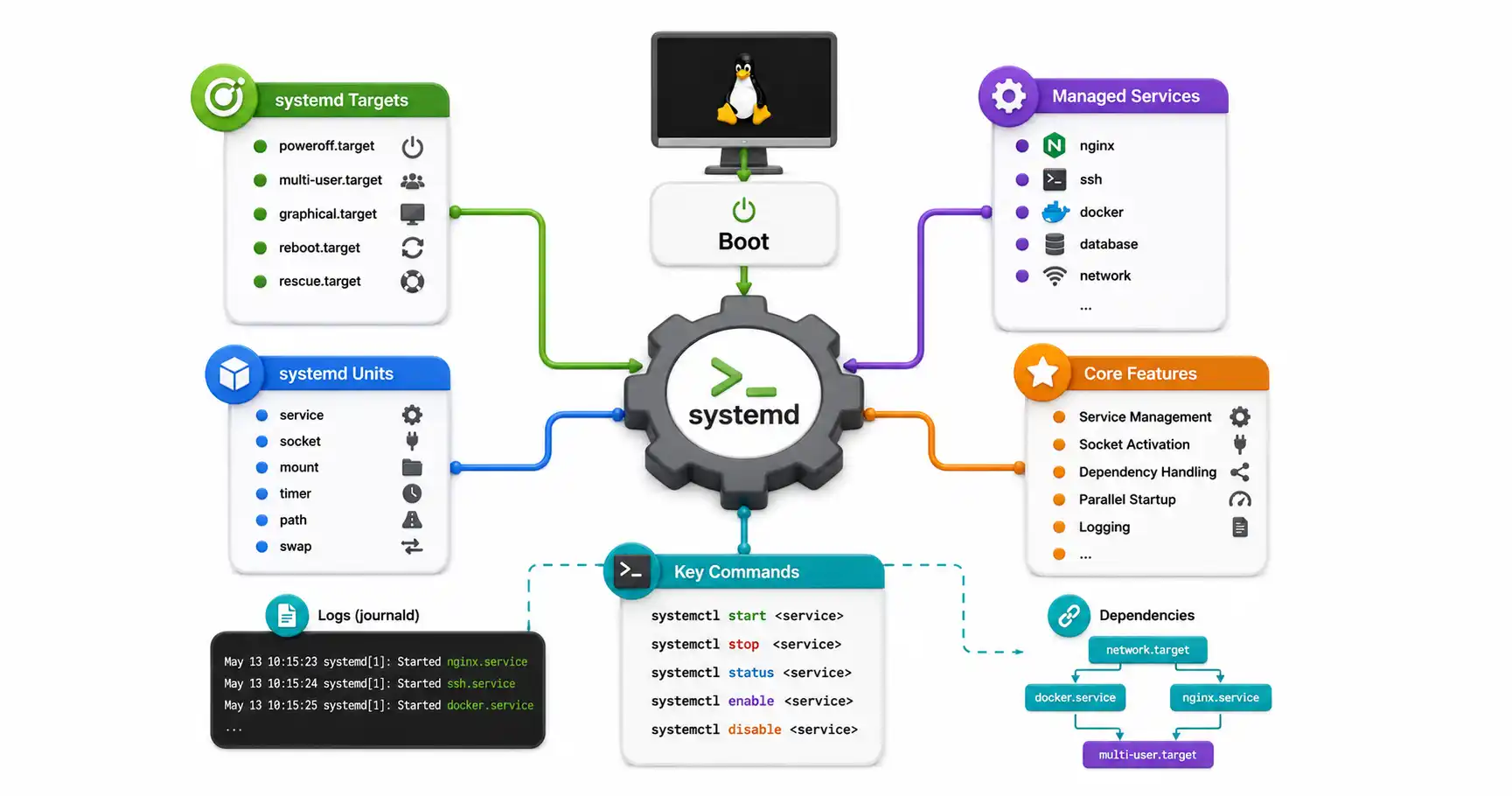
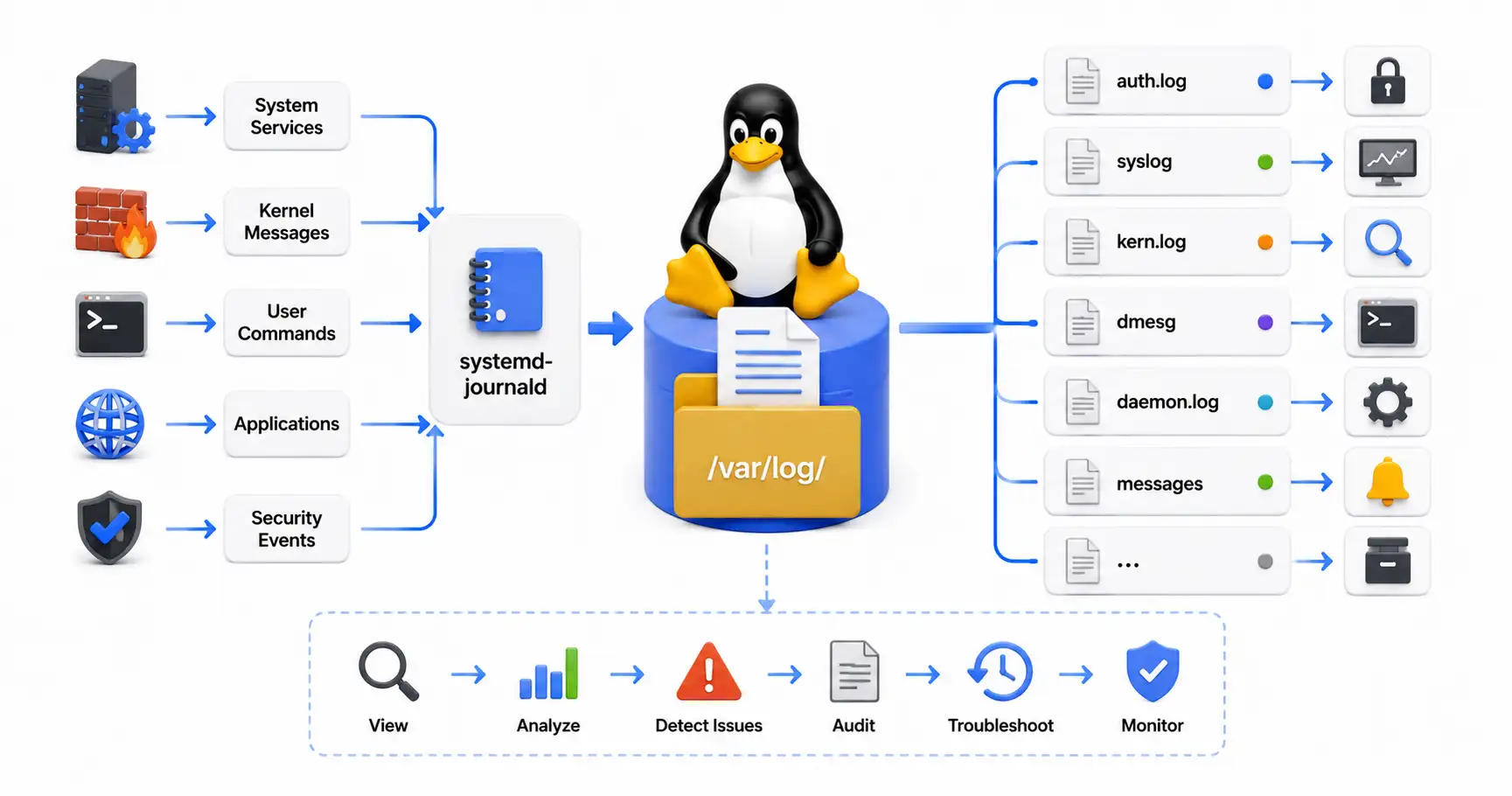
While an Unmanaged VPS presents a steep learning curve, the skills you acquire—navigating the Linux filesystem, reading system logs, and configuring firewalls—are the exact same skills required to manage massive, multi-million dollar cloud infrastructures in the modern tech industry. A $5 VPS is the best educational investment a developer can make.
Discussion
Loading comments...