

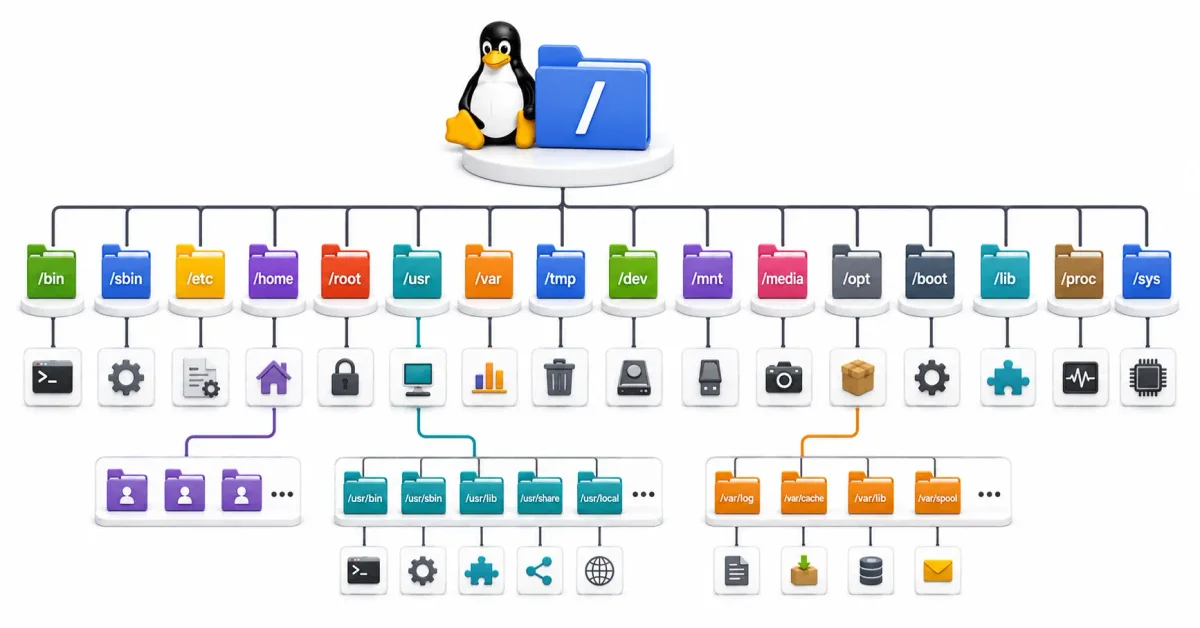
If you have spent your entire computing life using Microsoft Windows, the underlying structure of your hard drive is likely ingrained in your brain. You know that the operating system lives in C:\Windows, your applications live in C:\Program Files, and your personal documents live in C:\Users. It is a system built around the concept of physical disk drives. If you plug in a USB thumb drive, it becomes the D:\ or E:\ drive, entirely separate from your main hard drive.
However, the moment you open a terminal in any modern Linux distribution—whether it’s Ubuntu, Fedora, or a massive enterprise server running Red Hat—you are presented with a completely alien landscape. You will see directories with cryptic, three-letter names like /etc, /usr, /var, /bin, and /mnt.
At first glance, it looks like a chaotic mess of random abbreviations. But beneath this surface lies a meticulously organized, unified rulebook called the Filesystem Hierarchy Standard (FHS).
In 2026, understanding this structure is the absolute prerequisite for mastering Linux. It is essential for installing software, configuring firewalls, reading system logs, and navigating servers. In this comprehensive guide, we will demystify the Linux filesystem, explain the philosophy behind it, and take a detailed tour of exactly what lives where.
1. The Core Philosophy: Everything is a File, and Everything is One Tree
Before we look at the specific folders, you must understand the two fundamental design philosophies of Unix and Linux.
Philosophy 1: The Unified Tree (The Root)
Unlike Windows, which assigns a new letter to every physical drive, Linux creates a single, unified, inverted tree.
At the absolute top of this tree is the Root Directory, represented simply by a forward slash: /.
Every single file, folder, application, and piece of hardware on your system exists somewhere beneath this Root. If you plug in a massive 10TB external hard drive, it does not become a D:\ drive. Instead, it is “mounted” as a folder inside the existing tree, usually at /mnt/external_drive. The user experience is seamless; you navigate from your local hard drive to the external hard drive simply by changing directories.
Philosophy 2: Everything is a File
In Linux, text documents are files. Applications are files. But more surprisingly, your keyboard is a file. Your mouse is a file. Your network card is a file. The operating system interacts with hardware by reading and writing to special “device files.” This abstraction makes Linux incredibly powerful and scriptable.
2. The Root and The Boot
Let’s begin our tour from the absolute top of the filesystem and work our way down.
/ (The Root Directory)
This is the base of the entire system. Only the supreme system administrator (the root user) has permission to write files directly into this directory.
/boot (The Ignition System)
This directory contains everything required to start the computer before the operating system is fully loaded.
- The Kernel (
vmlinuz): The core engine of the Linux operating system. - The Bootloader (
GRUB): The menu that appears when you turn on your computer, asking which operating system or kernel version you want to load. - Initramfs: A temporary, miniature file system loaded into memory during startup to help the kernel access the main hard drive.
Note: The /boot directory is often placed on a completely separate, small physical partition on your hard drive to ensure the computer can read it even if the main filesystem is encrypted or corrupted.
3. The Core Binaries (The Command Line Tools)
When you type a command into the terminal, like ls or cat, where does the system actually find that program?
/bin (User Binaries)
Historically, this folder contained the essential command-line tools required for the system to operate and for basic users to navigate. This is where commands like ls (list files), cp (copy), mkdir (make directory), and bash (the shell itself) live.
/sbin (System Binaries)
The “s” stands for system (or superuser). This folder contains essential administrative tools that generally require root or sudo privileges to execute. This is where tools like fdisk (for formatting hard drives), iptables (for firewall rules), and reboot live.
(Modern Note: In modern 2026 Linux distributions, to simplify the system, /bin and /sbin are often just “symbolic links” (shortcuts) pointing to /usr/bin and /usr/sbin. All tools now live under the /usr umbrella).
4. System Configuration: The Nervous System
If you need to change how a piece of software behaves, you do not look in the folder where the software is installed. You look here.
/etc (Editable Text Configuration)
This is arguably the most important directory for a system administrator. The /etc directory (pronounced “etsy”) contains all the system-wide configuration files.
In Linux, configuration is not hidden inside a proprietary, binary Registry (like in Windows). Configuration is always written in plain, human-readable text files.
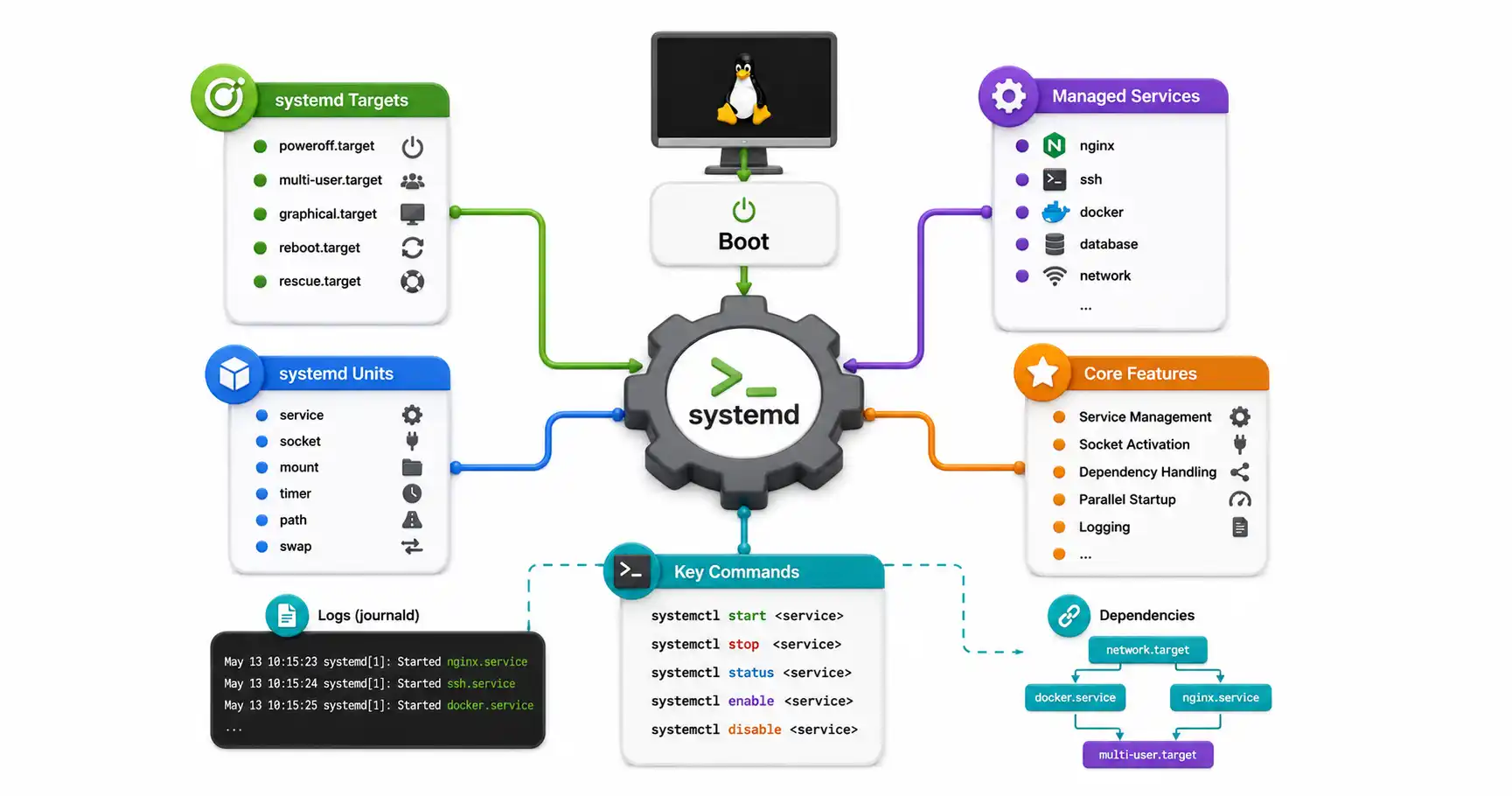
/etc/passwd: Defines all the user accounts on the system./etc/fstab: Tells the system which hard drives to mount during boot./etc/ssh/sshd_config: The security rules for remote server access./etc/systemd/system/: Where you place configuration files to make your custom applications start automatically when the server boots.
5. Software and Libraries: The Bulk of the System
Where do the massive applications, graphics libraries, and web browsers actually install themselves?
/usr (Unix System Resources)
Originally, this stood for “User,” but its purpose changed decades ago. Today, /usr is the largest directory on a fresh Linux install. It contains the majority of the software, libraries, and documentation installed by your package manager (like apt or dnf).
/usr/bin: Where 99% of your installed applications live (Firefox, Python, VLC)./usr/lib: Shared code libraries (similar to.dllfiles in Windows) that multiple applications rely on./usr/share: Architecture-independent data, like application icons, desktop wallpapers, and built-in manual pages (manfiles).
/opt (Optional Software)
While /usr is strictly managed by your distribution’s package manager, /opt is reserved for massive, third-party software suites that bundle all their own libraries and don’t want to integrate with the rest of the system. For example, if you install Google Chrome or proprietary enterprise database software, it will often install itself entirely inside /opt.
6. Variable Data and State
Linux systems are dynamic. They constantly write logs, cache data, and process queues. This data cannot be mixed with static application files.
/var (Variable Data)
This folder is for files that are expected to grow and change continuously as the system runs.
/var/log: The single most critical folder for troubleshooting. Every time an application crashes, an SSH login fails, or the kernel panics, the text evidence is written into a log file here./var/www: The standard, default location for hosting HTML files if you are running an Apache or Nginx web server./var/lib: State information pertaining to an application. For example, this is where Docker stores its container images, and where PostgreSQL stores its actual database files.
7. User Data and Removable Media
Where do your personal files go?
/home (User Cubicles)
Every human user created on the system gets their own dedicated folder inside /home (e.g., /home/suresh). This is where your personal Downloads, Documents, and Desktop folders live.
- Dotfiles: Your
/homefolder also contains hidden files and folders that start with a period (like.bashrcor.config/). These are your personal configuration files. If you change a setting in Firefox, it saves to your home folder, meaning it doesn’t affect any other users on the system.
/root (The Administrator’s Home)
The root superuser does not live in /home. They have their own private, highly secure home directory located directly at /root.
/mnt and /media (Mount Points)
/media: When you plug in a USB thumb drive on a desktop Linux system, the graphical interface automatically mounts it here (e.g.,/media/suresh/USB_DRIVE)./mnt: This is a temporary playground for system administrators. If you need to manually attach a backup hard drive or a network file share via the terminal, you mount it inside/mnt.
8. The Virtual Filesystems (The Matrix)
These directories are the strangest part of Linux. They do not exist on your physical hard drive. They are illusions created by the Linux kernel in RAM, providing a way for you to interact directly with the computer’s hardware and memory using standard text commands.
/dev (Devices)
As mentioned earlier, “everything is a file.” This directory contains special device files that represent your hardware.
/dev/sdarepresents your first physical hard drive./dev/nullis a famous “black hole.” Any data you send to this file is instantly destroyed. It is used in scripting to hide unwanted output.
/proc (Processes)
This is a window directly into your computer’s RAM and CPU. It contains a folder for every single application currently running on your system. It also contains virtual text files that let you read hardware specs in real-time.
- Running
cat /proc/cpuinfowill print the exact make, model, and clock speed of your processor.
/sys (System)
Similar to /proc, but specifically designed to interact with the kernel’s hardware drivers. You can actually change the brightness of your laptop screen or the speed of your cooling fans by editing the text files inside /sys.
9. Practical Navigation: Essential Commands for the FHS
Understanding the structure is only half the battle — you also need to navigate it efficiently. These commands are your daily toolkit.
Finding Where a Program Is Installed
# Find the binary location of a command
which python3
# Output: /usr/bin/python3

# Find ALL locations (including aliases and functions)
type -a python3

# Locate every file belonging to an installed package (Debian/Ubuntu)
dpkg -L nginx

# Show which package owns a specific file
dpkg -S /usr/bin/vim
Searching the Entire Filesystem
# Find files by name (case-insensitive)
find / -iname "*.conf" 2>/dev/null

# Find files modified in the last 24 hours
find /etc -mtime -1

# Find files larger than 100MB (useful for finding disk space hogs)
find / -size +100M -type f 2>/dev/null | sort -k5 -rh

# Use locate for a faster (but less current) search
sudo updatedb
locate sshd_config
Checking Disk Usage by Directory
# Show total disk usage of key directories, sorted by size
sudo du -sh /var /usr /home /opt 2>/dev/null | sort -rh

# Drill down into /var to find what is consuming space
sudo du -sh /var/* | sort -rh | head -10

# Show human-readable disk space remaining on all mounted filesystems
df -h
10. The Full FHS Quick-Reference Table
Here is a complete, condensed reference of every major directory in the Linux Filesystem Hierarchy Standard. Keep this bookmarked for quick lookups.
| Directory | Full Name / Purpose | Writable? |
|---|---|---|
/ | Root of the entire tree | Root only |
/bin | Essential user binaries (ls, cp, bash) | No (system) |
/sbin | Essential system admin binaries (fdisk, reboot) | No (system) |
/boot | Kernel, GRUB bootloader, initramfs | No (system) |
/dev | Device files (virtual, in RAM) | Kernel managed |
/etc | System-wide configuration files | Root only |
/home | User personal directories (/home/suresh) | User owned |
/lib | Shared libraries for /bin and /sbin | No (system) |
/media | Auto-mount points for removable media (USB drives) | Auto-managed |
/mnt | Temporary manual mount points for admins | Root only |
/opt | Optional third-party self-contained software | Root only |
/proc | Virtual filesystem: running processes and kernel info | Read-only |
/root | Home directory for the root superuser | Root only |
/run | Runtime data (PIDs, sockets) since last boot | System |
/srv | Data served by this system (web, FTP content) | Root only |
/sys | Virtual filesystem: hardware driver interface | Kernel managed |
/tmp | Temporary files, cleared on every reboot | World-writable |
/usr | Most installed software, libraries, and docs | No (system) |
/usr/bin | Primary location for installed application binaries | No (system) |
/usr/lib | Shared libraries for /usr/bin applications | No (system) |
/usr/local | Manually compiled software (not managed by APT) | Root only |
/usr/share | Arch-independent data: icons, man pages, themes | No (system) |
/var | Variable data: logs, databases, mail queues, caches | Root/service |
/var/log | System and application log files | Root/service |
/var/www | Default web server document root | Root/www-data |
/var/lib | Persistent application state (Docker images, databases) | Service owned |
/var/cache | Application cached data (APT cache, browser cache) | Service owned |
11. Real-World Admin Tasks Mapped to the FHS
Knowing the FHS means knowing exactly where to look for any task. Here are the most common sysadmin scenarios:
| Task | Where to Look |
|---|---|
| SSH is not accepting connections | /etc/ssh/sshd_config |
| Find why Nginx returned a 500 error | /var/log/nginx/error.log |
| Check which users have root access | /etc/sudoers or /etc/sudoers.d/ |
| Find all scheduled cron jobs | /etc/crontab, /etc/cron.d/, /var/spool/cron/ |
| Change the system hostname | /etc/hostname and /etc/hosts |
| Disk space is full — find the culprit | sudo du -sh /var/* | sort -rh |
| Check DNS resolver settings | /etc/resolv.conf |
| See which hard drives are mounted at boot | /etc/fstab |
| Nginx/Apache web content (default) | /var/www/html/ |
| Docker container images and volumes | /var/lib/docker/ |
| PostgreSQL database files | /var/lib/postgresql/ |
| Custom app startup service | /etc/systemd/system/myapp.service |
12. Frequently Asked Questions
What is the difference between /bin and /usr/bin?
Historically, /bin contained only the tools needed to repair the system in an emergency (when /usr might not yet be mounted), while /usr/bin held the rest. In modern Linux (2015+), /bin is simply a symbolic link to /usr/bin. They are the same directory. You can verify this with ls -la /bin.
Why is /tmp dangerous from a security perspective?
/tmp is world-writable, meaning any user and any process can create files there. This makes it a common target for symlink attacks — where a malicious process creates a symlink in /tmp that points to a sensitive system file, tricking a privileged process into overwriting it. For sensitive scripts, write temporary files to a user-owned directory instead.
What is /usr/local for?
/usr/local is the correct location for software that you compile and install manually from source code (using make install). Your package manager (apt, dnf) never touches files in /usr/local, so there is no risk of conflicts. The structure mirrors /usr: binaries go into /usr/local/bin/, libraries into /usr/local/lib/, etc.
Why does /proc show CPU info even though it’s not a real file?
/proc is a virtual filesystem (type proc) created entirely in RAM by the Linux kernel. When you run cat /proc/cpuinfo, the kernel intercepts the read, dynamically assembles the current CPU information as text, and returns it to you. Nothing is ever actually stored on disk. This is why you cannot write to most /proc files and why the directory is empty if you boot from a minimal live disk.
Can I move /home to a separate hard drive?
Yes, and it is a best practice on desktop Linux systems. By placing /home on its own partition or disk, you can completely reinstall the operating system without erasing your personal files. To do this, format the new drive, copy your existing /home data to it, and then add an entry to /etc/fstab to mount it at /home automatically on every boot.
Conclusion: The Logic Behind the Chaos
While the Filesystem Hierarchy Standard might seem overwhelming to a beginner, it is an incredible feat of organizational engineering.
By strictly separating static application files (/usr), dynamic state data (/var), system configuration (/etc), and personal user data (/home), Linux achieves unparalleled stability and security. It allows system administrators to easily backup critical data without backing up easily replaceable applications, and it ensures that a rogue application cannot fill up the root filesystem with log files and crash the system.
Once you internalize the FHS, the terminal stops looking like a maze of random letters and begins to look like a meticulously organized, perfectly logical library. Every directory has a reason, and once you know the reason, navigating any Linux server — from a Raspberry Pi to a 1,000-core data center node — becomes second nature.
Want to see the FHS in action? Learn how Linux reads system logs from /var/log or explore how software gets installed into these directories.
Discussion
Loading comments...