

A few years ago, I looked at my Android phone’s battery usage screen and noticed something alarming. Apps I hadn’t opened in days—social media platforms, stock keyboards, and default file managers—were silently draining my battery by constantly phoning home. My data was being harvested around the clock.
That was the day I wiped my phone and started installing open-source alternatives.
The Android ecosystem is incredible because, unlike iOS, you have the freedom to sideload software and completely bypass corporate app stores. If you’ve read my guide on the best open-source software alternatives for desktop, you already know the benefits. You don’t need a heavy VPS to regain your privacy; you just need better mobile apps.
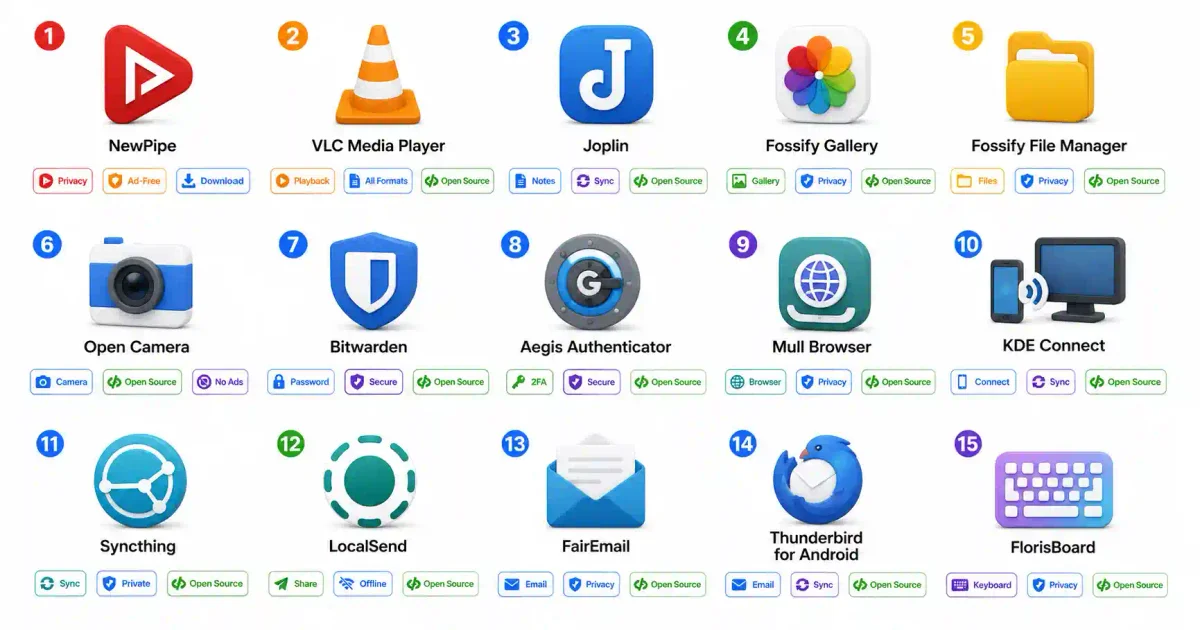
Here are the 15 best free and open-source (FOSS) Android apps that completely replaced big tech on my phone.
1. NewPipe (YouTube Alternative)
If you are sick of unskippable double ads on YouTube, NewPipe is a revelation. It is a lightweight YouTube client that parses the website natively without requiring the official Google API or a Google account.
You can subscribe to channels, download audio for offline listening, and play videos in the background while your screen is off. If you prefer archiving massive playlists to your local hard drive, I highly recommend pairing NewPipe on your phone with our yt-dlp open source tutorial on your PC, then streaming those local files back to your phone via a Jellyfin media server.
2. KDE Connect (Device Sync)
KDE Connect bridges the gap between your Android phone and your Linux/Windows PC over your local network. It allows you to share clipboards, transfer files, use your phone as a remote mouse, and reply to SMS messages directly from your desktop.
It is an absolute must-have if you use any of the best Linux distros for beginners. When I am working on a server, I frequently use KDE Connect to paste complex SSH keys from my phone directly into my desktop’s top 13 Linux CLI text editors. It’s much faster than manually typing or using SFTP file transfers.
3. Syncthing (Google Drive Alternative)
Why pay for Google Drive when you can build a peer-to-peer sync network? Syncthing continuously syncs folders between your phone, laptop, and desktop without using a centralized cloud server.
If you have an old PC lying around, you can turn it into an always-on node by following our Proxmox home lab setup guide. It’s the ultimate backend for our Syncthing private file sync workflow. And if you are running your nodes on a server, deploying it is incredibly easy if you’ve mastered installing Docker on Ubuntu.
4. Joplin (Evernote Alternative)
For note-taking, Joplin is spectacular. It uses standard Markdown, making it feel very similar to writing code in a terminal editor like Micro or Nano.
More importantly, it supports true End-to-End Encryption. I point my Joplin Android app to my self-hosted Nextcloud server, ensuring my personal thoughts, code snippets, and journal entries are entirely under my control.
5. Aegis Authenticator (2FA)
Do not use Google Authenticator or SMS for your two-factor authentication. If you get SIM-swapped, you are ruined. Aegis is an open-source 2FA vault for Android that is fully encrypted and allows you to export your secrets.
Security requires redundancy. If you’ve ever seen the signs your email was hacked or had to check if your password was leaked, you know how vital 2FA is. Pair Aegis with one of the best password managers in 2026 for an impenetrable defense.
6. LocalSend (AirDrop Alternative)
Apple users brag about AirDrop, but LocalSend brings that exact functionality to Android, Linux, and Windows. It requires no internet connection and auto-discovers devices on your Wi-Fi network.
Under the hood, it uses local multicast DNS. If you’re a networking nerd and want to understand how it discovers peers without hitting external servers, read our deep dive on what DNS is and how it works and what happens when you type a URL. It’s a brilliant practical application of fundamental HTTP concepts.
7. Fossify Gallery (Google Photos Alternative)
Google Photos is an incredible piece of software, but I do not want an advertising company running facial recognition algorithms on pictures of my family. Fossify Gallery is a beautiful, offline-first photo manager.
It simply manages the files on your device without phoning home. If you miss the cloud backup features of Google Photos, just sync the Fossify folder to your own server running an Immich self-hosted photo management instance. (And for your scanned physical documents, keep them out of your photo gallery—use Paperless-ngx instead).
8. Fossify File Manager
The default file managers shipped by Samsung and Google are loaded with “cleaning” recommendations and cloud upsells. Fossify File Manager is a clean, tabbed local file explorer.
It gives you root-level access to your Android filesystem. If you are comfortable managing Linux file permissions (or using our Linux permission calculator), you will feel right at home. It is incredibly useful for finding system logs when debugging background systemd processes in a Termux environment on your phone.
9. VLC Media Player
VLC is the Swiss Army knife of media players. It plays literally every video codec in existence, supports network streams, and has no ads.
I use the Android VLC app to directly stream MKV files from my home server. If you host your media apps in containers, you can learn the differences in runtime performance by reading our Docker vs Podman technical benchmark, and you can manage those stacks easily using Portainer.
10. Mull Browser (Chrome Alternative)
Chrome on mobile is designed to track you. Mull Browser is a privacy-hardened fork of Firefox for Android. It strips out telemetry, enables anti-fingerprinting by default, and supports extensions like uBlock Origin.
Browsing on Mull is significantly safer, but remember that a secure browser doesn’t hide your IP address—only a VPN can do that. Furthermore, no browser can stop social engineering. You still need to check a website before clicking a link to avoid falling victim to targeted OSINT investigations.
11. FlorisBoard (Gboard Alternative)
Your keyboard has a keylogger built-in by design. If you are using Gboard, every word you type is processed. FlorisBoard is a sleek, open-source keyboard that respects your privacy.
It has excellent clipboard history management and swipe typing. Switching to an offline keyboard is one of the easiest ways to protect yourself from the massive data brokering algorithms that dictate modern search engine optimization. If you understand how search engines crawl and index websites, you know that stopping data collection at the input layer is crucial. (And if you are ever searching for sensitive information, always run a Google Dorking investigation through a proxy).
12. FairEmail (Gmail Alternative)
FairEmail is a minimalist, privacy-focused email client. It doesn’t store your passwords on a third-party server (unlike some modern commercial email clients), and it prevents tracking pixels in newsletters from loading.
Because it operates strictly via IMAP/SMTP, it gives you raw headers. This makes it incredibly easy to spot phishing emails. If you download an attachment, FairEmail won’t scan it for you, so make sure you are routing questionable files through a ClamAV antivirus check. And remember, email is just one vector; always ensure you protect your WhatsApp account with 2FA as well.
13. Thunderbird for Android (Outlook Alternative)
If you love the desktop version of Thunderbird, the new Thunderbird for Android (built on the legacy of K-9 Mail) brings that exact experience to mobile.
It handles multiple accounts flawlessly and supports unified inboxes. If you run your own mail server, you’ll need to secure your domains. I highly recommend learning how to enable HTTPS with Let’s Encrypt. The easiest way to manage these certificates is by putting your webmail behind a Caddy web server or deploying Nginx Proxy Manager.
14. Open Camera
The stock camera apps on most phones process photos heavily with AI. Open Camera is a completely free app that gives you raw, manual DSLR-style controls over your smartphone sensor.
You can lock exposure, adjust ISO, and use external microphones for video recording. If you are building a content marketing strategy or following a beginner’s guide to SEO and need high-quality, unprocessed product photos, Open Camera is indispensable.
15. KeePassDX / Bitwarden
Finally, you need a password manager. If you want an entirely offline, locally encrypted vault, use KeePassDX. Read our KeePassDX complete guide to learn how to sync it with your PC.
If you prefer a cloud-synced experience, use Bitwarden. The mobile app is fully open-source and integrates flawlessly with Android’s autofill framework. Always generate maximum-entropy passwords (you can use our password generator) and, if you want total sovereignty, host the backend yourself using our Vaultwarden setup guide.
Conclusion
Switching to open-source Android apps isn’t just about saving money. It is a fundamental shift toward digital sovereignty. You are taking your computing environment back from corporations that view you as a product.
Start small. Replace your browser, install an open-source keyboard, and move your passwords to a secure vault. You might be surprised at how much faster your phone runs when it isn’t constantly running background telemetry analytics. (And if you ever need to inspect the API payloads these FOSS apps generate, bookmark our JSON formatter for easy debugging).
Take back your phone.
Frequently Asked Questions (FAQ)
Are open-source Android apps safe to use?
Yes, and in many cases, they are safer than proprietary apps. Because the source code is public, independent security researchers can audit the applications for vulnerabilities, malicious code, or hidden tracking telemetry.
Do I need to root my Android phone to install FOSS apps?
No, you do not need root access. You can easily sideload open-source apps by downloading the .apk files directly from the developer’s website, or by installing an alternative open-source app repository like F-Droid.
Can open-source apps completely replace Google services?
For the majority of daily tasks (email, web browsing, file management, video playback, and note-taking), open-source alternatives are more than capable. However, certain proprietary ecosystems like Google Maps or highly specific banking applications may still require closed-source software.
What is F-Droid and why should I use it?
F-Droid is an alternative app store for Android that exclusively hosts Free and Open Source Software (FOSS). It verifies that apps contain no tracking modules and compiles the code from source, ensuring you get a clean, private application.
Why does my phone warn me when installing apps outside the Play Store?
Android’s default security model requires you to explicitly grant permission to “Install Unknown Apps” from your browser or file manager. This is a standard security prompt to prevent malicious downloads. Always ensure you are downloading from verified sources like F-Droid or official GitHub repositories.
Are these open-source apps completely free?
Yes. The vast majority of FOSS Android apps are completely free of charge and contain zero advertisements. Developers usually support themselves through voluntary community donations on platforms like Patreon or GitHub Sponsors.
Can I sync my data without using Google Drive?
Absolutely. Apps like Syncthing allow you to sync files directly between your phone and your PC in a peer-to-peer fashion. Alternatively, you can self-host a private cloud platform like Nextcloud to replace Google Drive entirely.
Will open-source apps drain my battery?
Generally, the opposite is true. Proprietary apps often run constant background processes to harvest analytics and serve advertisements. Because open-source apps typically strip out these tracking modules, they are usually much lighter on battery consumption and CPU usage.
Do I need technical skills to use these apps?
Not at all. While the underlying philosophy is technical, modern open-source apps like VLC, Bitwarden, and NewPipe have highly polished, user-friendly interfaces that operate just like standard commercial applications.
How do I update open-source apps installed outside the Play Store?
If you install an alternative store like F-Droid or Obtainium, they will handle background updates automatically just like the Google Play Store. If you install standalone APKs, the apps will often notify you internally when a new version is released on GitHub.

Discussion
Loading comments...