

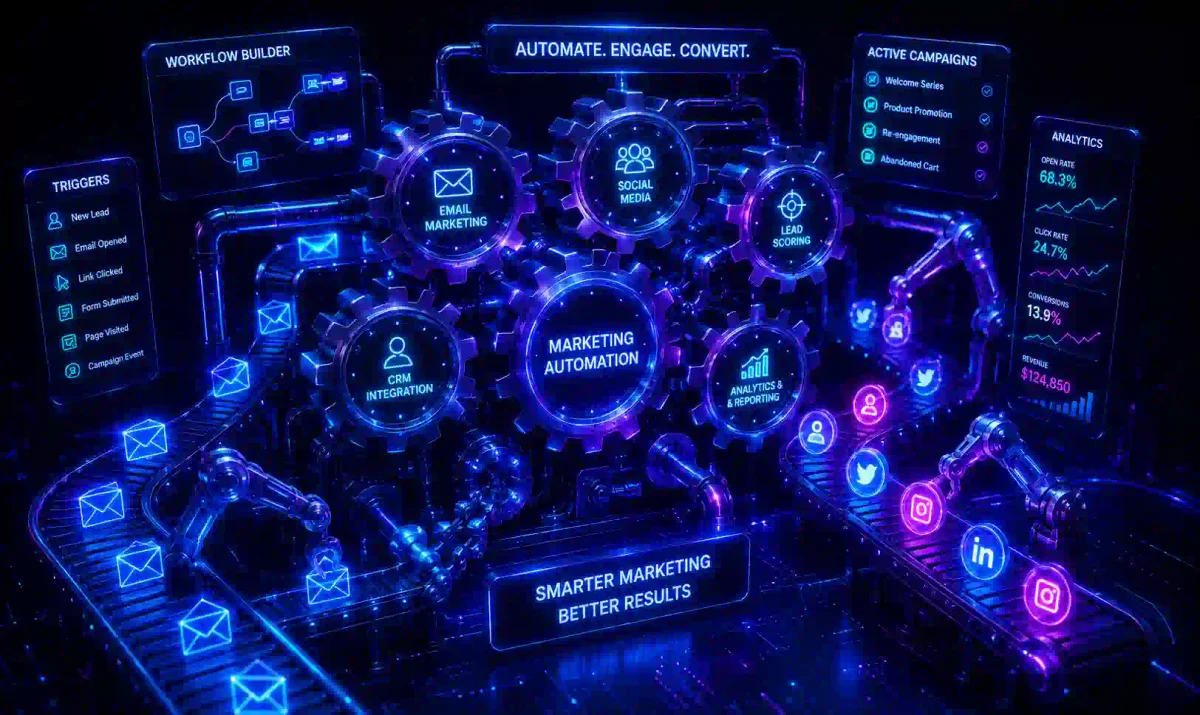
In the early, chaotic days of launching a business, marketing is inherently manual. You send individual, personalized emails to your first 10 prospects. You manually post updates on Twitter and manually reply to every comment. You type out responses to customer service inquiries.
This manual approach works when you have 10 customers. It collapses when you have 10,000.
The fundamental bottleneck of any growing business is time. You simply cannot hire enough people to track every user’s website behavior, score their purchase intent, and type out the right email at the right moment they are most likely to buy.
Enter Marketing Automation.
Marketing automation is the digital engine that allows a nimble, 5-person startup to operate with the marketing efficiency and scale of a Fortune 500 company. It is the technology that turns marketing from a manual, exhausting daily chore into a scalable, predictable, 24/7 revenue-generating machine.
In this guide, we will explore the core philosophy of automation, how to build complex, profitable behavioral workflows, how to utilize AI for predictive lead scoring, and crucially, how to avoid the trap of sounding like a generic robot.
1. Defining True Marketing Automation
Marketing Automation refers to a category of software platforms and digital technologies designed for marketing departments and organizations to more effectively market on multiple digital channels simultaneously (such as email, social media, websites, and text messages) and automate repetitive, manual tasks.
However, that is the sterile, technical definition.
The practical, revenue-focused definition of marketing automation is this: Consistently delivering the right message, to the right person, at the right time, without human intervention.
Imagine a scenario: A user visits the pricing page of your B2B SaaS website three times in a single week, but they never actually click the “Buy” button.
A human sales representative would recognize this buying intent and would want to call that user. But a human rep cannot monitor the website 24/7. Marketing automation software notices that specific behavior instantly. It automatically triggers an internal Slack alert to the sales team, and simultaneously sends that user an email offering a personalized 10% discount to push them over the edge. It happens while you sleep.
2. The Critical Difference Between Automation and Spam
Many old-school marketers hear the word “automation” and recoil. They think of the generic, unsolicited LinkedIn direct messages they receive every day: “Hi [First_Name], I noticed you work at [Company_Name]! Buy my software.”
That is not marketing automation. That is automated spam. You must understand the difference to protect your brand’s reputation.
- Automated Spam: Sending the same generic marketing message to a list of 10,000 people simultaneously, regardless of who they are, what their specific pain points are, or what their past behavior dictates. It is a “spray and pray” approach.
- True Marketing Automation: Sending 10,000 different messages to 10,000 people, with each message tailored to the user’s specific past behavior, demographic data, and current stage in the customer lifecycle.
Good, ethical marketing automation should feel invisible to the end user. It should not feel like they are talking to a robot; it should feel like digital serendipity.
When a user buys a complex camera from your e-commerce store, and three days later they receive an automated email containing a beautifully produced YouTube tutorial on how to use that camera model, they don’t think, “Wow, what a great automated workflow.” They think, “Wow, this company really cares about my success.”
3. The Core Mechanics: Triggers, Conditions, and Actions
Every marketing automation workflow (often referred to within the software as a “Flow,” a “Journey,” or a “Sequence”) is built using simple mathematical “If/Then” logic.
While enterprise platforms like Marketo or HubSpot can look intimidating, they all rely on three core foundational components:
1. Triggers (The “When”)
The Trigger is the specific event that starts the automation. It is the catalyst.
- “When a user submits the newsletter subscription form.”
- “When a user views the Checkout page but does not purchase.”
- “When a user’s annual software subscription is 14 days away from expiring.”
- “When a user clicks a specific link inside an email.”
2. Conditions (The “If”)
Conditions are the filtering rules. They create the “branching” logic that makes automation smart, ensuring the right message goes to the right segment.
- “If the user’s billing address is in the United States…”
- “If the user has spent a lifetime total of more than $500 (VIP status)…”
- “If the user did NOT open the previous email in the sequence…“
3. Actions (The “Then”)
Actions are what the software executes once the trigger and conditions are met.
- “Then send Email Template #1.”
- “Then wait 3 days and 4 hours.”
- “Then add the specific tag ‘VIP Customer’ to their CRM profile.”
- “Then send an automated SMS text message.”
- “Then automatically alert the Sales Team via an internal Slack notification.”
Putting it all together: When a user views the Enterprise pricing page (Trigger), If they are currently tagged in the CRM as a ‘Warm Lead’ (Condition), Then send them an email containing an Enterprise case study, and Then alert a sales rep to call them tomorrow morning (Action).
4. Lead Scoring: The Ultimate Bridge Between Marketing and Sales
In large B2B (Business-to-Business) companies, a structural problem often arises: The marketing department generates 1,000 new leads this month. However, the Sales team only has the physical time to call 50 of them.
Who do they call? If they call the wrong 50 people—people who only downloaded a free eBook and have zero budget—the company loses revenue.
Lead Scoring is the automated solution to this problem.
Your marketing automation software mathematically assigns points to a user’s profile based on their implicit and explicit behavior across your digital ecosystem.
Explicit Scoring (Demographics):
- User enters “CEO” as their job title: +20 points
- User enters “Student” as their job title: -50 points (They don’t have a budget).
- User works at a company with 500+ employees: +15 points
Implicit Scoring (Behavioral):
- User subscribes to the blog: +5 points
- User opens a marketing email: +1 point
- User clicks a link in an email: +3 points
- User visits the Pricing Page: +10 points
- User visits the “Careers/Jobs” page: -20 points (They want a job, not your software).
- User unsubscribes from the list: -100 points
As the user interacts with your brand over months, their score goes up and down. When a user’s total score crosses a specific, pre-determined threshold (e.g., 75 points), the software automatically flags them as a Marketing Qualified Lead (MQL). It instantly routes their profile directly to the CRM of a salesperson.
The sales team is no longer wasting valuable hours cold-calling unqualified leads; they are only picking up the phone to call people who are proven to be interested and have the budget to buy.
5. The 5 Essential Automation Workflows Every Business Needs
You do not need to invent complex, 50-step workflows from scratch on day one. Start by building these 5 foundational, profitable flows.
1. The Lead Nurturing Drip (The Educational Flow)
When someone downloads a free “Top 10 Tips” eBook from your site, they are cold. They are not ready to buy yet. If you immediately hard-pitch them, they will run away. You must nurture them automatically.
- Day 1: Deliver the promised eBook via email.
- Day 3: Send an automated email expanding on Chapter 1 of the eBook, providing extra free value.
- Day 7: Send a video case study proving how your product helped someone just like them.
- Day 10: Send a soft, low-pressure pitch to book a free sales consultation or start a free trial.
2. The SaaS Onboarding Sequence (The Retention Flow)
For Software-as-a-Service (SaaS) companies, the first 7 days after a user creates a new account dictate whether they will stay for years or cancel. Send targeted, automated emails that walk them through how to set up their account, how to use the core features, and most importantly, how to get their first “quick win” with your software so they experience the value immediately.
3. The Cart Abandonment Flow (The Revenue Rescuer)
As discussed extensively in our Email Marketing Guide, this is the most profitable automation in e-commerce. If a user adds physical items to their digital shopping cart but leaves without paying, your software must react.
- Send an automated email 4 hours later: “Oops! Did you forget something? We saved your cart.”
- If they still don’t buy, send a second email 24 hours later with a 10% discount code to force the sale. This simple automation often recovers 10% to 20% of all lost online revenue.
4. The Win-Back Campaign (The Reactivator)
If a loyal customer has not purchased anything from your store in 6 months, they are drifting away to a competitor. Trigger an automation: “We miss you! Here is a 20% VIP coupon valid only for the next 48 hours.” It is significantly cheaper to reactivate an old customer than to spend advertising dollars to acquire a brand new one.
5. The NPS / Feedback Loop (The Reputation Manager)
Thirty days after a customer makes a purchase, automatically email them an NPS (Net Promoter Score) survey asking them to rate the product from 1 to 10.
- Condition: If they score a 9 or 10 -> Action: Send an automated email thanking them and asking them to leave a public 5-star Google Review, boosting your SEO.
- Condition: If they score a 1 to 6 -> Action: Do NOT ask for a public review. Automatically alert the Customer Support team via Slack to call them, apologize, and fix the problem before they leave a bad review online.
6. Dynamic Content: Personalization at Infinite Scale
Basic personalization in the year 2010 was using the tag Hey {{First_Name}} at the top of an email.
Advanced marketing automation in 2026 uses Dynamic Content.
Dynamic content means that the images, paragraphs of text, and Call-to-Action buttons inside a single email template will change based on the specific data profile of the person opening it.
Imagine a sporting goods retailer sends out their weekly Saturday newsletter to 100,000 people. They only build one email template.
- If User A is tagged in the CRM as a “Golfer”, the hero image of the email loads as a man swinging a golf club, and the text promotes a sale on Titleist golf balls.
- If User B is tagged as a “Runner”, that same email template loads a picture of a woman running a marathon, and the text promotes Nike running shoes.
- If User C is tagged as “Interested in Camping”, the email loads tents and sleeping bags.
You build one automated email, but the software renders it 50 different ways in real-time, depending on the user’s behavioral data. This results in higher click-through rates because the content is relevant to every individual.
7. The Revolutionary Role of AI in Marketing Automation
Artificial Intelligence has changed what automation platforms are capable of doing. It has moved the industry from “reactive” to “predictive.”
- Send Time Optimization: Instead of a marketer guessing that “Tuesday at 10:00 AM” is the best time to send a newsletter to the whole list, AI analyzes the minute every individual user historically opens their phone. The AI then delays delivery, sending the email to User A at 7:14 AM, and User B at 9:32 PM, optimizing for the moment each person is most likely to click.
- Predictive Churn Analysis: AI constantly analyzes user behavior inside your app. It flags users who are exhibiting subtle patterns that historically lead to them canceling their subscription (e.g., they stopped logging in on weekends, or they deleted a project). The AI automatically triggers a “Save” automation flow, offering them a free consultation or a discount before the user even makes the conscious decision to quit.
- Generative Automation Flows: Instead of a marketer spending three days manually dragging and dropping “If/Then” logic boxes, marketers can now simply type a prompt into the AI: “Build a 5-day educational onboarding flow for new enterprise clients in the healthcare sector.” The software will instantly build the logic tree and draft the email copy in seconds.
8. Choosing the Right Automation Platform for Your Business Model
Choosing a marketing automation platform is a major commitment. It is the central nervous system of your business. Migrating from one platform to another a year later is painful, expensive, and risks data loss. Choose wisely based strictly on your business model.
- For E-commerce (Shopify/WooCommerce): Look at Klaviyo or Omnisend. They have deep, native integrations with shopping carts. They allow you to trigger automations based on the dollar amount spent, or the SKU purchased.
- For B2B & Mid-Market SaaS: HubSpot or ActiveCampaign. These platforms excel at Lead Scoring, complex behavioral logic, and native CRM integrations for sales teams.
- For Enterprise: Marketo (Adobe) or Pardot (Salesforce). These are complex, highly customizable, and expensive tools designed specifically for global sales teams operating in multiple languages and currencies.
9. Common Automation Pitfalls to Avoid
Even with the best software, human error can destroy an automation strategy.
- The “Set It and Forget It” Myth: Workflows break. Website links change. Product names change. If you build a 30-day onboarding sequence and don’t review it for two years, you are likely sending users broken 404 links or outdated information. Audit your flows quarterly.
- Over-Automation (The Spam Trap): Do not send an email for every click a user makes. If you bombard a new subscriber with 5 automated emails a day because they triggered too many workflows simultaneously, they will hit “Spam”, destroying your sender reputation.
- The “Creep” Factor: Just because your tracking pixel knows a user visited your pricing page 4 times today doesn’t mean you should say that in the email. It feels invasive. Keep it subtle. Sending an email saying, “Hey, just checking in to see if you needed any help with your strategy” works much better than, “I saw you looking at the Enterprise pricing tier for 14 minutes today.”
10. Conclusion
Marketing Automation is the ultimate lever for business growth. It allows you to digitally clone your best, most knowledgeable salesperson and have them work 24 hours a day, 365 days a year, communicating with tens of thousands of leads simultaneously.
However, the technology is merely a tool. It is an amplifier. If your underlying marketing strategy is terrible, automation will simply help you annoy people faster and at a larger scale.
Start simply. Do not log into a new platform and try to build a 50-step, complex workflow on day one. You will fail. Build a simple, 3-day welcome sequence. Launch it. Measure the open rates. Optimize the copy. Once that is generating revenue, move on to building the next flow. Automation is a marathon, not a sprint.
Frequently Asked Questions (FAQ)
Q: What is the true definition of marketing automation? A: True marketing automation is the practice of consistently delivering the right message to the right person at the right time without human intervention. It uses software to automate repetitive tasks based on user behavior and intent.
Q: How is marketing automation different from automated spam? A: Automated spam sends the same generic message to thousands of people simultaneously regardless of their interests. Marketing automation sends tailored, highly relevant messages to individuals based on their specific behavior, demographics, and customer lifecycle stage.
Q: What are the three core mechanics of an automation workflow? A: Workflows are built on Triggers (the event that starts the automation, like submitting a form), Conditions (the filtering rules or “if/then” logic), and Actions (the resulting step, like sending an email or alerting a sales rep).
Q: How does Lead Scoring work in marketing automation? A: Lead scoring mathematically assigns points to a user’s profile based on their implicit behaviors (like visiting a pricing page) and explicit data (like job title). Once a user reaches a certain score threshold, they are routed to the sales team as a highly qualified lead.
Q: What is Dynamic Content in email marketing? A: Dynamic content allows a single email template to change its images, text, and calls-to-action in real-time based on the specific data profile and tags of the person opening it, ensuring highly personalized messaging at infinite scale.
Discussion
Loading comments...