

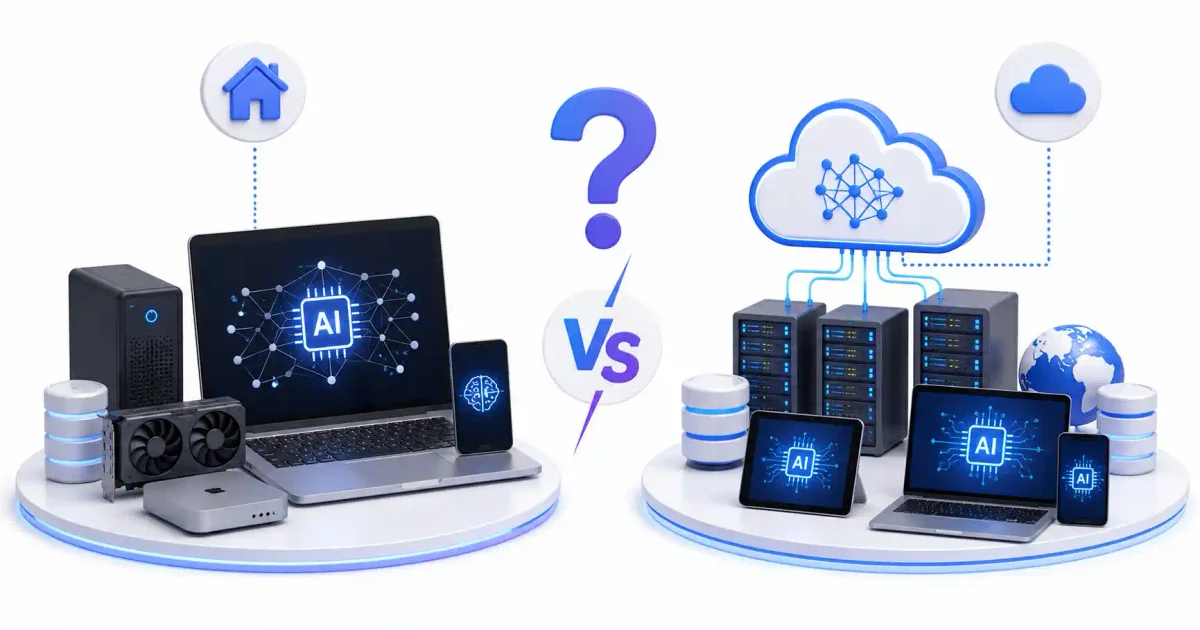
The central architectural dilemma facing modern software engineers, DevOps leads, and systems administrators in 2026 is no longer whether to integrate Artificial Intelligence, but where to compute it. Should you process inferences locally on edge workstations, local GPU clusters, and self-hosted bare metal? Or should you rely on API endpoints backed by hyperscale cloud infrastructure like OpenAI, Anthropic, Google Cloud, and AWS?
This choice is far more than a simple matter of convenience. It dictates your data sovereignty boundaries, network latency, long-term capital versus operational expenditures (CapEx vs OpEx), regulatory compliance posture, and overall system resilience during ISP or vendor outages.
Whether you are evaluating AI vs Machine Learning vs Deep Learning workloads or trying to choose the best AI coding assistants for your engineering team, understanding the architectural trade-offs between local and cloud computing is critical. In this operational breakdown, we will evaluate hardware requirements, financial models, latency profiles, security paradigms, hybrid routing implementations, and production deployment strategies.
Quick Architecture Summary: Local AI vs Cloud AI
Before examining deep system metrics, here is a high-level comparison of how local on-premise execution contrasts with cloud API consumption:
| Vector | Local Self-Hosted AI | Cloud AI APIs |
|---|---|---|
| Primary Advantage | Absolute data privacy & zero recurring token fees | Instant access to trillion-parameter frontier intelligence |
| Primary Limitation | Hardware VRAM capacity & upfront capital costs | Vendor lock-in, recurring token API costs, telemetry risks |
| Data Privacy | 100% on-premises / air-gapped; no external data egress | Data transmitted over public internet to third-party servers |
| Cost Model | Capital Expenditure (CapEx) — Hardware + Electricity | Operational Expenditure (OpEx) — Per-token consumption |
| Network Dependence | Works 100% offline; zero internet latency | Requires stable broadband; subject to cloud outages |
| Intelligence Ceiling | Limited by local VRAM (typically 7B to 70B parameter models) | Access to massive multi-trillion parameter frontier LLMs |
| Maintenance Burden | High (Driver management, quantization, MLOps, backups) | Zero infrastructure maintenance required |
| Regulatory Compliance | Simplifies HIPAA, GDPR, SOC2, and NDA compliance | Requires strict vendor BAAs, data processing addendums |
1. What is Local AI? (The Rise of On-Device Compute)
Local AI refers to hosting and executing open-weight Large Language Models (LLMs), small language models (SLMs), vector embedding models, and generative image pipelines directly on physical hardware under your direct administrative control. This hardware ranges from developer laptops with unified memory to specialized workstations, home lab bare-metal hypervisors, and dedicated private server racks.
The Technical Execution Path
Unlike cloud requests that travel across public internet backbones, a local inference request flows strictly through internal bus architectures:
- User Query Input: Application or CLI submits prompt context to a local HTTP daemon (such as Ollama or vLLM).
- Model Weight Loading: Quantized weights (e.g., GGUF or EXL2 format) are mapped directly into system RAM or graphics VRAM using memory-mapped I/O.
- Hardware Execution: Matrix multiplications execute directly on local CUDA tensor cores (NVIDIA), Metal performance shaders (Apple Silicon), or ROCm compute units (AMD).
- Token Generation: Plaintext output streams back over local loopback interfaces (
127.0.0.1or internal mesh subnets). Zero data packets touch the public internet.
To see how to set up this exact architecture step-by-step, refer to our complete Ollama Linux installation guide. You can also attach a web interface by reading our Open WebUI setup guide.
Hardware Acceleration in 2026
The feasibility of local AI has expanded due to recent hardware paradigms:
- Unified Memory Architectures (Apple Silicon): Apple’s system-on-chip (SoC) architecture allows the CPU, GPU, and Neural Engine to share a unified pool of high-bandwidth memory. A Mac Studio configured with 192GB of unified memory can load and query 70B parameter models entirely in RAM without requiring expensive enterprise GPUs.
- Consumer High-VRAM GPUs (NVIDIA RTX): Graphics cards equipped with 24GB of VRAM (such as the RTX 3090, RTX 4090, and workstation equivalents) can run highly optimized 8B, 14B, and 32B models at generation speeds exceeding 60 tokens per second.
- Dedicated NPUs (Neural Processing Units): Laptops bundled with dedicated NPUs (delivering 40+ TOPS of compute) process background embedding generation and small conversational assistants with minimal battery drain.
- Bare-Metal Home Labs: System administrators increasingly leverage hypervisors like Proxmox VE to pass consumer GPUs directly into dedicated Linux virtual machines. For step-by-step hypervisor instructions, consult our Proxmox home lab setup guide.
2. What is Cloud AI? (Supercomputing-as-a-Service)
Cloud AI involves consuming model inference from massive, centralized data centers hosting thousands of interconnected enterprise GPUs (such as NVIDIA H100, H200, or B200 accelerators). Providers like OpenAI, Anthropic, Google Cloud, AWS, and Microsoft Azure manage the underlying infrastructure, offering access through RESTful JSON endpoints.
The Cloud API Workflow
Consuming cloud AI follows standard client-server patterns:
- Client Serialization: Application serializes prompt context, system instructions, and schema definitions into JSON payloads.
- Network Transport: Packets route over public DNS and TLS networks to cloud load balancers. You can read our detailed breakdown of what happens when you type a URL to understand this transport layer.
- Queueing & Cluster Inference: The request is queued across thousands of distributed GPU nodes, computed across frontier model weights, and returned via server-sent events (SSE).
- Token Billing: The provider calculates input and output token counts and bills your API account accordingly.
Core Strengths of Cloud Infrastructure
- Unmatched Intelligence Ceilings: Frontier models like GPT-4o, Claude 3.5 Sonnet, and Gemini 1.5 Pro contain hundreds of billions (or trillions) of parameters. They handle complex multi-step reasoning, advanced mathematical derivation, and massive multi-file coding refactors that exceed the capacity of local consumer hardware.
- Zero Infrastructure Overhead: You do not manage CUDA drivers, kernel patches, hardware thermals, or memory allocation errors. Integration requires only standard HTTP libraries; review our guide on REST API concepts for beginners to see how simple these integrations can be.
- Continuous Updates: Model providers push updated checkpoints, safety guardrails, and context window expansions directly to their cloud endpoints without requiring you to re-download multi-gigabyte weight files.
3. Financial Analysis: CapEx vs OpEx Cost Breakdown
Choosing between local and cloud AI requires analyzing your financial model: Capital Expenditure (upfront hardware investments) versus Operational Expenditure (ongoing per-token API costs).
The Local AI Financial Model (CapEx)
Local AI incurs high initial hardware costs but near-zero marginal cost per token:
- Hardware Acquisition: Building a dual-GPU workstation (2x NVIDIA RTX 3090/4090 used or new) costs roughly $3,500 – $5,500. A dedicated Apple Mac Studio (128GB+ RAM) costs $4,000 – $6,000.
- Electricity Consumption: A dual-GPU system drawing 750W during active inference running 8 hours a day at $0.15/kWh costs approximately $27 per month in electricity.
- Depreciation & Maintenance: Hardware depreciates over a 3-to-5-year lifecycle. Replacement fans, thermal paste, and power supply upgrades represent minimal ongoing overhead.
Total Cost per Million Tokens: Virtually $0.00 after initial hardware payback.
The Cloud AI Financial Model (OpEx)
Cloud APIs charge strictly by consumption, measured per million tokens processed:
- Frontier Models (e.g., Claude 3.5 Sonnet / GPT-4o): Costs range from $2.50 to $3.00 per million input tokens and $10.00 to $15.00 per million output tokens.
- Mid-Tier Models (e.g., GPT-4o-mini / Haiku): Costs range from $0.15 to $0.25 per million input tokens and $0.60 to $1.25 per million output tokens.
Financial Tipping Point Calculation
Consider an enterprise team generating 50 million input tokens and 10 million output tokens per month:
- Cloud API Cost (Frontier Model): (50M * $3.00) + (10M * $15.00) = $300 per month ($3,600/year).
- High-Volume Enterprise Team (500M input / 100M output monthly): (500M * $3.00) + (100M * $15.00) = $3,000 per month ($36,000/year).
At high token volumes, an enterprise will break even on a $6,000 local workstation investment within 2 to 3 months. Conversely, for low-volume users processing only 1 million tokens a month, cloud APIs costing $5/month are far more economical than buying dedicated GPU hardware.
To explore cloud pricing and platform trade-offs, check our comparative guide on AWS vs Azure vs Google Cloud.
4. Data Privacy, Sovereignty, and Security Compliance
For organizations managing sensitive customer records, proprietary source code, or regulated data, privacy considerations dwarf all financial metrics.
Cloud AI Privacy Risks & Mitigations
When sending data to public cloud APIs, you expose your organization to several security concerns:
- Data Retention & Model Training: Unless you explicitly sign enterprise business agreements (Zero Data Retention / ZDR contracts), providers may retain logs for 30 days or use unencrypted requests to train future base models.
- Man-in-the-Middle & Transit Exposure: Traffic traversing public networks must strictly enforce TLS 1.3 encryption. Inspect your domain certificates using our recommended methods for enabling HTTPS with Let’s Encrypt.
- Regulatory Violations: Frameworks like HIPAA (healthcare), GDPR (EU privacy), SOC 2, and ITAR prohibit transmitting unencrypted PII or proprietary code to unauthorized third-party infrastructure.
Local AI Security Hardening
Local AI eliminates third-party data egress entirely. However, hosting your own local inference endpoints introduces self-managed operational security responsibilities:
- Network Boundary Isolation: Local model endpoints (such as Ollama on port
11434or vLLM on port8000) should never bind to public IP addresses (0.0.0.0). Bind them exclusively to127.0.0.1or private mesh interfaces. - Zero-Trust Mesh VPNs: Connect remote developer machines to your local GPU cluster securely using Tailscale or WireGuard. For a detailed security breakdown, read our guide on Tailscale vs WireGuard.
- Reverse Proxy Authentication: Route internal traffic through a hardened reverse proxy such as Nginx Proxy Manager, Traefik, or Caddy. Review our Nginx Proxy Manager security guide to enforce SSL termination and header security.
- Active Threat Prevention: Protect public or semi-private endpoints by installing UFW and securing server access with Fail2ban or CrowdSec. Follow our step-by-step guides on UFW firewall rules, Fail2ban configuration, and CrowdSec deployment.
- Host Hardening & Auditing: Lock down SSH access by disabling root password logins; see our guide on securing SSH on Ubuntu. Audit your server security posture regularly using Lynis by following our Lynis security audit guide.
5. Model Performance, Quantization, and Memory Management
Understanding local AI performance requires mastering quantization and memory management fundamentals.
What is Quantization?
Raw AI model weights are trained in full-precision floating-point formats (FP16 or BF16), where each parameter occupies 16 bits (2 bytes) of memory. Running an unquantized 70B parameter model requires over 140GB of VRAM just to load the weights into memory.
Quantization is the process of compressing model weights from 16-bit floating points to lower-bit representations (such as 8-bit, 4-bit, or 3-bit integers) with minimal degradation in output reasoning quality:
| Quantization Format | Bits per Weight | VRAM Required (8B Model) | VRAM Required (70B Model) | Quality Retention |
|---|---|---|---|---|
| FP16 (Uncompressed) | 16-bit | ~16 GB | ~140 GB | 100% (Baseline) |
| Q8_0 (8-bit Quant) | 8-bit | ~8.5 GB | ~75 GB | 99.5% |
| Q4_K_M (4-bit Medium) | 4-bit | ~5.2 GB | ~43 GB | 97.0% (Optimal Sweet Spot) |
| Q2_K (2-bit Aggressive) | 2-bit | ~3.1 GB | ~24 GB | 80.0% (Noticeable Degraded Reasoning) |
By converting a 70B model to Q4_K_M (4-bit quantization), the VRAM footprint drops from 140GB down to 43GB, allowing it to execute smoothly across two consumer GPUs or a single Mac Studio.
Linux Memory Management & Hugepages
When serving models locally on Linux servers, memory bottlenecks often occur at the operating system level. Large language models require massive continuous memory blocks. Understanding how Linux memory management works and configuring Transparent Huge Pages (THP) prevents kernel swapping and page table bottlenecks.
Furthermore, managing model weights requires understanding the Linux filesystem hierarchy and verifying correct Linux file permissions on model directories so local inference services can read weight files safely.
6. The Production Solution: Hybrid AI Architecture
For most modern engineering organizations, the debate should not be “Local OR Cloud.” The optimal enterprise paradigm is a Hybrid AI Architecture that routes workloads dynamically based on security classifications, latency requirements, and model complexity.
How Hybrid Routing Works
A hybrid gateway sits between your internal applications and your AI model backends:
                  [ Incoming Application Request ]
                                 │
                                 ▼
                    [ Intelligent AI Router ]
                                 │
        ┌────────────────────────┴────────────────────────┐
        │                                                 │
 [ Private / PII / Code ]                         [ Public / Complex ]
        │                                                 │
        ▼                                                 ▼
[ Local Inference Stack ]                       [ Cloud Frontier APIs ]
(Ollama / vLLM / pgvector) (OpenAI / Claude / Gemini)- Data Sanitization & Classification: The routing gateway inspects incoming prompts for sensitive patterns (PII, API keys, internal source code, financial figures) using static analysis tools or regex rules.
- Local Route (Privacy & High Speed): Sensitive data, routine text summaries, code autocompletion, and semantic search queries are directed to local inference instances (such as Ollama or vLLM).
- Cloud Route (High Reasoning): Non-sensitive, complex reasoning prompts that exceed local model capacities are routed to cloud APIs (such as Claude 3.5 Sonnet or GPT-4o).
- Fallback & Failover: If an internet outage disconnects cloud access, the router automatically downgrades requests to local models, ensuring system uptime.
Gateway Orchestration Tools
To build a production hybrid pipeline, software architects combine several specialized open-source tools:
- LiteLLM: Serves as a unified proxy that translates API calls into OpenAI-compatible format across 100+ cloud and local model backends.
- Model Context Protocol (MCP): Connects AI agents safely to internal databases, dev tools, and Linux file systems through standardized JSON-RPC interfaces. Read our full guide on the Model Context Protocol (MCP).
- n8n Workflow Automation: Connects local model endpoints to enterprise webhooks, email servers, and databases. Follow our guide to install n8n via Docker Compose.
- ChromaDB & pgvector: Stores high-dimensional vector embeddings locally. Learn how to configure PostgreSQL for vector storage in our PostgreSQL vs MySQL comparison.
7. MLOps Infrastructure Deployment: Self-Hosting local AI Stack
To deploy a self-hosted local AI stack in production, you can package services using Docker and manage orchestration with container tools.
Containerization & Orchestration Stack
Rather than installing dependencies directly on the host operating system, package your local AI services inside containerized environments:
- Docker & Podman: Isolate model inference, vector stores, and web interfaces into standalone containers. Compare container engines in our benchmark of Docker vs Podman, or read how to install Docker on Ubuntu. You can quickly create configurations using our Docker Compose generator.
- Container Management Panels: Simplify container operations using Portainer, DokPloy, or Coolify. Check out our setup guides for Portainer self-hosted management, DokPloy setup guide, and Coolify self-hosting guide.
- Enterprise Kubernetes: For multi-node GPU clusters, orchestrate containers using Kubernetes or k3s. Learn basic cluster concepts in our guide to Kubernetes explained simply.
- Service Lifecycle Management: Manage daemon processes cleanly on Linux systems by reviewing our guide on systemd for beginners and using our systemd service file generator.
Observability, Logging & Backups
Running production AI infrastructure requires continuous monitoring and disaster recovery planning:
- Metrics & Latency Tracking: Monitor GPU temperatures, VRAM utilization, and token generation latency by pairing Prometheus with Grafana. Track overall service availability using Uptime Kuma; see our Uptime Kuma self-hosted guide.
- Log Aggregation: Aggregate log streams from containerized inference engines using Loki or Vector. Read our comprehensive reference on Linux logs explained.
- Encrypted Backups: Backup model configurations, prompt templates, and vector databases using Restic, BorgBackup, or Duplicati. Review our complete guide to backup strategies for self-hosted servers.
- Secret Management: Store API credentials and database passwords securely in Vaultwarden rather than plaintext files; generate strong secrets with our password generator and ENV generator. Follow our Vaultwarden self-hosted guide and review our guide on the best password managers and passkeys vs passwords.
- Private Storage: Host internal datasets and multimodal files using MinIO or Nextcloud. Setup instructions are detailed in our Nextcloud complete setup guide.
8. Operational Decision Matrix: Which Should You Choose?
Use this decision matrix to determine whether Local AI, Cloud AI, or a Hybrid approach best aligns with your project constraints:
| Scenario / Use Case | Recommended Architecture | Primary Rationale |
|---|---|---|
| Individual Developer / Student | Local AI (Ollama + Open WebUI) | Zero token costs, great learning environment for building portfolio projects. Check out our guide on free AI tools for students. |
| Healthcare / Legal / Finance Enterprise | Local AI or Air-Gapped Hybrid | Strict legal compliance (HIPAA, GDPR) mandates zero data egress to external servers. |
| High-Volume SaaS Autocomplete API | Local AI (GPU Cluster) | Processing 500M+ monthly tokens on cloud APIs becomes cost-prohibitive; CapEx payback occurs within months. |
| Complex Reasoning / Math / Strategy | Cloud AI (Claude 3.5 / GPT-4o) | Frontier models contain reasoning capabilities that cannot be replicated on consumer local hardware. |
| Enterprise Engineering Team | Hybrid AI (LiteLLM + Local Gateway) | Routes routine code completion to local GPU servers while reserving cloud APIs for complex system architecture tasks. |
To discover additional specialized tools across both ecosystems, explore our curated list of hidden AI tools and our master directory of the top 50 AI websites to bookmark.
9. Official Documentation & References
- Ollama Infrastructure Project: https://github.com/ollama/ollama
- vLLM Inference Engine: https://docs.vllm.ai
- LiteLLM Unified Proxy: https://docs.litellm.ai
- Model Context Protocol (MCP): https://modelcontextprotocol.io
- OpenAI API Documentation: https://platform.openai.com/docs
- Anthropic API Documentation: https://docs.anthropic.com
10. Frequently Asked Questions
Can local AI models perform as well as GPT-4o or Claude 3.5 Sonnet?
For specialized, narrow tasks—such as code completion, document classification, or sentiment analysis—fine-tuned local models (like Llama 3 8B or Mistral 7B) perform comparably to frontier models. However, for broad multi-step reasoning, complex coding architecture, and advanced logical extrapolation, cloud-hosted frontier models (GPT-4o, Claude 3.5 Sonnet) remain superior due to their massive parameter scale.
What are the minimum hardware requirements to run Local AI in 2026?
To run modern 8B parameter quantized models locally, you need a system with at least 16GB of system RAM (or 8GB of dedicated VRAM on an NVIDIA GPU). For 70B parameter models, you need a minimum of 48GB of VRAM (e.g., dual NVIDIA RTX 3090/4090 GPUs) or an Apple Silicon Mac equipped with 64GB+ of unified memory.
Is running Local AI completely free?
While there are zero recurring token fees or subscription costs, running local AI is not strictly free. You must account for upfront hardware acquisition costs (CapEx) and ongoing electrical power consumption. However, for high-volume users, local execution is significantly cheaper per token than cloud APIs.
How does Local AI protect data privacy compared to Cloud AI APIs?
Local AI processes inference requests entirely within your local hardware boundaries (RAM/VRAM and CPU/GPU cores). Zero data packets are transmitted across the internet, completely eliminating risks of corporate data leaks, ISP interception, or third-party vendor model training. Cloud APIs require sending plaintext or encrypted prompts to external data centers.
What is model quantization, and why is it important for local AI?
Quantization reduces the precision of model weights (for example, compressing 16-bit floating-point numbers down to 4-bit integers). This reduces the memory footprint of an AI model by up to 70% with negligible loss in accuracy, enabling large models that originally required enterprise data center GPUs to run smoothly on consumer hardware.
What is a Hybrid AI architecture?
A Hybrid AI architecture uses an intelligent router gateway (such as LiteLLM) to split workloads between local and cloud models. Sensitive internal data and routine code autocompletions are processed locally on-premises, while non-sensitive, highly complex reasoning prompts are forwarded to cloud APIs.
Can I run Local AI without an internet connection?
Yes. Once you have downloaded the base model weight files onto your system using tools like Ollama or Hugging Face CLI, local inference operates 100% offline without requiring any active internet connection.
How do I secure a local AI endpoint on a Linux server?
Never expose local inference ports (such as Ollama’s port 11434) to public IP addresses. Bind endpoints strictly to 127.0.0.1 or internal mesh VPN interfaces using Tailscale or WireGuard. Place the service behind a hardened reverse proxy (like Nginx Proxy Manager or Caddy) with SSL certificates, enable UFW firewall rules, and install Fail2ban or CrowdSec to prevent unauthorized access.
Which programming languages are best for building local AI pipelines?
Python remains the primary ecosystem for model loading, vector indexing, and ML frameworks (PyTorch, Hugging Face). However, high-performance local inference backends and routing gateways are increasingly written in C++ (llama.cpp), Rust, and Go to maximize memory throughput and minimize latency.
How does local AI integrate with developer tools like VS Code or Neovim?
Developer environments connect to local AI backends through open-source extensions like Continue.dev or Codeium. These plugins allow developers to configure their local Ollama or vLLM endpoints as the completion provider, giving them AI-assisted coding inside VS Code or Neovim with total data privacy.

Discussion
Loading comments...