

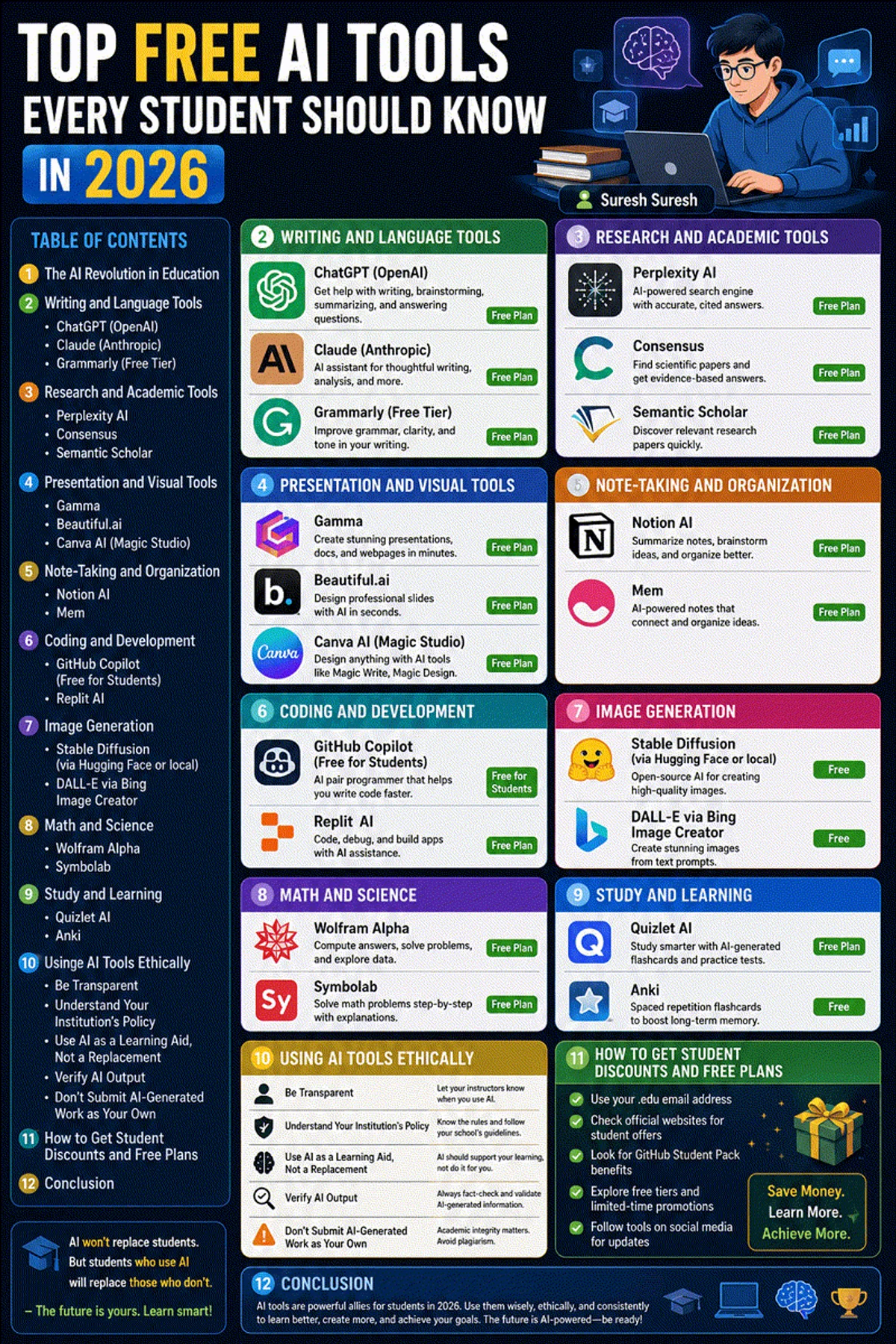
Artificial Intelligence has fundamentally reshaped academic workflows. From high school students preparing for exams to computer science undergraduates building software projects and graduate researchers analyzing dense literature, AI tools have evolved from novelty chatbots into essential daily productivity instruments.
However, the rapid commercialization of AI means many platforms hide their best capabilities behind expensive monthly subscriptions. For students operating on strict budgets, paying $20 or $30 a month for multiple AI services is simply unsustainable.
Fortunately, a robust ecosystem of zero-cost and open-source AI tools offers enterprise-grade capabilities for free. Whether you are searching for research paper aggregators, essay feedback assistants, interactive math engines, or free developer tools, this guide outlines the top free AI tools for students in 2026, complete with ethical usage frameworks and academic integrity guidelines.
If you are a computer science or engineering student building portfolio projects, check out our companion guide on AI projects for CS students and our master directory of top 50 AI websites to bookmark.
The Academic Productivity Matrix (Free Tier Comparison)
| Academic Task | Recommended Free AI Tool | Primary Capability | Zero-Cost Access Model |
|---|---|---|---|
| Research & Fact-Checking | Consensus & Elicit | Scientific paper search with real-time peer-reviewed citations | Generous free queries |
| Essay Drafting & Analysis | Claude & ChatGPT (Free) | Long-context document summarization and outline generation | Unlimited / Daily free tiers |
| Coding & Project Building | Codeium & Continue.dev | IDE autocomplete, inline debugging, and local model integration | 100% Free for individuals |
| Mathematical Computation | Wolfram Alpha | Step-by-step mathematical derivation and symbolic computation | Free web access |
| Document Summarization | Scholarcy & Stirling-PDF | Paper flashcard extraction and self-hosted PDF processing | Free tiers / 100% Open-source |
| Local Offline Execution | Ollama & Open WebUI | Run models locally on your laptop with total data privacy | 100% Free & Open-source |
| Diagrams & Mind Mapping | Napkin AI | Text-to-diagram generation for visual project presentations | Free tier available |
1. Research and Literature Review Tools
General search engines often surface blog posts, sponsored articles, and marketing landing pages. Academic research requires peer-reviewed data. These free tools query scientific databases directly.
1. Consensus (consensus.app)
Consensus functions as an AI-powered search engine built on top of a database of over 200 million academic papers. Ask questions like “Does sleep deprivation impair spatial memory retention?” and Consensus extracts findings from peer-reviewed studies, presenting an aggregate “Consensus Meter” that indicates scientific agreement.
2. Elicit (elicit.com)
Elicit automates the tedious phase of literature reviews. When given a research query, Elicit searches across papers, extracts core methodologies, sample sizes, and main findings, and compiles them into a clean comparison table. For graduate students writing lit reviews, this turns days of manual searching into minutes.
3. Scite (scite.ai)
Scite introduces “Smart Citations” that show how a paper has been cited by subsequent research. It categorizes citations into supporting evidence, contrasting results, or simple mentions. This allows students to determine whether a study’s conclusions have stood up to scientific scrutiny before relying on it in an assignment.
4. SearXNG (Self-Hosted Metasearch)
For students who value privacy and want to avoid search engine tracking while gathering research data, SearXNG is an open-source metasearch engine. It aggregates results from dozens of engines without building advertising profiles. Combine it with local AI models via the Model Context Protocol (MCP) for private research pipelines.
2. Writing, Proofreading, and Academic Summarization
AI writing tools should serve as interactive editors and thought partners—helping you structure arguments, refine tone, and fix grammatical errors—rather than essay generators.
5. Claude (claude.ai)
Anthropic’s Claude features a massive 200,000-token context window. Students can upload entire textbook chapters, primary historical sources, or dense PDF papers and ask Claude to explain complex arguments, identify counter-arguments, or summarize key themes. Claude is widely regarded as one of the best assistants for nuanced academic writing analysis.
6. ChatGPT (chat.openai.com)
OpenAI’s free tier provides access to GPT-4o mini and standard GPT-4o. It is an exceptional tool for brainstorming outline structures, creating flashcard questions from lecture notes, and getting feedback on draft paragraphs. Master effective prompt techniques by following our ChatGPT tips and tricks guide.
7. Scholarcy (scholarcy.com)
Scholarcy reads academic papers and converts them into structured summary cards. It breaks papers down into key takeaways, background context, research methods, and main conclusions. This allows students to quickly scan dozens of papers and decide which ones warrant a full read.
8. Stirling-PDF (stirlingpdf.com)
As a student, you handle dozens of PDF documents weekly. Stirling-PDF is a 100% free, open-source web application that allows you to merge, split, compress, OCR, and edit PDFs locally without uploading sensitive academic files to unknown third-party websites. Follow our Stirling-PDF self-hosted guide to run it.
3. Free AI Tools for Computer Science & STEM Students
For students studying computer science, software engineering, or data science, AI pair programmers can accelerate learning syntax, debugging errors, and understanding complex algorithms.
9. Codeium (codeium.com)
Codeium provides free individual autocompletion, inline chat, and codebase search across 70+ programming languages and all major IDEs (VS Code, JetBrains, Vim, Neovim). Unlike Copilot’s paid model, Codeium is completely free for individual students, making it the top recommended inline AI assistant for student developers.
10. Continue (continue.dev)
Continue is an open-source IDE extension for VS Code and JetBrains that allows students to plug in local or cloud AI models. If you are learning terminal editors, see our guides on Neovim modern editor and mastering Vim. Connect Continue to a local model to get free code completions without sending your assignment code off your laptop.
11. Wolfram Alpha (wolframalpha.com)
Wolfram Alpha is a computational knowledge engine that solves complex calculus, linear algebra, physics, and chemistry equations. Unlike language models that approximate math through text prediction, Wolfram Alpha calculates exact symbolic solutions accompanied by step-by-step mathematical derivations.
12. Bloop (bloop.ai)
Bloop uses GPT-4 and semantic code search to help student developers navigate large open-source codebases. Ask natural language questions like “Where is user session authentication validated in this project?” and Bloop highlights the precise source code lines.
For STEM students learning web development, practice building backend services with our tutorial on building a REST API with Node.js and Express or frontend interfaces with our React vs Vue vs Svelte framework comparison.
4. Privacy-First Local AI for Students (Zero Costs, 100% Offline)
Running AI models locally on your own laptop eliminates monthly fees, works offline without an internet connection, and guarantees total privacy for sensitive academic work.
13. Ollama (ollama.com)
Ollama is the gold standard for running open-weight models (like Llama 3, Mistral, Gemma, or Qwen) locally on Linux, macOS, and Windows. Follow our step-by-step Ollama Linux installation guide to set it up. Once installed, downloading and running a model requires only one terminal command: ollama run llama3.1.
14. Open WebUI (openwebui.com)
Pair Ollama with Open WebUI to get a ChatGPT-style interface running locally on your laptop. You can upload lecture PDFs, create personal study assistants, and organize notes by subject. Follow our Open WebUI setup guide to get started.
15. PrivateGPT (private-gpt.com)
PrivateGPT is an open-source project designed for private document interaction. Upload lecture slides, research papers, or syllabus documents and ask questions offline. Zero packets leave your machine, making it ideal for air-gapped study sessions.
For a deeper dive into the architectural trade-offs between on-device models and API services, read our complete guide on local AI vs cloud AI. To discover underrated niche utilities, browse our list of hidden AI tools.
5. Free Self-Hosted Tools for Student Developers & Home Labs
For computer science and IT students setting up home lab servers or cloud VPS instances, these open-source self-hosted tools provide hands-on DevOps experience.
16. Portainer (portainer.io)
Portainer provides a visual web dashboard for managing Docker containers. Learn container fundamentals in our guide on installing Docker on Ubuntu, compare runtimes in our Docker vs Podman benchmark, and set up management using our Portainer self-hosted guide. Quickly create configurations using our Docker Compose generator.
17. Coolify & DokPloy
Hosting personal portfolio projects on cloud PaaS services can get expensive. Coolify and DokPloy are open-source Heroku alternatives that let you host Node.js, Python, or Go apps on a cheap VPS. Follow our Coolify self-hosting guide and DokPloy setup guide. Learn to host sites for free in our guide to hosting a website for free.
18. n8n (Workflow Automation)
n8n is a self-hosted automation platform that lets students connect AI models to webhooks, email, and Discord/Slack bots. Follow our guide to install n8n with Docker Compose.
19. Nextcloud & Syncthing
Store lecture notes, datasets, and project backups securely. Nextcloud offers a private Google Drive alternative (see our Nextcloud setup guide), while Syncthing provides real-time peer-to-peer file synchronization (see our Syncthing file sync guide). Implement solid backups by reading our backup strategies for self-hosted servers.
20. Vaultwarden (Secret Management)
Secure your API keys, SSH credentials, and student accounts using Vaultwarden, a lightweight Bitwarden server written in Rust. Follow our Vaultwarden self-hosted guide, generate strong keys using our password generator, and review password security in our guides on best password managers and passkeys vs passwords.
6. Security, Networking & System Utilities for Students
When setting up local servers or accessing university labs remotely, student engineers must enforce network security:
- Mesh VPN Access: Connect securely to your home server from campus using Tailscale or WireGuard. Compare mesh setups in our Tailscale vs WireGuard comparison and learn how VPNs work.
- Reverse Proxies & HTTPS: Route web traffic using Nginx Proxy Manager or Caddy with SSL certificates. Follow our Nginx Proxy Manager security guide and learn to enable HTTPS with Let’s Encrypt. Generate web server configs using our Nginx config generator.
- Server Firewalls & Intrusion Prevention: Protect host Linux VPS servers using UFW, Fail2ban, and CrowdSec. Read our tutorials on UFW firewall rules, Fail2ban guide, and CrowdSec beginner guide. Secure SSH access following our Ubuntu SSH hardening guide and audit compliance using Lynis via our Lynis security audit guide.
- Container Hardening: Scan containers for vulnerabilities using Trivy by reviewing our guide on securing Docker containers.
- Database Fundamentals: Learn relational data modeling with our PostgreSQL vs MySQL comparison and manage daemon services using our systemd for beginners guide and systemd service file generator.
7. Ethical AI Usage Framework for Students
Using AI tools effectively requires maintaining strict academic integrity. Here is a practical 4-step framework for using AI ethically:
- Use AI for Conceptual Understanding, Not Generation: Treat AI like a 24/7 tutor. Ask it to “Explain the concept of neural network backpropagation using an intuitive real-world analogy” rather than “Write an essay explaining backpropagation.”
- Always Verify Citations: Never copy citations directly from AI chatbots. Always locate the primary source paper, read the abstract, and confirm the findings yourself.
- Declare AI Usage When Required: Check your institution’s AI policy. If permitted, include a short declaration methodology note explaining which AI tools were used for proofreading or brainstorming.
- Master the Underlying Syntax: Using AI code completion tools like Codeium is valuable, but ensure you understand every line of code generated. If an interviewer or professor asks you to explain your solution on a whiteboard, you must be able to write it manually.
8. Essential Web Utilities & Generators for Students
Bookmark these interactive web utilities for quick formatting, schema generation, and system administration tasks:
- Container Management: Docker Compose Generator
- Web Server Configs: Nginx Config Generator
- Init & Service Files: Systemd Service File Generator
- Data Inspection: JSON Formatter & JSON Validator
- Security & Passwords: Password Generator & ENV Generator
- Linux Learning: Linux Command Explorer & Linux Permission Calculator
- Expression Debugging: Regex Tester
- Automation: Cron Expression Generator & Gitignore Generator
9. Official Documentation & Learning Resources
- Consensus Research Engine: https://consensus.app
- Elicit Academic Assistant: https://elicit.com
- Codeium Developer Tools: https://codeium.com
- Continue.dev Open Source: https://continue.dev
- Ollama Official Website: https://ollama.com
- Wolfram Alpha Computational Engine: https://www.wolframalpha.com
10. Frequently Asked Questions
What is the single best free AI tool for academic research?
Consensus and Elicit are the top free tools for academic research. Unlike general chatbots that may fabricate sources, Consensus and Elicit query databases of millions of peer-reviewed scientific papers, extracting methodology summaries and verified community consensus metrics.
Is Codeium really 100% free for individual computer science students?
Yes. Codeium offers an unlimited free individual tier that includes AI code completion, inline chat, and codebase search across 70+ programming languages and all major IDEs (VS Code, JetBrains, Vim, Neovim).
Can using AI tools like ChatGPT get me accused of plagiarism?
Yes, if you copy AI-generated text directly into your assignments. AI detectors and professors look for synthetic phrasing and unverified claims. Use AI tools for brainstorming, outlining, and explaining complex concepts—always write final drafts in your own words.
How do I run free AI models offline on my student laptop?
Install Ollama (free and open-source). Once installed, run ollama run llama3.1 in your terminal to download and query open-weight models locally. Pair it with Open WebUI to get a ChatGPT-like interface running 100% offline.
What is the best free AI tool for solving math and physics problems?
Wolfram Alpha is the gold standard for computational STEM subjects. It computes exact symbolic mathematical solutions for calculus, linear algebra, physics, and chemistry, providing step-by-step derivations rather than text predictions.
How can graduate students use free AI tools for literature reviews?
Graduate students can combine Elicit (to extract methodology tables across papers), Scholarcy (to convert PDFs into summary cards), Connected Papers (to discover citation graphs), and Claude (to analyze dense 50-page PDF chapters).
Do I need a expensive gaming laptop with a GPU to run local AI for school?
No. Modern small language models (like Llama 3 8B or Phi 3) run well on standard student laptops equipped with 8GB or 16GB of system RAM using CPU execution in Ollama. Dedicated GPUs are only necessary if you are fine-tuning large models or requiring high-throughput inference.
How does the Model Context Protocol (MCP) benefit student developers?
MCP is an open standard that lets local AI models connect safely to your local files, databases, and developer tools. Student developers can build custom MCP servers in TypeScript or Python to give local LLMs access to assignment data without writing custom API code.
Are self-hosted developer tools good to include on a resume?
Absoluely. Self-hosting tools like Portainer, Coolify, n8n, Vaultwarden, and Ollama on a home lab or cheap VPS demonstrates real-world DevOps, Linux administration, and container orchestration skills that employers value far more than basic academic coursework.
What is the best free alternative to Grammarly for students?
Claude and ChatGPT (free tier) serve as exceptional proofreading assistants. Paste your draft paragraph into Claude and prompt it: “Review this paragraph for academic clarity, active voice, and conciseness, without changing my core argument.”


Discussion
Loading comments...